





假设有个oracle数据库,有个foo用户(创建用户时就会创建一个默认的与用户名同名的schema:foo,schema就是个名称空间,用来隔离各类数据库对象,如表、序列等),密码11111,项目中对应的yaml配置如下:
spring:
  datasource:
  	url: jdbc:oracle:thin:@1.1.1.1:1521:orcl
    username: foo
    password: 111111
    driver-class-name: oracle.jdbc.OracleDriver
    hikari:
        validationTimeout: 2000
        connectionTimeout: 10000
        keepaliveTime: 180000
        maxLifetime: 600000
        minimumIdle: 3
        maximumPoolSize: 3
        idleTimeout: 600000
        connectionTestQuery: ""
那么上文这种配置,使用foo用户连接数据库,默认就能访问foo这个schema下的表,我们写sql时:
select * from test_table;
其实就相当于访问:
select * from foo.test_table;
但如果我们换个用户bar登录:
spring:
  datasource:
  	url: jdbc:oracle:thin:@1.1.1.1:1521:orcl
    username: bar
    password: 111111
    driver-class-name: oracle.jdbc.OracleDriver
此时,再执行sql:
select * from test_table;
那就相当于在bar这个schema下找表,就会报错,因为这个表在bar下不存在:
select * from bar.test_table;
此时,怎么解决呢?
要么,你还是换回foo用户连接数据库;要么,保持bar用户连接数据库,但sql中指定表的全称:
//bar用户访问foo下的表时:
select * from foo.test_table;
如果不想每个sql都这么麻烦呢?能不能全局指定一下schema呢?
当然,还有人可能会问,为啥非要用bar访问foo下的表,因为在我们这边:
老系统A,使用foo用户访问foo下的表;这次我们上新系统B,访问foo下的表时,运维或者dba要求使用新的账号,以和老系统A区分(比如权限不同,或者是方便管理,或者是通过账号就能知道是哪个系统来的连接),这种还是比较合情合理的要求,应该支持。
像postgre数据库这类,都是可以url指定schema:
  datasource:
    url: jdbc:postgresql://1.1.1.1:5432/demo?currentSchema=strategy
    username: 111
    password: 111
    driver-class-name: org.postgresql.Driver
但是oracle我试了下,不行。
我这边项目由于使用的是动态多数据源:
    <dependency>
        <groupId>com.baomidou</groupId>
        <artifactId>dynamic-datasource-spring-boot-starter</artifactId>
        <version>4.2.0</version>
    </dependency>
    <dependency>
        <groupId>com.oracle</groupId>
        <artifactId>ojdbc6</artifactId>
        <version>11.2.0.3</version>
    </dependency>
spring:
  datasource:
    dynamic:
      enabled: true
      primary: demo
      strict: false
      grace-destroy: false
      datasource:
        demo:
          url: jdbc:postgresql://11111:5432/11111
          username: 略
          password: 略
          driver-class-name: org.postgresql.Driver
          hikari:
            validationTimeout: 2000
            connectionTimeout: 10000
            keepaliveTime: 180000
            maxLifetime: 600000
            minimumIdle: 10
            maximumPoolSize: 10
            idleTimeout: 600000
            connectionTestQuery: ""
        foo:
          url: jdbc:oracle:thin:@1.1.1.1:1521:orcl
          username: bar
          password: 111111
          driver-class-name: oracle.jdbc.OracleDriver
          hikari:
            validationTimeout: 2000
            connectionTimeout: 10000
            keepaliveTime: 180000
            maxLifetime: 600000
            minimumIdle: 3
            maximumPoolSize: 3
            idleTimeout: 600000
            connectionTestQuery: ""
另外,连接池就直接用的spring boot默认的hikari,hikari是支持指定一个schema属性的:
        foo:
          url: jdbc:oracle:thin:@1.1.1.1:1521:orcl
          username: bar
          password: 111111
          driver-class-name: oracle.jdbc.OracleDriver
          hikari:
            schema: foo ------------------- 这里可以指定
            validationTimeout: 2000
            connectionTimeout: 10000
            keepaliveTime: 180000
            maxLifetime: 600000
            minimumIdle: 3
            maximumPoolSize: 3
            idleTimeout: 600000
            connectionTestQuery: ""
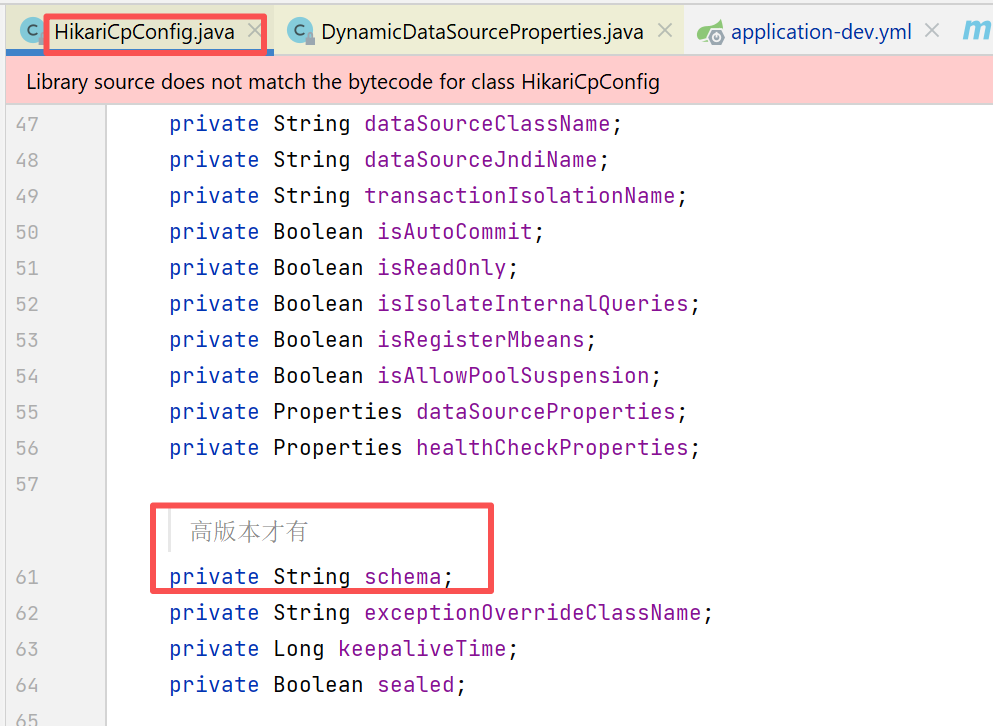
但是,最终这个schema是要传递给oracle driver那一层的,我这边这个版本的驱动,会报错。应该是高版本的driver才支持设置schema。
com.baomidou.dynamic.datasource.creator.hikaricp.HikariCpConfig
我们可以指定一个初始执行的sql:
ALTER SESSION SET CURRENT_SCHEMA = foo
      hikari:
        validationTimeout: 2000
        connectionTimeout: 10000
        keepaliveTime: 180000
        maxLifetime: 600000
        minimumIdle: 3
        maximumPoolSize: 3
        idleTimeout: 600000
        connectionTestQuery: ""
        connectionInitSql: "ALTER SESSION SET CURRENT_SCHEMA = foo" ------ 这个方式
这样就可以了。各类数据库连接池框架,应该都支持类似的特性:连接建立后,执行一个初始sql。配置就大家自己查一下。
使用bar用户访问foo下的表,记得要给bar授予相关权限才行。
我个人其实不太习惯在nginx上配置cors,我目前手里项目是在spring boot项目里,自己写个cors的filter就实现了。但我新接手的一个项目,发现有个小问题:
nginx--》spring gateway --》 spring boot服务。
我给spring boot服务加了cors后,默认在http返回header时,就会加上cors相关的header:
Access-Control-Allow-Origin "*";
结果前端访问时,说报错了。提示有多个Access-Control-Allow-Origin header。
因为spring gateway 上也开了cors相关filter,也加了一个(按理说要判断是否后端服务已经加了,如果加了,就不应该再加了,是spring boot gateway里的配置没对,导致重复加了)。
如果要临时解决上述问题,就可以在nginx上实现cors(location中加如下指令):
proxy_hide_header Access-Control-Allow-Credentials;
proxy_hide_header Access-Control-Allow-Origin;

add_header Access-Control-Allow-Credentials "true";
add_header Access-Control-Allow-Origin "*";
重要的是上面的proxy_hide_header,要把后端服务返回的先隐藏,否则就会有多个类似这种的Access-Control-Allow-Origin header,导致报错。
我这边配置的比较暴力,是允许了*,大家根据情况自行配置。
此内容由惯性聚合(RSS阅读器)自动聚合整理,仅供阅读参考。 原文来自 — 版权归原作者所有。