





节前最后几天了,随便写点水文吧,今天就记录一下,当我们拿到的网络抓包文件太大,应该怎么分析。
一般来说,我们个人抓包的话,linux上用tcpdump比较多,抓的时候也会用捕获表达式,抓出来的包一般不大,用wireshark分析就很容易。
但是,前一阵的一个晚上,dba突然找我,看能不能帮忙一起分析一个网络抓包文件,连了会议后一看,大小有4g,这么大的包,wireshark打开都很是困难,分析也很卡。
这么大的包,怎么来的呢,原来是网络同事直接在路由器上抓的,过滤条件就是某个数据库服务器的ip:1433端口(sql server数据库)。既然过滤了,包还这么大?问了下,原来在路由器上抓了整整一个半小时,然后这个库流量又大,所以最终就有4g。
dba的诉求是,某个数据库客户端发了某些sql,导致把数据库服务器搞死了,现在就是要找出来是哪个客户端,哪个sql。
最终呢,我只是给dba同事说了下,怎么拆分包,怎么查看包里的sql;后续忙起来后,我也没问进度,估计已经解决了吧。
这里就简单记录下,遇到这种大的包,怎么拆分。
editcap这个命令是wireshark自带的,一般就在wireshark目录下,像我这边在:C:\Program Files\Wireshark\editcap.exe,我一般会加入到环境变量PATH。
介绍如下:
Editcap is a program that reads some or all of the captured packets from the infile, optionally converts them in various ways and writes the resulting packets to the capture outfile (or outfiles).
即,可以读取pcap/pcapng类型的文件,通过各种方式进行一些处理、转换,然后将结果写入到另外的文件。
说明文档:

在我们场景中,一般使用如下几个选项就行了:

-A
Saves only the packets whose timestamp is on or after start time. The time is given in the following format YYYY-MM-DD HH:MM:SS[.nnnnnnnnn] (the decimal and fractional seconds are optional).
比如,对于如下这个包:
editcap file20230325.pcap file20230325-after-pm-3.pcap -A "2023-03-25 15:00:00"
其中,file20230325-after-pm-3.pcap就是要保存的文件名,-A就是选择15点以后的报文。
可以看下图示例效果:

但你可能有个疑问,如果不知道包的时间范围呢?
可以先用如下命令获取:
capinfos file20230325.pcap

-B
Saves only the packets whose timestamp is before stop time. The time is given in the following format YYYY-MM-DD HH:MM:SS[.nnnnnnnnn] (the decimal and fractional seconds are optional).
editcap file20230325.pcap file20230325-start3-end310.pcap -A "2023-03-25 15:00:00" -B "2023-03-25 15:10:00"

-c <packets per file>
Splits the packet output to different files based on uniform packet counts with a maximum of <packets per file> each. Each output file will be created with a suffix -nnnnn, starting with 00000. If the specified number of packets is written to the output file, the next output file is opened. The default is to use a single output file.
这个是把大文件拆分,按照包的数量,届时,每个子文件里的包的数量是一致的。
editcap file20230325.pcap -c 100000 file20230325-by-packets-number.pcap
效果:

但可以看到,每个里面都有1w个包


-i
Splits the packet output to different files based on uniform time intervals using a maximum interval of each. Floating point values (e.g. 0.5) are allowed. Each output file will be created with a suffix -nnnnn, starting with 00000. If packets for the specified time interval are written to the output file, the next output file is opened. The default is to use a single output file.
单位是秒。
我们示例文件总共是1000多秒。

editcap file20230325.pcap -i 100 file20230325-by-seconds.pcap

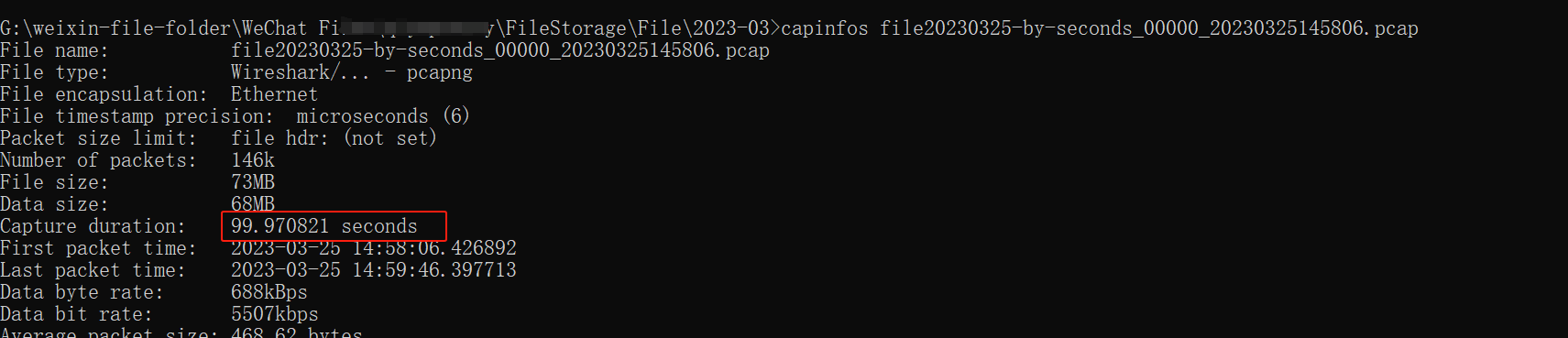

editcap file20230325.pcap file20230325-start3-end310-packets-number.pcap -A "2023-03-25 15:00:00" -B "2023-03-25 15:10:00" -c 10000

这个就是,本来按照时间范围,只会生成一个包。加了-C后,就继续按包的数量拆分了。
editcap file20230325.pcap file20230325-start3-end310-seconds.pcap -A "2023-03-25 15:00:00" -B "2023-03-25 15:10:00" -i 100


命令中可以指定序号,但是默认是删掉这些序号的包。
-r
Reverse the packet selection. Causes the packets whose packet numbers are specified on the command line to be written to the output capture file, instead of discarding them.
加了-r后,意味着反选。即保留这些序号的包。
官方示例:
To limit a capture file to packets from number 200 to 750 (inclusive) use:

editcap -r capture.pcapng small.pcapng 200-750

我这边也试了下:
editcap -r file20230325.pcap file20230325-frame-number.pcap 1-100

也没啥好总结的。
此内容由惯性聚合(RSS阅读器)自动聚合整理,仅供阅读参考。 原文来自 — 版权归原作者所有。