惯性聚合 高效追踪和阅读你感兴趣的博客、新闻、科技资讯
阅读原文 在惯性聚合中打开

推荐订阅源

酷 壳 – CoolShell
酷 壳 – CoolShell
H
Hacker News: Front Page
P
Palo Alto Networks Blog
T
ThreatConnect
Apple Machine Learning Research
博客园_首页
T
True Tiger Recordings
P
Privacy & Cybersecurity Law Blog
B
Blog
IT之家
IT之家
Last Week in AI
Last Week in AI
F
Full Disclosure
Hacker News: Ask HN
Hacker News: Ask HN
C
Comments on: Blog
Microsoft Azure Blog
C
Cybersecurity and Infrastructure Security Agency CISA
Microsoft Security Blog
博客园 - 【当耐特】
N
News and Events Feed by Topic
NISL@THU
NISL@THU
腾讯CDC
雷峰网
雷峰网
Security Latest
Security Latest
李成银的技术随笔
M
Microsoft Research Blog - Microsoft Research
L
LangChain Blog
L
Lohrmann on Cybersecurity
cs.CL updates on arXiv.org
C
Check Point Blog
Y
Y Combinator Blog
Recent Announcements
博客园 - Franky
N
News | PayPal Newsroom
V
V2EX
A
About on SuperTechFans
The Register - Security
月光博客
月光博客
奇客Solidot–传递最新科技情报
奇客Solidot–传递最新科技情报
Google Online Security Blog
MyScale Blog
MyScale Blog
Cisco Talos Blog
Cisco Talos Blog
Vercel News
Vercel News
WordPress大学
WordPress大学
C
Cyber Attacks, Cyber Crime and Cyber Security
The Hacker News
The Hacker News
IntelliJ IDEA : IntelliJ IDEA – the Leading IDE for Professional Development in Java and Kotlin | The JetBrains Blog
爱范儿
爱范儿
A
Arctic Wolf
L
LINUX DO - 最新话题
freeCodeCamp Programming Tutorials: Python, JavaScript, Git & More

博客园 - 01星河

AI时代:速度的错觉与秩序的退潮 UI 自动化测试产品深度对比分析报告 Web 自动化测试系统深度分析报告 TextBoxPopupBehavior控件 第 7 章 系统效果评测与监控 Linux TOP 命令详解 mysql-canal-rabbitmq 安装部署教程 第 6 章 用户画像系统 Elasticsearch 模块 - Shard Allocation 机制 追溯 MySQL Statement Cancellation Timer 第 5 章 机器学习技术的应用(下) 第 5 章 机器学习技术的应用(中) 第 5 章 机器学习技术的应用(上) 第 4 章 算法融合与数据血统 第 3 章 基础推荐算法 第 2 章 推荐系统的核心技术概述 阅读笔记 - 从零开始构建企业级推荐系统 第 1 章 推荐系统的时代背景 三个实例演示 Java Thread Dump 日志分析
Kibana 插件环境搭建教程
01星河 · 2021-03-06 · via 博客园 - 01星河

原文

环境背景, Kibana 7.4.0, Elasticsearch 7.4.0

注意, 执行以下命令时, 尽量在管理员权限的命令行窗口里执行, 避免一些没有权限的报错;

1. 准备 Kibana 源码

git clone https://github.com/elastic/kibana.git

如果 github 访问过慢, 可以切换加速通道: https://github.com.cnpmjs.org/elastic/kibana.git

切换对应 ES 版本的分支/标签:

cd kibana
git fetch # 取回所有分支和标签的更新
git tag -l | findstr 7.4.0 # windows 下查看 7.4.0 版本的标签
git checkout v7.4.0 # 切换 7.4.0 标签

2. 安装依赖软件

2.1 node

安装 .node-version 文件里标记的 node 版本

cat .node-version

2.2 nvm

windows 可以安装 nvm-windows 工具来管理 node 版本;

nvm list # 查看已安装的 node 版本列表
nvm use <version> # 切换 node 到指定版本
nvm install <version> # 安装指定版本的 node

2.3 yarn

npm install --global yarn

3. 初始化 Kibana

3.1 chromedriver

npm install chromedriver --chromedriver_cdnurl=http://cdn.npm.taobao.org/dist/chromedriver

3.2 node-gyp

用于编译插件模块的工具, Kibana 初始化过程中会遇到问题, 所以提前先准备好;

npm install -g node-gyp

设置 npm 指定的 python 版本, 如果已安装有不同版本的 python:

node-gyp set python /path/to/executable/python

如果之前已经安装好了的, 会出现以下异常, 可以忽略不管:

***\kibana>npm install -g node-gyp
npm WARN deprecated request@2.88.2: request has been deprecated, see https://github.com/request/request/issues/3142
npm WARN deprecated har-validator@5.1.5: this library is no longer supported
npm ERR! path ***\Node\global\node-gyp.cmd
npm ERR! code EEXIST
npm ERR! Refusing to delete ***\Node\global\node-gyp.cmd: is outside ***\Node\global\node_modules\node-gyp and not a link
npm ERR! File exists: ***\Node\global\node-gyp.cmd
npm ERR! Move it away, and try again.

npm ERR! A complete log of this run can be found in:
npm ERR!     ***\Node\cache\_logs\2021-02-08T09_20_46_911Z-debug.log

3.3 初始化

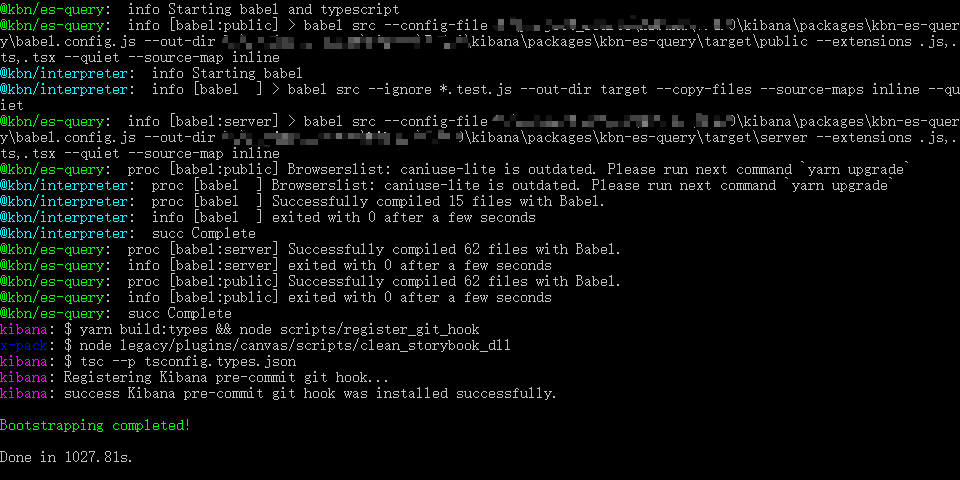
yarn kbn bootstrap

初始化完成的时候如下图所示:

image-20210201075541173

如果想切换分支删除已经下载的依赖, 或者下载的依赖有问题需要清除, 执行一下命令:

yarn kbn clean
yarn cache clean

注意, 清空之后需要回到 3.1 再按照流程安装相应的依赖包;

4. 环境配置

Kibana 是个大项目, 一些命令容易触发默认的堆内存限制导致内存溢出, 可以修改 --max_old_space_size 配置调大最大堆内存限制;

export NODE_OPTIONS="--max_old_space_size=2048"

windows 环境下没有找到配置的位置, 再调试插件的时候也没有出现内存溢出的情况, 暂时不考虑;

5. 连接 ES 集群

准备运行的 Elasticsearch 环境(略)

修改 config/kibana.yml 文件:

elasticsearch.hosts: ["http://test-es-host:9200"]

6. 从源码启动 Kibana

kibana 根目录下执行命令 yarn start , 即可启动 Kibana 进程, 并连接上面配置的 ES 集群;

启动成功后, 在本地浏览器中访问 http://localhost:5601, 有时候是 5603 等其他端口, 要注意启动成功的命令行窗口里的提示, 根据提示修改对应访问的端口号;

Q. 问题

  1. Current existing ChromeDriver binary is unavailable, proceding with download and extraction.

先安装 chromedriver

npm install --global chromedriver --chromedriver_cdnurl=http://cdn.npm.taobao.org/dist/chromedriver
  1. Error: Failed to parse .i18nrc.json file at ....i18nrc.json, info:TypeError: Cannot read property 'forEach' of undefined

异常原因是因为 .i18nrc.json 文件中没有配置翻译文件; 通过 gen 脚本创建初始化的插件, 一上来就会有这个问题~

{
  "paths": {
    "mycol": "./"
  },
  "translations": ["translations/zh-CN.json"] # 添加这一行配置即可, 语言选择对应的 json 文件即可
}

R. 参考资料

  1. https://www.elastic.co/guide/en/kibana/7.10/development-getting-started.html
  2. https://blog.csdn.net/qq_41882147/article/details/81222054
  3. kibana 使用备忘录