
惯性聚合 高效追踪和阅读你感兴趣的博客、新闻、科技资讯
阅读原文 在惯性聚合中打开

推荐订阅源

酷 壳 – CoolShell
酷 壳 – CoolShell
H
Hacker News: Front Page
P
Palo Alto Networks Blog
T
ThreatConnect
Apple Machine Learning Research
博客园_首页
T
True Tiger Recordings
P
Privacy & Cybersecurity Law Blog
B
Blog
IT之家
IT之家
Last Week in AI
Last Week in AI
F
Full Disclosure
Hacker News: Ask HN
Hacker News: Ask HN
C
Comments on: Blog
Microsoft Azure Blog
C
Cybersecurity and Infrastructure Security Agency CISA
Microsoft Security Blog
博客园 - 【当耐特】
N
News and Events Feed by Topic
NISL@THU
NISL@THU
腾讯CDC
雷峰网
雷峰网
Security Latest
Security Latest
李成银的技术随笔
M
Microsoft Research Blog - Microsoft Research
L
LangChain Blog
L
Lohrmann on Cybersecurity
cs.CL updates on arXiv.org
C
Check Point Blog
Y
Y Combinator Blog
Recent Announcements
博客园 - Franky
N
News | PayPal Newsroom
V
V2EX
A
About on SuperTechFans
The Register - Security
月光博客
月光博客
奇客Solidot–传递最新科技情报
奇客Solidot–传递最新科技情报
Google Online Security Blog
MyScale Blog
MyScale Blog
Cisco Talos Blog
Cisco Talos Blog
Vercel News
Vercel News
WordPress大学
WordPress大学
C
Cyber Attacks, Cyber Crime and Cyber Security
The Hacker News
The Hacker News
IntelliJ IDEA : IntelliJ IDEA – the Leading IDE for Professional Development in Java and Kotlin | The JetBrains Blog
爱范儿
爱范儿
A
Arctic Wolf
L
LINUX DO - 最新话题
freeCodeCamp Programming Tutorials: Python, JavaScript, Git & More

博客园 - CHPowerljp

在 VS2022 中关闭“包提醒”(通常指 NuGet 包更新提示、推荐包提示等) Windows 11 安装或重置过程中,跳过微软邮箱登录 C#客户端WPF/Winform调用WebService服务引用,对操作 “xxx” 的回复消息正文进行反序列化时出错【解决方案】 无密码远程桌面连接方法 SQLServer高并发 SQLlite数据库教程 IIS设置高并发 C# 连接Mysql读写 Linux安装php、mysql、apache服务 安装后phpmyadmin访问被拒绝的解决方案 XAMPP安装教程 Python开发环境搭建 .NET面试题大全(C#面试题)2020更新 javascript函数传递字符串参数 .NET HTTP异步请求(适用于并发请求同时大于上千上万个) .NET之设计模式总结完整版 Linux安装Docker IIS部署.NET Core方法及常见的需要注意的坑 Navicat连接mysql提示1251解决方案 js获取select下拉框选中的值 Windows下安装Mysql数据库
本地HTTPS证书免费 使用本地私有IP而不是域名作为站点,IIS部署站点
CHPowerljp · 2026-02-28 · via 博客园 - CHPowerljp

有很多时候,部署的网页不得已需要使用https. 然后https 访问会牵涉到 ssl证书问题,否则访问时chrome第一次访问会出现

不是安全链接的提示。所以要解决这个问题,基本的方法还是安装SSL证书。

可以使用 mkcert 进行安装。

1. 下载 mkcert

https://github.com/FiloSottile/mkcert/releases

2. 使用命令行窗口运行对应的exe文件, 如果是要部署到服务器的,直接写服务器的IP地址。

3. 会生成两个文件, 都是以 .pem 为扩展名的文件,

可以将带key的那个文件后缀名修改为 .key ,为了方便,我同时改成了 server.key , server.pem。

 4. 下载安装openssl,将server.key 和 server.pem 拷贝到 安装目录的bin目录下。

http://slproweb.com/products/Win32OpenSSL.html

对 openssl.exe 以管理员权限运行,然后输入 

pkcs12 导出 pfx文件。
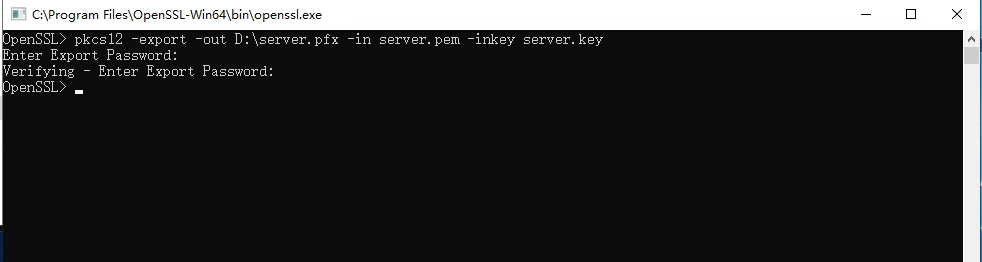
5. 在服务器IIS中导入对应的pfx文件。
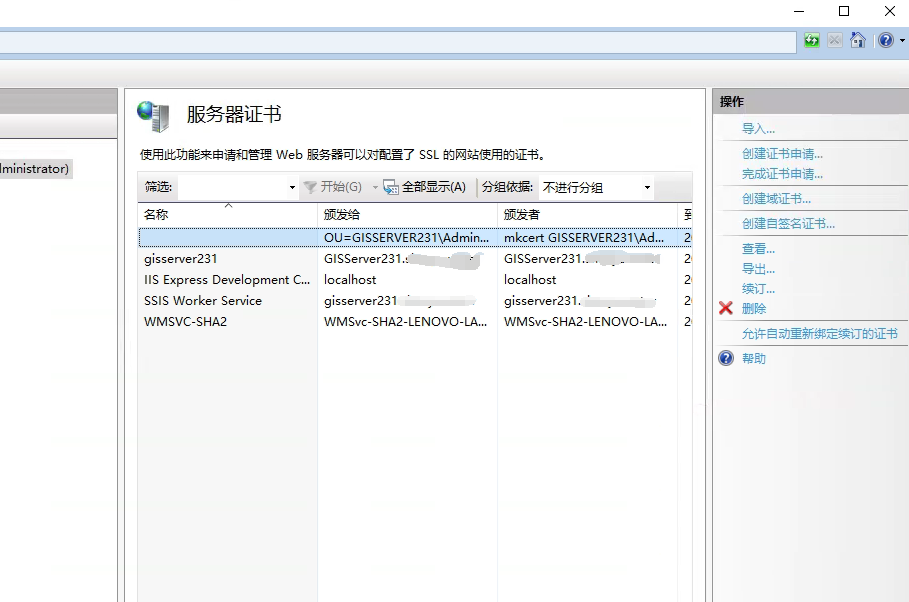
6. 客户端访问

使用 mkcert -CAROOT 查找到安装的证书位置。
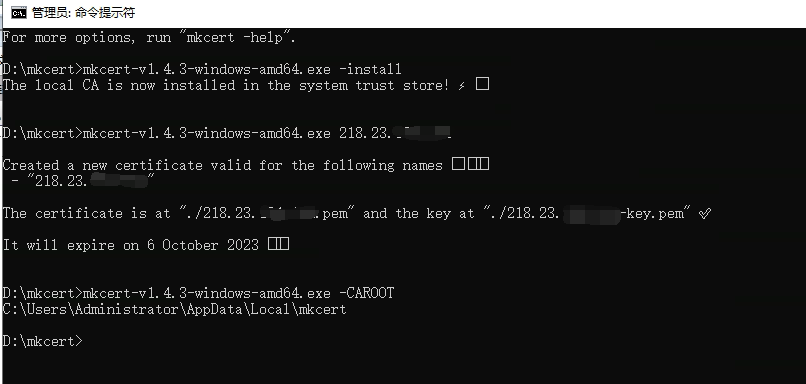
7. 将该目录下的 rootCA.pem 拷贝一份,并修改后缀名为 .crt 。 在客户访问的机器上双击安装该证书。

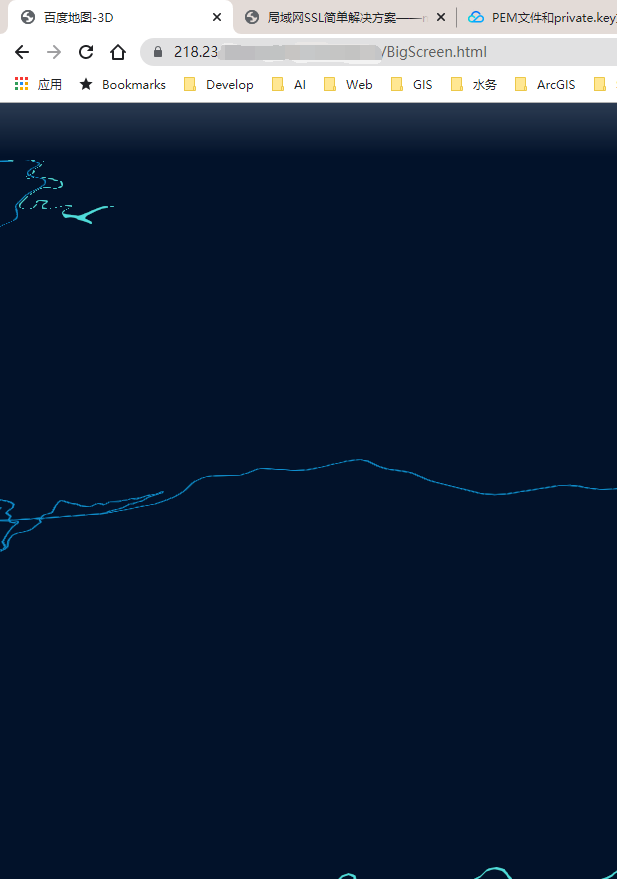
8. 通过浏览器访问服务器上的页面。可以看到不会再提示链接不安全的提示了。
转载自:https://www.cnblogs.com/googlegis/p/14976720.html

image

https://www.aliyun.com/benefit?userCode=h3d90dml

阿里云6-8折扣优惠,部分AI模型调用1折优惠