


惯性聚合 高效追踪和阅读你感兴趣的博客、新闻、科技资讯
阅读原文 在惯性聚合中打开

推荐订阅源

酷 壳 – CoolShell
酷 壳 – CoolShell
H
Hacker News: Front Page
P
Palo Alto Networks Blog
T
ThreatConnect
Apple Machine Learning Research
博客园_首页
T
True Tiger Recordings
P
Privacy & Cybersecurity Law Blog
B
Blog
IT之家
IT之家
Last Week in AI
Last Week in AI
F
Full Disclosure
Hacker News: Ask HN
Hacker News: Ask HN
C
Comments on: Blog
Microsoft Azure Blog
C
Cybersecurity and Infrastructure Security Agency CISA
Microsoft Security Blog
博客园 - 【当耐特】
N
News and Events Feed by Topic
NISL@THU
NISL@THU
腾讯CDC
雷峰网
雷峰网
Security Latest
Security Latest
李成银的技术随笔
M
Microsoft Research Blog - Microsoft Research
L
LangChain Blog
L
Lohrmann on Cybersecurity
cs.CL updates on arXiv.org
C
Check Point Blog
Y
Y Combinator Blog
Recent Announcements
博客园 - Franky
N
News | PayPal Newsroom
V
V2EX
A
About on SuperTechFans
The Register - Security
月光博客
月光博客
奇客Solidot–传递最新科技情报
奇客Solidot–传递最新科技情报
Google Online Security Blog
MyScale Blog
MyScale Blog
Cisco Talos Blog
Cisco Talos Blog
Vercel News
Vercel News
WordPress大学
WordPress大学
C
Cyber Attacks, Cyber Crime and Cyber Security
The Hacker News
The Hacker News
IntelliJ IDEA : IntelliJ IDEA – the Leading IDE for Professional Development in Java and Kotlin | The JetBrains Blog
爱范儿
爱范儿
A
Arctic Wolf
L
LINUX DO - 最新话题
freeCodeCamp Programming Tutorials: Python, JavaScript, Git & More

博客园 - 赵青青

AI模型Claude的Haiku、Sonnet、Opus 怎么选? obsidian(md笔记管理)使用实践 python中可变参数与装饰器的例子 C++ lambda 表达式 3ds max的obj文件格式说明 CPython调试和性能分析 Python3类型安全type hint Python3虚拟机和对象 与ChatGPT的对话在windows上获取mac地址 Python311新特性-特化指令specializing adaptive interpreter-typing-asyncio 最小体积拉取git仓库并保持可更新 unity .net8 suppot comming pycharm一些减少代码warning的拼写检查设置 JavaScript速查表 Python cheatsheet 速查表 DirectX9(D3D9)游戏开发:高光时刻录制和共享纹理的踩坑 FFmpeg在游戏视频录制中的应用:画质与文件大小的综合比较 c++中字符串之string和char IMGUI快速入门
vs编译cpp时设置排除项
赵青青 · 2024-12-15 · via 博客园 - 赵青青

cpp编译排除

一个c++文件不需要被编译但还保留在工程中(阅读),可使用ExcludedFromBuild,有两种方法实现:

  1. 图形化操作
  2. 改vs的项目配置文件

图形化操作

在vs的资源管理器选中文件 - 右键 - 属性 - 切到当前的编译配置项(debug/release),有个选项【从生成中排除】,选择为是
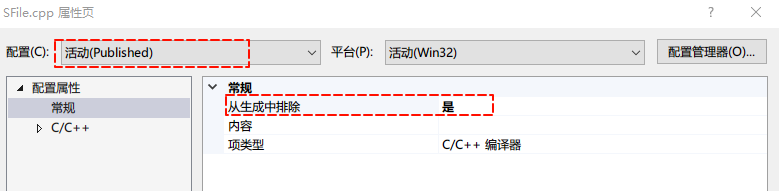
image-20241119100056626

vcxproj文件

手动编辑,增加以下内容,注意路径

<ClCompile Include="..\..\..\src\tools\SFile.cpp">
  <ExcludedFromBuild Condition="'$(Configuration)|$(Platform)'=='Published|Win32'">true</ExcludedFromBuild>
</ClCompile>
<ClCompile Include="..\..\..\src\tools\ffmpeg.cpp" />