惯性聚合 高效追踪和阅读你感兴趣的博客、新闻、科技资讯
阅读原文 在惯性聚合中打开

推荐订阅源

A
About on SuperTechFans
OSCHINA 社区最新新闻
OSCHINA 社区最新新闻
T
Tenable Blog
WordPress大学
WordPress大学
小众软件
小众软件
Y
Y Combinator Blog
酷 壳 – CoolShell
酷 壳 – CoolShell
博客园 - 聂微东
大猫的无限游戏
大猫的无限游戏
T
The Exploit Database - CXSecurity.com
Attack and Defense Labs
Simon Willison's Weblog
C
CXSECURITY Database RSS Feed - CXSecurity.com
量子位
有赞技术团队
有赞技术团队
C
Cisco Blogs
D
Darknet – Hacking Tools, Hacker News & Cyber Security
F
Fortinet All Blogs
S
Schneier on Security
Engineering at Meta
Engineering at Meta
Microsoft Azure Blog
Martin Fowler
Martin Fowler
Recent Announcements
Stack Overflow Blog
Stack Overflow Blog
Recent Commits to openclaw:main
阮一峰的网络日志
阮一峰的网络日志
G
GRAHAM CLULEY
Spread Privacy
Spread Privacy
F
Full Disclosure
Scott Helme
Scott Helme
GbyAI
GbyAI
N
Netflix TechBlog - Medium
MyScale Blog
MyScale Blog
Cloudbric
Cloudbric
云风的 BLOG
云风的 BLOG
L
LangChain Blog
aimingoo的专栏
aimingoo的专栏
Hacker News - Newest:
Hacker News - Newest: "LLM"
Security Latest
Security Latest
CTFtime.org: upcoming CTF events
MongoDB | Blog
MongoDB | Blog
The GitHub Blog
The GitHub Blog
The Register - Security
L
Lohrmann on Cybersecurity
PCI Perspectives
PCI Perspectives
Exploit-DB.com RSS Feed
D
Docker
钛媒体:引领未来商业与生活新知
钛媒体:引领未来商业与生活新知
S
Secure Thoughts
C
Check Point Blog

博客园 - 乔闻

关于NVIDIA-geforce 1650和tesla-P4系列显卡,共用一个驱动的办法。其他型号一样。 记一次安装nvidia-container-runtme后,作为containerd默认的runtime,k8s节点挂掉的问题。 Docker Swarm Keepalived Operator:高可用集群虚拟 IP 管理方案 scheduler报错: Failed to watch *v1beta1.PodDisruptionBudget: failed to list *v1beta1.PodDisruptionBudget, no kind "KubeSchedulerConfiguration" is registered for version "componentconfig/v1alpha1" 介绍一个prometheus监控数据生成工具 EOS:dfuse stream 保证不会错过一个心跳 ubuntu18.04安装时ACPI error 无法进入系统的问题 Supervisor-类unix系统下的进程控制工具 windows10 易升 下载失败 解决方法 Visual Studio for Mac 安装时无法连接到网络等问题 用VsCode编辑TypeScript OWIN是什么? Dapper 实例字段与静态字段区别 ref - 按引用传递参数 TweenMax 前台脚本库 如何使用CSS Sprites技术进行图片合并 QQ群开放接口 使用 Hexo 生成一套静态博客网页
windows10 自带的OpenSSH Client(Beta)
乔闻 · 2017-09-20 · via 博客园 - 乔闻

我不知道其他版本有没有 ,我是windows10 专业版,版本1709,OS内部版本16288.1

安装过程:

1.我的电脑上面的卸载或更改程序
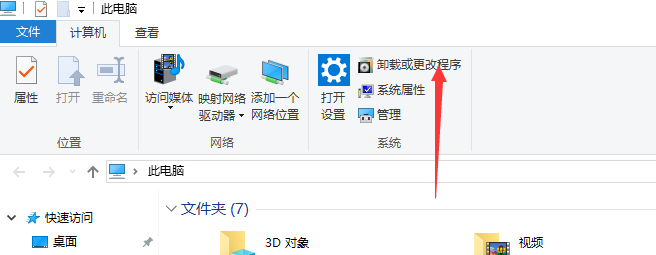
2.管理可选功能

3.添加功能

4.重启电脑,搞定 OK ssh

登陆服务器命令 ssh 用户名@IP地址 -p 端口号

 

多了一个这个服务 

ssh我刚接触 我也不知道它有什么用,mark一下先。

openssh的安装路径:

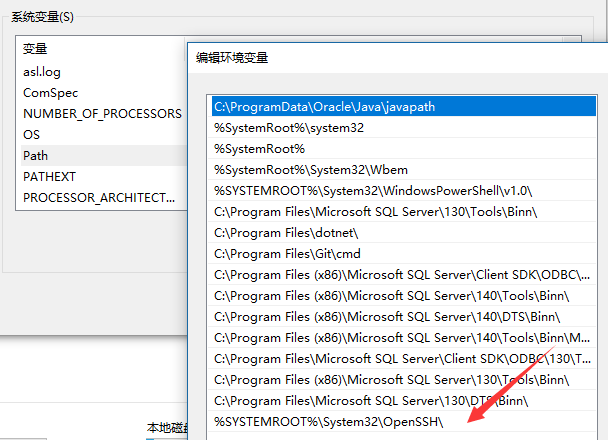
C:\WINDOWS\System32\openssh\

 系统变量Path多了一条