





我做的这个测试系统所属的功能模块用的是默认自带的,没有密码明文、密文显示功能,也就是我们在登录时经常使用的,默认显示输入的密文,点击“睁眼”图片显示明文,点击“闭眼”图片显示密文。
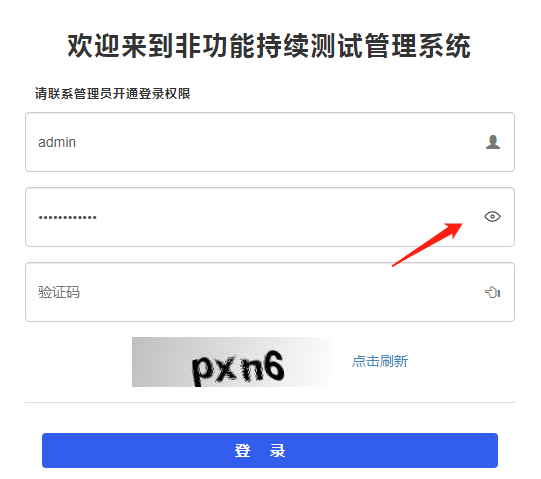
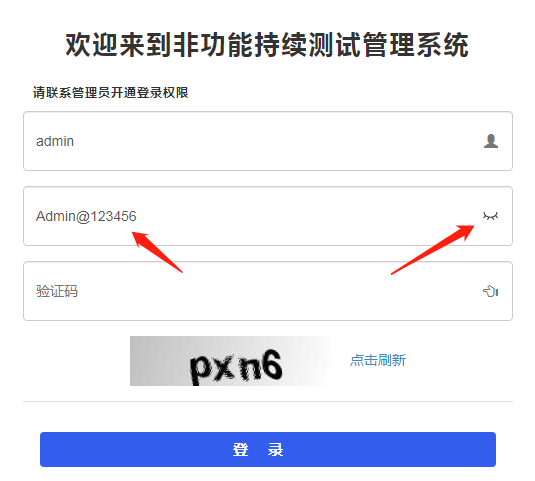
以下三段代码放到login.html页面中即可:包括CSS样式代码、JS实现代码、password调用代码,其中css和js代码可以分开放到不同的文件中也是可以的。
1、CSS样式代码,放到<head></head>中:
<head>
  <meta charset="utf-8">
  <meta http-equiv="X-UA-Compatible" content="IE=edge">
  <title>测试管理系统</title>
  <!-- Tell the browser to be responsive to screen width -->
  <meta content="width=device-width, initial-scale=1, maximum-scale=1, user-scalable=no" name="viewport">
  <link rel="shortcut icon" type="image/x-icon" href="favicon.ico">
  <link rel="stylesheet" href="css/bootstrap.min.css">
  <link rel="stylesheet" href="css/font-awesome.min.css">
  <link rel="stylesheet" href="css/AdminLTE.min.css">

  <style type="text/css">
    #img {
        width: 25px;
        height: 25px;
        position: absolute;
        right: 10px;
        margin-top: 12px;
        top: 5px;
        text-align: center;
    }
</style>
</head>
2、JS实现代码,放到<body></body>中任何位置(我是放到了login.html页面的最下头):
<body>

。。。。
。。。。


<script type="text/javascript">
      //添加登录密码明文、密文切换功能20210216
      var demoImg = document.getElementById("img");
      var PWD = document.getElementById("HXB-login-password");

      function hideShowPsw() {
          if (PWD.type == "password") {
              PWD.type = "text";
              demoImg.src = "/swagger/images/icon-invisible.png"; //闭眼图片
          } else {
              PWD.type = "password";
              demoImg.src = "/swagger/images/icon-visible.png"; // 睁眼图片
          }
      }
</script>
</body>
3、登录代码中password调用代码
代码中 id="HXB-login-password" 和 onclick="hideShowPsw()" 就是调用的js的方法,名称可以自定义修改。
  <div class="login-box-body">

      <div v-if="error" class="alert alert-danger alert-dismissible">
        <h4 style="margin-bottom: 0px;"><i class="fa fa-exclamation-circle"></i> {{errorMsg}}</h4>
      </div>
      <div class="form-group has-feedback">
          登录账号代码
      </div>

     <div class="form-group has-feedback">
           <input id="HXB-login-password" type="password" class="form-control-login" v-model="form.password" placeholder="密码" >
           <img id="img" onclick="hideShowPsw()" src="/swagger/images/icon-visible.png">
      </div>

      <div class="form-group has-feedback">
          验证码代码
      </div>
      <div class="form-group has-feedback">
          刷新验证码代码
      </div>

      <div class="row">
        <!-- /.col -->
        <div class="col-xs-4">
          <button type="button" class="btn btn-primary-login btn-block btn-flat" @click="login">登录</button>
        </div>
        <!-- /.col -->
      </div>
用到的睁眼图片、闭眼图片,自己下载:
睁眼图片:https://www.iconfont.cn/search/index?searchType=icon&q=%E7%9D%81%E7%9C%BC
闭眼图片:https://www.iconfont.cn/search/index?searchType=icon&q=%E9%97%AD%E7%9C%BC
图片下载后放到网站images目录中。
我用的eclipse,还需要点击项目名称F5刷新以下才可以。
此内容由惯性聚合(RSS阅读器)自动聚合整理,仅供阅读参考。 原文来自 — 版权归原作者所有。