








本文基于modsecurity,ubuntu 系统 nginx搭建环境,需要先安装modsecurity,再编译安装nginx
它是一款开源的的三方模块,功能包括http流量日志,实时检测等功能。
ModSecurity核心规则集(CRS)提供以下类别的保户来防止攻击。
官方宣传:
◆HTTP Protection (HTTP防御) - HTTP协议和本地定义使用的detectsviolations策略。
◆Real-time Blacklist Lookups(实时黑名单查询) -利用第三方IP信誉。
◆HTTP Denial of Service Protections(HTTP的拒绝服务保护) -防御HTTP的洪水攻击和HTTP Dos 攻击。
◆Common Web Attacks Protection(常见的Web攻击防护) -检测常见的Web应用程序的安全攻击。
◆Automation Detection(自动化检测) -检测机器人,爬虫,扫描仪和其他表面恶意活动。
◆Integration with AV Scanning for File Uploads(文件上传防病毒扫描) -检测通过Web应用程序上传的恶意文件。
◆Tracking Sensitive Data(跟踪敏感数据) -信用卡通道的使用,并阻止泄漏。
◆Trojan Protection(木马防护) -检测访问木马。
◆Identification of Application Defects (应用程序缺陷的鉴定)-应用程序的错误配置警报。
ModSecurity是一款开源的Web应用防火墙(WAF),用于保护Web应用免受各种攻击。
第一步 更新依赖包
sudo apt-get update
sudo apt-get install libxml2 libxml2-dev libpcre3 libpcre3-dev libapr1 libapr1-dev libaprutil1 libaprutil1-dev
第二步:下载并编译ModSecurity
git clone https://github.com/SpiderLabs/ModSecurity
cd ModSecurity
./build.sh
./configure
make
sudo make install
第三步:下载
git clone --depth 1 https://github.com/SpiderLabs/ModSecurity-nginx.git
第四步:宝塔安装nginx
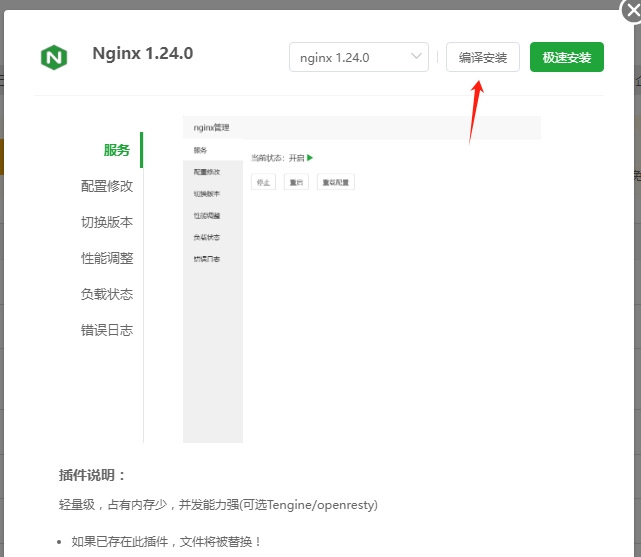
在宝塔中打开软件商店,选择编译安装
添加自定义模块
模块参数: --add-module=path path为第三步下载的ModSecurity-nginx文件绝对路径
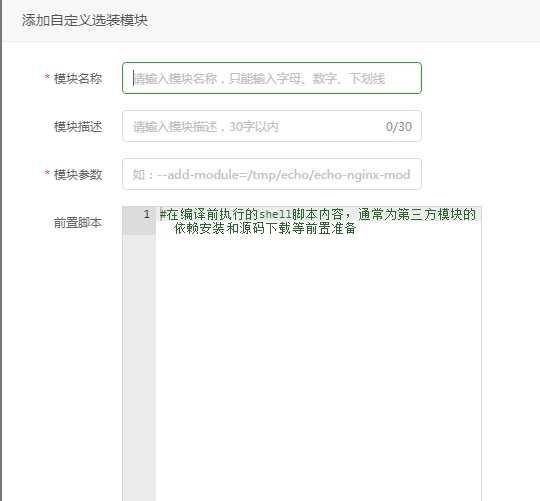
设置好后就可以开始编译安装nginx 了
第五步:ModSecurity-nginx配置文件设置
git clone https://github.com/coreruleset/coreruleset /etc/nginx/modsec/coreruleset
cp /etc/nginx/modsec/coreruleset/crs-setup.conf.example /etc/nginx/modsec/coreruleset/crs-setup.conf
修改修改/etc/nginx/modsec/main.conf
#开启ModSecurity 验证
SecRuleEngine On
#加载配置文件
Include /etc/nginx/modsec/coreruleset/crs-setup.conf
Include /etc/nginx/modsec/coreruleset/rules/*.conf
第六步:nginx 配置
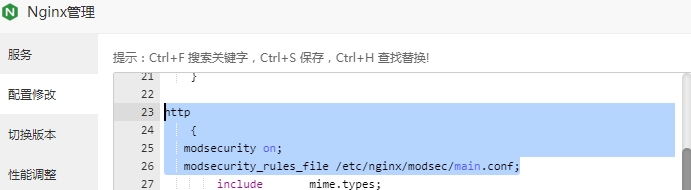
http
    {
    log_format extended '$remote_addr - $remote_user [$time_local] '
                    '"$request" $status $body_bytes_sent '
                    '"$http_referer" "$http_user_agent" $request_id';
   modsecurity on;
     modsecurity_rules '
          SecRuleEngine On
          SecDebugLog /tmp/modsec_debug.log
          SecDebugLogLevel 0
          SecRuleRemoveById 10
        ';
   modsecurity_rules_file /etc/nginx/modsec/main.conf;
开启modsecurity,并记录日志
完成后重启nginx 后即可
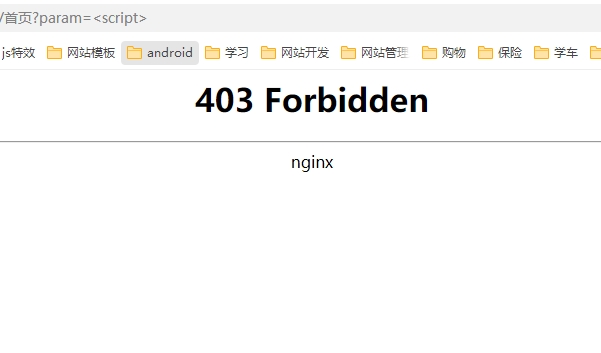
生效效果
参考资料:https://blog.csdn.net/yangshangwei/article/details/139050621
自定义ModSecurity规则(规则新建完成后,需要在修改/etc/nginx/modsec/main.conf文件,然后重启nginx)
在文件中加入规则
修改/etc/nginx/modsec/main.conf
SecRuleEngine On
Include /etc/nginx/modsec/coreruleset/crs-setup.conf
Include /etc/nginx/modsec/coreruleset/rules/*.conf
Include /etc/nginx/modsec_my.conf
下面是一个简单的 ModSecurity 规则,其目的是在请求的任何参数中查找并拒绝包含字符 (,),',; 的输入。
SecRule ARGS "@rx [\(\)';]" \
    "id:12345,log,deny,status:403,msg:'Input contains disallowed characters.'"
这条规则包含以下解释:
SecRule:这个指令告诉 ModSecurity 开始一条新的规则。ARGS:这个参数指定需要检查的请求参数名,例如 ARGS:name 将仅对名为 "name" 的参数执行规则。@rx:这个运算符表示参数值将通过一个正则表达式进行匹配。[\(\)';]:这个正则表达式用于匹配包含 (,),',; 中任意一个字符的输入。id:这个规则 ID 是一个唯一标识符,可用于跟踪日志和分析。log:这个选项表示当规则触发时,ModSecurity 将记录一条相应的日志。deny:这个选项用于拒绝包含不良输入的请求。status:这个选项指定拒绝请求时返回的 HTTP 状态码。msg:这个选项用于在日志中记录的规则消息。请注意,在实际部署之前,建议先对规则进行仔细测试和评估。请确保您仅拦截确实需要禁止的输入,并避免阻止合法的用户请求。
此内容由惯性聚合(RSS阅读器)自动聚合整理,仅供阅读参考。 原文来自 — 版权归原作者所有。