




惯性聚合 高效追踪和阅读你感兴趣的博客、新闻、科技资讯
阅读原文 在惯性聚合中打开

推荐订阅源

Microsoft Azure Blog
WordPress大学
WordPress大学
让小产品的独立变现更简单 - ezindie.com
The Cloudflare Blog
U
Unit 42
D
Docker
Hugging Face - Blog
Hugging Face - Blog
博客园 - 聂微东
Recent Announcements
GbyAI
GbyAI
T
The Blog of Author Tim Ferriss
Last Week in AI
Last Week in AI
V
Visual Studio Blog
I
InfoQ
Google DeepMind News
小众软件
小众软件
L
LangChain Blog
C
Check Point Blog
宝玉的分享
宝玉的分享
Martin Fowler
Martin Fowler
酷 壳 – CoolShell
酷 壳 – CoolShell
博客园 - 【当耐特】
J
Java Code Geeks
罗磊的独立博客

博客园 - fogwu

豆包加开源工具apache jmeter 生成网站测试报告 windows 服务器 防止黑客利用漏洞上传可执行文件的免费方法 解决js每次刷新都需要实时从服务端获取的方法 powerdesinger 生成数据库结构表图并导出pdf iis 应用程序池通过钉钉机器人进行监控 windows 系统查看文件或文件夹被哪个进程占用并解除的方法 sqlsever 2008 全文索引的使用 uni-app 开发微信小程序 onLaunch后再执行页面onLoad ASP.NET ”未显示页面,因为请求实体过大“的问题处理 ubutu 安装雷池waf 宝塔 nginx 安装 免费防护墙ModSecurity 模块 laravel postman api 请求, 表单验证不通过,不返回错误信息的json 而是返回302重定向 Windows Server 下 IIS 申请部署 Let's Encrypt 证书实现 免费 HTTPS h5 自适应页面背景图无法自动适应的问题 iis 部署SSL 出现错误的处理方法推荐 think\db\Raw could not be converted to string 错误的处理方式 - fogwu 解决使用js 打印当前页面时会多出一页空白纸张的问题 windiows 显卡安装指定旧版驱动 mysql 5.6 升级到 5.7 教程 winows 下iis+nginx +php 部署 windows cmd 命令中使用grep 查找 mediawiki 调用外站内容方法
windows server 2022 通过命令行更改远程端口
fogwu · 2025-11-25 · via 博客园 - fogwu

以前更改端口我都是直接通过注册表修改,现在有了更快捷的方式。

以管理员身份打开 PowerShell,进行如下操作

更改端口命令如下:

$portValue = '<Port Number>' 

Set-ItemProperty -Path 'HKLM:\SYSTEM\CurrentControlSet\Control\Terminal Server\WinStations\RDP-Tcp' -name 'PortNumber' -Value $portValue

查看端口是否更改成功:

Get-ItemProperty -Path 'HKLM:\SYSTEM\CurrentControlSet\Control\Terminal Server\WinStations\RDP-Tcp' -name 'PortNumber'

  更改效果如下:
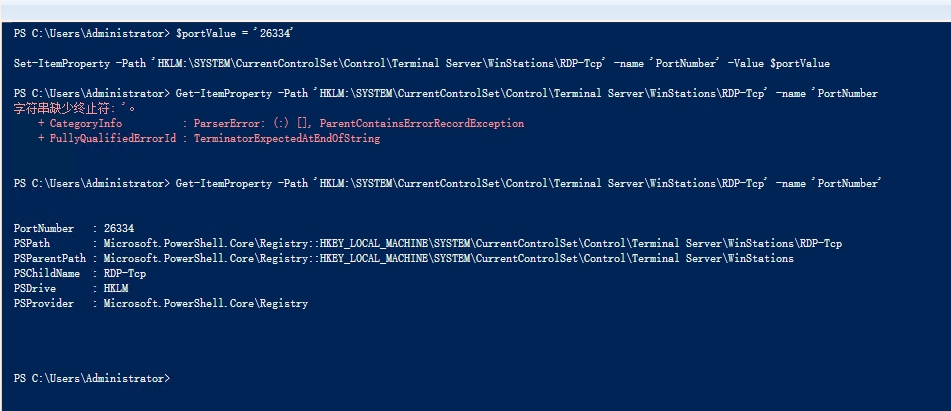
  微信截图_20251125162203

参考文档:https://learn.microsoft.com/zh-cn/windows-server/remote/remote-desktop-services/remotepc/change-listening-port?tabs=powershell