








#include <iostream>
#include <windows.h>
#include <tchar.h>
#include <string>
#include <cassert>
#include <functional>

typedef std::basic_string<TCHAR> StringT;
typedef std::string StringA;

#define _PP_CAT_IMPL_(a, b ) a ## b
#define PP_CAT(a, b) _PP_CAT_IMPL_( a, b )

namespace Details
{
    template <typename TCallable>
    class ScopedExit
    {
    public:
        ScopedExit(TCallable func) :
            Func(func)
        {
        }

        ~ScopedExit()
        {
            Func();
        }

        ScopedExit(const ScopedExit&) = delete;
        const ScopedExit& operator=(const ScopedExit&) = delete;

    private:
        TCallable Func;
    };
}

#define SCOPED_EXIT(expression) \
	::Details::ScopedExit<std::function<void()> > PP_CAT(ScopedExitInstalce_, __COUNTER__)([&]()\
{ \
	expression;\
})


StringA CalculateFileMD5(const StringT& filepath)
{
#define BUFSIZE 1024
#define MD5LEN  16

    DWORD dwStatus = 0;
    BOOL bResult = FALSE;
    HCRYPTPROV hProv = 0;
    HCRYPTHASH hHash = 0;
    HANDLE hFile = NULL;
    BYTE rgbFile[BUFSIZE];
    DWORD cbRead = 0;
    BYTE rgbHash[MD5LEN];
    DWORD cbHash = 0;
    CHAR rgbDigits[] = "0123456789abcdef";
    // Logic to check usage goes here.

    hFile = CreateFile(filepath.c_str(),
        GENERIC_READ,
        FILE_SHARE_READ,
        NULL,
        OPEN_EXISTING,
        FILE_FLAG_SEQUENTIAL_SCAN,
        NULL);

    if (INVALID_HANDLE_VALUE == hFile)
    {
        return "";
    }

    SCOPED_EXIT(CloseHandle(hFile));

    // Get handle to the crypto provider
    if (!CryptAcquireContext(&hProv,
        NULL,
        NULL,
        PROV_RSA_FULL,
        CRYPT_VERIFYCONTEXT))
    {
        return "";
    }

    SCOPED_EXIT(CryptReleaseContext(hProv, 0));

    if (!CryptCreateHash(hProv, CALG_MD5, 0, 0, &hHash))
    {
        return "";
    }

    SCOPED_EXIT(CryptDestroyHash(hHash));

    while (bResult = ReadFile(hFile, rgbFile, BUFSIZE, &cbRead, NULL))
    {
        if (0 == cbRead)
        {
            break;
        }

        if (!CryptHashData(hHash, rgbFile, cbRead, 0))
        {
            return "";
        }
    }

    if (!bResult)
    {
        return "";
    }

    cbHash = MD5LEN;
    if (CryptGetHashParam(hHash, HP_HASHVAL, rgbHash, &cbHash, 0))
    {
        StringA result;
        result.reserve(40);

        for (DWORD i = 0; i < cbHash; i++)
        {
            result.push_back(rgbDigits[rgbHash[i] >> 4]);
            result.push_back(rgbDigits[rgbHash[i] & 0xf]);
        }

        return result;
    }

    return "";
}

int main()
{
    auto md5 = CalculateFileMD5(_T("E:\\aow-install-apk-100.xml"));
    std::cout << md5 << std::endl;

    return 0;
}
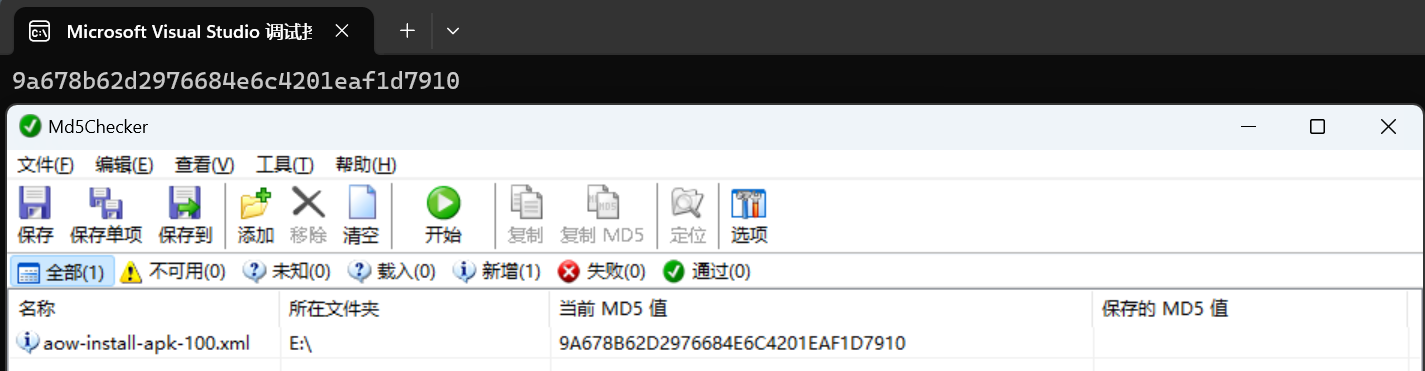
测试:
此内容由惯性聚合(RSS阅读器)自动聚合整理,仅供阅读参考。 原文来自 — 版权归原作者所有。