惯性聚合 高效追踪和阅读你感兴趣的博客、新闻、科技资讯
阅读原文 在惯性聚合中打开

推荐订阅源

S
Schneier on Security
GbyAI
GbyAI
D
Docker
Recent Announcements
L
LangChain Blog
Microsoft Security Blog
Recorded Future
Recorded Future
IT之家
IT之家
C
Cisco Blogs
H
Help Net Security
Security Latest
Security Latest
T
Tenable Blog
H
Hacker News: Front Page
罗磊的独立博客
博客园_首页
MyScale Blog
MyScale Blog
美团技术团队
S
Securelist
K
Kaspersky official blog
Vercel News
Vercel News
Threat Intelligence Blog | Flashpoint
Latest news
Latest news
Cisco Talos Blog
Cisco Talos Blog
Jina AI
Jina AI
V
Vulnerabilities – Threatpost
P
Privacy & Cybersecurity Law Blog
L
Lohrmann on Cybersecurity
N
News and Events Feed by Topic
Know Your Adversary
Know Your Adversary
钛媒体:引领未来商业与生活新知
钛媒体:引领未来商业与生活新知
B
Blog RSS Feed
T
Tor Project blog
P
Proofpoint News Feed
S
Security Affairs
P
Palo Alto Networks Blog
Scott Helme
Scott Helme
cs.CL updates on arXiv.org
雷峰网
雷峰网
M
MIT News - Artificial intelligence
NISL@THU
NISL@THU
博客园 - 【当耐特】
V
Visual Studio Blog
Cloudbric
Cloudbric
S
Secure Thoughts
SecWiki News
SecWiki News
C
Comments on: Blog
Application and Cybersecurity Blog
U
Unit 42
cs.AI updates on arXiv.org
F
Fortinet All Blogs

博客园 - hjswlqd

python pip 离线包安装 whl格式 tar gz格式 py-radius mysql 连接查询 左连接 右连接 笛卡尔积 等 python linux 调试 vscode timeline不显示|不正常|异常|no filtered timeline information was provided|Timeline does not work es scroll id 每次都相同 python 安装 echarts的渐变色配置 LinearGradient 联想 进入bios u盘启动 kibana筛选数据 vscode python 3.7 pylance debugpy 插件 vsix vsix 离线 编译 转 | 一次搞懂数据大屏适配方案 (vw vh、rem、scale) 分辨率 缩放比 转 | element-ui组件table去除下方滚动条,实现鼠标左右拖拽移动表格 vscode 提示js 函数的插件 | vue3项目的插件 Window中查看端口被哪个进程占用,并结束进程的方法 nodejs 统计算指定后缀,格式的文件 python windows命令行 批处理 统计算指定后缀,格式的文件 保存 |下载 | 提取 win10 win11 电脑 锁屏壁纸
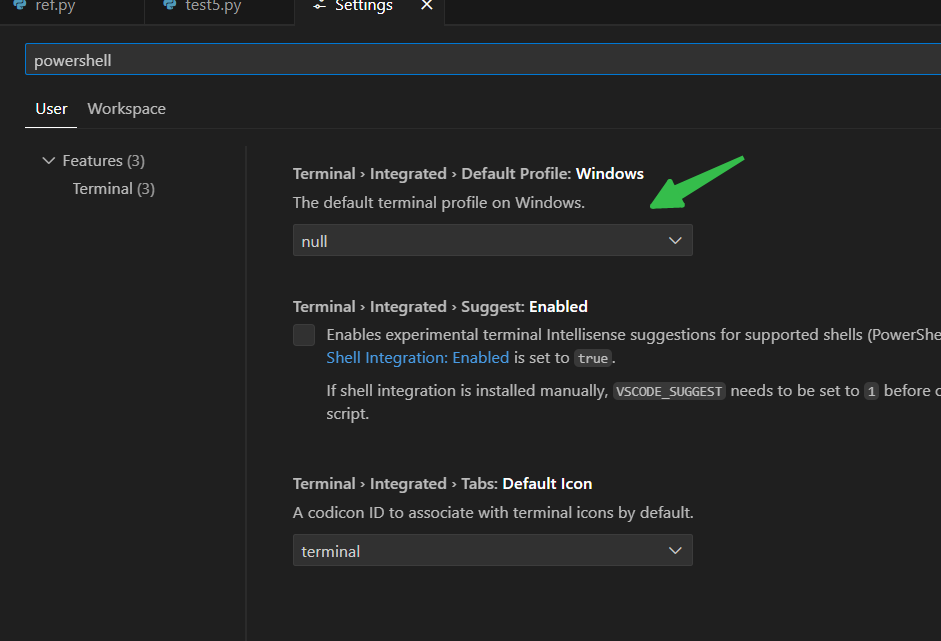
vscode process terminal 3221225506 终端打不开 默认打开powershell
hjswlqd · 2024-06-14 · via 博客园 - hjswlqd
可能旧的 版本,旧的文章不适用 可能内网环境,识别不了终端 现在的解决方式是,打开setting,搜索“”“powershell” ,定位到 ,修改default profile 选项为 Command Prompt …