


惯性聚合 高效追踪和阅读你感兴趣的博客、新闻、科技资讯
阅读原文 在惯性聚合中打开

推荐订阅源

云风的 BLOG
云风的 BLOG
Forbes - Security
Forbes - Security
IT之家
IT之家
I
InfoQ
The Register - Security
宝玉的分享
宝玉的分享
罗磊的独立博客
让小产品的独立变现更简单 - ezindie.com
GbyAI
GbyAI
Recorded Future
Recorded Future
Google DeepMind News
U
Unit 42
V
Visual Studio Blog
Cyberwarzone
Cyberwarzone
Threat Intelligence Blog | Flashpoint
I
Intezer
Project Zero
Project Zero
L
LINUX DO - 热门话题
Blog — PlanetScale
Blog — PlanetScale
大猫的无限游戏
大猫的无限游戏
Vercel News
Vercel News
博客园 - 三生石上(FineUI控件)
Stack Overflow Blog
Stack Overflow Blog
D
Darknet – Hacking Tools, Hacker News & Cyber Security
T
The Blog of Author Tim Ferriss
博客园 - 聂微东
H
Hackread – Cybersecurity News, Data Breaches, AI and More
P
Privacy & Cybersecurity Law Blog
Know Your Adversary
Know Your Adversary
美团技术团队
博客园 - Franky
F
Full Disclosure
P
Privacy International News Feed
NISL@THU
NISL@THU
MyScale Blog
MyScale Blog
C
CERT Recently Published Vulnerability Notes
Microsoft Security Blog
P
Palo Alto Networks Blog
小众软件
小众软件
S
Secure Thoughts
T
Threat Research - Cisco Blogs
Schneier on Security
PCI Perspectives
PCI Perspectives
MongoDB | Blog
MongoDB | Blog
M
MIT News - Artificial intelligence
Help Net Security
Help Net Security
S
Securelist
Google Online Security Blog
L
Lohrmann on Cybersecurity
Y
Y Combinator Blog

博客园 - VipSoft

Python 项目简单部署(Linux) MinerU - 将非结构化文档(PDF、图片、Office 文件等)转换为机器可读的 Markdown 和 JSON LangChain 入门 服务端部署-FastAPI LangChain 入门 LangSmith LangChain 入门 实战 - 食谱推荐 LangChain 入门 Memory 会话记忆 LangChain 入门 Tools 工具 LangChain 入门 Tools 工具 LangChain 入门 Prompts 提示词 LangChain 入门 Message 消息 LangChain 入门 Model 的初始化和调用 LangChain 入门 Agent 的基本运行机制 AI 0基础学习,名词解析 LangChain 和 LangGraph AI大模型知识体系 Dify — Workflow - 数据可视化 Dify — 连接MySQL配置 Dify — Chatflow - 数据库智能查询 Dify — Chatflow - 文档知识库 Dify — Agent 智能体 高安全券码、注册码生成 Dify — 文本生成应用 Dify — 聊天助手 -- 知识库 Windows 下 Docker 安装 Dify Ollama — 命令 Ollama — 为什么能够运行不同的模型 Ollama — 接口 Qwen — 自定义模型文件 Ollama Qwen — 安装测试 Ollama Windows 安装 & 指定安装目录 跟着AI学AI - 诊断结论信息抽取 - 批量处理脚本 跟着AI学AI - 诊断结论信息抽取 - 模型压缩与部署 跟着AI学AI - 诊断结论信息抽取 - 模型评估与调试 跟着AI学AI - 诊断结论信息抽取 - 模型训练 轻型民用无人驾驶航空器安全操控理论考试培训材料 FreeRedis Helper Windbg w3wp.DMP 内存分析 跟着AI学AI - 诊断结论信息抽取 - 数据增强 QQ 录屏软件 Java - 加权随机算法 - 示例 Java - 加权随机算法--Demo Java LoadBalanceUtil 负载均衡、轮询加权 SpringBoot 集成 IP2Region 获取IP地域信息 Windows 服务器和虚拟主机,创建.开头的文件夹 .well-known 跟着AI学AI - 诊断结论信息抽取 - 数据格式转换BERT训练格式 跟着AI学AI - 诊断结论信息抽取 - LabelStudio 标注 -- 结论标注 跟着AI学AI - 诊断结论信息抽取 - 学习路径 跟着AI学AI - UV 安装 数据标注工具 Label-Studio 跟着AI学AI - 学习路径 - 命名实体识别(NER)和信息抽取(IE) 跟着AI学AI - 需要购买显卡吗? C# 无BOM的UTF-8编码 Vue ref reactive Vue - el-table 嵌套表 Spring `@Scheduled` 中这些参数的区别、组合和应用场景 Python 找出同步日志中的重复数据 Python - UV PyCharm 不能识别 .venv 的环境
`VIRTUAL_ENV=venv` does not match the project environment
VipSoft · 2026-01-16 · via 博客园 - VipSoft
(venv) PS D:\OpenSource\Python\VipPython> .\.venv\Scripts\activate
(vippython) PS D:\OpenSource\Python\VipPython> uv run .\main.py        
Hello from vippython!
(vippython) PS D:\OpenSource\Python\VipPython> 

.\.venv\Scripts\activate 切换后,前面的 (vuen) => (vippython)

pyproject.toml

[project]
name = "vippython"
version = "0.1.0"
description = "Add your description here"
readme = "README.md"
requires-python = ">=3.12"
dependencies = [
    "numpy>=2.4.1",
    "scikit-learn>=1.8.0",
    "scipy>=1.17.0",
    "sentence-transformers>=5.2.0",
    "torch>=2.9.1",
    "transformers>=4.57.5",
]

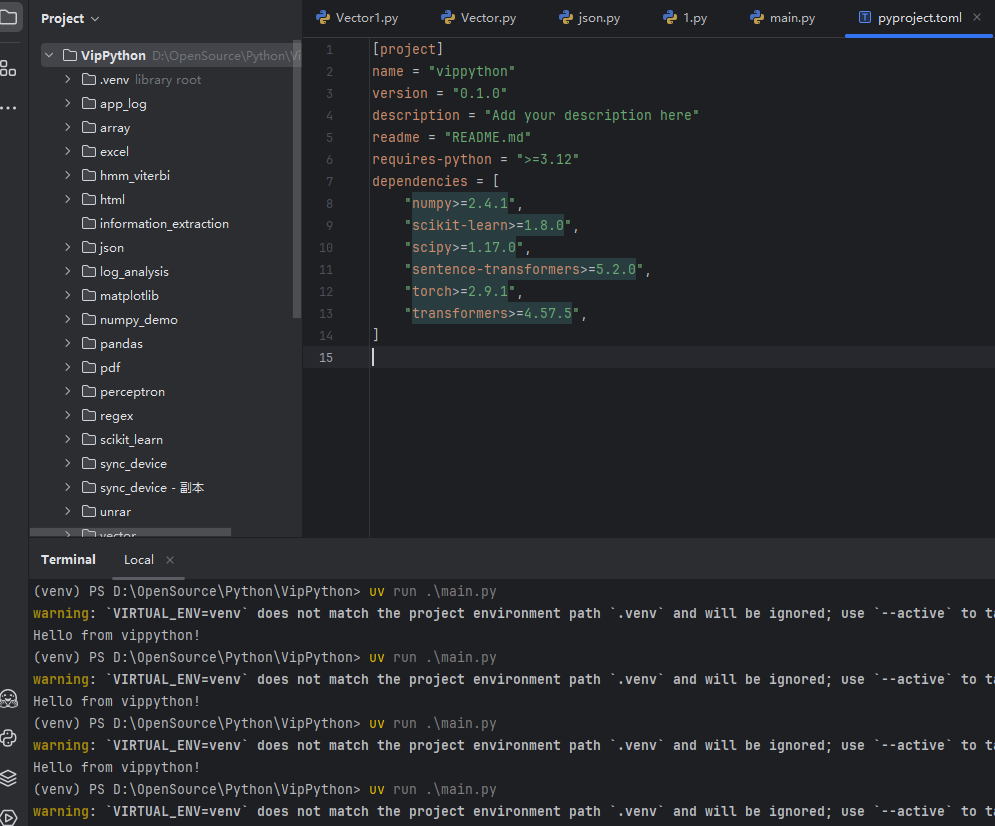
(venv) PS D:\OpenSource\Python\VipPython> uv run .\main.py
warning: `VIRTUAL_ENV=venv` does not match the project environment path `.venv` and will be ignored; use `--active` to target the active environment instead
Hello from vippython!
image

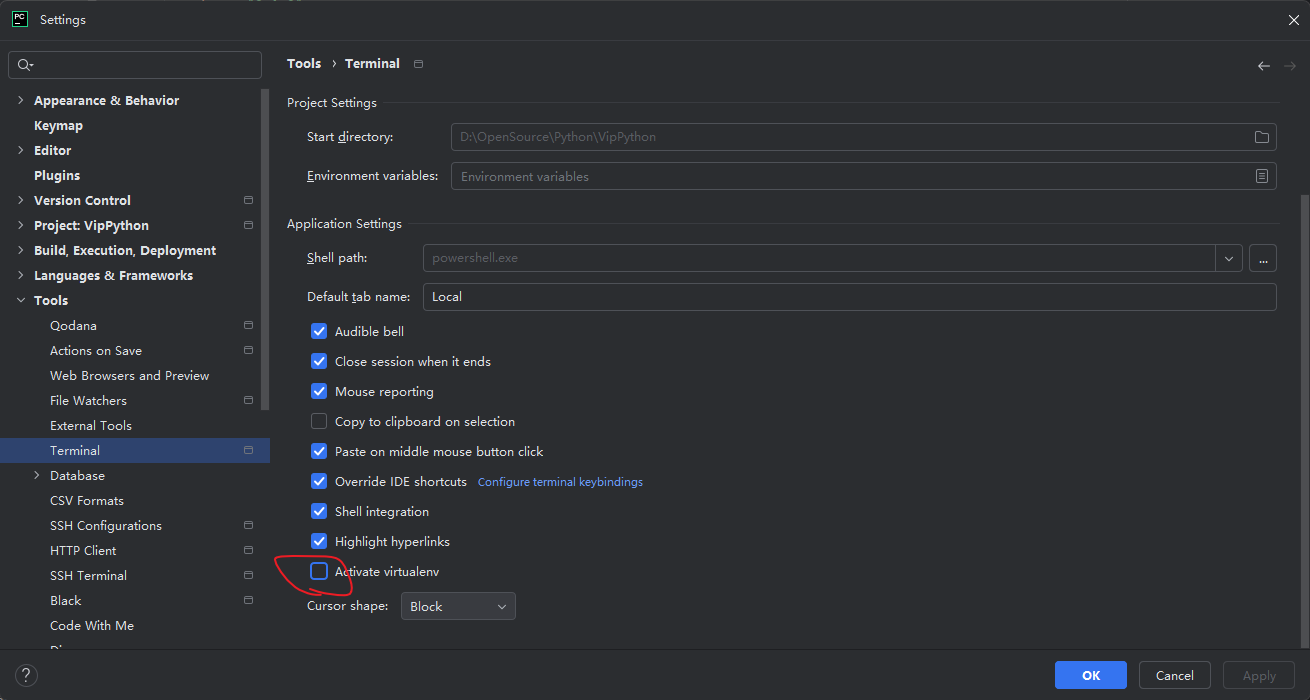
方法一:修改 PyCharm 的 Terminal 设置(推荐)

  1. 关闭自动激活虚拟环境

    • FileSettingsToolsTerminal
    • 取消勾选 Activate virtualenv
    • 或者修改 Shell path 为你的系统默认终端(如 PowerShell)
  2. 在 Terminal 中使用正确的激活命令

    # 如果项目中有 .venv 环境
    .\.venv\Scripts\activate
    
    # 如果有 venv 环境
    .\venv\Scripts\activate
    
    # 然后运行
    uv run .\main.py
    

image