






SpringBoot Scheduled 常见用法: https://www.cnblogs.com/vipsoft/p/15751660.html
import cn.hutool.core.date.DateUtil;
import org.slf4j.Logger;
import org.slf4j.LoggerFactory;
import org.springframework.scheduling.annotation.EnableScheduling;
import org.springframework.scheduling.annotation.Scheduled;
import org.springframework.stereotype.Component;

@Component
@EnableScheduling
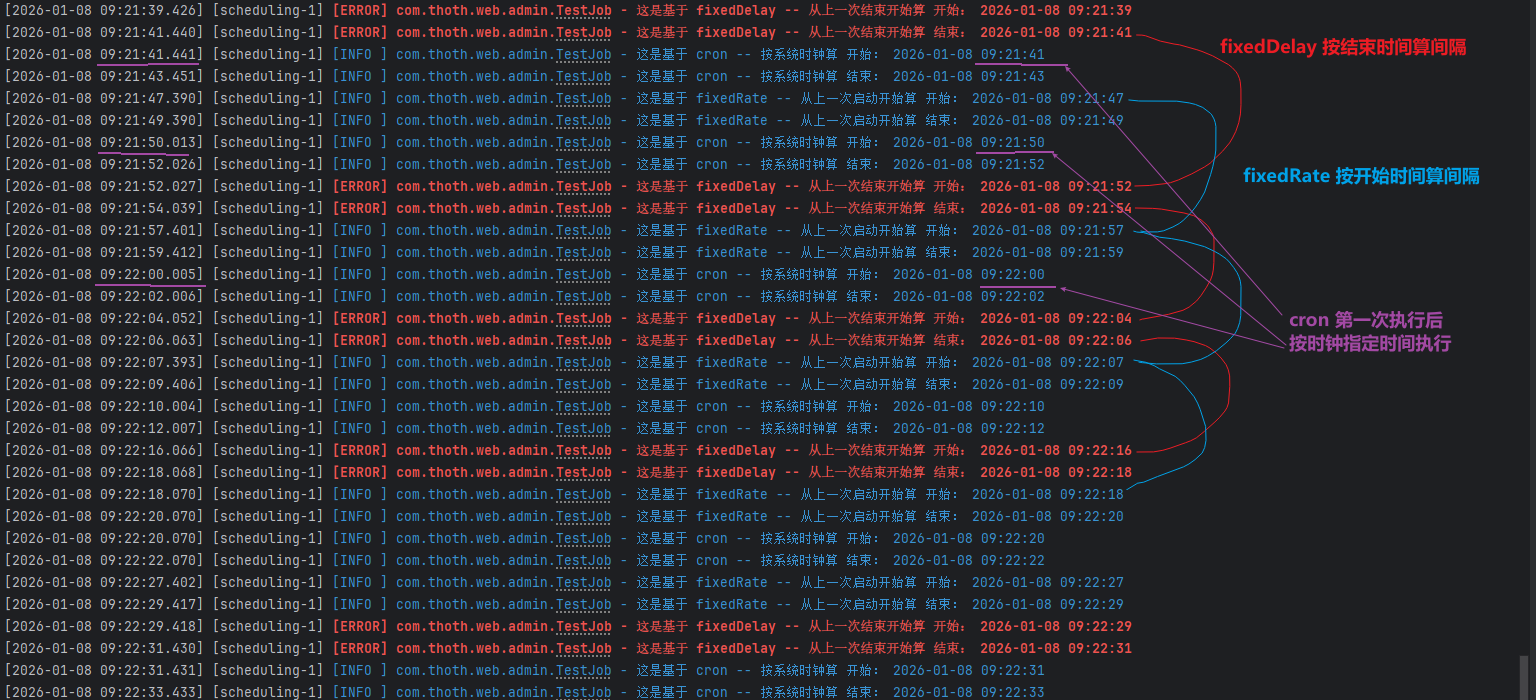
public class TestJob {

    Logger logger = LoggerFactory.getLogger(this.getClass());

    @Scheduled(cron = "*/10 * * * * ?")
    public void crontabTask() throws InterruptedException {
        logger.info("这是基于 cron -- 按系统时钟算 开始: {}", DateUtil.now());
        Thread.sleep(2000);
        logger.info("这是基于 cron -- 按系统时钟算 结束: {}", DateUtil.now());
    }

    @Scheduled(fixedRate = 10 * 1000)
    public void fixedRateTask() throws InterruptedException {
        logger.info("这是基于 fixedRate -- 从上一次启动开始算 开始: {}", DateUtil.now());
        Thread.sleep(2000);
        logger.info("这是基于 fixedRate -- 从上一次启动开始算 结束: {}", DateUtil.now());
    }

    @Scheduled(fixedDelay = 10 * 1000)
    public void fixedDelayTask() throws InterruptedException {
        logger.info("这是基于 fixedDelay -- 从上一次结束开始算 开始: {}", DateUtil.now());
        Thread.sleep(2000);
        logger.info("这是基于 fixedDelay -- 从上一次结束开始算 结束: {}", DateUtil.now());
    }
}
秒 分 时 日 月 周 年(可选)// 每天凌晨1点执行
@Scheduled(cron = "0 0 1 * * ?")
// 每5分钟执行(在每分钟的0秒执行)
@Scheduled(cron = "0 */5 * * * ?")
// 每小时的10分、30分、50分执行
@Scheduled(cron = "0 10,30,50 * * * ?")
// 每5分钟执行一次(从上次开始算起)
@Scheduled(fixedRate = 5 * 60 * 1000)
// 上次执行结束后,等待5分钟再执行下次
@Scheduled(fixedDelay = 5 * 60 * 1000)
// 应用启动后等待10分钟,然后每5分钟执行一次
@Scheduled(initialDelay = 10 * 60 * 1000, fixedRate = 5 * 60 * 1000)
// 情况1:fixedRate = 5分钟
// 时间线:0分开始→2分结束→5分开始→7分结束→10分开始...
// 实际间隔:3分钟(5-2)

// 情况2:fixedDelay = 5分钟
// 时间线:0分开始→2分结束→7分开始→9分结束→14分开始...
// 实际间隔:7分钟(2+5)

// 情况3:cron = "0 */5 * * * ?"
// 时间线:0分开始→2分结束→5分开始→7分结束→10分开始...
// 实际间隔:3分钟,但开始时间固定在0、5、10分
initialDelay + fixedRate@Component
public class DataSyncScheduler {
// 应用启动后等待2小时(让其他服务就绪),然后每30分钟同步一次
@Scheduled(initialDelay = 2 * 60 * 60 * 1000,
fixedRate = 30 * 60 * 1000)
public void syncData() {
// 数据同步任务,执行时间较短
}
}
适用场景:
initialDelay + fixedDelay@Component
public class ReportGenerator {
// 应用启动后等待5分钟,然后每次执行结束后等待1小时再执行
@Scheduled(initialDelay = 5 * 60 * 1000,
fixedDelay = 60 * 60 * 1000)
public void generateReport() {
// 生成报表,执行时间较长(约10-20分钟)
// 保证每次生成完成后,休息1小时再开始
}
}
适用场景:
@Component
public class MaintenanceTask {

    @PostConstruct
    public void init() {
        // 计算到下一个整点的延迟
    }

    @Scheduled(cron = "0 0 */2 * * ?", zone = "Asia/Shanghai")
    public void maintenance() {
        // 每2小时在整点执行系统维护
    }
}
// 工作日早上9点执行
@Scheduled(cron = "0 0 9 * * MON-FRI")

// 每小时的第5分钟执行
@Scheduled(cron = "0 5 * * * ?")

// 每月1号凌晨2点执行
@Scheduled(cron = "0 0 2 1 * ?")
// 实时监控,频率优先
@Scheduled(fixedRate = 30 * 1000)  // 每30秒

// 频繁的小任务
@Scheduled(fixedRate = 5 * 1000)   // 每5秒
// 处理大量数据,需要间隔
@Scheduled(fixedDelay = 10 * 60 * 1000)  // 每次间隔10分钟

// 调用有限制的第三方API
@Scheduled(fixedDelay = 2 * 1000)  // 每次间隔2秒,避免限流
// Spring Cloud 配置,等待配置中心就绪
@Scheduled(initialDelay = 30 * 1000, fixedRate = 60 * 1000)

// 缓存预热后再执行
@Scheduled(initialDelay = 2 * 60 * 1000, cron = "0 */15 * * * ?")
@Component
public class CustodySyncService {

    @PostConstruct
    public void init() {
        // 可以在这里计算动态的 initialDelay
    }

    // 方案1:使用 cron + 动态初始延迟(需要自己实现)
    // 方案2:使用 fixedRate + 计算的 initialDelay

    // 如果坚持要整点开始,建议:
    @Scheduled(cron = "0 */5 * * * ?")
    public void syncCustody() {
        // 这种会固定在 :00, :05, :10 执行
    }

    // 如果要从启动时间算,每5分钟:
    @Scheduled(fixedRate = 5 * 60 * 1000)
    public void syncCustody2() {
        // 从启动开始算,每5分钟执行
        // 首次执行是启动后立即执行,除非配合 initialDelay
    }
}
# application.yml
scheduling:
  tasks:
    custody-sync:
      # 从配置读取,方便不同环境调整
      fixed-rate: 300000  # 5分钟
      initial-delay: ${SYNC_INITIAL_DELAY:120000}  # 默认2分钟
      enabled: true
时区问题:cron 表达式默认使用服务器时区,建议显式指定
@Scheduled(cron = "0 0 9 * * ?", zone = "Asia/Shanghai")
任务重叠问题:
fixedRate 可能重叠,使用 @Async 或调整线程池fixedDelay 保证不重叠异常处理:
应用集群部署:
根据你的具体需求,我建议:
@Async 取决于你的具体需求:@Async(默认单线程)@Component
@EnableScheduling
public class CronTask3 {
@Scheduled(fixedDelay = 10000) // 不加 @Async
public void first() throws InterruptedException {
taskLogger.info("任务开始执行,线程: " + Thread.currentThread().getName());
Thread.sleep(5000); // 模拟任务执行5秒
taskLogger.info("任务执行结束");
}
}
执行效果:
10:00:00 任务开始执行,线程: scheduling-1
10:00:05 任务执行结束
10:00:15 任务开始执行,线程: scheduling-1  ← 等待了10秒(5+5)
@Async(多线程异步执行)@Component
@EnableScheduling
@EnableAsync
public class CronTask3 {
@Async
@Scheduled(fixedDelay = 10000) // 加了 @Async
public void first() throws InterruptedException {
taskLogger.info("任务开始执行,线程: " + Thread.currentThread().getName());
Thread.sleep(5000); // 模拟任务执行5秒
taskLogger.info("任务执行结束");
}
}
执行效果:
10:00:00 任务开始执行,线程: task-1
10:00:05 任务执行结束
10:00:10 任务开始执行,线程: task-2  ← 等待了5秒(不是10秒!)
fixedDelay + @Async 的行为变化当你使用 fixedDelay = 10000 时:
@Async:从上一次方法结束开始算,10秒后执行下一次@Async:从上一次方法调用开始算,10秒后执行下一次这是因为 @Async 使方法立即返回(实际在另一个线程执行),Spring 认为方法"结束"了。
@Component
@EnableScheduling
@EnableAsync
public class CronTask3 {

    @Async
    @Scheduled(fixedDelay = 10000)  // 注意:这里的 fixedDelay 行为变了!
    public void first() throws InterruptedException {
        // 实际行为类似 fixedRate,不是真正的 fixedDelay
    }
}
@Component
@EnableScheduling
@EnableAsync
public class CronTask3 {

    @Async
    @Scheduled(fixedDelay = 10000)
    public CompletableFuture<Void> first() throws InterruptedException {
        return CompletableFuture.runAsync(() -> {
            try {
                taskLogger.info("任务开始执行");
                Thread.sleep(5000);
                taskLogger.info("任务执行结束");
            } catch (InterruptedException e) {
                Thread.currentThread().interrupt();
            }
        });
    }
}
@Component
@EnableScheduling
@EnableAsync
public class CronTask3 {

    @Async
    @Scheduled(fixedRate = 10000)  // 建议使用 fixedRate
    public void first() throws InterruptedException {
        taskLogger.info("任务开始执行");
        Thread.sleep(5000);
        taskLogger.info("任务执行结束");
    }
}
| 组合方式 | 行为特点 | 是否重叠 | 适用场景 |
|---|---|---|---|
fixedDelay |
上次结束 → 间隔 → 下次开始 | ❌ 不重叠 | 串行任务,避免并发 |
fixedRate |
上次开始 → 间隔 → 下次开始 | ✅ 可能重叠 | 固定频率,不关心执行时长 |
fixedDelay + @Async |
行为类似 fixedRate | ✅ 可能重叠 | 需要异步但误解了行为 |
fixedRate + @Async |
真正的异步固定频率 | ✅ 可能重叠 | 高并发,短任务,需要异步 |
@Async 的情况:fixedDelay 保证间隔@Async 的情况:fixedRate 保持固定频率@Component
@EnableScheduling
public class CronTask3 {
Logger taskLogger = LoggerFactory.getLogger("crontabTask_3");
// 如果任务执行时间 < 10秒,且需要严格间隔10秒
// 不要加 @Async
@Scheduled(fixedDelay = 10000)
public void first() throws InterruptedException {
// 你的逻辑
}
// 如果任务执行时间不确定,需要异步并行
// 可以加 @Async,但要改用 fixedRate
@Async
@Scheduled(fixedRate = 10000)
public void second() throws InterruptedException {
// 你的逻辑
}
}
@Async 需要配置线程池,否则默认线程池可能不够用@Async 方法的事务边界需要注意@Configuration
@EnableAsync
public class AsyncConfig {
@Bean("taskExecutor")
public TaskExecutor taskExecutor() {
ThreadPoolTaskExecutor executor = new ThreadPoolTaskExecutor();
executor.setCorePoolSize(10);
executor.setMaxPoolSize(50);
executor.setQueueCapacity(100);
executor.setThreadNamePrefix("async-task-");
executor.initialize();
return executor;
}
}
对于你的代码 @Scheduled(fixedDelay = 10000):
@Async@Async,但考虑改用 fixedRate@Async,保持 fixedDelay@Async,改用 fixedRate此内容由惯性聚合(RSS阅读器)自动聚合整理,仅供阅读参考。 原文来自 — 版权归原作者所有。