


PostgreSQL pg_auto_failover 高可用 1:pg_auto_failover集群搭建
PostgreSQL pg_auto_failover 高可用 2:pg_auto_failover集群运维
pg_autoctl
+ create    Create a pg_auto_failover node, or formation
+ drop      Drop a pg_auto_failover node, or formation
+ config    Manages the pg_autoctl configuration
+ show      Show pg_auto_failover information
+ enable    Enable a feature on a formation
+ disable   Disable a feature on a formation
+ get       Get a pg_auto_failover node, or formation setting
+ set       Set a pg_auto_failover node, or formation setting
+ perform   Perform an action orchestrated by the monitor
  activate  Activate a Citus worker from the Citus coordinator
  run       Run the pg_autoctl service (monitor or keeper)
  stop      signal the pg_autoctl service for it to stop
  reload    signal the pg_autoctl for it to reload its configuration
  status    Display the current status of the pg_autoctl service
  help      print help message
  version   print pg_autoctl version

pg_autoctl create
  monitor      Initialize a pg_auto_failover monitor node
  postgres     Initialize a pg_auto_failover standalone postgres node
  coordinator  Initialize a pg_auto_failover citus coordinator node
  worker       Initialize a pg_auto_failover citus worker node
  formation    Create a new formation on the pg_auto_failover monitor

pg_autoctl drop
  monitor    Drop the pg_auto_failover monitor
  node       Drop a node from the pg_auto_failover monitor
  formation  Drop a formation on the pg_auto_failover monitor

pg_autoctl config
  check  Check pg_autoctl configuration
  get    Get the value of a given pg_autoctl configuration variable
  set    Set the value of a given pg_autoctl configuration variable

pg_autoctl show
  uri            Show the postgres uri to use to connect to pg_auto_failover nodes
  events         Prints monitor's state of nodes in a given formation and group
  state          Prints monitor's state of nodes in a given formation and group
  settings       Print replication settings for a formation from the monitor
  standby-names  Prints synchronous_standby_names for a given group
  file           List pg_autoctl internal files (config, state, pid)
  systemd        Print systemd service file for this node

pg_autoctl enable
  secondary    Enable secondary nodes on a formation
  maintenance  Enable Postgres maintenance mode on this node
  ssl          Enable SSL configuration on this node
  monitor      Enable a monitor for this node to be orchestrated from

pg_autoctl disable
  secondary    Disable secondary nodes on a formation
  maintenance  Disable Postgres maintenance mode on this node
  ssl          Disable SSL configuration on this node
  monitor      Disable the monitor for this node

pg_autoctl get
+ node       get a node property from the pg_auto_failover monitor
+ formation  get a formation property from the pg_auto_failover monitor

pg_autoctl get node
  replication-quorum  get replication-quorum property from the monitor
  candidate-priority  get candidate property from the monitor

pg_autoctl get formation
  settings              get replication settings for a formation from the monitor
  number-sync-standbys  get number_sync_standbys for a formation from the monitor

pg_autoctl set
+ node       set a node property on the monitor
+ formation  set a formation property on the monitor

pg_autoctl set node
  metadata            set metadata on the monitor
  replication-quorum  set replication-quorum property on the monitor
  candidate-priority  set candidate property on the monitor

pg_autoctl set formation
  number-sync-standbys  set number-sync-standbys for a formation on the monitor

pg_autoctl perform
  failover    Perform a failover for given formation and group
  switchover  Perform a switchover for given formation and group
promotion Perform a failover that promotes a target node通过pg_autoctl get formation settings查看集群参数设置
root@ubuntu11:~# pg_autoctl get formation settings
  Context |     Name |                   Setting | Value
----------+----------+---------------------------+------------------------------------
formation |  default |     number_sync_standbys | 0
  primary | ubuntu12 |   synchronous_standby_names | 'ANY 1 (pgautofailover_standby_60)'
     node | ubuntu13 |    candidate priority | 50
     node | ubuntu12 |    candidate priority | 50
     node | ubuntu13 |    replication quorum | true
     node | ubuntu12 |    replication quorum | true
参数说明
number_sync_standbys:同步备库的数量
number_sync_standbys表示设置强同步节点的数量,如果为0的话,表示当从节点故障之后,主节点依旧可以支持读写,否则,如果可用的备用节点数量小于number_sync_standbys设置的个数的时候,主节点的写操作会被挂起。
number_sync_standbys的设置
pg_autoctl set formation number_sync_standbys 1
Replication quorum
此参数可设置为 true或 false,默认情况下为 true,表示有可能成为同步备库。如果设置为 false,表示使用异步复制。
Candidate Priority
该参数表示候选备库优先级,可以设为0 到100 间的任意值,缺省值是50。优先级越大,越容易备选择成为主库。如果设置为0,则不会选择该节点为新主库。
当备库候选优先级相同时,Monitor节点将选择LSN位置最高的的备库。如果各个备库的LSN位置相同,则随机选择一个备库。
实际测试中到一个有意思的问题,主备节点都正常的情况下
1,从pg_auto_failover的维度看,synchronous_standby_names 为 'ANY 1 (pgautofailover_standby_60)'
2,从postgresql实例的维度看,synchronous_commit = on,synchronous_standby_names=ANY 1 (pgautofailover_standby_60)
这意味着主备节点是同步复制。
但是当关闭备节点来模拟备节点故障的时候,发现synchronous_standby_names为'',此时再从主节点查询synchronous_standby_names,其值也变为'',意味着自动降级为异步复制。
select name,setting from pg_settings where name like '%synchronous_commit%';
name              |setting|
------------------+-------+
synchronous_commit|on     |

select name,setting from pg_settings where name like '%synchronous_standby_names%' ;
name                     |setting                          |
-------------------------+---------------------------------+
synchronous_standby_names|ANY 1 (pgautofailover_standby_60)|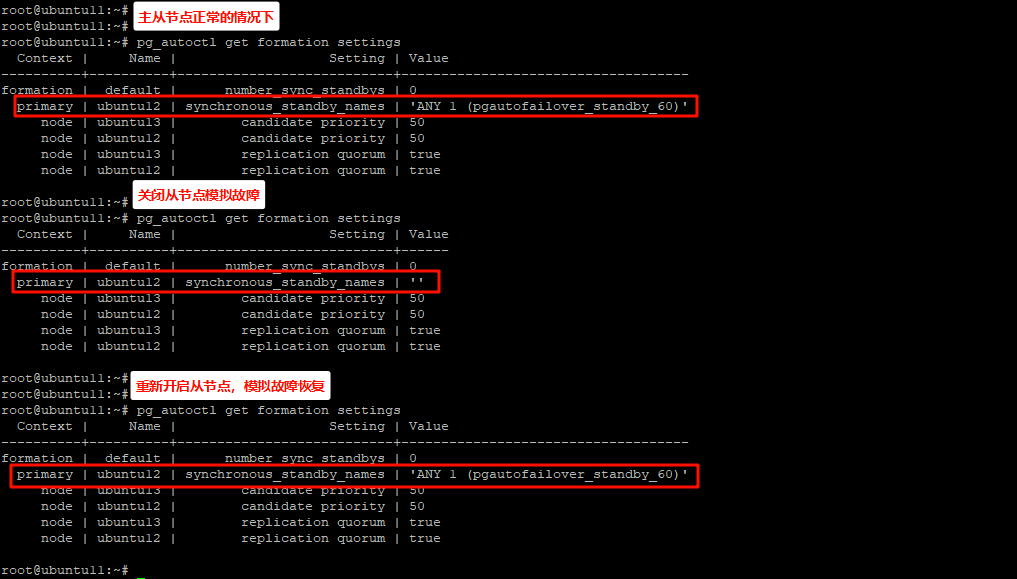
如果想设置为强同步模式,通过pg_autoctl set formation number-sync-standbys 1设置,这时会发现,一主一备的模式是不支持的

如下是pgautofailover故障转移相关的监控参数,参考https://pg-auto-failover.readthedocs.io/en/main/ref/configuration.html#configuration
select name, setting, unit, short_desc from pg_settings where name ~ 'pgautofailover.';
name                                            |setting |unit|short_desc                                                                                          |
------------------------------------------------+--------+----+----------------------------------------------------------------------------------------------------+
pgautofailover.enable_sync_wal_log_threshold    |16777216|    |Don't enable synchronous replication until secondary xlog is within this many bytes of the primary's|
pgautofailover.health_check_max_retries         |2       |    |Maximum number of re-tries before marking a node as failed.                                         |
pgautofailover.health_check_period              |5000    |ms  |Duration between each check (in milliseconds).                                                      |
pgautofailover.health_check_retry_delay         |2000    |ms  |Delay between consecutive retries.                                                                  |
pgautofailover.health_check_timeout             |5000    |ms  |Connect timeout (in milliseconds).                                                                  |
pgautofailover.node_considered_unhealthy_timeout|20000   |ms  |Mark node unhealthy if last ping was over this long ago                                             |
pgautofailover.primary_demote_timeout           |30000   |ms  |Give the primary this long to drain before promoting the secondary                                  |
pgautofailover.promote_wal_log_threshold        |16777216|    |Don't promote secondary unless xlog is with this many bytes of the master                           |
pgautofailover.startup_grace_period |10000 |ms |Wait for at least this much time after startup before initiating a failover. |通过重启主节点的pgautofailover服务来模拟故障,发现会备用节点自动切换为主节点,原主节点启动后作为备用节点加入集群。
root@ubuntu11:~#
root@ubuntu11:~# pg_autoctl show state
    Name |  Node |     Host:Port |       TLI: LSN |   Connection |      Reported State |      Assigned State
---------+-------+---------------+----------------+--------------+---------------------+--------------------
ubuntu13 |    60 | ubuntu13:9300 |   9: 0/5039798 |    read-only |           secondary |           secondary
ubuntu12 |    68 | ubuntu12:9300 |   9: 0/5039798 |   read-write |             primary |             primary

root@ubuntu11:~#
root@ubuntu11:~#
root@ubuntu11:~# pg_autoctl show state
    Name |  Node |     Host:Port |       TLI: LSN |   Connection |      Reported State |      Assigned State
---------+-------+---------------+----------------+--------------+---------------------+--------------------
ubuntu13 |    60 | ubuntu13:9300 |  10: 0/5039960 |   read-write |        wait_primary |        wait_primary
ubuntu12 |    68 | ubuntu12:9300 |   9: 0/5039810 |         none |             demoted |          catchingup

root@ubuntu11:~#
root@ubuntu11:~#
root@ubuntu11:~# pg_autoctl show state
    Name |  Node |     Host:Port |       TLI: LSN |   Connection |      Reported State |      Assigned State
---------+-------+---------------+----------------+--------------+---------------------+--------------------
ubuntu13 |    60 | ubuntu13:9300 |  10: 0/5039A10 |   read-write |             primary |             primary
ubuntu12 |    68 | ubuntu12:9300 |  10: 0/5039A10 |    read-only |           secondary |           secondary

root@ubuntu11:~#在待提升为主节点的备节点上,或者monitor节点上,执行pg_autoctl perform switchover,可以看到当前节点提升为主节点
在一主多从的情况下,可在任意节点执行pg_autoctl perform switchover,会根据Candidate Priority执行切换,Candidate Priority高的可以接替主节点
root@ubuntu12:~# pg_autoctl perform switchover
05:12:23 213044 INFO  Targetting group 0 in formation "default"
05:12:23 213044 INFO  Listening monitor notifications about state changes in formation "default" and group 0
05:12:23 213044 INFO  Following table displays times when notifications are received
    Time |     Name |  Node |     Host:Port |       Current State |      Assigned State
---------+----------+-------+---------------+---------------------+--------------------
05:12:23 | ubuntu13 |    60 | ubuntu13:9300 |             primary |            draining
05:12:23 | ubuntu12 |    68 | ubuntu12:9300 |           secondary |   prepare_promotion
05:12:23 | ubuntu12 |    68 | ubuntu12:9300 |   prepare_promotion |   prepare_promotion
05:12:23 | ubuntu12 |    68 | ubuntu12:9300 |   prepare_promotion |    stop_replication
05:12:23 | ubuntu13 |    60 | ubuntu13:9300 |             primary |      demote_timeout
05:12:23 | ubuntu13 |    60 | ubuntu13:9300 |            draining |      demote_timeout
05:12:23 | ubuntu13 |    60 | ubuntu13:9300 |      demote_timeout |      demote_timeout
05:12:24 | ubuntu12 |    68 | ubuntu12:9300 |    stop_replication |    stop_replication
05:12:24 | ubuntu12 |    68 | ubuntu12:9300 |    stop_replication |        wait_primary
05:12:24 | ubuntu13 |    60 | ubuntu13:9300 |      demote_timeout |             demoted
05:12:24 | ubuntu13 |    60 | ubuntu13:9300 |             demoted |             demoted
05:12:24 | ubuntu12 |    68 | ubuntu12:9300 |        wait_primary |        wait_primary
05:12:24 | ubuntu13 |    60 | ubuntu13:9300 |             demoted |          catchingup
05:12:25 | ubuntu13 |    60 | ubuntu13:9300 |          catchingup |          catchingup
05:12:26 | ubuntu13 |    60 | ubuntu13:9300 |          catchingup |           secondary
05:12:26 | ubuntu13 |    60 | ubuntu13:9300 |           secondary |           secondary
05:12:26 | ubuntu12 |    68 | ubuntu12:9300 |        wait_primary |             primary
05:12:26 | ubuntu12 |    68 | ubuntu12:9300 |             primary |             primary
root@ubuntu12:~#
从monitor节点也可以看到主备身份发生了变化
root@ubuntu11:~#
root@ubuntu11:~# pg_autoctl show state
    Name |  Node |     Host:Port |       TLI: LSN |   Connection |      Reported State |      Assigned State
---------+-------+---------------+----------------+--------------+---------------------+--------------------
ubuntu13 |    60 | ubuntu13:9300 |  11: 0/5039CC0 |    read-only |           secondary |           secondary
ubuntu12 | 68 | ubuntu12:9300 | 11: 0/5039CC0 | read-write | primary | primarypg_autoctl perform failover需要在monitor节点上执行,其结果会将备用节点提升为主节点。其他节点上执行该命令无效。
root@ubuntu11:~# pg_autoctl perform failover
05:15:57 774844 INFO  Waiting 60 secs for a notification with state "primary" in formation "default" and group 0
05:15:57 774844 INFO  Listening monitor notifications about state changes in formation "default" and group 0
05:15:57 774844 INFO  Following table displays times when notifications are received
    Time |     Name |  Node |     Host:Port |       Current State |      Assigned State
---------+----------+-------+---------------+---------------------+--------------------
05:15:57 | ubuntu12 |    68 | ubuntu12:9300 |             primary |            draining
05:15:57 | ubuntu13 |    60 | ubuntu13:9300 |           secondary |   prepare_promotion
05:15:57 | ubuntu13 |    60 | ubuntu13:9300 |   prepare_promotion |   prepare_promotion
05:15:57 | ubuntu13 |    60 | ubuntu13:9300 |   prepare_promotion |    stop_replication
05:15:57 | ubuntu12 |    68 | ubuntu12:9300 |             primary |      demote_timeout
05:15:57 | ubuntu12 |    68 | ubuntu12:9300 |            draining |      demote_timeout
05:15:57 | ubuntu12 |    68 | ubuntu12:9300 |      demote_timeout |      demote_timeout
05:15:58 | ubuntu13 |    60 | ubuntu13:9300 |    stop_replication |    stop_replication
05:15:58 | ubuntu13 |    60 | ubuntu13:9300 |    stop_replication |        wait_primary
05:15:58 | ubuntu12 |    68 | ubuntu12:9300 |      demote_timeout |             demoted
05:15:58 | ubuntu12 |    68 | ubuntu12:9300 |             demoted |             demoted
05:15:58 | ubuntu13 |    60 | ubuntu13:9300 |        wait_primary |        wait_primary
05:15:58 | ubuntu12 |    68 | ubuntu12:9300 |             demoted |          catchingup
05:15:59 | ubuntu12 |    68 | ubuntu12:9300 |          catchingup |          catchingup
05:16:00 | ubuntu12 |    68 | ubuntu12:9300 |          catchingup |           secondary
05:16:00 | ubuntu12 |    68 | ubuntu12:9300 |           secondary |           secondary
05:16:00 | ubuntu13 |    60 | ubuntu13:9300 |        wait_primary |             primary
05:16:00 | ubuntu13 |    60 | ubuntu13:9300 |             primary |             primary
root@ubuntu11:~#
root@ubuntu11:~# pg_autoctl show state
    Name |  Node |     Host:Port |       TLI: LSN |   Connection |      Reported State |      Assigned State
---------+-------+---------------+----------------+--------------+---------------------+--------------------
ubuntu13 |    60 | ubuntu13:9300 |  12: 0/503A0E8 |   read-write |             primary |             primary
ubuntu12 |    68 | ubuntu12:9300 |  12: 0/503A0E8 |    read-only |           secondary |           secondary

root@ubuntu11:~#
root@ubuntu11:~#pg_autoctl perform promotion special_node,需要在待提升为主节点的目标机器上执行,当前主节点是ubuntu12,在ubuntu13上执行pg_autoctl perform promotion ubuntu13
postgres@ubuntu13:~$ pg_autoctl perform promotion ubuntu13
01:19:48 224754 INFO  Listening monitor notifications about state changes in formation "default" and group 0
01:19:48 224754 INFO  Following table displays times when notifications are received
    Time |     Name |  Node |     Host:Port |       Current State |      Assigned State
---------+----------+-------+---------------+---------------------+--------------------
01:19:48 | ubuntu13 |  0/98 | ubuntu13:9300 |           secondary |           secondary
01:19:48 | ubuntu12 |   0/3 | ubuntu12:9300 |             primary |            draining
01:19:48 | ubuntu12 |   0/3 | ubuntu12:9300 |            draining |            draining
01:19:48 | ubuntu12 |   0/3 | ubuntu12:9300 |            draining |          report_lsn
01:19:48 | ubuntu13 |  0/98 | ubuntu13:9300 |           secondary |          report_lsn
01:19:48 | ubuntu14 | 0/101 | ubuntu14:9300 |           secondary |          report_lsn
01:19:48 | ubuntu13 |  0/98 | ubuntu13:9300 |          report_lsn |          report_lsn
01:19:48 | ubuntu14 | 0/101 | ubuntu14:9300 |          report_lsn |          report_lsn
01:19:49 | ubuntu12 |   0/3 | ubuntu12:9300 |          report_lsn |          report_lsn
01:19:49 | ubuntu13 |  0/98 | ubuntu13:9300 |          report_lsn |          report_lsn
01:19:49 | ubuntu13 |  0/98 | ubuntu13:9300 |          report_lsn |   prepare_promotion
01:19:49 | ubuntu13 |  0/98 | ubuntu13:9300 |   prepare_promotion |   prepare_promotion
01:19:49 | ubuntu13 |  0/98 | ubuntu13:9300 |   prepare_promotion |        wait_primary
01:19:49 | ubuntu14 | 0/101 | ubuntu14:9300 |          report_lsn |      join_secondary
01:19:49 | ubuntu14 | 0/101 | ubuntu14:9300 |      join_secondary |      join_secondary
01:19:49 | ubuntu12 |   0/3 | ubuntu12:9300 |          report_lsn |      join_secondary
01:19:49 | ubuntu12 |   0/3 | ubuntu12:9300 |      join_secondary |      join_secondary
01:19:50 | ubuntu13 |  0/98 | ubuntu13:9300 |        wait_primary |        wait_primary
01:19:50 | ubuntu14 | 0/101 | ubuntu14:9300 |      join_secondary |           secondary
01:19:50 | ubuntu12 |   0/3 | ubuntu12:9300 |      join_secondary |           secondary
01:19:50 | ubuntu12 |   0/3 | ubuntu12:9300 |           secondary |           secondary
01:19:50 | ubuntu14 | 0/101 | ubuntu14:9300 |           secondary |           secondary
01:19:50 | ubuntu13 |  0/98 | ubuntu13:9300 |        wait_primary |             primary
01:19:50 | ubuntu13 |  0/98 | ubuntu13:9300 |             primary |             primary
postgres@ubuntu13:~$这里初始化新的机器ubuntu14,IP地址为192.168.152.124。此时主机列表如下,依次修改前三台主机的hosts映射文件,增加ubuntu14的地址与主机名。
192.168.152.121 ubuntu11
192.168.152.122 ubuntu12
192.168.152.123 ubuntu13
192.168.152.124 ubuntu14
使用pg_autoctl 创建注册到monitor节点。
/usr/local/pgsql16/server/bin/pg_autoctl create postgres --hostname ubuntu14 --name ubuntu14 --pgdata /usr/local/pgsql16/pg9300/data/ --pgport 9300 --auth trust --ssl-self-signed --monitor 'postgres://autoctl_node@ubuntu11:9300/pg_auto_failover?sslmode=require'
pg_auto_failover添加节点执行过程
root@ubuntu14:~# su - postgres
postgres@ubuntu14:~$
postgres@ubuntu14:~$
postgres@ubuntu14:~$ /usr/local/pgsql16/server/bin/pg_autoctl create postgres --hostname ubuntu14 --name ubuntu14 --pgdata /usr/local/pgsql16/pg9300/data/ --pgport 9300 --auth trust --ssl-self-signed --monitor 'postgres://autoctl_node@ubuntu11:9300/pg_auto_failover?sslmode=require'
06:09:25 2643 INFO  Using default --ssl-mode "require"
06:09:25 2643 INFO  Using --ssl-self-signed: pg_autoctl will create self-signed certificates, allowing for encrypted network traffic
06:09:25 2643 WARN  Self-signed certificates provide protection against eavesdropping; this setup does NOT protect against Man-In-The-Middle attacks nor Impersonation attacks.
06:09:25 2643 WARN  See https://www.postgresql.org/docs/current/libpq-ssl.html for details
06:09:25 2643 INFO  Started pg_autoctl postgres service with pid 2645
06:09:25 2643 INFO  Started pg_autoctl node-init service with pid 2646
06:09:25 2645 INFO   /usr/local/pgsql16/server/bin/pg_autoctl do service postgres --pgdata /usr/local/pgsql16/pg9300/data/ -v
06:09:25 2646 INFO  Registered node 75 "ubuntu14" (ubuntu14:9300) in formation "default", group 0, state "wait_standby"
06:09:25 2646 INFO  Writing keeper state file at "/home/postgres/.local/share/pg_autoctl/usr/local/pgsql16/pg9300/data/pg_autoctl.state"
06:09:25 2646 INFO  Writing keeper init state file at "/home/postgres/.local/share/pg_autoctl/usr/local/pgsql16/pg9300/data/pg_autoctl.init"
06:09:25 2646 INFO  Successfully registered as "wait_standby" to the monitor.
06:09:25 2646 INFO  FSM transition from "init" to "wait_standby": Start following a primary
06:09:25 2646 INFO  Transition complete: current state is now "wait_standby"
06:09:26 2646 INFO  FSM transition from "wait_standby" to "catchingup": The primary is now ready to accept a standby
06:09:26 2646 INFO  Initialising PostgreSQL as a hot standby
06:09:26 2646 INFO   /usr/local/pgsql16/server/bin/pg_basebackup -w -d 'application_name=pgautofailover_standby_75 host=ubuntu13 port=9300 user=pgautofailover_replicator sslmode=require' --pgdata /usr/local/pgsql16/pg9300/backup/node_75 -U pgautofailover_replicator --verbose --progress --max-rate 100M --wal-method=stream --slot pgautofailover_standby_75
06:09:26 2646 INFO  pg_basebackup: initiating base backup, waiting for checkpoint to complete
06:09:26 2646 INFO  pg_basebackup: checkpoint completed
06:09:26 2646 INFO  pg_basebackup: write-ahead log start point: 0/6000028 on timeline 12
06:09:26 2646 INFO  pg_basebackup: starting background WAL receiver
06:09:26 2646 INFO  22759/22759 kB (100%), 0/1 tablespace (...backup/node_75/global/pg_control)
06:09:26 2646 INFO  22759/22759 kB (100%), 1/1 tablespace
06:09:26 2646 INFO  pg_basebackup:
06:09:26 2646 INFO
06:09:26 2646 INFO  write-ahead log end point: 0/6000100
06:09:26 2646 INFO  pg_basebackup:
06:09:26 2646 INFO
06:09:26 2646 INFO  waiting for background process to finish streaming ...
06:09:26 2646 INFO  pg_basebackup:
06:09:26 2646 INFO
06:09:26 2646 INFO  syncing data to disk ...
06:09:27 2646 INFO  pg_basebackup:
06:09:27 2646 INFO
06:09:27 2646 INFO  renaming backup_manifest.tmp to backup_manifest
06:09:27 2646 INFO  pg_basebackup:
06:09:27 2646 INFO
06:09:27 2646 INFO  base backup completed
06:09:27 2646 INFO  Creating the standby signal file at "/usr/local/pgsql16/pg9300/data/standby.signal", and replication setup at "/usr/local/pgsql16/pg9300/data/postgresql-auto-failover-standby.conf"
06:09:27 2646 INFO  Contents of "/usr/local/pgsql16/pg9300/data/postgresql-auto-failover-standby.conf" have changed, overwriting
06:09:27 2646 INFO   /usr/bin/openssl req -new -x509 -days 365 -nodes -text -out /usr/local/pgsql16/pg9300/data/server.crt -keyout /usr/local/pgsql16/pg9300/data/server.key -subj "/CN=ubuntu14"
06:09:27 2668 INFO   /usr/local/pgsql16/server/bin/postgres -D /usr/local/pgsql16/pg9300/data -p 9300 -h *
06:09:27 2646 INFO  PostgreSQL started on port 9300
06:09:27 2646 INFO  Fetched current list of 2 other nodes from the monitor to update HBA rules, including 2 changes.
06:09:27 2646 INFO  Ensuring HBA rules for node 60 "ubuntu13" (ubuntu13:9300)
06:09:27 2646 INFO  Ensuring HBA rules for node 68 "ubuntu12" (ubuntu12:9300)
06:09:27 2646 INFO  Reloading Postgres configuration and HBA rules
06:09:27 2645 INFO  Postgres is now serving PGDATA "/usr/local/pgsql16/pg9300/data" on port 9300 with pid 2668
06:09:27 2646 INFO  Transition complete: current state is now "catchingup"
06:09:27 2646 INFO  keeper has been successfully initialized.
06:09:27 2643 WARN  pg_autoctl service node-init exited with exit status 0
06:09:27 2645 INFO  Postgres controller service received signal SIGTERM, terminating
06:09:27 2645 INFO  Stopping pg_autoctl postgres service
06:09:27 2645 INFO  /usr/local/pgsql16/server/bin/pg_ctl --pgdata /usr/local/pgsql16/pg9300/data --wait stop --mode fast
06:09:27 2643 INFO  Stop pg_autoctl
postgres@ubuntu14:~$
然后创建systemctl服务
pg_autoctl -q show systemd --pgdata "/usr/local/pgsql16/pg9300/data" | tee /etc/systemd/system/pgautofailover.service
systemctl daemon-reload
systemctl enable pgautofailover
systemctl start pgautofailover
此时从monitor节点中看到,新的ubuntu14节点已经作为从节点加入到了集群中。
root@ubuntu11:~# pg_autoctl show state
    Name |  Node |     Host:Port |       TLI: LSN |   Connection |      Reported State |      Assigned State
---------+-------+---------------+----------------+--------------+---------------------+--------------------
ubuntu13 |    60 | ubuntu13:9300 |  12: 0/7000060 |   read-write |             primary |             primary
ubuntu12 |    68 | ubuntu12:9300 |  12: 0/7000060 |    read-only |           secondary |           secondary
ubuntu14 |    75 | ubuntu14:9300 |  12: 0/7000060 |    read-only |           secondary |           secondary

root@ubuntu11:~#
root@ubuntu11:~# pg_autoctl show state
    Name |  Node |     Host:Port |       TLI: LSN |   Connection |      Reported State |      Assigned State
---------+-------+---------------+----------------+--------------+---------------------+--------------------
ubuntu13 |    60 | ubuntu13:9300 |  12: 0/7000060 |   read-write |             primary |             primary
ubuntu12 |    68 | ubuntu12:9300 |  12: 0/7000060 |    read-only |           secondary |           secondary
ubuntu14 |    75 | ubuntu14:9300 |  12: 0/7000060 |    read-only |           secondary |           secondary

root@ubuntu11:~#
root@ubuntu11:~#
与此同时,pg_auto_failover会自动将集群升级为强同步模式(number_sync_standbys=1)
root@ubuntu11:~# pg_autoctl get formation settings
  Context |     Name |                   Setting | Value
----------+----------+---------------------------+---------------------------------------------------------------
formation |  default |      number_sync_standbys | 1
  primary | ubuntu13 | synchronous_standby_names | 'ANY 1 (pgautofailover_standby_68, pgautofailover_standby_75)'
     node | ubuntu13 |        candidate priority | 50
     node | ubuntu12 |        candidate priority | 50
     node | ubuntu14 |        candidate priority | 50
     node | ubuntu13 |        replication quorum | true
     node | ubuntu12 |        replication quorum | true
     node | ubuntu14 |        replication quorum | true

root@ubuntu11:~#如果不希望新节点的candidate-priority为默认的50,可以降低其candidate-priority优先级
在ubuntu14自身节点上执行pg_autoctl set node candidate-priority --name ubuntu14 10 --monitor 'postgres://autoctl_node@ubuntu11:9300/pg_auto_failover?sslmode=require'
root@ubuntu14:~# pg_autoctl set node candidate-priority --name ubuntu14 10 --monitor 'postgres://autoctl_node@ubuntu11:9300/pg_auto_failover?sslmode=require'
06:26:00 6614 INFO  Waiting for the settings to have been applied to the monitor and primary node
06:26:00 6614 INFO  New state is reported by node 60 "ubuntu13" (ubuntu13:9300): "apply_settings"
06:26:00 6614 INFO  Setting goal state of node 60 "ubuntu13" (ubuntu13:9300) to primary after it applied replication properties change.
06:26:01 6614 INFO  New state is reported by node 60 "ubuntu13" (ubuntu13:9300): "primary"
10
root@ubuntu14:~#
然后从monitor上查看
###candidate priority修改前
root@ubuntu11:~# pg_autoctl get formation settings
  Context |     Name |                   Setting | Value
----------+----------+---------------------------+---------------------------------------------------------------
formation |  default |      number_sync_standbys | 1
  primary | ubuntu13 | synchronous_standby_names | 'ANY 1 (pgautofailover_standby_68, pgautofailover_standby_75)'
     node | ubuntu13 |        candidate priority | 50
     node | ubuntu12 |        candidate priority | 50
     node | ubuntu14 |        candidate priority | 50
     node | ubuntu13 |        replication quorum | true
     node | ubuntu12 |        replication quorum | true
     node | ubuntu14 |        replication quorum | true
###candidate priority修改后
root@ubuntu11:~#
root@ubuntu11:~# pg_autoctl get formation settings
  Context |     Name |                   Setting | Value
----------+----------+---------------------------+---------------------------------------------------------------
formation |  default |      number_sync_standbys | 1
  primary | ubuntu13 | synchronous_standby_names | 'ANY 1 (pgautofailover_standby_68, pgautofailover_standby_75)'
     node | ubuntu13 |        candidate priority | 50
     node | ubuntu12 |        candidate priority | 50
     node | ubuntu14 |        candidate priority | 10
     node | ubuntu13 |        replication quorum | true
     node | ubuntu12 |        replication quorum | true
     node | ubuntu14 |        replication quorum | true
尝试将ubuntu14节点的quorum设置为false时报错,应该是条件不满足
root@ubuntu14:~# pg_autoctl set node replication-quorum --name ubuntu14 false  --pgdata /usr/local/pgsql16/pg9300/data/   --monitor 'postgres://autoctl_node@ubuntu11:9300/pg_auto_failover?sslmode=require'
06:30:53 7313 WARN  Given --monitor URI, the --pgdata option is ignored
06:30:53 7313 INFO  Connecting to monitor at "postgres://autoctl_node@ubuntu11:9300/pg_auto_failover?sslmode=require"
06:30:53 7313 ERROR Monitor ERROR:  can't set replication quorum to false
06:30:53 7313 ERROR Monitor DETAIL:  At least 2 standby nodes are required in formation default with number_sync_standbys = 1, and only 1 would be participating in the replication quorum
06:30:53 7313 ERROR SQL query: SELECT pgautofailover.set_node_replication_quorum($1, $2, $3)
06:30:53 7313 ERROR SQL params: 'default', 'ubuntu14', 'false'
06:30:53 7313 ERROR Failed to update node replication quorum on node "ubuntu14"in formation "default" for replication_quorum: "false"
06:30:53 7313 ERROR Failed to set "replication-quorum" to "false".
root@ubuntu14:~#配置文件查看pg_autoctl show file
monitor节点
root@ubuntu11:~# pg_autoctl show file
   File | Path
--------+----------------
 Config | /root/.config/pg_autoctl/usr/local/pgsql16/pg9300/data/pg_autoctl.cfg
    Pid | /run/user/0/pg_autoctl/usr/local/pgsql16/pg9300/data/pg_autoctl.pid

root@ubuntu11:~#
数据节点
root@ubuntu12:~#
root@ubuntu12:~# pg_autoctl show file
   File | Path
--------+----------------
 Config | /root/.config/pg_autoctl/usr/local/pgsql16/pg9300/data/pg_autoctl.cfg
  State | /root/.local/share/pg_autoctl/usr/local/pgsql16/pg9300/data/pg_autoctl.state
   Init | /root/.local/share/pg_autoctl/usr/local/pgsql16/pg9300/data/pg_autoctl.init
    Pid | /run/user/0/pg_autoctl/usr/local/pgsql16/pg9300/data/pg_autoctl.pid
从monitor中删除节点
pg_autoctl drop node(只能在本地节点上执行pg_autoctl drop node)
postgres@ubuntu13:~$ pg_autoctl drop node --hostname ubuntu13
07:18:34 42900 FATAL Only dropping the local node is supported, [ --hostname --pgport ] are not supported when --pgdata is used.
07:18:34 42900 INFO  To drop another node, please use this command from the monitor itself.
postgres@ubuntu13:~$ pg_autoctl drop node
07:18:41 42919 INFO  Removing node with name "ubuntu13" in formation "default" from the monitor
07:18:41 42919 INFO  An instance of pg_autoctl is running with PID 41949, waiting for it to stop.
07:18:42 42919 INFO  The pg_autoctl instance with pid 41949 has now terminated.
07:18:42 42919 INFO  This node with id 89 in formation "default" and group 0 has been dropped from the monitor
07:18:42 42919 WARN  Preserving configuration file: "/home/postgres/.config/pg_autoctl/usr/local/pgsql16/pg9300/data/pg_autoctl.cfg"
07:18:42 42919 WARN  Preserving Postgres Data Directory: "/usr/local/pgsql16/pg9300/data"
07:18:42 42919 INFO  pg_autoctl drop node keeps your data and setup safe, you can still run Postgres or re-join a pg_auto_failover cluster later
07:18:42 42919 INFO  HINT: to completely remove your local Postgres instance and setup, consider `pg_autoctl drop node --destroy`
postgres@ubuntu13:~$
清除.local中的文件
pg_autoctl drop node --destory
此内容由惯性聚合(RSS阅读器)自动聚合整理,仅供阅读参考。 原文来自 — 版权归原作者所有。