惯性聚合 高效追踪和阅读你感兴趣的博客、新闻、科技资讯
阅读原文 在惯性聚合中打开

推荐订阅源

I
InfoQ
G
Google Developers Blog
Engineering at Meta
Engineering at Meta
月光博客
月光博客
博客园 - 聂微东
博客园 - Franky
奇客Solidot–传递最新科技情报
奇客Solidot–传递最新科技情报
有赞技术团队
有赞技术团队
A
About on SuperTechFans
Microsoft Azure Blog
Blog — PlanetScale
Blog — PlanetScale
U
Unit 42
T
Tailwind CSS Blog
Cyber Security Advisories - MS-ISAC
云风的 BLOG
云风的 BLOG
S
SegmentFault 最新的问题
F
Fortinet All Blogs
H
Help Net Security
J
Java Code Geeks
酷 壳 – CoolShell
酷 壳 – CoolShell
博客园 - 叶小钗
L
LangChain Blog
Martin Fowler
Martin Fowler
N
Netflix TechBlog - Medium

博客园 - imzhi

VS Code 1.86.1 Requires glibc 2.28 or Later vscode 多个光标自动生成从0开始的数字 js 处理 19.9*0.95 浮点数精度问题的正确姿势,不引入第三方库 ssh 无法用密钥登录 send_pubkey_test: no mutual signature algorithm iqoo手机关掉视频彩铃 pc.vivo.com vivo办公套件网页,拼图验证失败的原因 公司自有服务器无法请求在指向自己服务器的其他域名的API 【转】Cialdini Quiz Explained 机械革命code01 v2.0 开机黑屏,电源键是亮着的 php实现数字转中文大写金额表示 微信支付api 付款到银行卡v2 商家转账v3 openssl3.0 php 使用 openssl_encrypt des-ecb 加密报错 error:0308010C:digital envelope routines::unsupported php pdo 写入 sqlserver image类型字段的写法 连接位置国外的远程桌面,使用anydesk thinkphp console 命令行打印错误调用堆栈 【gpt搬运】bash脚本压缩png,jpg图片,当图片大小大于60kb或者尺寸大于500px*500px的时候 【gpt搬运】bash脚本压缩png,jpg图片,当图片大小大于100kb的时候 win10系统休眠、睡眠、关机后进入假死状态的解决方案 如何返回“无法访问此网站,网页可能暂时无法连接,或者它已经永久性地移动到了新网址” dbeaver 升级 24.1.x 版本提示 An error has occurred 的解决
html table表格导入excel文件的方法
imzhi · 2025-06-26 · via 博客园 - imzhi

deepseek 给出的回答,使用 SheetJS(xlsx.js)库


<!DOCTYPE html>
<html lang="en">
<head>
    <meta charset="UTF-8">
    <meta name="viewport" content="width=device-width, initial-scale=1.0">
    <title>Document</title>
</head>
<body>
    <button onclick="exportToExcel()">导出Excel</button>
    <table id="exportTable">
        <tr>
            <th>First Name</th>
            <th>Last Name</th>
            <th>Points</th>
          </tr>
          <tr>
            <td rowspan="3">Jill</td>
            <td>Smith</td>
            <td>50</td>
          </tr>

          <tr>
            <td>Smith</td>
            <td>50</td>
          </tr>

          <tr>
            <td>Smith</td>
            <td>50</td>
          </tr>
    </table>

    <script src="https://cdn.jsdelivr.net/npm/xlsx@0.18.5/dist/xlsx.full.min.js"></script>
    <script>
    function exportToExcel() {
    // 获取表格元素
    const table = document.getElementById('exportTable');

    // 将表格转换为工作簿
    const wb = XLSX.utils.table_to_book(table);

    // 生成Excel文件并下载
    XLSX.writeFile(wb, '表格数据.xlsx');
    }
    </script>
</body>
</html>

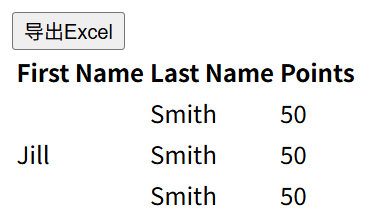
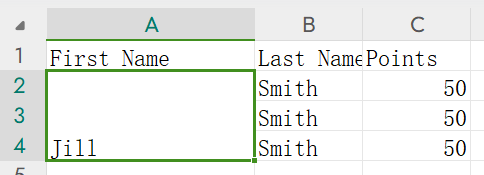
实测效果

html页面

导出的excel文件