惯性聚合 高效追踪和阅读你感兴趣的博客、新闻、科技资讯
阅读原文 在惯性聚合中打开

推荐订阅源

Jina AI
Jina AI
V
Visual Studio Blog
博客园 - 司徒正美
TaoSecurity Blog
TaoSecurity Blog
博客园 - 聂微东
IT之家
IT之家
博客园_首页
Threat Intelligence Blog | Flashpoint
C
Cyber Attacks, Cyber Crime and Cyber Security
博客园 - Franky
雷峰网
雷峰网
罗磊的独立博客
S
Schneier on Security
C
Cybersecurity and Infrastructure Security Agency CISA
The Cloudflare Blog
T
Tailwind CSS Blog
B
Blog RSS Feed
H
Help Net Security
T
The Blog of Author Tim Ferriss
C
CXSECURITY Database RSS Feed - CXSecurity.com
T
Threatpost
C
CERT Recently Published Vulnerability Notes
博客园 - 三生石上(FineUI控件)
P
Palo Alto Networks Blog
I
Intezer
G
GRAHAM CLULEY
Engineering at Meta
Engineering at Meta
S
Securelist
J
Java Code Geeks
V
V2EX
Y
Y Combinator Blog
Simon Willison's Weblog
L
LINUX DO - 热门话题
云风的 BLOG
云风的 BLOG
Spread Privacy
Spread Privacy
MongoDB | Blog
MongoDB | Blog
P
Privacy International News Feed
cs.CL updates on arXiv.org
B
Blog
Forbes - Security
Forbes - Security
Google Online Security Blog
Help Net Security
Help Net Security
S
SegmentFault 最新的问题
N
Netflix TechBlog - Medium
Webroot Blog
Webroot Blog
Microsoft Security Blog
SecWiki News
SecWiki News
Scott Helme
Scott Helme
aimingoo的专栏
aimingoo的专栏
N
News and Events Feed by Topic

博客园 - lizhigang

DBeaver 打开 utf8的sql文件 SMT 贴片机与 MES 系统集成指南 容器访问外部服务(10.100.1.90:9090)防火墙规则配置总结 Docker 容器间通信故障排查与修复操作总结 Docker 容器部署与运维总结报告 Nginx Docker 容器白名单配置操作总结 使用 pnpm 构建 Vue2 项目操作总结(Node 16 → Node 22) 前端项目 Docker 镜像构建完整操作总结 Windows 11 下使用 MySQL Workbench 还原多数据库备份文件操作指南 在 WSL2 + Docker Desktop 环境下构建前后端 Docker 镜像 从内网私有仓库迁移镜像到阿里云 ACR 完整指南 wsl网络设置允许访问ssh(端口22) 在 Windows 11 上安装 Docker Nginx配置 访问数据库报错 Windows系统运行RuoYi-Vue完整指南 RuoYi-Vue 项目结构分析 win11 报错 windows 11 如何使用 Microsoft Hyper-V VMware 替代产品 IntelliJ IDEA 社区版支持 Spring Boot 开发说明文档 imes开发部署(IDEA社区版 差异) IntelliJ IDEA 社区版默认支持 Spring Boot 吗? imes开发部署 IDEA 端口被占用 解决办法 ruoyi-nbcio ktg-mes、ktm-mes-ui部署 Widows下安装和配置Redis Windows下Redis安装与配置全攻略 mes开源 imes:注意 若依框架:开源
使用MySQL Workbench进行数据库备份
lizhigang · 2025-09-04 · via 博客园 - lizhigang

链接:https://www.cnblogs.com/ykagile/p/18414578

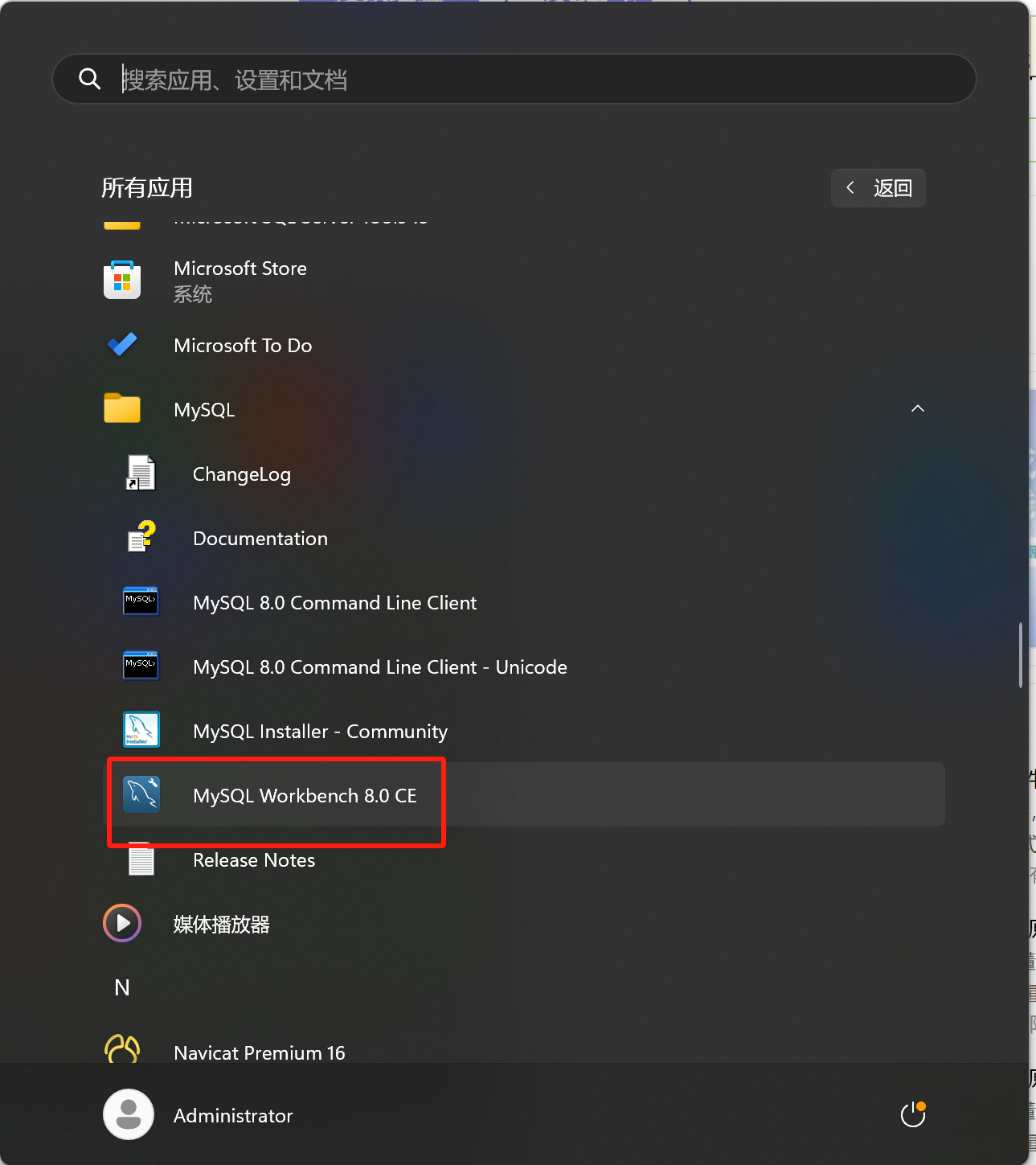
1、打开MySQL Workbench
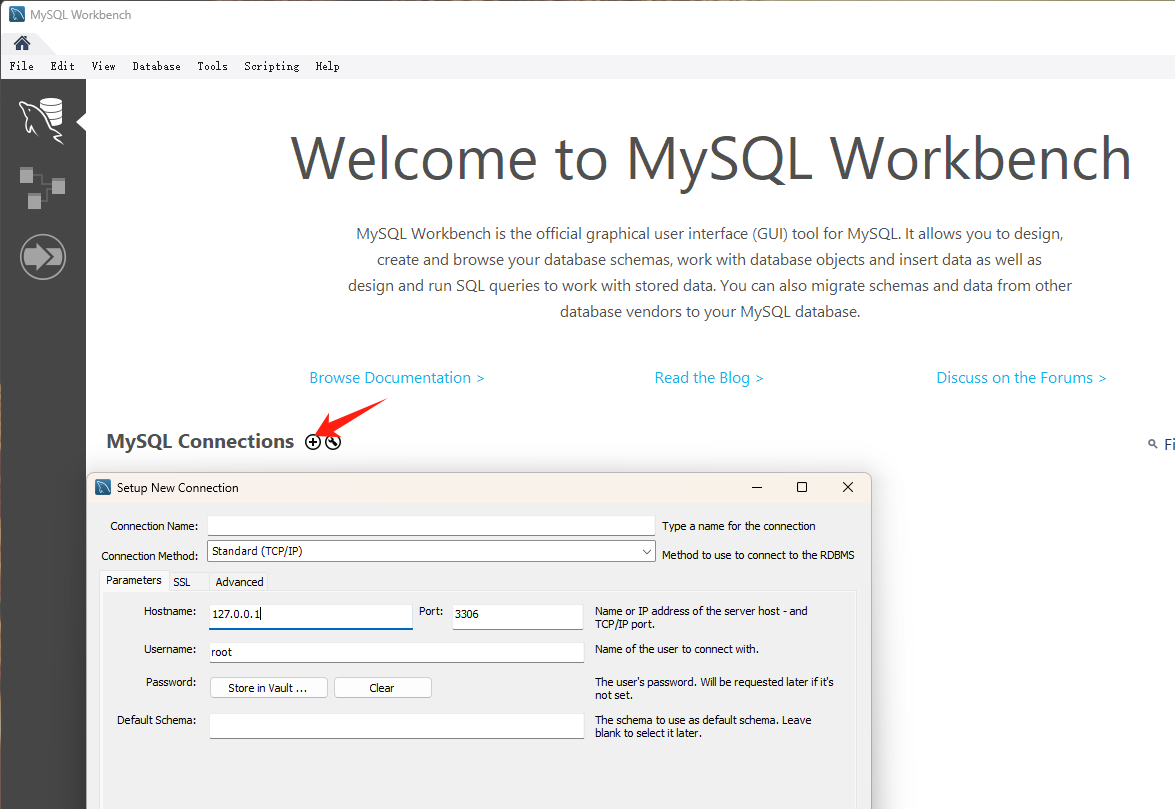
2、进行数据库连接配置
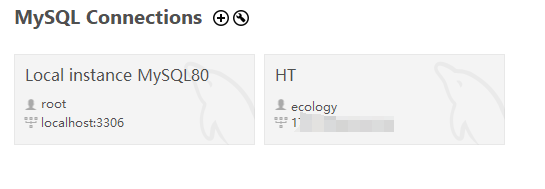
 如果之前连过,会有历史记录,直接点击需要备份的连接即可
3、进入主界面后,选择左侧的Administration选项卡,然后点击Data Export;或者点击工具栏的Server——Data Export
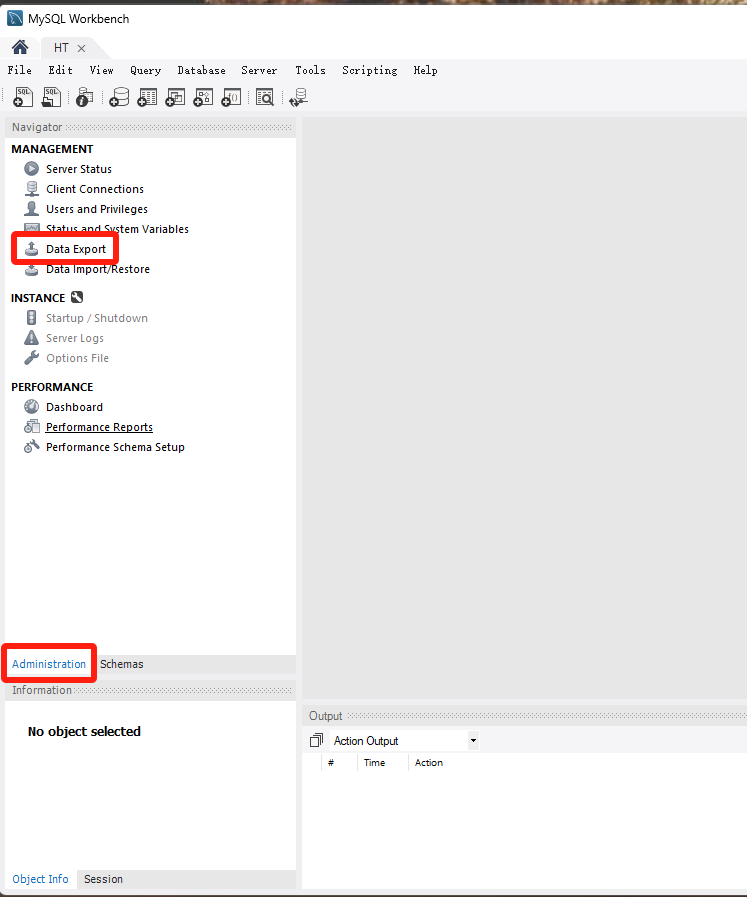
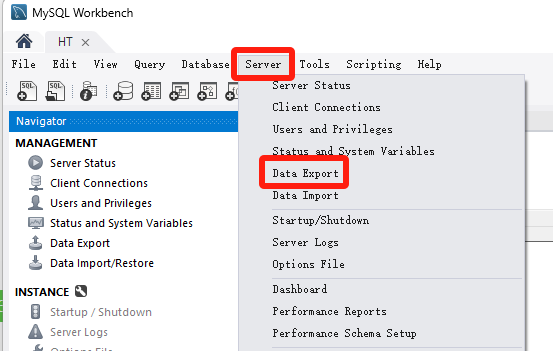
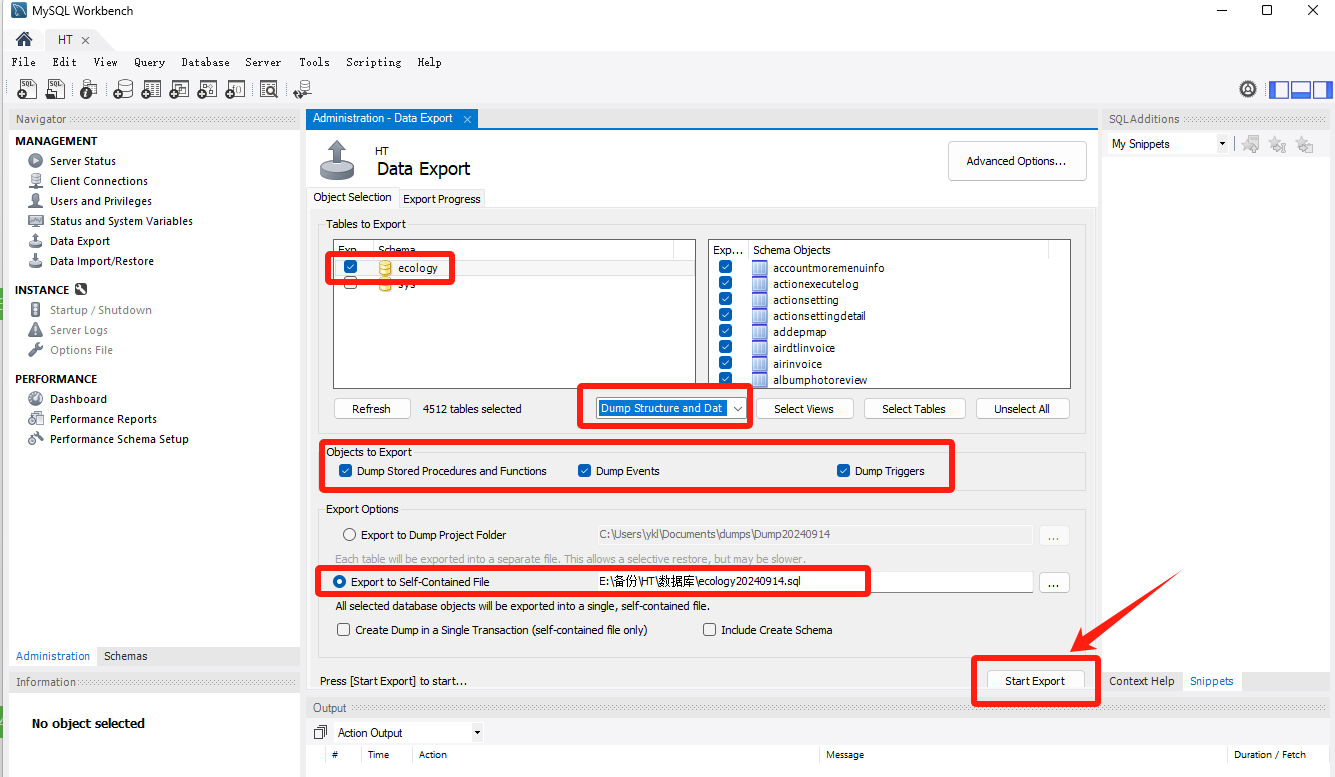
4、选择要备份的数据库,默认选择所有的表,在objects to export里将三个选项全部勾选,在select views的左边下拉框选择dump structure and data(根据自己的需求,如果只需要备份数据或者数据库结构,则选择对应的选项即可)。

选择备份文件的存放位置并命名备份文件。

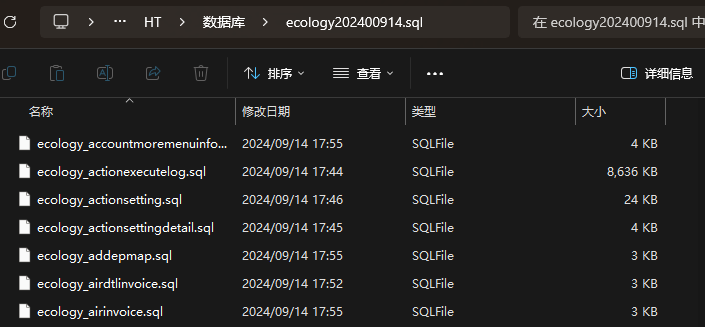
1)Export to Dump Project Folder每个表结构及数据单独以一个sql文件进行备份,备份至同一个文件夹中,效果如下图所示
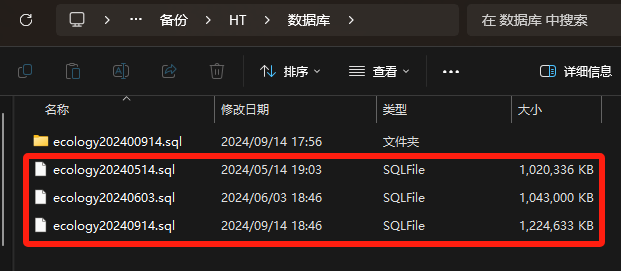
 2)Export to Self-Contained File代表将所有表数据结构以及数据备份到同一个sql文件中,效果如下图所示:
全部设置好后,点击右下角的Start Export执行备份
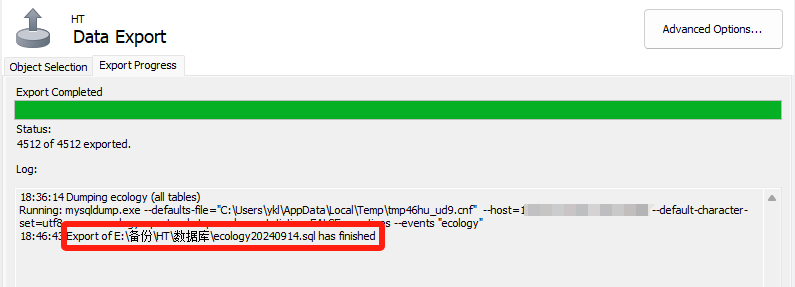
5、等待备份,如果数据量比较大,则可能需要备份的时间会比较长,耐心等待即可
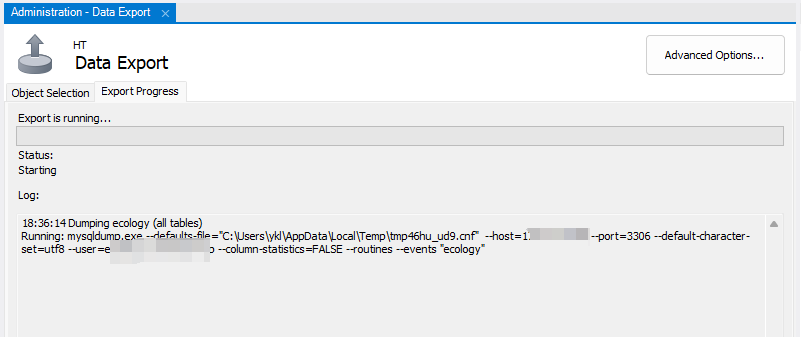
6、最后,备份成功