






使用VSTO创建修改和删除outlook会议加载项
Outlook 解决方案
https://learn.microsoft.com/zh-cn/visualstudio/vsto/outlook-solutions?view=vs-2022
对象模型:
https://learn.microsoft.com/zh-cn/visualstudio/vsto/outlook-object-model-overview?view=vs-2022
private void ThisAddIn_Startup(object sender, System.EventArgs e)
{
    this.Application.Inspectors.NewInspector += Inspectors_NewInspector;
    this.Application.ItemSend += Application_ItemSend;
}

private void Application_ItemSend(object Item, ref bool Cancel)
{
    if (Item is _MeetingItem meetingItem)
    {
        AppointmentItem appointment = meetingItem.GetAssociatedAppointment(false);
        if (appointment == null)
        {
            return;
        }
        string appointmentId = appointment.GlobalAppointmentID;
        // 取消会议
        if (appointment.MeetingStatus == OlMeetingStatus.olMeetingCanceled)
        {
            if (!string.IsNullOrWhiteSpace(appointmentId))
            {

            }
        }
        else
        {
            //修改会议
            if (!string.IsNullOrWhiteSpace(appointmentId))
            {

            }
        }
    }
}

private void Inspectors_NewInspector(Inspector Inspector)
{
    if (Inspector.CurrentItem is AppointmentItem appointment)
    {
        if(!string.IsNullOrWhiteSpace(appointment.EntryID))
        {
            return;
        }
        if (!string.IsNullOrWhiteSpace(appointment.Subject) || !string.IsNullOrWhiteSpace(appointment.Body))
        {
            return;
        }

    }
}
使用代码创建新会议并打开创建会议窗口:
private void CreateMeeting()
{
    Globals.ThisAddIn.Application.CreateItem(OlItemType.olMailItem);
    var appointment = Globals.ThisAddIn.Application.CreateItem(OlItemType.olAppointmentItem) as AppointmentItem;
    appointment.MeetingStatus = OlMeetingStatus.olMeeting;
    appointment.Display(true);
}
设置RibbonType以控制加载项的显示场景

设置ControlIdType和OfficeId,来控制加载项的显示位置
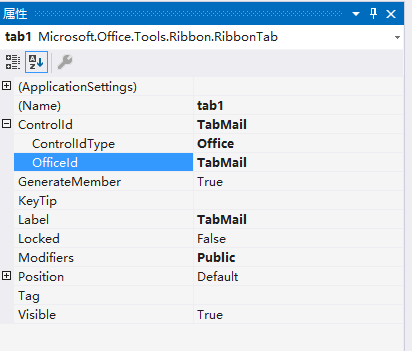
多个 场景显示需要复制多个Tab。
此内容由惯性聚合(RSS阅读器)自动聚合整理,仅供阅读参考。 原文来自 — 版权归原作者所有。