
惯性聚合
高效追踪和阅读你感兴趣的博客、新闻、科技资讯
阅读原文
在惯性聚合中打开
即将跳转到惯性聚合
3
在聚合应用中查看完整内容和互动
立即跳转
取消
推荐订阅源
P
Proofpoint News Feed
Hacker News: Ask HN
T
Threatpost
C
Cybersecurity and Infrastructure Security Agency CISA
C
CXSECURITY Database RSS Feed - CXSecurity.com
S
Security @ Cisco Blogs
T
Threat Research - Cisco Blogs
T
Troy Hunt's Blog
www.infosecurity-magazine.com
cs.CL updates on arXiv.org
Cyber Security Advisories - MS-ISAC
freeCodeCamp Programming Tutorials: Python, JavaScript, Git & More
V
V2EX - 技术
N
News and Events Feed by Topic
A
Arctic Wolf
小众软件
雷峰网
Hacker News - Newest: "LLM"
量
量子位
WordPress大学
有赞技术团队
C
Comments on: Blog
博
博客园_首页
云风的 BLOG
Last Week in AI
Project Zero
G
Google Developers Blog
cs.AI updates on arXiv.org
H
Help Net Security
MongoDB | Blog
Forbes - Security
Application and Cybersecurity Blog
D
DataBreaches.Net
Hugging Face - Blog
AI
cs.CV updates on arXiv.org
Help Net Security
T
The Blog of Author Tim Ferriss
博
博客园 - 三生石上(FineUI控件)
L
LINUX DO - 最新话题
L
Lohrmann on Cybersecurity
H
Hackread – Cybersecurity News, Data Breaches, AI and More
I
InfoQ
S
SegmentFault 最新的问题
The Last Watchdog
酷 壳 – CoolShell
Stack Overflow Blog
Cisco Talos Blog
T
The Exploit Database - CXSecurity.com
V
Visual Studio Blog
博客园 - sikewang
Gradle的init.d的init.gradle , init.d的位置 , x.gradle或x.gradle.kts的位置
maven wrapper 介绍及使用详解
Plugin [id: 'org.gradle.kotlin.kotlin-dsl', version: '4.2.1'] was not found in any of the following sources:
JEnv-for-Windows 安装与使用
jenv报错无法加载文件jenv.ps1
Warning! PATH is not properly set up, /Users/i/.rvm/gems/ruby-3.3.0/bin is not at first place.摘抄整理
mac上如何用fvm设置全局Flutter SDK?
Inconsistent JVM-target compatibility detected for tasks 'compileDebugJavaWithJavac' (1.8) and 'compileDebugKotlin' (17).
fvm Flutter多版本管理安装与常用指令
JVM_XMS 和 java_opts哪种写法对?如何在JVM中设置JVM_XMS和java_opts?
Elastic Search 安装部署最全教程(Docker)
VMware中Ubuntu配置固定IP
下载Android SDK tools完成Android SDK 安装、配置环境变量
Oracle JDK究竟从哪个版本开始收费?
报红 import 'package:http/http.dart' as http; import 'package:date_format/date_format.dart';
Flutter doctor
CSRF攻击与防御
windows查看文件/夹被哪个进程占用以及解除方法
windows上安装nvm-noinstall.zip
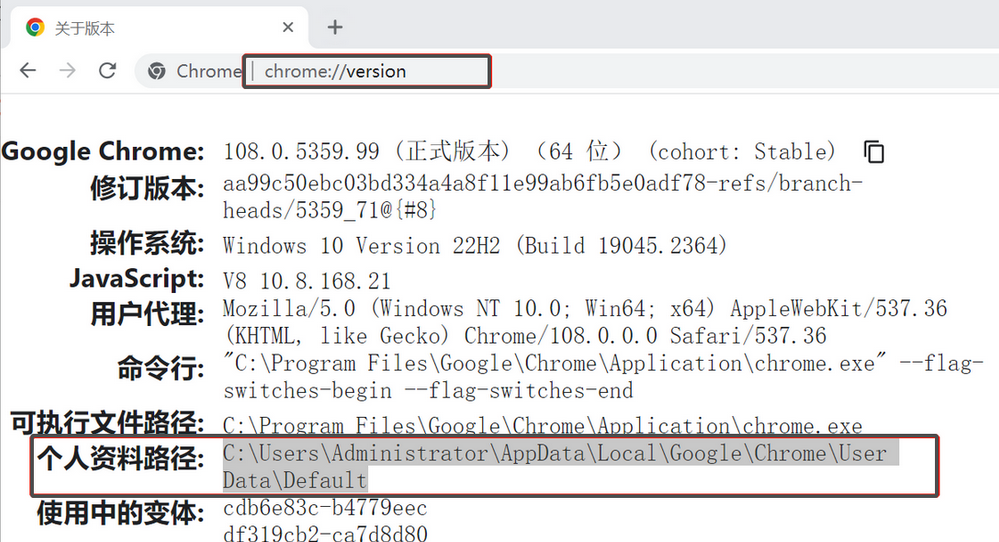
修改chrome用户数据的路径
sikewang
·
2024-10-23
·
via
博客园 - sikewang
1.打开chrome,地址栏输入:chrome://version,查看用户数据文件路径 2.运行CMD,删除原用户数据文件夹 C:\Users\Administrator>rmdir /s "C:…
此内容由惯性聚合(RSS阅读器)自动聚合整理,仅供阅读参考。
原文来自
— 版权归原作者所有。