



这篇文章介绍了如何从零开始构建一个基于Gemini 3的AI智能体。智能体的核心构成非常简单,包括一个LLM、可执行的工具、上下文/记忆以及一个不断循环的流程。文章通过逐步引导,展示了从基本的文本生成到创建一个功能完善的CLI代理的过程。
It seems complicated, when you watch an AI agent edit multiple files, run commands, handle errors, and iteratively solve a problem, it feels like magic. But it isn’t. The secret to building an agent is that there is no secret.
The core of an Agent is surprisingly simple: It is a Large Language Model (LLM) running in a loop, equipped with tools it can choose to use.
If you can write a loop in Python, you can build an agent. This guide will walk you through the process, from a simple API call to a functioning CLI Agent.
Traditional software workflows are prescriptive and follow predefined paths (Step A -> Step B -> Step C), Agents are System that uses an LLM to dynamically decide the control flow of an application to achieve a user goal.
An agent generally consists of these core components:
while loop that allows the model to: Observe → Think → Act → Observe again, until the task is complete.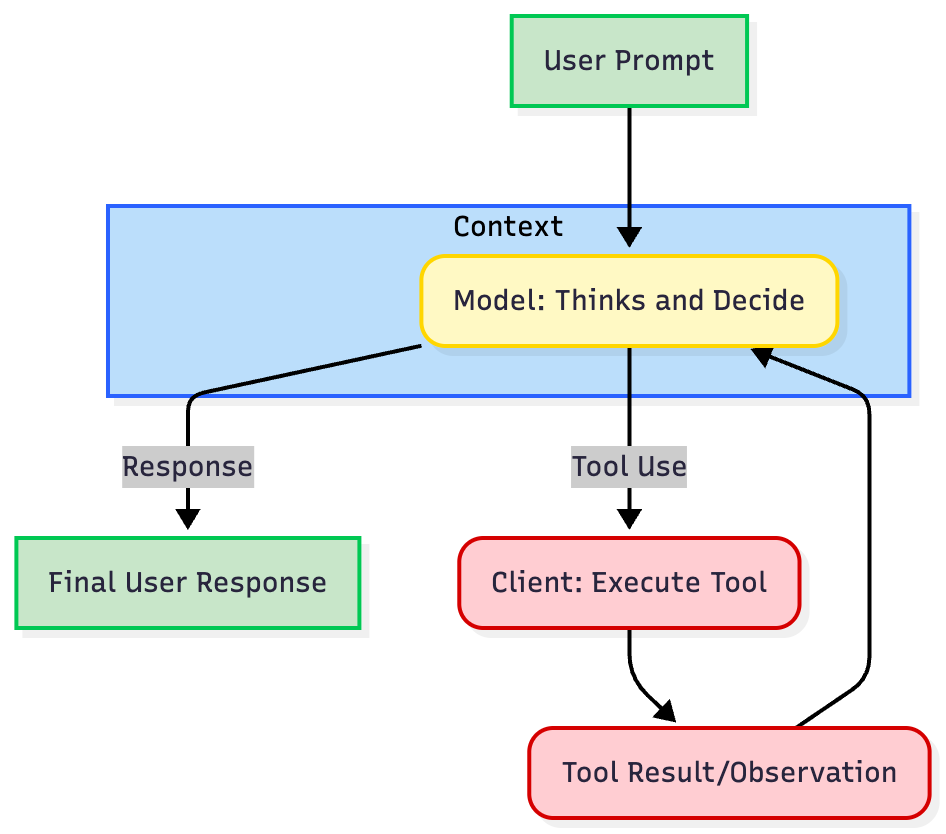
"The Loop" of nearly every agent is an iterative process:
get_weather) to the model using a structured JSON format.tool use containing the tool name and arguments.tool use, executes the actual code or API call, and captures the result.tool response) back to model. The model uses this new information to decide the next step, either calling another tool or generating the final response.Let's build an agent step-by-step, progressing from basic text generation to a functional CLI agent using Gemini 3 Pro and Python SDK.
Prerequisites: Install the SDK (pip install google-genai) and set your GEMINI_API_KEY environment variable (Get it in AI Studio).
The first step is to create a baseline interaction with the LLM, for us Gemini 3 Pro. We are going to create a simple Agent class abstraction to structure our code, which we will extend throughout this guide. We will first start with a simple chatbot that maintains a conversation history.
from google import genaifrom google.genai import types class Agent: def __init__(self, model: str): self.model = model self.client = genai.Client() self.contents = [] def run(self, contents: str): self.contents.append({"role": "user", "parts": [{"text": contents}]}) response = self.client.models.generate_content(model=self.model, contents=self.contents) self.contents.append(response.candidates[0].content) return response agent = Agent(model="gemini-3-pro-preview")response1 = agent.run( contents="Hello, What are top 3 cities in Germany to visit? Only return the names of the cities.") print(f"Model: {response1.text}")# Output: Berlin, Munich, Cologne response2 = agent.run( contents="Tell me something about the second city.") print(f"Model: {response2.text}")# Output: Munich is the capital of Bavaria and is known for its Oktoberfest.This is not an agent yet. It is a standard chatbot. It maintains state but cannot take action, has no "hands or eyes".
To start turning this an agent, we need Tool Use or Function Calling. We provide the agent with tools. This requires defining the implementation (the Python code) and the definition (the schema the LLM sees). If the LLM believes that tool will help solve a user's prompt, it will return a structured request to call that function instead of just text.
We are going to create 3 tools, read_file, write_file, and list_dir. A tool Definition is a JSON schema that defines the name, description, and parameters of the tool.
Best Practice: Use the description fields to explain when and how to use the tool. The model relies heavily on these to understand when and how to use the tool. Be explicit and clear.
import osimport json read_file_definition = { "name": "read_file", "description": "Reads a file and returns its contents.", "parameters": { "type": "object", "properties": { "file_path": { "type": "string", "description": "Path to the file to read.", } }, "required": ["file_path"], },} list_dir_definition = { "name": "list_dir", "description": "Lists the contents of a directory.", "parameters": { "type": "object", "properties": { "directory_path": { "type": "string", "description": "Path to the directory to list.", } }, "required": ["directory_path"], },} write_file_definition = { "name": "write_file", "description": "Writes a file with the given contents.", "parameters": { "type": "object", "properties": { "file_path": { "type": "string", "description": "Path to the file to write.", }, "contents": { "type": "string", "description": "Contents to write to the file.", }, }, "required": ["file_path", "contents"], },} def read_file(file_path: str) -> dict: with open(file_path, "r") as f: return f.read() def write_file(file_path: str, contents: str) -> bool: """Writes a file with the given contents.""" with open(file_path, "w") as f: f.write(contents) return True def list_dir(directory_path: str) -> list[str]: """Lists the contents of a directory.""" full_path = os.path.expanduser(directory_path) return os.listdir(full_path) file_tools = { "read_file": {"definition": read_file_definition, "function": read_file}, "write_file": {"definition": write_file_definition, "function": write_file}, "list_dir": {"definition": list_dir_definition, "function": list_dir},}Now we integrate the tools and function calls into our Agent class.
from google import genaifrom google.genai import types class Agent: def __init__(self, model: str,tools: list[dict]): self.model = model self.client = genai.Client() self.contents = [] self.tools = tools def run(self, contents: str): self.contents.append({"role": "user", "parts": [{"text": contents}]}) config = types.GenerateContentConfig( tools=[types.Tool(function_declarations=[tool["definition"] for tool in self.tools.values()])], ) response = self.client.models.generate_content(model=self.model, contents=self.contents, config=config) self.contents.append(response.candidates[0].content) return response agent = Agent(model="gemini-3-pro-preview", tools=file_tools) response = agent.run( contents="Can you list my files in the current directory?")print(response.function_calls)# Output: [FunctionCall(name='list_dir', arguments={'directory_path': '.'})]Great! The model has successfully called the tool. Now, we need to add the tool execution logic to our Agent class and the loop return the result back to the model.
An Agent isn't about generating one tool call, but about generating a series of tool calls, returning the results back to the model, and then generating another tool call, and so on until the task is completed.
The Agent class handles the core loop: intercepting the FunctionCall, executing the tool on the client side, and sending back the FunctionResponse. We also add a SystemInstruction to the model to guide the model on what to do.
Note: Gemini 3 uses Thought signatures to maintain reasoning context across API calls. You must return these signatures back to the model in your request exactly as they were received.
# ... Code for the tools and tool definitions from Step 2 should be here ... from google import genaifrom google.genai import types class Agent: def __init__(self, model: str,tools: list[dict], system_instruction: str = "You are a helpful assistant."): self.model = model self.client = genai.Client() self.contents = [] self.tools = tools self.system_instruction = system_instruction def run(self, contents: str | list[dict[str, str]]): if isinstance(contents, list): self.contents.append({"role": "user", "parts": contents}) else: self.contents.append({"role": "user", "parts": [{"text": contents}]}) config = types.GenerateContentConfig( system_instruction=self.system_instruction, tools=[types.Tool(function_declarations=[tool["definition"] for tool in self.tools.values()])], ) response = self.client.models.generate_content(model=self.model, contents=self.contents, config=config) self.contents.append(response.candidates[0].content) if response.function_calls: functions_response_parts = [] for tool_call in response.function_calls: print(f"[Function Call] {tool_call}") if tool_call.name in self.tools: result = {"result": self.tools[tool_call.name]["function"](**tool_call.args)} else: result = {"error": "Tool not found"} print(f"[Function Response] {result}") functions_response_parts.append({"functionResponse": {"name": tool_call.name, "response": result}}) return self.run(functions_response_parts) return response agent = Agent( model="gemini-3-pro-preview", tools=file_tools, system_instruction="You are a helpful Coding Assistant. Respond like you are Linus Torvalds.") response = agent.run( contents="Can you list my files in the current directory?")print(response.text)# Output: [Function Call] id=None args={'directory_path': '.'} name='list_dir'# [Function Response] {'result': ['.venv', ... ]}# There. Your current directory contains: `LICENSE`,Congratulations. You just built your first functioning agent.
Now we can run our agent in a simple CLI loop. It takes surprisingly little code to create highly capable behavior.
# ... Code for the Agent, tools and tool definitions from Step 3 should be here ... agent = Agent( model="gemini-3-pro-preview", tools=file_tools, system_instruction="You are a helpful Coding Assistant. Respond like you are Linus Torvalds.") print("Agent ready. Ask it to check files in this directory.")while True: user_input = input("You: ") if user_input.lower() in ['exit', 'quit']: break response = agent.run(user_input) print(f"Linus: {response.text}\n")Building the loop is easy; making it reliable, transparent, and controllable is hard. Here are key engineering principles derived from top industry practices, grouped by functional area.
Your tools are the interface for the model. Don't just wrap your existing internal APIs. If a tool is confusing to a human, it's confusing to the model:
search_customer_database rather than cust_db_v2_query.Error: File not found. Did you mean 'data.csv'?. This allows the agent to self-correct.Models have a finite "attention budget." Managing what information enters the context is crucial for performance and cost.
get_all_users(), create search_users(query: str).It's tempting to build complex multi-agent systems. Don't.
max_iterations break (e.g., 15 turns).system_instruction to guide the model with hard rules (e.g., "You are strictly forbidden from offering refunds greater than $50") or use external classifier.send_email or execute_code), pause the loop and require user confirmation before the tool is actually executed.Building an agent is no longer magic; it is a practical engineering task. As we've shown, you can build a working prototype in under 100 lines of code. While understanding these fundamentals is key, don't get bogged down re-engineering the same pattern over and over. The AI community has created fantastic open-source libraries that can help you build more complex and robust agents faster.
此内容由惯性聚合(RSS阅读器)自动聚合整理,仅供阅读参考。 原文来自 — 版权归原作者所有。