





本节文章研究的代码位于 tsc/src/compiler/scanner.ts
任何源码都是由很多字符组成的,这些字符可以是字母、数字、空格、符号、汉字等……
每一个字符都有一个编码值,比如字符“a”的编码值是97,字符“林”的编码值是26519。
每个字符对应的编码值是多少是由编码表决定的,上面所示的编码值是全球统一的编码表 Unicode 中的编码值,如果没有特别声明,所有编码值都是以 Unicode 为准的。
一般地,字符的编码值都是有序的,比如字符“a”的编码值是97,字符“b”的编码值是98,字符“c”的编码值是99,汉字则是按照笔划顺序排序的。在给字符串排序时,也是根据每个字符的编码值大小进行排序的。
如果想要判断一个字符是不是英文字母,只需要判断这个字符的编码值是否位于字符“a”的编码值和字符“z”的编码值之间即可。
在 JavaScript 中,可以通过 "a".charCodeAt(0) 获取字符“a”的编码值;通过 String.fromCharCode(97) 获取指定编码值对应的字符。
在代码中如果直接写 99,你可能不清楚这个数字的含义,但如果写成 CharacterCodes.c,你就可以很快明白。通过枚举给每个编码值定义一个名称,方便读者理解,同时我们也不需要去记忆每个字符的实际编码值。CharacterCodes 枚举位于 tsc/src/compiler/types.ts,源码如下:
/* @internal */
export const enum CharacterCodes {
        _0 = 0x30,
        _1 = 0x31,
        // ...(略)
        _9 = 0x39,

        a = 0x61,
        b = 0x62,// ...(略)
        z = 0x7A,

        A = 0x41,// ...(略)
        Z = 0x5a,

        ampersand = 0x26,             // &
        asterisk = 0x2A,              // *
        // ...(略)
    }
要判断一个字符是不是数字字符,只需确认它的字符编码是不是在“0”和“9”的编码值之间:
function isDigit(ch: number): boolean {  // 参数 ch 表示一个编码值
    return ch >= CharacterCodes._0 && ch <= CharacterCodes._9;
}
同理,还可以判断其它字符,比如判断是不是换行符:
export function isLineBreak(ch: number): boolean {
    // ES5 7.3:
    // The ECMAScript line terminator characters are listed in Table 3.
    //     Table 3: Line Terminator Characters
    //     Code Unit Value     Name                    Formal Name
    //     \u000A              Line Feed               <LF>
    //     \u000D              Carriage Return         <CR>
    //     \u2028              Line separator          <LS>
    //     \u2029              Paragraph separator     <PS>
    // Only the characters in Table 3 are treated as line terminators. Other new line or line
    // breaking characters are treated as white space but not as line terminators.

    return ch === CharacterCodes.lineFeed ||
        ch === CharacterCodes.carriageReturn ||
        ch === CharacterCodes.lineSeparator ||
        ch === CharacterCodes.paragraphSeparator;
}
根据 ES 规范,换行符一共有 4 个,虽然平常我们只实用前两个,但对有些语言来说,后两个也是需要的。
判断是不是空格:
export function isWhiteSpaceLike(ch: number): boolean {
    return isWhiteSpaceSingleLine(ch) || isLineBreak(ch);
}

/** Does not include line breaks. For that, see isWhiteSpaceLike. */
export function isWhiteSpaceSingleLine(ch: number): boolean {
    // Note: nextLine is in the Zs space, and should be considered to be a whitespace.
    // It is explicitly not a line-break as it isn't in the exact set specified by EcmaScript.
    return ch === CharacterCodes.space ||
        ch === CharacterCodes.tab ||
        ch === CharacterCodes.verticalTab ||
        ch === CharacterCodes.formFeed ||
        ch === CharacterCodes.nonBreakingSpace ||
        ch === CharacterCodes.nextLine ||
        ch === CharacterCodes.ogham ||
        ch >= CharacterCodes.enQuad && ch <= CharacterCodes.zeroWidthSpace ||
        ch === CharacterCodes.narrowNoBreakSpace ||
        ch === CharacterCodes.mathematicalSpace ||
        ch === CharacterCodes.ideographicSpace ||
        ch === CharacterCodes.byteOrderMark;
}
有的地方需要把换行当空格处理,有的地方不需要,所以 TypeScript 拆成两个函数,一个包括换行符,一个不包括。
标识符即俗称的变量名,我们都知道 JS 中变量名是不能随便取的,是有规则的,比如开头不能是数字。
在 ES 规范中,明确地点名了:哪些字符可以做标识符;哪些字符可以做标识符但不能以它开头。TypeScript 实现了 isUnicodeIdentifierStart 和 isUnicodeIdentifierPart 来分别判断。
哪些字符可以做标识符,其实是没有简单的规律的,这些都是在 ES 规范一个个手动指定的,规范中这个列表很长,最简单的实现就是:手动记录每个字符是否允许作标识符,然后查表。
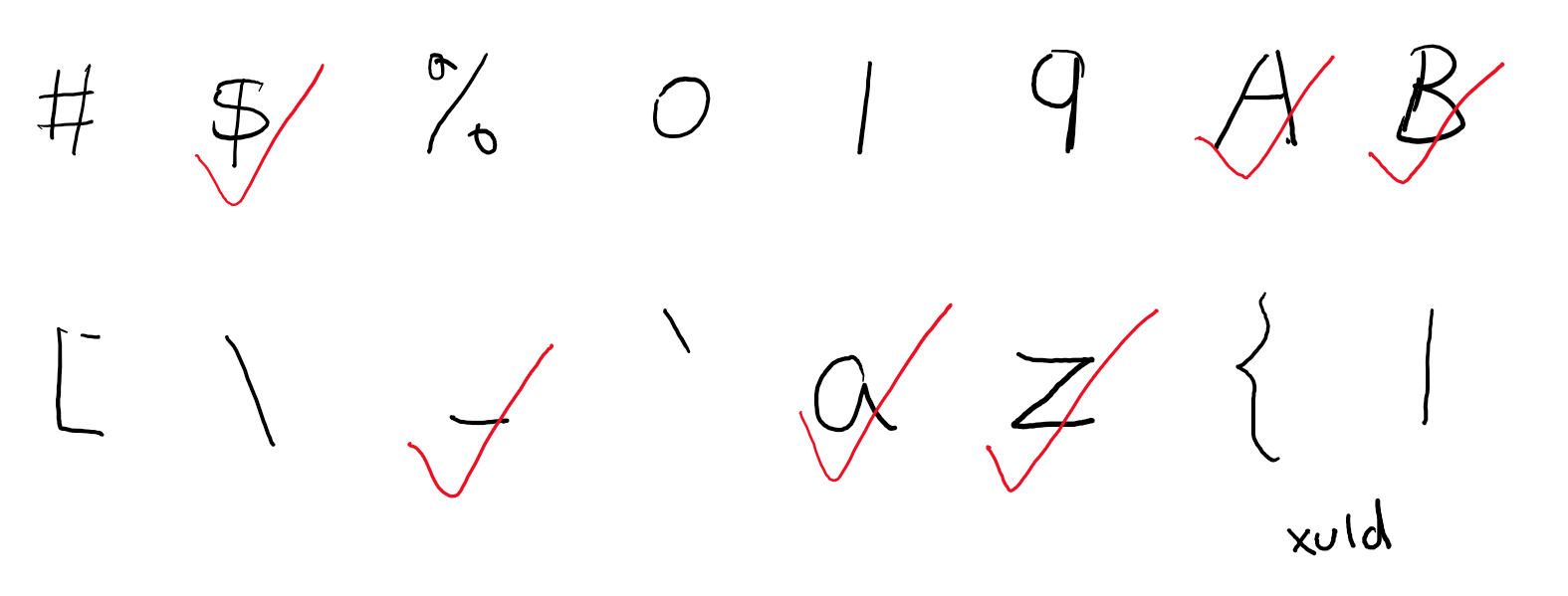
不过字符很多,每个字符单独记录要占用很大空间,所以 TypeScript 设计了一个小算法来压缩内存,算法基于这么一个事实:一般地,允许作为标识符的字符都是连续的一段(比如“a”到“z”)。
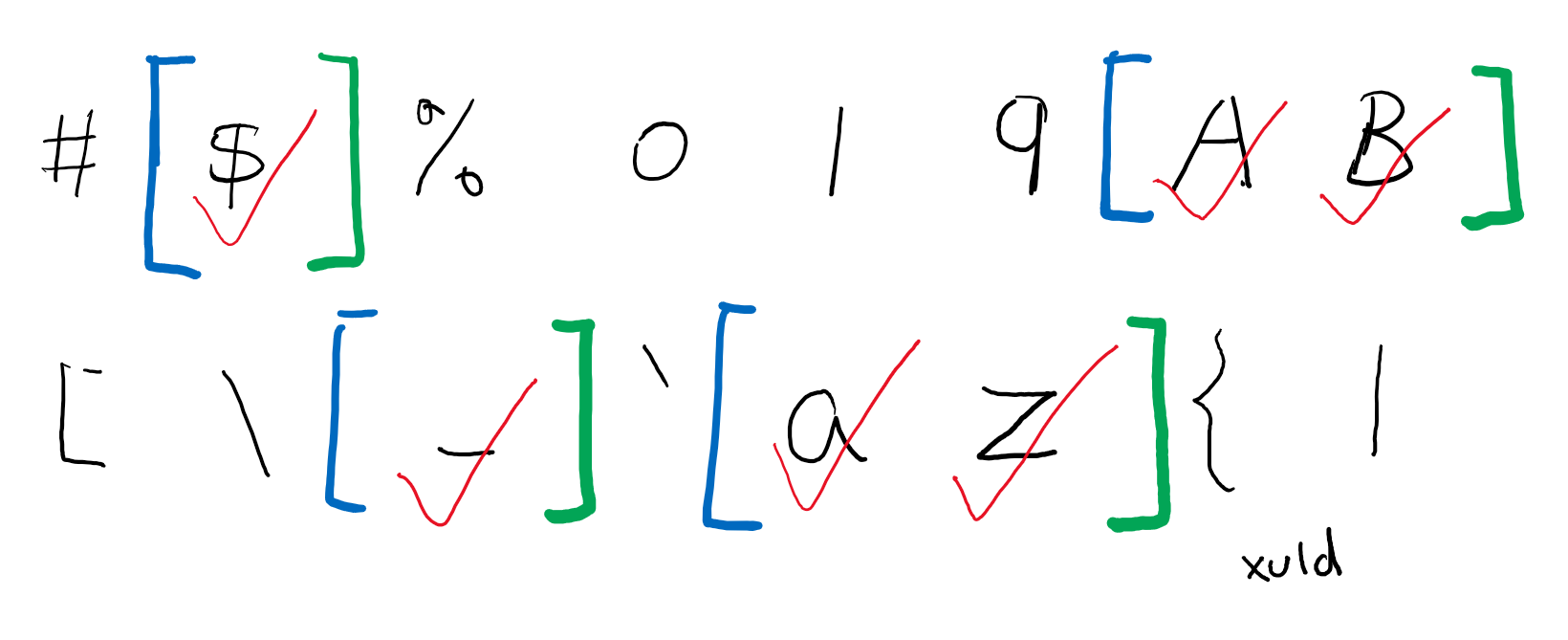
只要记录每段的开头和结尾部分,就可以比原先的记录该段的所有字符,要更节约内存。
将所有开始位置和结束位置放在同一个数组,数组的奇数位即图中的蓝色段,表示每段开头,偶数位即绿色段,表示每段结尾。
当需要查找一个字符是不是标识符时,采用二分搜索算法,快速定位确认它是否在包含的段中。
const unicodeESNextIdentifierStart = [65, 90, 97, 122, 170, /*...(略) */, 194560, 195101]
const unicodeESNextIdentifierPart = [48, 57, 65,  /*...(略) */, 917999]

function lookupInUnicodeMap(code: number, map: readonly number[]): boolean {
    // 由于代码中多数字符还是英文字符,如果是就不查表直接判断
    // Bail out quickly if it couldn't possibly be in the map.
    if (code < map[0]) {
        return false;
    }

    // 以下是标准二分搜索算法,不懂的同学请自己补课
    // Perform binary search in one of the Unicode range maps
    let lo = 0;
    let hi: number = map.length;
    let mid: number;

    while (lo + 1 < hi) {
        mid = lo + (hi - lo) / 2;
        // mid has to be even to catch a range's beginning
        mid -= mid % 2;
        if (map[mid] <= code && code <= map[mid + 1]) {
            return true;
        }
        if (code < map[mid]) {
            hi = mid;
        } else {
            lo = mid + 2;
        }
    }

    return false;
}
接下来就可以看明白 isUnicodeIdentifierStart 和 isUnicodeIdentifierPart 这两个函数了:
/* @internal */ export function isUnicodeIdentifierStart(code: number, languageVersion: ScriptTarget | undefined) {
    return languageVersion! >= ScriptTarget.ES2015 ?
        lookupInUnicodeMap(code, unicodeESNextIdentifierStart) :
        languageVersion! === ScriptTarget.ES5 ? lookupInUnicodeMap(code, unicodeES5IdentifierStart) :
        lookupInUnicodeMap(code, unicodeES3IdentifierStart);
}

function isUnicodeIdentifierPart(code: number, languageVersion: ScriptTarget | undefined) {
    return languageVersion! >= ScriptTarget.ES2015 ?
        lookupInUnicodeMap(code, unicodeESNextIdentifierPart) :
        languageVersion! === ScriptTarget.ES5 ? lookupInUnicodeMap(code, unicodeES5IdentifierPart) :
        lookupInUnicodeMap(code, unicodeES3IdentifierPart);
}
由于 TypeScript 支持不同版本的 ES 代码,且不同版本的 ES 规范对标识符的定义有细微查表,所以 TypeScript 内部准备了不同版本的表。
通过以上俩函数的结合,也就可以判断一个字符串是不是合法的标识符了:
/* @internal */
export function isIdentifierText(name: string, languageVersion: ScriptTarget | undefined): boolean {
    let ch = codePointAt(name, 0);
    if (!isIdentifierStart(ch, languageVersion)) {
        return false;
    }

    for (let i = charSize(ch); i < name.length; i += charSize(ch)) {
        if (!isIdentifierPart(ch = codePointAt(name, i), languageVersion)) {
            return false;
        }
    }

    return true;
}
如果将源码看成字符串,每个字符都有一个字符串的下标索引,同时这个字符又可以理解为源码中的第几行第几列。
给定一个字符串的索引,可以通过扫描这个索引之前有几个换行符确定这个索引属于第几行第几列,反过来,通过行列号也可以确认这个位置对应的字符串索引。
在源码中如果发现一个错误,编译器需要向用户报告错误,并明确指出位置,一般地,编译器需要将错误的行列报出来(如果报的是索引那你自己慢慢数……),为了能够在报错时知道这些位置,编译器在词法扫描阶段就需要保存一切源码位置了,那编译器存的是行列号还是索引呢?
有的编译器选择了存行列号,因为行列号才是用户最后需要的,但行列号意味着需要两个字段存储这个信息,如果将它们分别处理,每次处理行列号的地方都需要两行代码,如果将它们合并为一个对象,这在 JavaScript 引擎中会造成大量的引用对象,影响性能。因此 TypeScript 选择:存储索引。出错的时候,再将索引换算成行列号显示出来。
TypeScript 用 Position(位置)这个术语表示索引,用 LineAndCharacter(行和字符)这个术语表示行列号。这三者都是从 0 开始计数的,即 line = 0 表示第一行。
为什么是 LineAndCharacter 而不是 LineAndColumn(行列),主要为了和 VSCode 中的 LineColumn 区分,多数情况,LineAndCharacter 和 LineAndColumn 是一样的,除非碰到制表符(TAB)缩进,一个 TAB 始终是一个字符,但它可能跨越 2 列、4 列、8列等(具体根据用户配置)。TypeScript 并不在意 TAB 这个字符,统一将它当一个字符处理可以简单许多,所以为了避免和 VSCode 的行列混淆,改用了别的称呼。
基于索引计算行列号需要遍历这个索引之前的所有字符,为了加速计算,TypeScript 作了一个小优化:缓存每行第一个字符的索引,然后通过二分搜索查找对应的行列(又是二分?)
首先计算每行第一个字符的索引表:
/* @internal */
export function computeLineStarts(text: string): number[] {
    const result: number[] = new Array();
    let pos = 0;
    let lineStart = 0;
    while (pos < text.length) {
        const ch = text.charCodeAt(pos);
        pos++;
        switch (ch) {
            case CharacterCodes.carriageReturn:
                if (text.charCodeAt(pos) === CharacterCodes.lineFeed) {
                    pos++;
                }
                // falls through
            case CharacterCodes.lineFeed:
                result.push(lineStart);
                lineStart = pos;
                break;
            default:
                if (ch > CharacterCodes.maxAsciiCharacter && isLineBreak(ch)) {
                    result.push(lineStart);
                    lineStart = pos;
                }
                break;
        }
    }
    result.push(lineStart);
    return result;
}
然后检索索引表查询行列号:
/* @internal */
/**
 * We assume the first line starts at position 0 and 'position' is non-negative.
 */
export function computeLineAndCharacterOfPosition(lineStarts: readonly number[], position: number): LineAndCharacter {
    let lineNumber = binarySearch(lineStarts, position, identity, compareValues);
    if (lineNumber < 0) {
        // If the actual position was not found,
        // the binary search returns the 2's-complement of the next line start
        // e.g. if the line starts at [5, 10, 23, 80] and the position requested was 20
        // then the search will return -2.
        //
        // We want the index of the previous line start, so we subtract 1.
        // Review 2's-complement if this is confusing.
        lineNumber = ~lineNumber - 1;
        Debug.assert(lineNumber !== -1, "position cannot precede the beginning of the file");
    }
    return {
        line: lineNumber,
        character: position - lineStarts[lineNumber]
    };
}
同时使用索引表也可以实现从行列号查询索引:
/* @internal */
export function computePositionOfLineAndCharacter(lineStarts: readonly number[], line: number, character: number, debugText?: string, allowEdits?: true): number {
    if (line < 0 || line >= lineStarts.length) {
        if (allowEdits) {
            // Clamp line to nearest allowable value
            line = line < 0 ? 0 : line >= lineStarts.length ? lineStarts.length - 1 : line;
        }
        else {
            Debug.fail(`Bad line number. Line: ${line}, lineStarts.length: ${lineStarts.length} , line map is correct? ${debugText !== undefined ? arraysEqual(lineStarts, computeLineStarts(debugText)) : "unknown"}`);
        }
    }

    const res = lineStarts[line] + character;
    if (allowEdits) {
        // Clamp to nearest allowable values to allow the underlying to be edited without crashing (accuracy is lost, instead)
        // TODO: Somehow track edits between file as it was during the creation of sourcemap we have and the current file and
        // apply them to the computed position to improve accuracy
        return res > lineStarts[line + 1] ? lineStarts[line + 1] : typeof debugText === "string" && res > debugText.length ? debugText.length : res;
    }
    if (line < lineStarts.length - 1) {
        Debug.assert(res < lineStarts[line + 1]);
    }
    else if (debugText !== undefined) {
        Debug.assert(res <= debugText.length); // Allow single character overflow for trailing newline
    }
    return res;
}
本节介绍了 scanner 中的一些独立函数,这些函数都将被词法扫描程序中调用。先独立理解了这些概念,对完全理解词法扫描会有重大帮助。
下节将介绍:词法扫描的实现(即 scanner.ts 中剩余的其它函数)【更新于 2020-1-18】
#如果你有问题可以在评论区提问#
此内容由惯性聚合(RSS阅读器)自动聚合整理,仅供阅读参考。 原文来自 — 版权归原作者所有。