


Video conferencing is a pillar for modern day coordination, collaboration, and periodic updates. Without video conferencing, we cannot even imagine modern-day workplaces. Irrespective of whether you are handling a remote team, running client calls, or hosting large-scale webinars, the platform you select matters a lot. Two names appear consistently at the top of the list, i.e., Google Meet and Zoom. However, which one is the right fit for your workflow?
This Google Meet vs Zoom breakdown encompasses all you need to know about pricing and usability to AI security and features, so that you can make a data-driven decision without any guesswork or doubts.

Google Meet is a video conferencing solution created by Google, directly built into the Google Workspace environment. It enables users to share screens, host video calls, and ensure real-time collaboration via a browser; no desktop application is needed. Since it natively integrates with Google Calendar, Gmail, and Google Drive, it is a natural choice for teams who are already working within the Google environment.
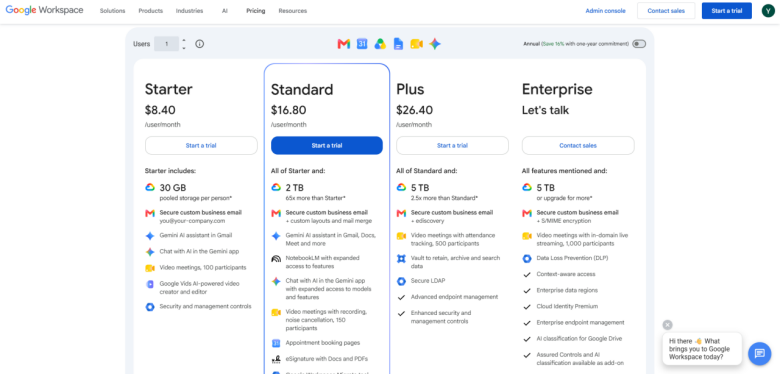
The free plan of Google Meet supports group video calls of up to 1 hour with a maximum of 100 participants. Premium plans are available via Google Workspace subscriptions, beginning at $6/month (billed per year), which extends meeting duration to 24 hours and unlocks more features.
Native integration with Google productivity tools makes it an ideal option to store and repurpose recordings for marketing purposes. You can also further use SEO tips for video marketing to enhance content performance.

Zoom is a video communications platform that has been widely adopted across workplaces during the pandemic and has since evolved into a comprehensive productivity suite. Referred to as Zoom Workplace, the platform involves team chat, video meetings, calendar, email, and collaborative documents, positioning itself as a direct competitor to Google Workspace.
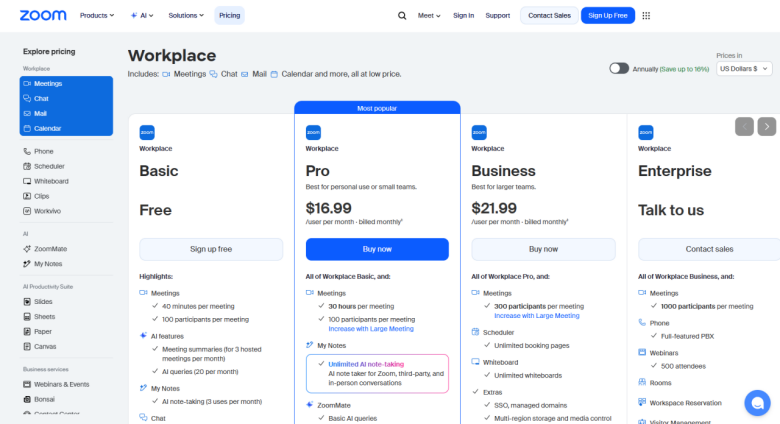
In the free plan of Zoom, you get around 40 minutes of meeting and can invite up to 100 participants. Premium plans start at around $14/user/per month (billed annually) and unlock longer meetings, AI features, and cloud recording. While more cost-effective than Google Meet, the advanced feature set of Zoom can justify the cost for bigger organizations.
Google Meet is broadly recognized for its minimum and clean interface. Starting or joining a meeting takes just a few clicks, and the in-meeting settings are very simple. This suits users who want to set up a quick call without learning any advanced settings.
On the contrary, Zoom provides a more advanced interface with a wider range of customization and settings options. While this depth proves to be an asset for power users, it can feel extremely overwhelming for users who want simplicity. Zoom can compensate that by providing desktop apps for macOS, Windows, and Linux, something Google Meet does not provide, as it entirely operates through a browser.
Verdict: Google Meet wins in terms of simplicity. Zoom wins in terms of features’ depth.
Google Meet is a more cost-effective option, specifically for small teams. However, the pricing plan of Zoom represents its wider set of features, making it a successful investment for businesses with complicated conferencing requirements.
The pricing tiers of Google Meet and Zoom are shown in the screenshot below:
This is one of the areas where Zoom gets a clear edge. Zoom saves chat messages during the meeting and enables participants to send one-on-one, and private messages during calls. Its feature of meeting chat even allows communication after and before the meeting itself.
On the other hand, Google Meet provides support only to group messages during meetings and does not save the chat messages once the call concludes. While Google Workspace involves Google Chat for asynchronous communication, users find it inadequate when compared to messaging tools.
Both platforms support meeting recordings. However, there are a few important differences:
As far as screen sharing is concerned, Zoom provides more sophisticated options, including the capability to share a particular application window, a secondary camera view, or a portion of your screen. Google Meet can pose restrictions when it comes to sharing full screen, a browser window, or a particular tab.
Both AI platforms are available on premium plans. Zoom’s AI companion is broadly recognized as more practically valuable for day-to-day management of meetings, while multilingual caption support of Gemini AI is a standout option for global teams.
Both platforms utilize encryption and two-factor authentication. Google Meet has an effective track record with security, data encryption in transit and at rest, and providing end-to-end encryption (E2EE) for personal accounts.
Zoom has faced a lot of scrutiny in early years over Zoombombing and misleading encryption claims. Ever since, the platform has introduced a broad range of waiting rooms, passcode-secure meetings, E2EE, and a host-level feature known as Suspend Participant Activities, which shuts down all audio, video, and chat in an emergency. Verdict: Google Meet comprises a more consistent history of security; Zoom has robust controls for host management.
If your team depends greatly on non-Google tools, the wider integration library of Zoom gives it a vital advantage.
There is no universal right answer to the Google Meet Vs Zoom debate; the right choice depends a lot on the budget, team size, and existing tools.
Select Google Meet if you:
Select Zoom if you:
Both Google Meet and Zoom are referred to as video conferencing platforms, each with a diverse set of strengths. Google Meet is a lot better option for affordability, simplicity, and Google Workspace integration. Zoom leads as far as advanced features, scalability, third-party integrations, and host-level controls is concerned.
For most individuals and small businesses, Google Meet gives all you need out of the box. For larger enterprises, businesses, or teams host webinars and complex virtual events regularly, Zoom is likely a preferable investment. Assess particular requirements of your team and select the platform between Google Meet Vs Zoom that best complements how you work.
It depends on the existing tools you are using, budget, and the number of participants. Google Meet provides users with a 60-minute limit for meetings with around 100 participants. One-on-one meetings do not have any time limits.
Broadly considered simpler to set up since it is completely simpler to set up. You do not need to download any desktop application in order to join or host a meeting, which is an ideal option for minimizing IT headaches.
Zoom provides a lot more hosting controls (e.g., restricting specific screen shares, granular mute-all, and detailed private chat controls). It provides support to 1,000 interactive participants through large meeting add-ons.
Zoom features more advanced controls for presentation, in-built whiteboards, and annotation tools, making it extremely interactive for collaborative teams.
Google Meet. Incorporates directly with the Google Cloud security settings, making it extremely secure if your business depends on the Google Workspace already. It leverages AES-128 encryption.
此内容由惯性聚合(RSS阅读器)自动聚合整理,仅供阅读参考。 原文来自 — 版权归原作者所有。