




我们的开源项目 Host 在 Github,并且使用它强大的 Actions 功能在做 CICD。单看 Github Actions 可能不知道是啥。其实它就是我们常说的 CICD pipeline 或者叫 workflow。当我们 Push 代码到 Github,它会自动触发这些管道。它会帮我们自动 build 代码,跑 test cases,构建镜像,发布镜像,等等。这一切还都是免费的。
今天我把 AgileConfig 的测试在 Github Actions 上跑通了。原来集成测试在 Actions 上跑一直有点问题,今天终于修好了。既然 test cases 都可以跑通了,那么能不能在 Actions 直接看到 code coverage 呢?答案当然是肯定的。
在我们每次运行单元测试的时候,微软的工具其实已经可以为我们生成结果描述文件了。请使用以下代码运行测试:
dotnet test --no-build --verbosity normal --collect:"XPlat Code Coverage" --results-directory ./coverage
运行完成后我们可以看到会生成多个 xml 文件,这些文件其实就是用来描述测试内容与结果的文件.
测试运行成功。
测试总数: 123
     通过数: 123
总时间: 2.6757 分钟
     1>已完成生成项目“D:\00WORKSPACE\AgileConfig\AgileConfig.sln”(VSTest 个目标)的操作。

已成功生成。
    0 个警告
    0 个错误

已用时间 00:02:43.08

附件:
  D:\00WORKSPACE\AgileConfig\coverage\1a7564b1-aa53-44ad-b34b-9abbb4b97c9f\coverage.cobertura.xml
  D:\00WORKSPACE\AgileConfig\coverage\45f571fb-2ec4-445b-b444-6879f784c925\coverage.cobertura.xml
  D:\00WORKSPACE\AgileConfig\coverage\ff1d49a5-9663-42f9-813b-2ef81fe5ed3f\coverage.cobertura.xml
  D:\00WORKSPACE\AgileConfig\coverage\6b502f8f-a99f-4931-8643-faf79db7273c\coverage.cobertura.xml
  D:\00WORKSPACE\AgileConfig\coverage\ff389298-7b68-4e60-a35c-d9c0db8cd640\coverage.cobertura.xml
有了这几个 xml 文件我们就可以进行分析了。当然用肉眼来分析是看不出来啥的。我们先在本地用插件来分析一波。
在 VS 里安装插件:
Fine Code Coverage
安装完后插件后,再次运行一下所有的测试用例。在 VS 的输出窗口我们选择 FCC 。
这个窗口内会打印出每个 project 的测试结果。
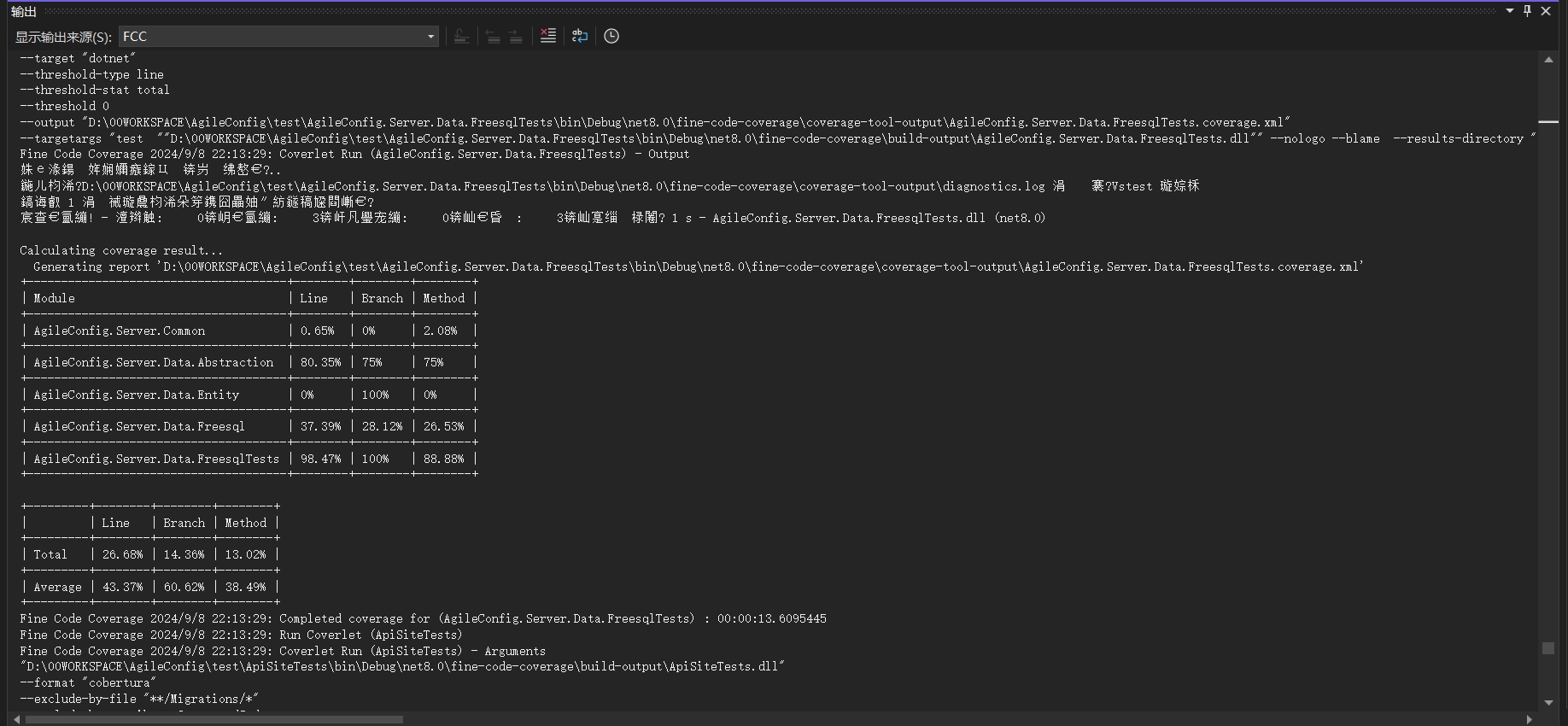
打开 “视图”>“其他窗口”>“Fine code coverage” ,我们能查看更详细的结果。
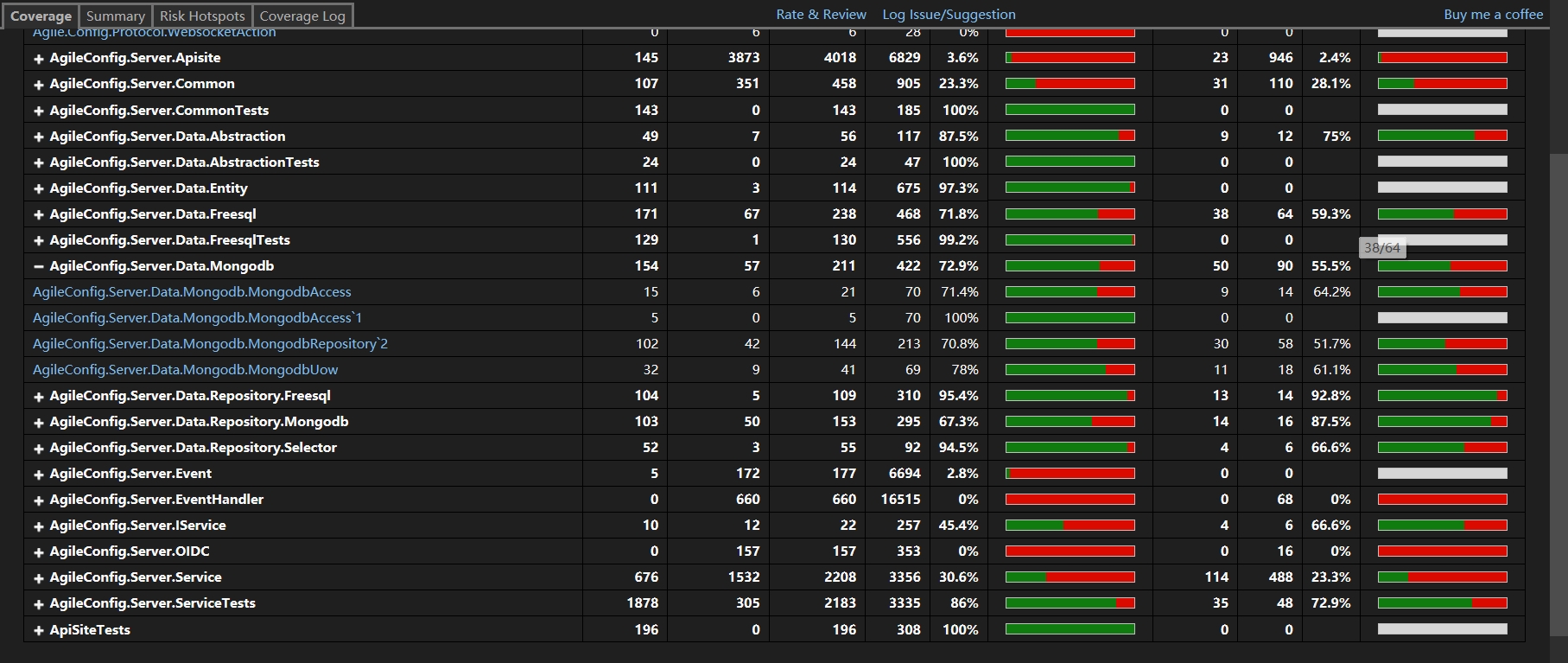
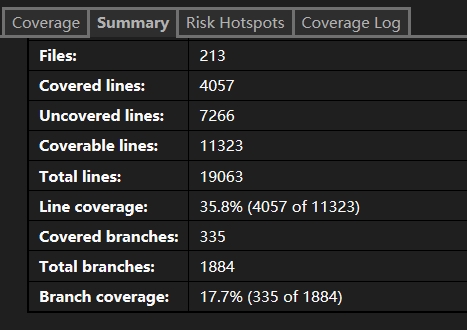
既然在本地能分析这些文件,那么我们显然只要能在 Github Actions 里面插入一步分析的步骤就可以了。显然已经有大佬实现了这个 Action,我们只要集成到自己的 workflow 文件里就行了。
CodeCoverageSummary:
A GitHub Action that reads Cobertura format code coverage files from your test suite and outputs a text or markdown summary. This summary can be posted as a Pull Request comment or included in Release Notes by other actions to give you an immediate insight into the health of your code without using a third-party site.
修改我们的 CI Workflow 文件:
  - name: Build
      run: dotnet build --no-restore
    - name: Test
      run: dotnet test --no-build --verbosity normal --collect:"XPlat Code Coverage" --results-directory ./coverage
    - name: Code Coverage Report
      uses: irongut/CodeCoverageSummary@v1.3.0
      with:
        filename: coverage/**/coverage.cobertura.xml
        badge: true
        fail_below_min: true
        format: markdown
        hide_branch_rate: false
        hide_complexity: true
        indicators: true
        output: both
        thresholds: '60 80'
使用起来非常简单。并且有非常多的配置项,这里不一一介绍了。有需要的直接看它的文档吧。
下面让我们跑一下这个 workflow 试试看。
Coverage File: /github/workspace/coverage/d497ebaf-5670-41ea-8215-dfb4f3a037d6/coverage.cobertura.xml
Coverage File: /github/workspace/coverage/83632b7c-8df2-4179-b0a8-e6410a71b1b7/coverage.cobertura.xml
Coverage File: /github/workspace/coverage/b434d3bb-7909-4a7d-b0f2-f8620d429cfc/coverage.cobertura.xml
Coverage File: /github/workspace/coverage/af81da37-b5c5-4edd-a409-74984355857e/coverage.cobertura.xml
Coverage File: /github/workspace/coverage/1b159b39-3eb4-4951-936e-afde68925b34/coverage.cobertura.xml

Package | Line Rate | Branch Rate | Health
-------- | --------- | ----------- | ------
AgileConfig.Server.IService | 41% | 67% | ❌
Agile.Config.Protocol | 0% | 100% | ❌
AgileConfig.Server.Data.Repository.Freesql | 95% | 93% | ✔
AgileConfig.Server.Data.Freesql | 72% | 59% | ➖
AgileConfig.Server.Service | 28% | 21% | ❌
AgileConfig.Server.EventHandler | 0% | 0% | ❌
AgileConfig.Server.Data.Mongodb | 73% | 54% | ➖
AgileConfig.Server.Data.Abstraction | 77% | 50% | ➖
AgileConfig.Server.Event | 0% | 100% | ❌
AgileConfig.Server.Data.Repository.Mongodb | 67% | 88% | ➖
AgileConfig.Server.Data.Entity | 97% | 100% | ✔
AgileConfig.Server.Common | 1% | 0% | ❌
AgileConfig.Server.Data.Repository.Selector | 95% | 67% | ✔
AgileConfig.Server.Data.Freesql | 45% | 31% | ❌
AgileConfig.Server.Data.Abstraction | 80% | 75% | ✔
AgileConfig.Server.Data.Entity | 89% | 100% | ✔
AgileConfig.Server.Common | 1% | 0% | ❌
AgileConfig.Server.Data.Abstraction | 77% | 67% | ➖
AgileConfig.Server.Data.Entity | 0% | 100% | ❌
AgileConfig.Server.Common | 1% | 0% | ❌
AgileConfig.Server.Common | 21% | 25% | ❌
AgileConfig.Server.IService | 27% | 17% | ❌
Agile.Config.Protocol | 0% | 100% | ❌
AgileConfig.Server.Data.Repository.Freesql | 0% | 0% | ❌
AgileConfig.Server.Data.Freesql | 0% | 0% | ❌
AgileConfig.Server.Service | 2% | 2% | ❌
AgileConfig.Server.EventHandler | 0% | 0% | ❌
AgileConfig.Server.Data.Mongodb | 0% | 0% | ❌
AgileConfig.Server.Data.Abstraction | 0% | 0% | ❌
AgileConfig.Server.Event | 3% | 100% | ❌
AgileConfig.Server.Data.Repository.Mongodb | 0% | 0% | ❌
AgileConfig.Server.Data.Entity | 15% | 100% | ❌
AgileConfig.Server.OIDC | 0% | 0% | ❌
AgileConfig.Server.Common | 2% | 3% | ❌
AgileConfig.Server.Data.Repository.Selector | 0% | 0% | ❌
AgileConfig.Server.Apisite | 4% | 2% | ❌
**Summary** | **18%** (2009 / 15061) | **15%** (337 / 3196) | ❌
_Minimum allowed line rate is `60%`_
FAIL: Overall line rate below minimum threshold of 60%.
我们发现这个 workflow 跑失败了。原因是我们的 coverage 只有 18%。刚才我们配置了最小值是 60%,低于60就会直接跑出异常,中断 workflow。看日志我们也可以看到对每一个项目的统计。有 line rate,branch rate,health 等内容。
这次我们演示了如何在本地使用 VS 插件对单元测试的结果进行分析获得 coverage。以及演示了如何通过 CodeCoverageSummary 在 Github Action 的 workflow 内对测试结果进行分析。还是非常简单的。希望对大家有帮助。
好了不说了,补单元测试去了。。。

此内容由惯性聚合(RSS阅读器)自动聚合整理,仅供阅读参考。 原文来自 — 版权归原作者所有。