惯性聚合 高效追踪和阅读你感兴趣的博客、新闻、科技资讯
阅读原文 在惯性聚合中打开

推荐订阅源

小众软件
小众软件
Security Archives - TechRepublic
Security Latest
Security Latest
K
Kaspersky official blog
P
Palo Alto Networks Blog
T
Threat Research - Cisco Blogs
D
Darknet – Hacking Tools, Hacker News & Cyber Security
T
Tor Project blog
Threat Intelligence Blog | Flashpoint
A
Arctic Wolf
NISL@THU
NISL@THU
GbyAI
GbyAI
腾讯CDC
罗磊的独立博客
Simon Willison's Weblog
Scott Helme
Scott Helme
S
SegmentFault 最新的问题
Cyberwarzone
Cyberwarzone
Jina AI
Jina AI
S
Schneier on Security
WordPress大学
WordPress大学
云风的 BLOG
云风的 BLOG
博客园 - 【当耐特】
Cyber Security Advisories - MS-ISAC
Spread Privacy
Spread Privacy
C
CXSECURITY Database RSS Feed - CXSecurity.com
让小产品的独立变现更简单 - ezindie.com
The Register - Security
C
Cybersecurity and Infrastructure Security Agency CISA
L
Lohrmann on Cybersecurity
V
Vulnerabilities – Threatpost
G
GRAHAM CLULEY
P
Proofpoint News Feed
Cisco Talos Blog
Cisco Talos Blog
博客园_首页
雷峰网
雷峰网
量子位
酷 壳 – CoolShell
酷 壳 – CoolShell
V2EX - 技术
V2EX - 技术
O
OpenAI News
博客园 - 司徒正美
S
Security @ Cisco Blogs
Last Week in AI
Last Week in AI
M
MIT News - Artificial intelligence
博客园 - 叶小钗
Vercel News
Vercel News
AI
AI
博客园 - 聂微东
Webroot Blog
Webroot Blog
J
Java Code Geeks

博客园 - Agile.Zhou

AgileAI - 一个新的 .NET AI 库 并发,并行与异步 为什么说 IO 操作异步才有意义 自定义 Visual Studio 主题 使用 Azure AI Foundry 微调模型 SK + Neo4j 实现简单问答系统 AgileConfig-1.11.0 发布:增强的权限管理 LongRunningTask-正确用法 如何正确实现一个 BackgroundService Dynamic adaptation to application sizes (DATAS) GC 策略 使用 AutoGen Studio 打造你的私有团队 在 Aspire 项目下使用 AgileConfig 使用 SK 进行向量操作 本地部署 DeepSeek Janus Pro 文生图大模型 Kernel Memory 让 SK 记住更多内容 .NET 依赖注入中的 Captive Dependency 在 Development 环境下依赖注入的行为可能有所不同 使用 SK Plugin 给 LLM 添加能力 在 Github Action 管道内集成 Code Coverage Report
使用 SemanticKernel 对接 Ollma
Agile.Zhou · 2024-12-06 · via 博客园 - Agile.Zhou

前面的 2 篇文章已经介绍了 ollama 的基本情况。我们也已经能在本地跟 LLM 进行聊天了。但是如何使用代码跟 LLM 进行交互呢?如果是 C# 选手那自然是使用 SK (SemanticKernel) 了。在这篇博客中,我们将探讨如何使用 Microsoft 的 SemanticKernel 框架对接 Ollama 的聊天服务。我们将通过一个简单的 C# 控制台应用程序来展示如何实现这一点。

前提条件

在本地安装 ollama 服务,并且安装至少一个模型,这次我们的模型是 llama3.1:8b。具体如何安装就不赘述了,请参考以往文章:

安装 SK 及 ollama connector

首先在本地创建一个 Console 项目,然后安装以下包:

dotnet add package Microsoft.SemanticKernel --version 1.21.1
dotnet add package Microsoft.SemanticKernel.Connectors.Ollama --version 1.21.1-alpha

注意:ollama connector 还是 alpha 版本,请勿用于生产

修改 Program 文件

添加命名空间

首先,我们需要引入一些必要的命名空间:

using Microsoft.Extensions.DependencyInjection;
using Microsoft.SemanticKernel;
using Microsoft.SemanticKernel.ChatCompletion;
using Microsoft.SemanticKernel.Connectors.Ollama;

配置 Ollama 服务

接下来,我们需要配置 Ollama 服务的端点和模型 ID ,并添加 Ollama 的聊天服务:

var endpoint = new Uri("http://localhost:11434");
var modelId = "llama3.1:8b";

var builder = Kernel.CreateBuilder();
#pragma warning disable SKEXP0070 
builder.Services.AddScoped<IChatCompletionService>(_ => new OllamaChatCompletionService(modelId, endpoint));

注意:OllamaChatCompletionService 为实验性质所以我们需求手工关闭 SKEXP0070 的警告

获取聊天服务

var chatService = kernel.GetRequiredService<IChatCompletionService>();
var history = new ChatHistory();
history.AddSystemMessage("This is a llama3 assistant ...");

聊天循环

最后,我们实现一个简单的聊天循环,读取用户输入并获取 Ollama 的回复:

while (true)
{
    Console.Write("You:");

    var input = Console.ReadLine();

    if (string.IsNullOrWhiteSpace(input))
    {
        break;
    }

    history.AddUserMessage(input);

    var contents = await chatService.GetChatMessageContentsAsync(history);

    foreach (var chatMessageContent in contents)
    {
        var content = chatMessageContent.Content;
        Console.WriteLine($"Ollama: {content}");
        history.AddMessage(chatMessageContent.Role, content ?? "");
    }
}

试一下

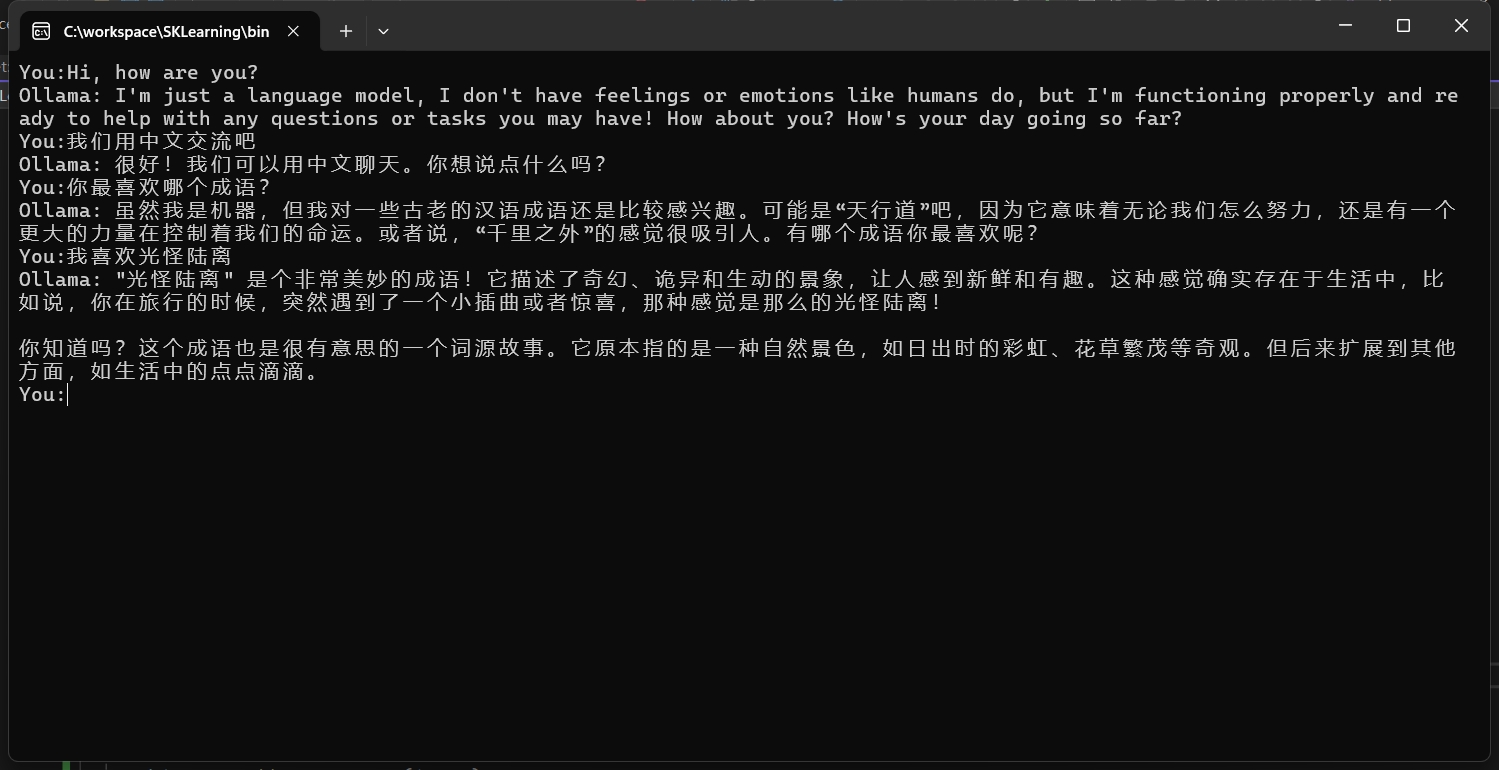
让我们运行项目在 Console 中跟 ollama 进行对话吧。

总结

通过这篇博客,我们展示了如何使用 Microsoft 的 SemanticKernel 框架对接 Ollama 的聊天服务。希望这篇博客能帮助您更好地理解和使用这些工具。如果您有任何问题或建议,请随时在评论区留言。

关注我的公众号一起玩转技术