


程序开发的一个良好原则就是:“将使用和创建分开”。5年前有多少人采用这种风格呢?几乎没有。在IOC流行甚至泛滥的今天,还有一些团队没有使用IOC容器,有些是由于历史原因,有些是由于团队的文化。没有采用IOC的团队,找个机会拥抱一下吧。
我一直在用IOC容器,在此介绍一下如何将IOC集成到WebForm和WebMvc的应用系统中。

 1 using System;
 2 using System.Collections.Generic;
 3 using System.Linq;
 4 using System.Text;
 5 using System.Threading.Tasks;
 6
 7 namespace Happy.Web
 8 {
 9     public interface IWantAutoDependInjection
10     {
11     }
12 }
 1 using System;
 2 using System.Collections.Generic;
 3 using System.Linq;
 4 using System.Text;
 5 using System.Threading.Tasks;
 6
 7 namespace Happy.Web
 8 {
 9     [AttributeUsage(AttributeTargets.Property, AllowMultiple = false)]
10     public sealed class DependToAttribute : Attribute
11     {
12         public Type DependToType { get; set; }
13
14         public string Key { get; set; }
15     }
16 }
 1 using System;
 2 using System.Collections.Generic;
 3 using System.Linq;
 4 using System.Text;
 5 using System.Threading.Tasks;
 6
 7 using System.Web;
 8
 9 using Microsoft.Practices.ServiceLocation;
10
11 using Happy.ExtensionMethods.Reflection;
12
13 namespace Happy.Web
14 {
15     public class DependInjectionModule : IHttpModule
16     {
17         public void Init(HttpApplication context)
18         {
19             context.PreRequestHandlerExecute += OnPreRequestHandlerExecute;
20         }
21
22         private void OnPreRequestHandlerExecute(object sender, EventArgs e)
23         {
24             if (!(HttpContext.Current.CurrentHandler is IWantAutoDependInjection))
25             {
26                 return;
27             }
28
29             var properties = HttpContext.Current.CurrentHandler.GetType().GetProperties();
30
31             foreach (var property in properties)
32             {
33                 var dependToAttribute = property.GetAttribute<DependToAttribute>(false);
34
35                 if (dependToAttribute == null)
36                 {
37                     continue;
38                 }
39
40                 var dependType = dependToAttribute.DependToType ?? property.PropertyType;
41
42                 var value = ServiceLocator.Current.GetInstance(dependType, dependToAttribute.Key ?? string.Empty);
43
44                 property.SetValue(HttpContext.Current.Handler, value);
45             }
46         }
47
48         public void Dispose()
49         {
50         }
51     }
52 }
 1 <configuration>
 2   <system.web>
 3     <compilation debug="true" targetFramework="4.5" />
 4     <httpRuntime targetFramework="4.5" />
 5   </system.web>
 6
 7   <system.webServer>
 8     <modules>
 9       <add name="DependInjectionModule" type="Happy.Web.DependInjectionModule"/>
10     </modules>
11   </system.webServer>
12
13 </configuration>
 1 using System;
 2 using System.Collections.Generic;
 3 using System.Linq;
 4 using System.Web;
 5 using System.Web.UI;
 6 using System.Web.UI.WebControls;
 7
 8 using Happy.Web;
 9
10 namespace WebStudy
11 {
12     public partial class Test : System.Web.UI.Page, IWantAutoDependInjection
13     {
14         [DependTo]
15         public ApplicationService ApplicationService { get; set; }
16
17         protected void Page_Load(object sender, EventArgs e)
18         {
19             this.Response.Write(this.ApplicationService.GetMessage());
20         }
21     }
22
23     public sealed class ApplicationService
24     {
25         public string GetMessage()
26         {
27             return "段光伟";
28         }
29     }
30 }
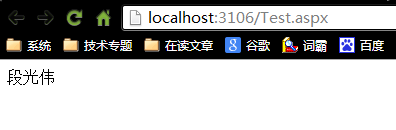
 1 using System;
 2 using System.Collections.Generic;
 3 using System.Linq;
 4 using System.Text;
 5 using System.Threading.Tasks;
 6
 7 using System.Web.Routing;
 8 using System.Web.Mvc;
 9
10 using Microsoft.Practices.ServiceLocation;
11
12 using Happy.DesignByContract;
13
14 namespace Happy.Web.Mvc
15 {
16     public sealed class ServiceLocationDependencyResolver : IDependencyResolver
17     {
18         private readonly IServiceLocator _serviceLocator;
19
20         public ServiceLocationDependencyResolver(IServiceLocator serviceLocator)
21         {
22             Check.RequireNotNull(serviceLocator, "serviceLocator");
23
24             _serviceLocator = serviceLocator;
25         }
26
27         public object GetService(Type serviceType)
28         {
29             Check.RequireNotNull(serviceType, "serviceType");
30
31             try
32             {
33                 return _serviceLocator.GetInstance(serviceType);
34             }
35             catch
36             {
37                 return null;
38             }
39         }
40
41         public IEnumerable<object> GetServices(Type serviceType)
42         {
43             Check.RequireNotNull(serviceType, "serviceType");
44
45             try
46             {
47                 return _serviceLocator.GetAllInstances(serviceType);
48             }
49             catch
50             {
51                 return new List<object>();
52             }
53         }
54     }
55 }
想象一下,开发人员只需要定义和声明,不需要手工组装(new)会有多爽。IOC容器的配置最好根据约定自动配置。
此内容由惯性聚合(RSS阅读器)自动聚合整理,仅供阅读参考。 原文来自 — 版权归原作者所有。