


惯性聚合 高效追踪和阅读你感兴趣的博客、新闻、科技资讯
阅读原文 在惯性聚合中打开

推荐订阅源

The GitHub Blog
The GitHub Blog
Martin Fowler
Martin Fowler
Vercel News
Vercel News
U
Unit 42
Engineering at Meta
Engineering at Meta
aimingoo的专栏
aimingoo的专栏
MyScale Blog
MyScale Blog
Y
Y Combinator Blog
阮一峰的网络日志
阮一峰的网络日志
爱范儿
爱范儿
Apple Machine Learning Research
博客园_首页
钛媒体:引领未来商业与生活新知
钛媒体:引领未来商业与生活新知
B
Blog RSS Feed
N
Netflix TechBlog - Medium
GbyAI
GbyAI
F
Fortinet All Blogs
MongoDB | Blog
MongoDB | Blog
大猫的无限游戏
大猫的无限游戏
C
Check Point Blog
M
MIT News - Artificial intelligence
D
Docker
IT之家
IT之家
Stack Overflow Blog
Stack Overflow Blog

MacRumors: Mac News and Rumors - All Stories

X Rolls Out AI-Powered Custom Timelines for Premium Users Apple Launches Tap to Pay on iPhone in Malaysia MacRumors Readers React to Tim Cook Stepping Down as CEO Apple TV's Hit Show 'Silo' is Returning Soon: Release Date and Trailer Apple Pulled Cal AI for Deceptive Billing Design, Not External Payments Apple Teases 'Incredible Road Map Ahead' Tim Cook Says He's 'Healthy,' Plans to Remain at Apple 'for a Long Time' Apple Releases New iOS 26.5, iPadOS 26.5 and macOS Tahoe 26.5 Public Betas AirPods Pro 3 vs. Sony WF-1000XM6: Which Flagship Earbuds Should You Buy? Satechi Launches ChargeView 140W Desktop Charger Get Up to $52 Off the 11th Gen iPad, Available From $299 [Update: Sold Out] Yelp's AI Assistant Can Now Book Restaurants, Doctors, and More Anker Earth Day Sale Features Up to 40% Off Popular Chargers and More Top Leaders React to Apple Announcing Tim Cook Will Step Down as CEO WhatsApp Testing Paid 'Plus' Subscription Tier – Here's What's Included Report: Ternus to Bring Jobs-Era Decisiveness Back to Apple 200MP Telephoto iPhone Lens Unlikely to Arrive Before 2028 Apple's Tim Cook Shares Community Letter After Announcing Plans to Step Down as CEO iPhone 18 Pro May Come in These Four Colors MacBook Pro With Touch Screen and New Mac Studio Likely 'Postponed' Apple Testing Two New iOS 27 Home Screen Customization Options WWDC 2026 Graphic Teases Major iOS 27 Feature AirPods Weekend Deals Include AirPods Pro 3 for $199.99 and AirPods 4 for $99 Apple Has Released These 12 New Products This Year 5+ Things to Know About the Next Mac Studio India Won't Require Apple to Preinstall Government ID App on iPhones Anthropic Debuts Claude Design for Creating Prototypes, Pitch Decks, and Mockups iPhones to Get These New Satellite Features Top Stories: 'iPhone Ultra' Rumors, Mac Mini and Mac Studio Shortages, and More The MacRumors Show: What's Next for the iPad
Make Your MacBook Battery Last Longer With This Setting
2026-04-10 · via MacRumors: Mac News and Rumors - All Stories

If you own a MacBook and work from home, it's easy to have your laptop plugged in for hours on end without thinking about the long-term battery life implications. Fortunately, Apple recently added a setting that lets you cap how high your Mac's battery charges, and if you own an iPhone that was released in the last few years, you may already be familiar with it.
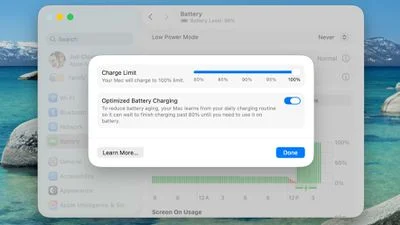
macos 26 4 charge limit
Lithium-ion batteries generally degrade fastest when held at a high state of charge, which means keeping your iPhone or your Mac's battery at 100 percent accelerates the chemical wear that permanently reduces its actual capacity over time.

To mitigate this on iPhone 15 and newer models, Apple lets you set a Charge Limit that prevents your device from charging beyond 80, 85, 90, 95, or 100 percent. And in macOS Tahoe 26.4, Apple has brought over the same Charge Limit feature to Macs for the first time.

This option differs from Optimized Battery Charging, which learns your daily routine and delays charging past 80 percent until you're likely to need a full battery. Depending on your usage, however, your Mac may still regularly reach 100 percent.

Setting a charge limit prevents that. Obviously a lower charge cap means less time you'll be able to work away from a power outlet. But if you mostly sit at a desk with your MacBook plugged in, the trade-off is worth the long-term battery gains. That said, if you regularly rely on your Mac away from power, then you may want to opt for a higher cap, which should hopefully still curb battery wear without leaving you completely stranded. Either way, here's how to set the feature:

Set a MacBook Battery Charge Limit in macOS

  1. Click the Apple symbol () in your Mac's menu bar and open System Settings....
  2. Click Battery in the sidebar.
  3. Click the i button next to Charging.
  4. Drag the Charge Limit slider to your preferred level: 80%, 85%, 90%, 95%, or 100%, then click Done.

That's all there is to it. Your Mac will now stop charging once it hits the level you chose, and Optimized Battery Charging will continue to work in the background unless you switch it off in the same panel.

Note that even with Optimized Battery Charging set to a limit below 100%, your Mac will occasionally charge to 100% so that macOS can maintain accurate battery level estimates, but for the most part it will stick to the specified maximum level.

Popular Stories

macOS 27 Will Mark the End of an Era

During its Platforms State of the Union segment at WWDC 2025, Apple revealed that macOS 26 Tahoe is the final major macOS version for Intel-based Macs. The upcoming macOS 27 release will be compatible with Apple silicon Macs only, meaning that you will need a Mac with an M-series chip or a MacBook Neo with an A18 Pro chip in order to install the software update. macOS 27 should be available...

iPhone 18 Pro's Four Rumored Colors Revealed, Including 'Dark Cherry'

A source said to be familiar with Apple's supply chain today revealed the color options Apple is planning for the iPhone 18 Pro, iPhone 18 Pro Max, and the upcoming foldable iPhone. Image via Macworld. The information comes from Macworld, which says the signature new color for this year's Pro models will be Dark Cherry, a deep wine-like red. While other sources had previously reported on a...

Apple Says CarPlay Ultra is Coming to These Vehicle Brands

Last year, Apple launched CarPlay Ultra, the long-awaited next-generation version of its CarPlay software system for vehicles. Nearly a year later, CarPlay Ultra is still limited to Aston Martin's latest luxury vehicles, but that should change fairly soon. In May 2025, Apple said many other vehicle brands planned to offer CarPlay Ultra, including Hyundai, Kia, and Genesis. CarPlay Ultra...