

惯性聚合 高效追踪和阅读你感兴趣的博客、新闻、科技资讯
阅读原文 在惯性聚合中打开

推荐订阅源

美团技术团队
N
Netflix TechBlog - Medium
WordPress大学
WordPress大学
云风的 BLOG
云风的 BLOG
J
Java Code Geeks
V
Visual Studio Blog
H
Help Net Security
Engineering at Meta
Engineering at Meta
Hugging Face - Blog
Hugging Face - Blog
Microsoft Security Blog
腾讯CDC
博客园 - 【当耐特】
B
Blog
Stack Overflow Blog
Stack Overflow Blog
freeCodeCamp Programming Tutorials: Python, JavaScript, Git & More
大猫的无限游戏
大猫的无限游戏
GbyAI
GbyAI
博客园 - 司徒正美
博客园 - 叶小钗
Y
Y Combinator Blog
MyScale Blog
MyScale Blog
钛媒体:引领未来商业与生活新知
钛媒体:引领未来商业与生活新知
G
Google Developers Blog
酷 壳 – CoolShell
酷 壳 – CoolShell

MacRumors: Mac News and Rumors - All Stories

X Rolls Out AI-Powered Custom Timelines for Premium Users Apple Launches Tap to Pay on iPhone in Malaysia MacRumors Readers React to Tim Cook Stepping Down as CEO Apple TV's Hit Show 'Silo' is Returning Soon: Release Date and Trailer Apple Pulled Cal AI for Deceptive Billing Design, Not External Payments Apple Teases 'Incredible Road Map Ahead' Tim Cook Says He's 'Healthy,' Plans to Remain at Apple 'for a Long Time' Apple Releases New iOS 26.5, iPadOS 26.5 and macOS Tahoe 26.5 Public Betas AirPods Pro 3 vs. Sony WF-1000XM6: Which Flagship Earbuds Should You Buy? Satechi Launches ChargeView 140W Desktop Charger Get Up to $52 Off the 11th Gen iPad, Available From $299 [Update: Sold Out] Yelp's AI Assistant Can Now Book Restaurants, Doctors, and More Anker Earth Day Sale Features Up to 40% Off Popular Chargers and More Top Leaders React to Apple Announcing Tim Cook Will Step Down as CEO WhatsApp Testing Paid 'Plus' Subscription Tier – Here's What's Included Report: Ternus to Bring Jobs-Era Decisiveness Back to Apple 200MP Telephoto iPhone Lens Unlikely to Arrive Before 2028 iPhone 18 Pro May Come in These Four Colors MacBook Pro With Touch Screen and New Mac Studio Likely 'Postponed' Apple Testing Two New iOS 27 Home Screen Customization Options WWDC 2026 Graphic Teases Major iOS 27 Feature AirPods Weekend Deals Include AirPods Pro 3 for $199.99 and AirPods 4 for $99 Apple Has Released These 12 New Products This Year 5+ Things to Know About the Next Mac Studio India Won't Require Apple to Preinstall Government ID App on iPhones Anthropic Debuts Claude Design for Creating Prototypes, Pitch Decks, and Mockups iPhones to Get These New Satellite Features Top Stories: 'iPhone Ultra' Rumors, Mac Mini and Mac Studio Shortages, and More The MacRumors Show: What's Next for the iPad Apple Store Becomes Backdrop for Honor's Brazen Hong Kong Ad Stunt
Everything New in Calendar and Reminders in iOS 27
Juli Clover · 2026-06-19 · via MacRumors: Mac News and Rumors - All Stories

The Calendar and Reminders apps look about the same as they did in iOS 26, but there are a couple of useful new Apple Intelligence features that make both apps more intuitive.
Calendar and Reminders Feature

Natural Language for Calendar

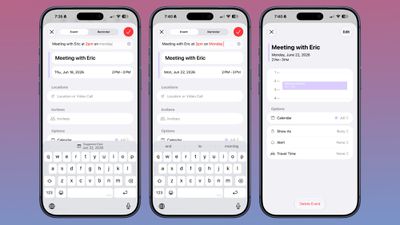
‌Apple Intelligence‌ in Calendar lets you add events by describing them in natural language. It identifies people, dates, and places while you are typing, and you can tap to add that info.
ios 27 calendar natural language
It's not as fluid as Fantastical, but it's better than before. You can't just open the Calendar app and type "meeting at 2pm with Eric on July 14" and have it filed correctly as you do in Fantastical because it doesn't have the same automatic date swapping.

Calendar adds an event on the date that's selected, and by default, that's the current date. To use natural language to select another date, you can type in "meeting at 2pm with Eric on July 14," but you need to tap on the July 14 suggestion at the top of the keyboard.

The Calendar app will automatically set the event to the time that you type in with natural language, so you don't need to tap for that.

Natural Language for Reminders

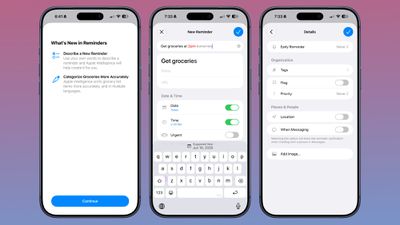
In Reminders, you can now describe a reminder in natural language and it will autofill the metadata that you mention. It can add date, time, and location automatically.
ios 27 reminders
You can write in a reminder like "get the groceries at 6pm tonight" or "send the photos to John tomorrow at 4pm" and it will add the correct times to your reminder. The feature is in beta and it's not entirely consistent, so sometimes you need to tap on the suggestion below to add the correct date and time, and sometimes it does it automatically.

With natural language support, Apple removed the menu bar at the bottom of the interface for adding a new reminder. Adding extra features like an image or metadata such as a flag can now be done through the "Details" interface.

Calendar Event Editing

The event editing interface is a little simpler to use, and it's quicker to get to time adjustments. If you adjust the frequency of an event, Calendar can intelligently apply changes to all events. Siri can also be used for editing calendar events.

Holiday-Aware Alarms

The Calendar app tracks holidays, and can alert you the day before a holiday to ask if you want to change the time of the wake-up alarm that you have set.

The Calendar and Reminders apps both have a new extra-large widget size that takes up an entire app page.

Siri AI

‌Siri‌ has full access to your calendar and can add events to it with natural language requests. What you can't do with the natural language entry, you can do with ‌Siri‌.

‌Siri‌ is much more capable than before, and it does a better job correctly adding events to the calendar on the day and time you intend, and with parameters, like repeating events.

Just describe the event you want to create and ‌Siri‌ can get it done. ‌Siri‌ can add events to your calendar from other apps, like Mail and Messages.

‌Siri‌ is able to search across the Calendar app and Reminders, so it knows your schedule and what's on your to-do list.

Visual Intelligence

Visual Intelligence in iOS 27 supports adding multiple events to your calendar at one time from a schedule. If you have a document with a list of dates, like a child's sports practice schedule, you can take a picture and add them to the Calendar app all at once.
<
h2>Reminders Grocery Lists

In ‌iOS 27‌, the Reminders app has improved grocery list sorting. It also supports more languages than before.

Shortcuts for Reminders

There are new Reminders actions in the Shortcuts app, including Create Group, Create List, Create Section, Delete Groups, Delete Lists, and Delete Sections. There's also a new "Get What's On Screen" option that can be used with Reminders.

Apple Intelligence Requirements

To use the ‌Apple Intelligence‌ features in ‌iOS 27‌, you need an iPhone 15 Pro or later.

Popular Stories

Apple Says iOS 27 Can Automatically Add Captions to Your Personal iPhone Videos

Apple this week previewed new accessibility features that are coming later this year, and one is particularly notable: automatic captions for personal videos. For videos that do not already have captions, Apple said a new on-device speech recognition model can automatically generate them for spoken audio. According to Apple, this feature will be available for videos that you record on your...

New iOS 27 Feature Hints at Major Siri Upgrade Coming Soon

Every May, Apple previews new accessibility features coming to devices like the iPhone, iPad, and Mac. The announcement typically occurs a few days before Global Accessibility Awareness Day, and it offers a glimpse into what will be included in the next major releases of Apple's software platforms, such as iOS, iPadOS, and macOS. This year, one of the new capabilities shown off by Apple is...

Don't Want to Wait for iOS 27? Shortcuts Playground From MacStories Generates Shortcuts Using AI

Thursday May 21, 2026 4:38 pm PDT by

Apple is rumored to be adding an AI feature for creating shortcuts with natural language to the Shortcuts app in iOS 27, but MacStories' Federico Viticci has a clever AI tool for making shortcuts that you can use today. Shortcuts Playground is a plugin for Claude Code and OpenAI Codex that can create shortcuts for the Apple Shortcuts app using natural language input. It's set up to let users ...