
惯性聚合 高效追踪和阅读你感兴趣的博客、新闻、科技资讯
阅读原文 在惯性聚合中打开

推荐订阅源

量子位
Recent Announcements
D
Docker
V
V2EX
阮一峰的网络日志
阮一峰的网络日志
Vercel News
Vercel News
Microsoft Security Blog
The GitHub Blog
The GitHub Blog
U
Unit 42
奇客Solidot–传递最新科技情报
奇客Solidot–传递最新科技情报
月光博客
月光博客
腾讯CDC
B
Blog
博客园_首页
罗磊的独立博客
D
DataBreaches.Net
IT之家
IT之家
酷 壳 – CoolShell
酷 壳 – CoolShell
L
LangChain Blog
aimingoo的专栏
aimingoo的专栏
MongoDB | Blog
MongoDB | Blog
GbyAI
GbyAI
Stack Overflow Blog
Stack Overflow Blog
M
MIT News - Artificial intelligence

MacRumors: Mac News and Rumors - All Stories

X Rolls Out AI-Powered Custom Timelines for Premium Users Apple Launches Tap to Pay on iPhone in Malaysia MacRumors Readers React to Tim Cook Stepping Down as CEO Apple TV's Hit Show 'Silo' is Returning Soon: Release Date and Trailer Apple Pulled Cal AI for Deceptive Billing Design, Not External Payments Apple Teases 'Incredible Road Map Ahead' Tim Cook Says He's 'Healthy,' Plans to Remain at Apple 'for a Long Time' Apple Releases New iOS 26.5, iPadOS 26.5 and macOS Tahoe 26.5 Public Betas AirPods Pro 3 vs. Sony WF-1000XM6: Which Flagship Earbuds Should You Buy? Satechi Launches ChargeView 140W Desktop Charger Get Up to $52 Off the 11th Gen iPad, Available From $299 [Update: Sold Out] Yelp's AI Assistant Can Now Book Restaurants, Doctors, and More Anker Earth Day Sale Features Up to 40% Off Popular Chargers and More Top Leaders React to Apple Announcing Tim Cook Will Step Down as CEO WhatsApp Testing Paid 'Plus' Subscription Tier – Here's What's Included Report: Ternus to Bring Jobs-Era Decisiveness Back to Apple 200MP Telephoto iPhone Lens Unlikely to Arrive Before 2028 iPhone 18 Pro May Come in These Four Colors MacBook Pro With Touch Screen and New Mac Studio Likely 'Postponed' Apple Testing Two New iOS 27 Home Screen Customization Options WWDC 2026 Graphic Teases Major iOS 27 Feature AirPods Weekend Deals Include AirPods Pro 3 for $199.99 and AirPods 4 for $99 Apple Has Released These 12 New Products This Year 5+ Things to Know About the Next Mac Studio India Won't Require Apple to Preinstall Government ID App on iPhones Anthropic Debuts Claude Design for Creating Prototypes, Pitch Decks, and Mockups iPhones to Get These New Satellite Features Top Stories: 'iPhone Ultra' Rumors, Mac Mini and Mac Studio Shortages, and More The MacRumors Show: What's Next for the iPad Apple Store Becomes Backdrop for Honor's Brazen Hong Kong Ad Stunt
iOS 27 Wallet App Gets 7 New Features
Juli Clover · 2026-06-24 · via MacRumors: Mac News and Rumors - All Stories

Apple is making more of an effort to turn the iPhone into a physical wallet replacement in iOS 27, and there are several upgrades to the Wallet app.
iOS 27 Adds These New Features to Your iPhones Wallet Feature

Pass Upgrades

Apple upgraded airline boarding passes in the Wallet app with iOS 26, and in ‌iOS 27‌, upgrades are coming to additional types of passes. Memberships, gift cards, loyalty cards, and rewards cards can use a bolder "Poster Generic" card style with full background images, primary logo, header fields, footer field, primary fields, and an optional barcode.
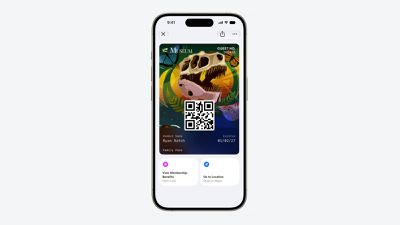
Apple Wallet Enhanced Pass iOS 27
Each pass is able to include up to two actions that can be tapped from the bottom of the pass, such as getting directions to a venue or checking a rewards point balance.

Apple is also allowing users to check the pass issuer certificate to ensure that a digital pass is legitimate (not applicable to Create a Pass), and there are four new barcode types supported, including EAN–13, Code 39, Codabar, and ITF.

There is a new Pass Designer Mac app for developers that makes it easier to create a pass using a WYSIWYG editor.

Create a Pass

There's a "Create a Pass" feature in the Wallet app for adding tickets, memberships, and more using Visual Intelligence. If you have a ticket for an event and there's not a digital version available for the Wallet app already, you can create one using the physical pass.
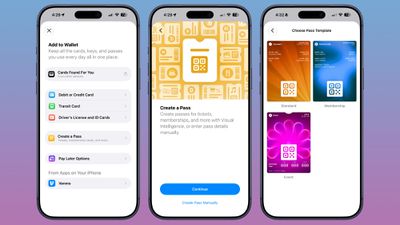
ios 27 wallet create pass

You can scan a pass and add it with Visual Intelligence if there's a barcode or QR code, or a pass can be added manually. Pass templates include Standard, Membership, and Event.

Each type includes relevant information like name, location, or admission type, along with a scannable code drawn from an included barcode or QR code that you take a photo of. There are 12 background colors to choose from with different texture options, or seven custom backgrounds for categories like theater, music, sports, and movies.

Fields can be added or removed as needed when creating a custom pass, with options like label, date, membership, contact, coupon code, VIN, insurance, and more, so most physical cards are able to be stored digitally.

Hotel Keys

When you add a digital hotel key from a participating hotel to the Wallet app, you can now view more details about the trip. Hotels can provide updates on booked activities and allow access to different services.

AI Bill Splitting

Using the new Siri Mode in the Camera app, or a feature in the Messages and Wallet apps, you can take a photo of a bill and use Apple Intelligence to figure out what each person owes. ‌Visual Intelligence‌ scans the receipt and makes a digital copy of everything on the list, and each person can select what they consumed. Tax and tip portions are also calculated automatically.

Payments can be made using Apple Cash, which is a U.S.-only feature.

Insights

‌iOS 27‌ includes an "Insights" feature where you can add financial accounts to the Wallet app to monitor spending.
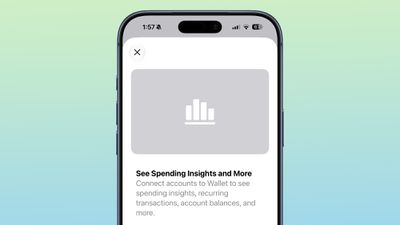
wallet app insights

Insights is an expansion of the Connected Accounts feature in earlier versions of iOS, and it includes spending, recurring transactions, account balances, and more. It works for financial institutions that have implemented Connected Cards support, including several UK banks.

Order Tracking

Order tracking in the Wallet app is expanding to Australia and Canada in ‌iOS 27‌. In ‌iOS 26‌, it was limited to the United States and UK.

Tap to Share is an ‌iOS 27‌ feature that lets customers connect to a participating merchant's iPhone for quicker digital checkout.

Device Requirements

‌Visual Intelligence‌ is an ‌Apple Intelligence‌ feature requiring an iPhone 15 Pro or newer. Many of the other features should work on all iPhones.

Popular Stories

New iOS 27 Rumors Include Revamped AirPods Settings Menu and More

Apple is set to unveil iOS 27 next month ahead of a September release. The update is expected to include a dedicated Siri app, expanded Apple Intelligence capabilities in apps like Wallet, Safari, and Shortcuts, an upgraded keyboard with improved autocorrect, the ability to use Apple Maps via satellite connection, and more. In his Power On newsletter today, Bloomberg's Mark Gurman revealed...

Apple to Unveil iOS 27 With All-New Siri App Next Month

Apple reportedly plans to debut an all-new, dedicated Siri app with a so-called "Extensions" feature across iOS 27, iPadOS 27, and macOS 27. With the Siri app, iPhone, iPad, and Mac users will reportedly be able to interact with Apple's assistant in both text and voice modes. The app will also provide users with access to their past conversations with Siri. Overall, the Siri app would...

iOS 27 Siri Redesign Will Use Dark Color Scheme, Matching Apple's WWDC Art

Tuesday May 26, 2026 2:30 pm PDT by

Apple is redesigning Siri for iOS 27 to accommodate new artificial intelligence features and chatbot capabilities. Siri is getting a dedicated app, integration with the iPhone's Dynamic Island, and a new design scheme. The graphics that Apple is using to promote WWDC hint at its design plans for Siri, according to Bloomberg's Mark Gurman. In this week's Power On newsletter, Gurman said the...