惯性聚合
高效追踪和阅读你感兴趣的博客、新闻、科技资讯
阅读原文
在惯性聚合中打开
即将跳转到惯性聚合
3
在聚合应用中查看完整内容和互动
立即跳转
取消
推荐订阅源
U
Unit 42
WordPress大学
T
The Exploit Database - CXSecurity.com
cs.AI updates on arXiv.org
Security Latest
Know Your Adversary
D
Darknet – Hacking Tools, Hacker News & Cyber Security
S
Schneier on Security
T
Tailwind CSS Blog
Recent Announcements
B
Blog
P
Proofpoint News Feed
Y
Y Combinator Blog
L
Lohrmann on Cybersecurity
罗
罗磊的独立博客
Cyber Security Advisories - MS-ISAC
Application and Cybersecurity Blog
cs.CV updates on arXiv.org
G
GRAHAM CLULEY
T
Threat Research - Cisco Blogs
aimingoo的专栏
博
博客园 - 【当耐特】
L
LangChain Blog
让小产品的独立变现更简单 - ezindie.com
H
Hackread – Cybersecurity News, Data Breaches, AI and More
AI
MyScale Blog
Latest news
Stack Overflow Blog
Forbes - Security
A
Arctic Wolf
Recent Commits to openclaw:main
T
The Blog of Author Tim Ferriss
Last Week in AI
PCI Perspectives
宝玉的分享
NISL@THU
B
Blog RSS Feed
H
Heimdal Security Blog
E
Exploit-DB.com RSS Feed
G
Google Developers Blog
N
Netflix TechBlog - Medium
V
Visual Studio Blog
美
美团技术团队
钛媒体:引领未来商业与生活新知
S
Securelist
Attack and Defense Labs
Hacker News - Newest: "LLM"
C
CXSECURITY Database RSS Feed - CXSecurity.com
W
WeLiveSecurity
博客园 - robinli
SQLServer 错误: 15404,无法获取有关 Windows NT 组/用户 - robinli
已解决:无法连接到WMI提供程序。你没有权限或者该服务器无访问···
window系统下升级node和npm
SQLSERVER:误删Windows登录用户而sa禁用,导致无法使用Windows身份验证解决方案 - robinli
更新依赖mvn dependency:resolve
服务器出现大批量登录审核失败/NtLmSsp攻击
sqlserver2008数据库登陆名备份迁移方法
如何将多个大型站点从 IIS 7 迁移到 IIS 8.5?
记一次 IIS 站点配置文件备份和还原,物理路径文件批量备份
SQL Server2019数据库备份与还原脚本,数据库可批量备份
vscode Vue格式化HTML标签换行问题
WIN10的IE错误代码inet_e_resource_not_found解决办法
远程桌面,身份验证错误:要求的函数不正确等解决办法
IIS 请求 超时设置
Redis设置密码重启后失效的解决方案
连接redis错误:ERR Client sent AUTH, but no password is set
关于阿里云专有网络搭建FTP服务器的深坑
电脑异常断电,IDEA崩溃
Winform 出现“Win已停止工作”解决方法
C# WinForm控件、自定义控件整理(大全)
出现“基础链接已关闭,无法链接到远程服务器"错误的解决办法
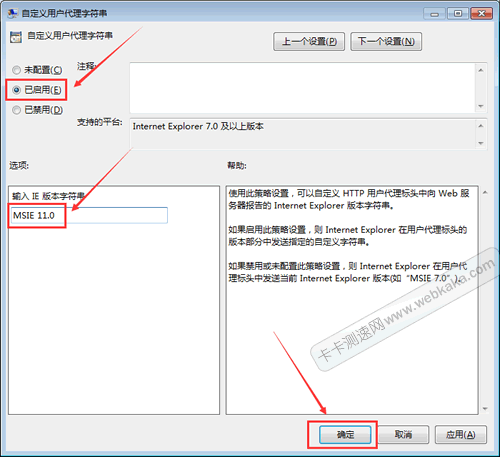
FCKeditor编辑器IE11不显示的解决方法
robinli
·
2021-10-07
·
via
博客园 - robinli
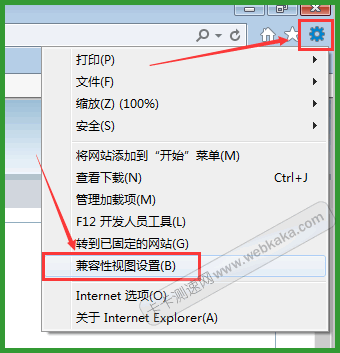
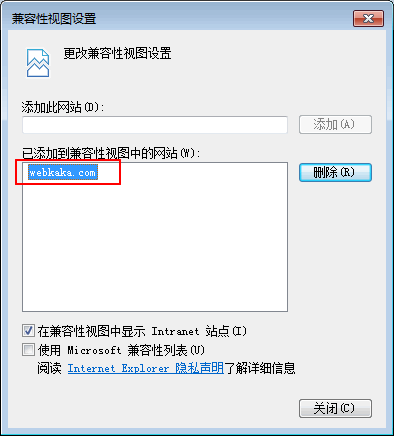
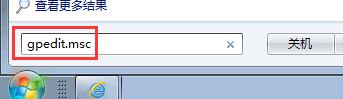
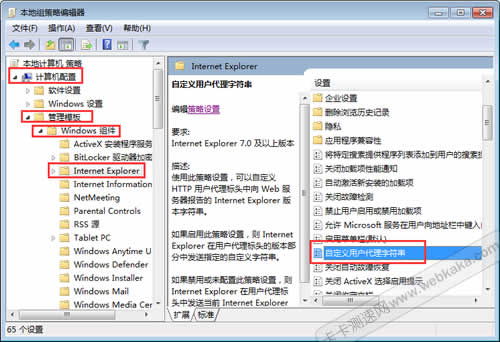
FCKeditor编辑器不兼容IE11,在IE11里此编辑器不显示,我们应该怎样解决这个问题呢?本文将分享一下本人的解决方法。 不同于网上流传的更改文件代码的复杂做法,本人仅通过设置IE11的两个地方便可轻松解决这个问…
此内容由惯性聚合(RSS阅读器)自动聚合整理,仅供阅读参考。
原文来自
— 版权归原作者所有。