


“五一”期间用了一下Swagger,碰到了以下问题:
现将解决办法记下留存。
一、在Docker中显示OpenApiInfo的中文内容
builder.Services.AddSwaggerGen(options =>
{
    options.SwaggerDoc("v1", new OpenApiInfo
    {
        Version = "v1",
        Title = "xxx Api调用说明",
        Description = "巴拉巴拉的一堆描述",
        License = new OpenApiLicense
        {
            Name = "Api调用须知",
            Url = new Uri("http://xxx.com/readmi.html")
        }
    });

});
以上设置的效果
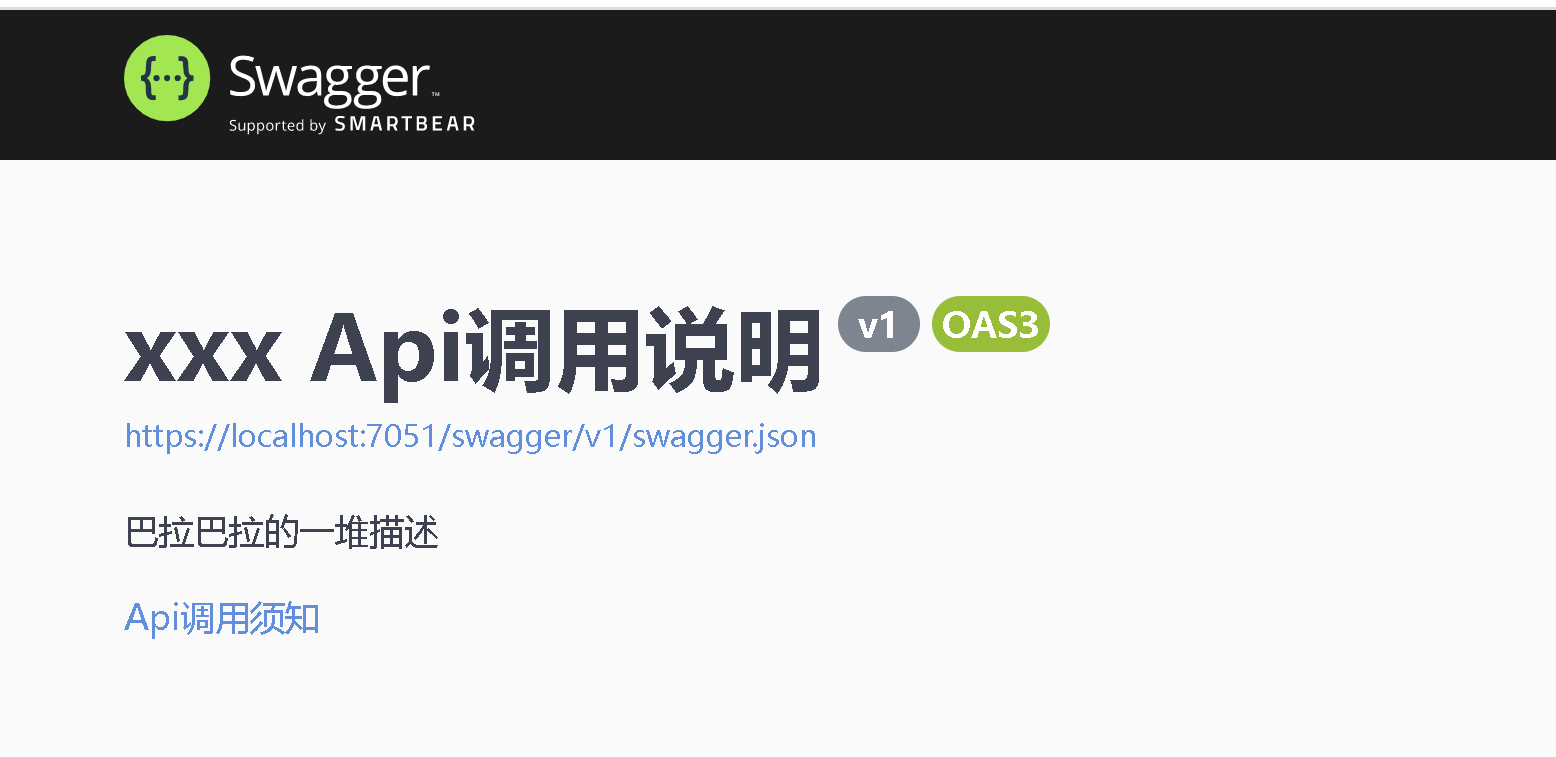
然而发布到Docker以后,中文乱码了(似乎在Program.cs里面输入的中文都会乱码)。我的解决的办法是:
builder.Services.AddSwaggerGen(ProgramHelper.SwaggerSetup);
using Microsoft.OpenApi.Models;
using Swashbuckle.AspNetCore.SwaggerGen;
namespace SwaggerDemo;
public static class ProgramHelper
{
    public static void SwaggerSetup(SwaggerGenOptions options)
    {
        options.SwaggerDoc("v1", new OpenApiInfo
        {
            Version = "v1",
            Title = "xxx Api调用说明",
            Description = "巴拉巴拉的一堆描述",
            License = new OpenApiLicense
            {
                Name = "Api调用须知",
                Url = new Uri("http://xxx.com/readmi.html")
            }
        });

    }
}
问题解决,但有点脱裤子放屁,不知道有没有不需要脱裤子的方法。
二、显示xml注释
三、如何显示Header

办法如下:
public class SwaggerHeaderAttribute : Attribute { }
public class SwaggerOperationFilter : IOperationFilter
{
    public void Apply(OpenApiOperation operation, OperationFilterContext context)
    {
        if (context.ApiDescription.CustomAttributes().Any(ii => ii.GetType() == typeof(SwaggerHeaderAttribute))
            || context.ApiDescription.ActionDescriptor.EndpointMetadata.Any(ii => ii.GetType() == typeof(SwaggerHeaderAttribute)))
        {
            if (operation.Parameters == null)
                operation.Parameters = new List<OpenApiParameter>();

            operation.Parameters.Add(new OpenApiParameter
            {
                Name = "Sign",
                In = ParameterLocation.Header,
                Description = "我的签名是这个生成的,巴拉巴拉巴拉",
                Required = true
            });
        }

    }
}
然后在SwaggerSetup里面添加一行
options.OperationFilter<SwaggerOperationFilter>();
在ApiController或者Action前面添加一行[SwaggerHeader]
四、隐藏ApiController、Action、类或者属性,显示枚举

想把1、2隐藏起来,把
public enum ECode
{
    成功,
    [Description("时间戳错误")]
    Timestamp,
    [Description("签名错误")]
    Sign

}
显示成3的样子,办法如下:
[AttributeUsage(AttributeTargets.Method | AttributeTargets.Class | AttributeTargets.Property | AttributeTargets.Enum | AttributeTargets.Field)]
public partial class SwaggerIgnoreAttribute : Attribute { }
public class SwaggerSchemaFilter : ISchemaFilter
{
    public void Apply(OpenApiSchema schema, SchemaFilterContext context)
    {

        #region 给设置了SwaggerIgnoreAttribute特性的类作个标记,以便在DocumentFilter里面移除整个架构
        if (context.Type.GetCustomAttribute<SwaggerIgnoreAttribute>() != null)
        {
            schema.Title = "Remove";
        }
        #endregion

        else
        {
            if (context.Type.IsEnum)
            {
                #region 设置枚举的描述
                List<string> titleItems = new List<string>();
                foreach (var e in Enum.GetValues(context.Type))
                {
                    if (context.Type.GetField(e.ToString()).GetCustomAttribute<SwaggerIgnoreAttribute>() == null)
                    {

                        titleItems.Add($"{(int)e}:{context.Type.GetField(e.ToString()).GetCustomAttribute<DescriptionAttribute>()?.Description ?? e}");
                    }
                }
                schema.Description = string.Join(";", titleItems);
                #endregion
            }
            else
            {
                #region 移除设置了SwaggerIgnoreAttribute特性的属性
                foreach (var propertyName in context.Type.GetProperties().Where(ii => ii.GetCustomAttribute<SwaggerIgnoreAttribute>() != null).Select(ii => ii.Name))
                    schema.Properties.Remove(propertyName);
                #region
            }
        }

    }
}

public class SwaggerDocFilter : IDocumentFilter
{
    public void Apply(OpenApiDocument swaggerDoc, DocumentFilterContext context)
    {
        //移除在SchemaFilter作了标记的架构
        foreach (var key in swaggerDoc.Components.Schemas.Where(ii => ii.Value.Title == "Remove"))
            swaggerDoc.Components.Schemas.Remove(key);

        #region 移除设置了SwaggerIgnoreAttribute特性的ApiController
        var ignoreApis = context.ApiDescriptions.Where(wh => wh.ActionDescriptor.EndpointMetadata.Any(any => any is SwaggerIgnoreAttribute));
        if (ignoreApis != null)
        {
            foreach (var ignoreApi in ignoreApis)
            {
                swaggerDoc.Paths.Remove("/" + ignoreApi.RelativePath);
            }
        }
        #endregion

    }
}
照例需要在在SwaggerSetup里面添加两行
options.SchemaFilter<SwaggerSchemaFilter>();
options.DocumentFilter<SwaggerDocFilter>();
然后给隐藏的内容添加[SwaggerIgnore]
如此,大致达到了我的目的,但存两点不爽:
此内容由惯性聚合(RSS阅读器)自动聚合整理,仅供阅读参考。 原文来自 — 版权归原作者所有。