





Chromadb是比较年轻的矢量数据库,也是LangChain默认使用的矢量数据库,使用简单,上手很容易。
官网地址:https://docs.trychroma.com/
Github:https://github.com/chroma-core/chroma
官网的指南:https://docs.trychroma.com/getting-started
import chromadb
# 创建客户端
chroma_client = chromadb.Client()
# 创建集合
collection = chroma_client.create_collection(name="my_collection")
# 添加数据
collection.add(
  documents=["Document 1", "Document 2"],
  ids=["id1", "id2"]
)
# 查询数据
results = collection.query(
  query_texts=["Document"],
  n_results=2
)
print(results)
2. 本地模式
该模式下,可在指定位置创建sqlite数据库进行持久化。
import chromadb
client = chromadb.PersistentClient(path="/path/to/data")
3. 服务模式
首先启动Chroma服务:
chroma run --path /db_path
之后在程序中连接该服务:
import chromadb
chroma_client = chromadb.HttpClient(host='localhost', port=8000)
使用服务模式时,客户端不需要安装全部的chromadb模块,只需要安装chromadb-client即可:
pip install chromadb-client
此包是用于服务模式下的轻量级HTTP客户机,具有最小的依赖占用。
集合(collection)是ChromaDB中存储嵌入,文档和元数据的地方,类似于关系数据库中的表(table)。你可以用客户端对象的create_collection方法创建一个集合,指定一个名称:
collection = chroma_client.create_collection(name="my_collection")
还有一些其他常用的方法:
# 获取一个存在的Collection对象
collection = chroma_client.get_collection("testname")

# 如果不存在就创建collection对象,一般用这个更多一点
collection = chroma_client.get_or_create_collection("testname")

# 查看已有的集合
chroma_client.list_collections()

# 删除集合
chroma_client.delete_collection(name="my_collection")
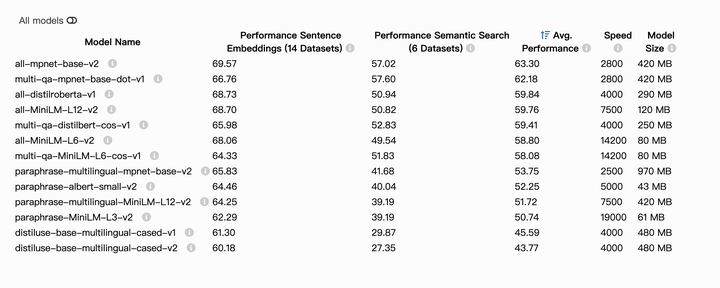
Chroma默认使用的是all-MiniLM-L6-v2模型来进行embeddings。
也可以直接使用官方预训练的托管在Huggingface上的模型:
from sentence_transformers import SentenceTransformer
model = SentenceTransformer('model_name')
选择非常多,可以点击官网查看每种预训练模型的详细信息:https://www.sbert.net/docs/sentence_transformer/pretrained_models.html
还可以使用其他第三方模型,包括第三方平台,例如:
openai_ef = embedding_functions.OpenAIEmbeddingFunction(
    api_key="YOUR_API_KEY",
    model_name="text-embedding-ada-002"
)
比较吸引我的是,chromadb还支持集成Ollama中的模型进行embedding:
import chromadb.utils.embedding_functions as embedding_functions

ollama_ef = embedding_functions.OllamaEmbeddingFunction(
    url="http://localhost:11434/api/embeddings",
    model_name="llama2",
)

embeddings = ollama_ef(["This is my first text to embed",
                        "This is my second document"])
记录一个适合中文矢量化的模型:coROM中文通用文本表示模型。
这是阿里旗下的Embedding模型,基于Pytorch的,等以后尝试加载到Ollama,用起来就更方便了。
此内容由惯性聚合(RSS阅读器)自动聚合整理,仅供阅读参考。 原文来自 — 版权归原作者所有。