


The OpenAI Assistants API empowers developers to effortlessly create robust AI assistants within their applications. This API includes the following features/functionality in that it:
In this article, we'll look at the Assistants API and how we can build a custom knowledge base using vector databases like MyScale and link it to Assistants API to achieve greater flexibility, accuracy, and cost savings.
](https://colab.research.google.com/github/myscale/examples/blob/main/assistant.ipynb))
](https://github.com/myscale/examples/blob/main/assistant.ipynb))
An OpenAI assistant is an automated workflow that can leverage Large Language Models—LLMs, tools, and knowledge bases to answer user queries. And as highlighted above, you must use the Assistants API to create an OpenAI assistant.
Let's start by taking a look inside the Assistants API:
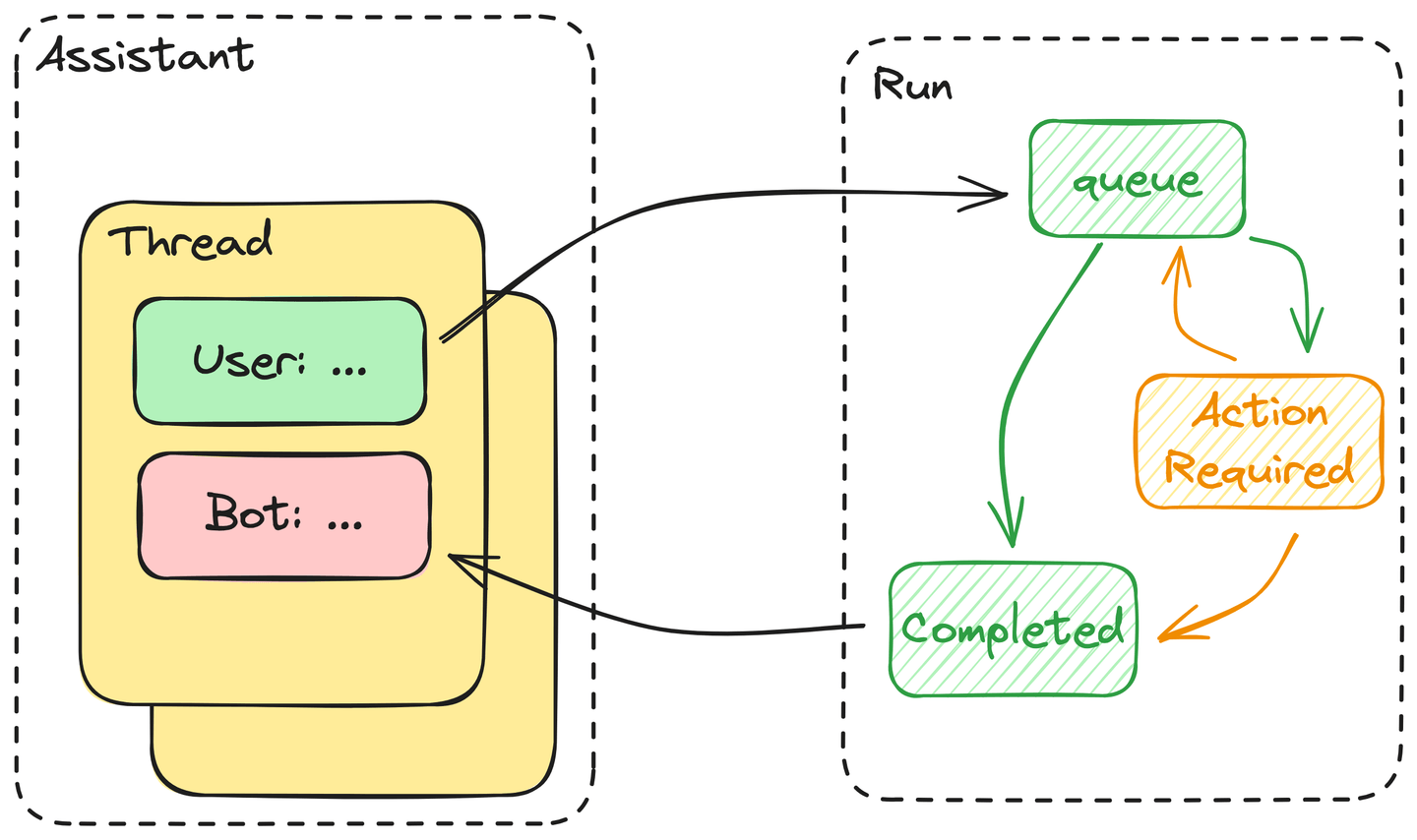
The Assistants API consists of the following core components:
It is an indication of Artificial Intelligence because these assistants know how to use the tools they are given via API calls. To this end, OpenAI has proven that GPT can turn user requests into formatted usage tools via a function call passed to the API. Therefore, in human terms, this is equivalent to knowing how to use a tool.
Moreover, these assistants can decide when and which tools should be used during the execution of a single run. If we simplify this process, we will find that:
ActionRequired state—the tool's output blocks it until the required action is provided. If not, the assistant will immediately return the answer and mark this run as Completed.In summary, the execution of a run is basically an automaton driven by an LLM.
Boost Your AI App Efficiency now
Sign up for free to benefit from 150+ QPS with 5,000,000 vectors
MyScale has an SQL interface—a significant advantage for automated queries. Additionally, LLMs are good at writing code, including SQL. Thus, we have combined the SQL WHERE filters with a vector search—as described in our function call documentation (opens new window).
Let’s now consider expanding this function call into a link between MyScale and OpenAI’s Assistants API.
OpenAI includes a Retrieval tool with the Assistants API that costs $0.2 / (GB * num_assistants) per day. Taking the Arxiv dataset, for example: its data is circa 24GB with the embedding. This will cost you $5 every day ($150 monthly) for just one assistant. Also, you never know what the retrieval performance will be for accuracy and time consumption. Only GPT knows whether it contains valuable knowledge or not. Consequently, an external vector database is a must if you have tons of data to store and search.
According to the Assistants API's official documentation, you can create an assistant using OpenAI().beta.create_assistants.create. Here is an example if you want to build an assistant with an existing knowledge base:
The exposed function has three inputs: subject, where_str, and limit, matching the implementation of the MyScale vectorstore in LangChain (opens new window).
As described in the prompt:
subject is the text used for the vector search andwhere_str is the structured filter written in an SQL format.We also add the table schema to the tool description, helping the assistant write filters using the correct SQL functions.
To inject external knowledge from MyScale into our assistant, we need a tool to retrieve this knowledge based on the arguments generated by the assistant. By way of an example, we minimized the implementation to the MyScale vector store, as the following code shows:
Secondly, we need a new thread to hold our input:
Runs are created from threads and are linked to a specific assistant. Different runs can have different assistants. As a result, a thread can contain messages generated using different tools.
It is essential to constantly check this run’s status and provide outputs for every function the assistant calls.
Once the outputs are submitted, the run will reenter the queued state.
Note: We also need to check this run’s status constantly.
Finally, this example demonstrates how to use the Assistants API.
Join Our Newsletter
In conclusion, integrating the MyScale vector database as an external knowledge base with OpenAI’s Assistants API opens up new horizons for developers seeking to enhance their AI assistants. By seamlessly incorporating this valuable resource, developers can leverage the power of MyScale alongside OpenAI-hosted tools like Code Interpreter and Retrieval.
This synergy not only streamlines the development process but also empowers AI assistants with a broader knowledge base, providing users with a more robust and intelligent experience. As we continue to make advancements in the study of Artificial Intelligence, such integrations mark a significant step toward creating versatile and capable virtual assistants.
Join us on Discord (opens new window) today to share your thoughts on the Assistants API!
此内容由惯性聚合(RSS阅读器)自动聚合整理,仅供阅读参考。 原文来自 — 版权归原作者所有。