




Your website is often the first impression potential customers have of your business. A professional website can help establish trust and credibility, while a poorly designed or outdated one can turn visitors away. That’s why you should always look out for website mistakes!
In this article, we’ll go through 10 website mistakes that can make you look unprofessional and provide tips for avoiding them.
At a glance
- Poor navigation
- Slow load times
- Outdated content
- Broken links
- Poor mobile responsiveness
- Cluttered design
- Lack of contact information
- Inconsistent branding
- Poor grammar and spelling
- Lack of security

📌 Website mistakes you should avoid
1. Poor navigation
One of the most frustrating experiences for website visitors is trying to navigate a poorly designed website. Confusing menus, hidden pages, broken links, and other navigation issues can make visitors close your website and look somewhere else.
When designing your website, it’s important to consider the user experience and make sure that your navigation is intuitive and easy to use.
For example, to make everything smoother, you could:
- organize your content into clear categories;
- use descriptive labels for your menu items;
- add a search bar to help users find specific content.
Another common mistake is burying important pages, such as your contact information or product pages, deep within your website. Make sure these pages are easily accessible from your homepage or main menu.
2. Slow load times
Users expect pages to load quickly. If your website takes too long to load, they may abandon it altogether.
There are several factors that can contribute to slow load times: large images and videos, too many plugins or widgets, a lack of optimization for mobile devices.
To improve load times, it’s important to optimize your website’s content: so, reduce the size of your images, compress videos, and minimize the use of unnecessary plugins or widgets. Another effective strategy is to use a Content Delivery Network (CDN), which can help speed up the delivery of your website by distributing your content across multiple servers.
Additionally, consider using a caching plugin or tool, which can store commonly used elements of your website – such as images and scripts – in a user’s browser cache, reducing the time it takes to load your website on subsequent visits.
3. Outdated content
Outdated content is one of those website mistakes that can make your website look neglected. Outdated content can include old blog posts, outdated product information, or details about events that have already taken place.
Not only can outdated content make your business look unprofessional, but it can also negatively impact your search engine rankings, as search engines tend to favor websites with fresh, relevant content.
To avoid this mistake, make sure to regularly review and update your website’s content. A content calendar can help you stay organized and plan out updates in advance.
4. Broken links
Broken links can be a really frustrating experience for users. If all they can see are 404 error pages, it’s likely they’ll never visit your website again.
Broken links can occur due to a variety of reasons, such as changes in website structure or moving content to new pages. To avoid them, it’s important to regularly review your website. For example, there are online tools – like Google Search Console – that scan your website for broken links and help you monitor the situation.
Moreover, if you make changes to your website’s structure or move content to a new page, make sure to redirect the old URLs to the new URLs using 301 redirects. This will ensure that users who click on the old links are redirected to the new pages, and search engines can update their indexes accordingly.

5. Poor mobile responsiveness
More than half of all internet traffic now comes from mobile devices, so it’s essential that your website is optimized for mobile users.
A website that is not mobile-responsive may have text that is too small to read, images that do not resize properly, or menus that are difficult to navigate on a smaller screen.
Most modern website builders are natively responsive. So they have responsive designs that automatically optimize your website for mobile.
👉 Learn more about responsive website builders here.
6. Cluttered design
A cluttered design is one of the most common web design website mistakes. It can make it difficult for users to find the information they need. If you’re using too many colors, fonts, or images on a single page, the navigation experience can soon become overwhelming.
To avoid a cluttered design, it’s important to prioritize simplicity and clarity in your website’s design. Use a consistent color scheme and typography throughout your website to create a cohesive look, and limit the number of fonts and colors.
Moreover, you could use white space strategically to break up content and make it easier to read. Clear, concise language and headings and subheadings will also help you organize your content and make it easier to scan.
7. Lack of contact information
A website is often the showcase of a business, so it should be easy for potential customers to contact you. If your website doesn’t include contact information, or if it’s difficult to find, it can make your business appear unprofessional.
To avoid this mistake, make sure that your website includes clear and visible contact information. This may include a contact page with a contact form, phone number, email address, and physical address. If you have a physical store or office, you could also include a map or directions to your business location to help users find you more easily.
How to make your forms GDPR-compliant
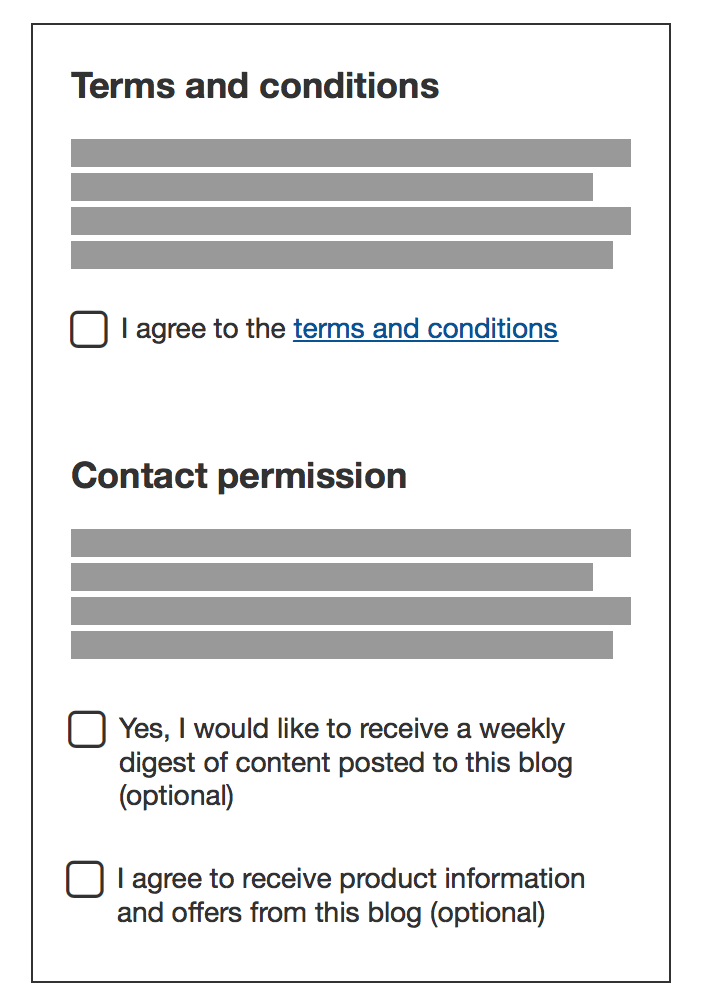
If you’re adding a form on your website, you are collecting the personal information of the users’ contacting you. That’s why it’s crucial that your forms are GDPR-compliant.
Here are a few tips:
- Avoid pre-ticketed boxes.
- Ask for different consents for each purpose: for example, you should have one box to agree to your Terms and Conditions and another one for marketing emails.
- Make it easy to withdraw consent, and specify this in your form.
- Keep a record of the consent you’ve collected.
8. Inconsistent branding
Inconsistent branding can make your business appear unprofessional and confuse users about your brand identity.
To avoid this, you should create a clear and consistent brand identity and stick to it throughout your website. Use the same colors, fonts, and styles on all pages of your website to create a cohesive and recognizable look and feel. Make sure to use the same logo and tagline throughout your website and all of your marketing channels, such as social media, email marketing, and advertising.
By maintaining consistent branding across all channels, you can create a stronger, more professional brand identity that is easily recognizable to your audience.
9. Poor grammar and spelling
Poor grammar and spelling is one of the website mistakes that quickly turn visitors away, because it can also make it difficult for users to understand your message and may lead to confusion or frustration.
Take the time to proofread all of the content on your website, including text, images, and videos. Use spell-check and grammar-check tools to catch any errors, and have a second set of eyes review your content for accuracy and clarity.
It’s also crucial to avoid using jargon or industry-specific language that may be confusing to users who are not familiar with your business.
10. Lack of security and legal documents
A lack of security on your website can make your business vulnerable to hacking, malware, and other cyber threats, and can also make your customers’ personal information at risk. This can lead to a loss of trust and credibility with your audience and can damage your business reputation.
To avoid this mistake, make sure that your website has adequate security measures in place, such as:
- SSL encryption;
- regular software updates;
- strong passwords for all accounts and two-factor authentication.
Then make sure to back up your website regularly to prevent data loss in the event of a data breach.
Finally, don’t forget compliance with privacy laws!
Legal compliance is often overlooked, but it shouldn’t. Now more than ever, people are conscious about privacy and how their data is used. Being transparent with them allows you to build a relationship based on trust, which will likely last longer.
Avoid website mistakes: How do you comply with privacy laws?
The first thing to do here is to determine your law (or laws) of reference, that is the law that applies to you.
Then you should create and add your documents.
Each website has its specific needs, so the documents you need may vary. However, generally speaking, a website will most likely need:
- a privacy policy, that is a document that contains all the information about the data you collect through your website and how you’re planning to use it;
- a consent management platform, that can help you manage every aspect of cookie consent and privacy preferences.
- if you run an e-commerce, or a more complex website, you may also need a terms and conditions document, which helps you set the rules on how to use your services or content.
Complying with privacy laws may seem complicated, but not with the right tools!
Take iubenda, for example.
iubenda offers attorney-level solutions to make your websites compliant with the law across multiple countries and legislations.
Creating your legal documents is really easy!
- Scan your website.
- Get your tailored report.
- Generate your documents with the guided set-up and add them to your website!
Curious to know what you might need?
About us

Attorney-level solutions to make your websites and apps compliant with the law across multiple countries and legislations.