






42
Thanks guys, after updating and a hard refresh it is now working as expected!
2 Likes
sunjam (james.network) 43
Just started testing this component; thanks! I’d curious about adding Placeholder text to private messages. Has anyone tried that?
Rhidian (Rhidian Bramley) 44
Private messages have the same default placeholder text as Topic posts. It can be changed by the site administrators under the admin settings Customize > Text. Search for js.composer.reply_placeholder - as shown at the top of this thread.
If you use this component to customise the placeholder text for each Topic Category, the default placeholder text should only apply to the Private Messages.
1 Like
JQ331 45
This theme component is really cool. I’ve been trying to find a way to give my users a little more guidance when they create a topic, and would like to make the experience more like completing a form.
Right now, this theme component makes it so that all text that is preloaded in a topic is a single placeholder. So, once a user types anything in the topic composer, all of the placeholder text goes away.
Would it be possible to have it so that there are different placeholders on the page? For example, the topic template could load a separate placeholder for:
“Name”
“Location”
“Issue”
So that when the users types in their name, the other placeholders for Location and Issue stay there, until the user types in their spots too?
Rhidian (Rhidian Bramley) 46
The default Discourse Topic Template Text stays whilst the user is typing. It sounds like that is what you need?
JQ331 47
The Placeholder Approach:
What I (and others?) would be looking for would behave more like placeholders in a form (meaning with separate form elements).
The basic default behavior now would allow me to list out different sections of the form, like what I wrote (“name”, “location”, and “issue”), but the default template behavior has the same problems as noted before–markdown makes it confusing and user can break it easily.
I think the ideal would be like a normal form, where there is a placeholder for each section (name, location, and issue), but (here’s the difference) the sections would behave independently. So when the user clicks on the name section, the placeholder “name” disappears, but the other sections stay until the user clicks on those too.
I could imagine this being possible (?) with jquery. Each section would have to have its own div with id, and then jquery would allow showing or removing the text of that particular id when the user clicks on it. This would require adding divs into the textarea, however, and I’m not sure how to do that.
I’m investigating that here.
The Template Approach
Probably an alternative would be that the section headers don’t “disappear” when the user clicks. So the section headers (example: Name, Location, and Issue) would be text that would stay on the page. To make it more form-like, compared to the current template default:
contenteditable="false")return, to create space to type.Perhaps this is the easier way to do it?
Ed_Bobkov (Ed) 48
I found this setting only apply on first post not working.
It doesn’t work if I want all posts in a topic have the same placeholder and deactivate the setting. I get a standard placeholder in this case.
JQ331 49
Any possibility of having a placeholder specific to replies (not the first post in a topic)? I’m hoping to give users more guidance on what can be in a reply, and a placeholder that pops up in a reply would be helpful.
4 Likes
nathank (Nathan Kershaw) 50
I’ve found that this works for replies only if the placeholder text has more than one line. Got no idea why as the code is a bit too complicated for me.
While there I’ve dropped in a small PR to stop the browser console warnings:
2 Likes
I’m having an issue where Placeholder Text doesn’t appear. What am i missing?
Template:

Component Setting

No placeholder/template text appears

When unticking “Display all your Topic Templates as placeholders”

Template appears as editable text (not placeholder text)

Edit Template Text it include [placeholder]
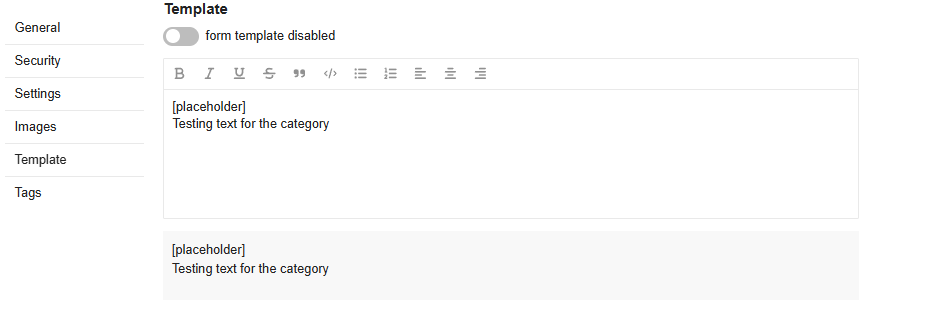
Template Text disappears/no placeholder text

This is on a fresh Discourse install, no plugins/components installed - Discourse 3.4.0
patrickemin (Patrick EMIN) 54
This component stopped working for me.
Oh well, I can confirm it’s not working. Probably because of major recent changes on Discourse.
1 Like
patrickemin (Patrick EMIN) 56
Hi, any hope it’s updated ? 
Don 57
Hello 
I’ve created a PR to bring this theme component back to life and make it compatible with the latest Discourse. 
8 Likes
Rhidian (Rhidian Bramley) 58
Thanks @Don I’ve merged your pull request. Please test that’s working for you. 
3 Likes
nathank (Nathan Kershaw) 59
I’ve just re-installed and used it - seems to be working well now.
Therefore, I’ve removed the broken tag.
2 Likes
martyn_thomas (Martyn Thomas) 60
[Admin Notice] Theme ‘Topic Template Placeholder Text’ contains code which needs updating. (id:discourse.resolver-resolutions)
[THEME 50 ‘Topic Template Placeholder Text’] DEPRECATION NOTICE: “site:main” is deprecated, use “service:site” instead [deprecated since Discourse 2.9.0.beta7] [deprecation id: discourse.resolver-resolutions]
Rhidian (Rhidian Bramley) 61
I’ve made that change and issued an update. All should be working now.
2 Likes
此内容由惯性聚合(RSS阅读器)自动聚合整理,仅供阅读参考。 原文来自 — 版权归原作者所有。
