


23
Hi Nat,
When I used this plugin at a former community, we could hide the video-player iframe until the user hit Going.
nathank (Nathan Kershaw) 24
This is an excellent feature request, and seems as though it would be quite doable. I can see our sites using it quite a lot as we have the same problem with cluttered meeting / event Topics. @nat - could that be broken out into its own Feature topic?
2 Likes
nat (Natalie T) 25
It does sound like the request is being made in this plugin topic but out of convenience.
From what I can read here it feels like folks want “short lived” information within a topic itself, and since Livestream has this ability, folks are leveraging this to do more things.
My suggestion would be for you to create the Feature topic with very specific requests. Or better yet upvote an existing one.
4 Likes
nathank (Nathan Kershaw) 26
Maybe this Topic is the best place - we are actually debating the core use-case of the Plugin.
It would make sense to me if it was instead the Discourse Topic Chats Plugin, with Livestreaming being one of the use-cases (simple events another - I’m sure that there would be more).
This could be achieved by having a setting for the Tags (and/or Categories) that this should apply to, instead of locking it to the livestream tag.
3 Likes
putty (putty) 27
To circle back on the solution for anyone else, you block out the content with the following:
[preview]
Here is preview text that is be visible prior to RSVP'ing
[/preview]

[hidden]
This section is not visible until the user RSVP's going
[/hidden]
I mistakenly thought it meant:
[wrap="preview"]
[/wrap]

[wrap="hidden"]
[/wrap]
10 Likes
exodrifter (Ava Pek) 28
I used this on my forum to do a watch party for Sony’s State of Play. We really liked it, but I am a bit confused about what this plugin does exactly.
It seems me that the purpose of this plugin is to watch videos synchronously with others. It happens to be the case that we were watching a Youtube livestream, so our video feeds were synced… until the livestream was over. Changing the video time afterwards, the playback didn’t get synced to others. But, the original post has a screenshot of the rick roll Youtube video, so maybe it does sync the playback and I’m just not aware of how that works? It would be nice if it did so we could do things like movie nights.
To be clear, I think not having playback sync is understandable since it’s quite a complicated feature as I understand it, but then am I correct in my understanding that all this plugin does is add a chat to the side of a thread? In that case, I don’t know why this plugin would have seemingly arbitrary requirements to have a video link embed, an event, and the livestream tag in order to add a chat sidebar to the right, or why the plugin has to be about livestreams specifically. In that case, I feel like @thoka’s suggestion is what this plugin does already, if this plugin just added one way to toggle the chat sidebar for topics instead of the other requirements.
1 Like
exodrifter (Ava Pek) 29
We ran into a bug where if you try to navigate to another livestream topic, the chat sidebar is not updated to the chat for that topic. This happens when, for example, a link is posted in a livestream chat to another livestream topic and you click that link.
1 Like
I just tested with Peertube live. It works, but I found the video delay between my laptop connected over WiFi to the Peertube (using OBS), and back is about 20 seconds, which seems a bit high for the usage I have in mind (replacing Twitch).
I guess using Peertube live and its chat directly would give less delay (and allow for federated participation in the chat).
Yet, I find it interesting and will pursue testing, especially as I would like to benefit from Discourse integration at some point, i.e., going live, and writing together in a post with shared editing enabled.
For now Peertube Live + HedgeDoc sounds easier than Discourse Livestream, but pad is not chat, and Peertube doesn’t have the event-attendance-to-chat feature, which could be combined with the Subscriptions plugin. Did anyone test that already?
A couple of things that could make things better:

These popped up from the top of my mind, maybe it’s not useful or maybe there are easier or different solutions to these situations.
In any case it’s very encouraging to be able to livestream on Discourse.
4 Likes
hellekin 35
Oh, and I forgot to mention a bug^W^W an undocumented feature: if enable_public_channels is unchecked, an Error 500 will fire. Although it would be easier to document it, I’d rather have the possibility to reserve the chat to select groups (as in the Livestream situation) than enabling chat for all categories: is there a way to do that using the existing settings?
nat (Natalie T) Split this topic 36
hellekin 40
I’m trying to figure out why my site became sluggish…
[PLUGIN discourse-livestream] Deprecation notice: Accessing site.mobileView or site.desktopView during the site initialization phase is deprecated. In future updates, the mobile mode will be determined by the viewport size and as consequence using these values during initialization can lead to errors and inconsistencies when the browser window is resized. Please move these checks to a component, transformer, or API callback that executes during page rendering. [deprecated since Discourse 3.5.0.beta9-dev] [deprecation id: discourse.static-viewport-initialization] [info: Designing for Different Devices (Viewport Size, Touch/Hover, etc.)] deprecated.js:62:13
2 Likes
eve (Phú)
41
It would be nice if one can adjust the size of the chat like with the default drawer mode of the chat. And also the size of the embedded live stream.
Currently it looks like this

There is a lot of unused space. When you switch the livestream to full screen, chat is no longer visible and usable.
1 Like
nat (Natalie T) Split this topic 43
james10 (james)
47
Hi all,
I have turned on all plugins, chat is enabled, etc. But after I select ‘going’ to the event I don’t seem to be able to have access to the chat.


nat (Natalie T)
48
Hey @james10, thanks for writing in.
I just did a quick check and updated this setting to Trust Level 0 (virtually similar to “everyone”, though “everyone” includes anonymous users, which is technically not possible since users need to be logged in to use chat).
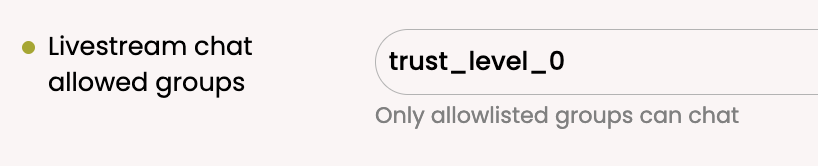
It should now work.
I believe the “everyone” group was causing problems because it’s not exactly a real group, and our plugin wasn’t doing a correct check here. I’ll update OP to indicate this gotcha as well.
3 Likes
此内容由惯性聚合(RSS阅读器)自动聚合整理,仅供阅读参考。 原文来自 — 版权归原作者所有。