







1
Hey guys, I’m a new Linux user, testing distros because I can’t stay still. I’ve already tested PopOS, Fedora SilverBlue, and now I’m on CachyOS. I installed it yesterday and today, testing it with games I play casually (Tibia), and when I checked my notebook’s temperature, it was nearing 100 degrees Celsius. I tested it by installing NBCF and messing with some BIOS settings, but it continues to overheat, even when idle. Also, I feel like the fan isn’t working. Does anyone know what the problem could be?
Here’s a reading from the sensors that I sent to a friend: sensors
coretemp-isa-0000
Adapter: ISA adapter
Package id 0: +96.0°C (high = +100.0°C, crit = +100.0°C)
Core 0: +91.0°C (high = +100.0°C, crit = +100.0°C)
Core 4: +96.0°C (high = +100.0°C, crit = +100.0°C)
Core 8: +92.0°C (high = +100.0°C, crit = +100.0°C)
Core 9: +92.0°C (high = +100.0°C, crit = +100.0°C)
Core 10: +92.0°C (high = +100.0°C, crit = +100.0°C)
Core 11: +92.0°C (high = +100.0°C, crit = +100.0°C)
Core 12: +89.0°C (high = +100.0°C, crit = +100.0°C)
Core 13: +89.0°C (high = +100.0°C, crit = +100.0°C)
Core 14: +89.0°C (high = +100.0°C, crit = +100.0°C)
Core 15: +89.0°C (high = +100.0°C, crit = +100.0°C)
BAT0-acpi-0
Adapter: ACPI interface
in0: 12.57 V
power1: 0.00 W
iwlwifi_1-virtual-0
Adapter: Virtual device
temp1: +53.0°C
nvme-pci-0100
Adapter: PCI adapter
Composite: +61.9°C (low = -273.1°C, high = +85.8°C)
(crit = +86.8°C)
Sensor 1: +66.8°C (low = -273.1°C, high = +65261.8°C)
Sensor 2: +61.9°C (low = -273.1°C, high = +65261.8°C)
acpitz-acpi-0
Adapter: ACPI interface
temp1: +27.8°C
So it’s not over heating. 100C is the safe limit for the CPU die and the FW is letting your system get that hot. If your computer rebooted or showed graphical glitches, then you can say it was over heating. However, you can install thermald (sudo pacman -Su thermald and then sudo systemctl enable --now thermald) and that will keep the temps down to 60C by throttling the CPU frequency. Most people don’t want thermald since throttling lowers overall perf, but if your system is getting too hot, then you might consider throttling useful.
Do note that thermald is only for Intel CPUs. I assume you are using an Intel laptop since your WiFi card vendor is Intel… But if you do have an AMD laptop you will need to consult the Arch Wiki for help on what userspace tools are available for AMD.
Another option is to disable turbo boost:
#!/bin/bash
#Toggle Turbo Boost feature
#no_turbo=<0|1>
no_turbo="/sys/devices/system/cpu/intel_pstate/no_turbo"
tb_state=$(<"$no_turbo")
if [ $tb_state -eq 0 ]; then
  echo 1 > "$no_turbo" && echo "Intel Turbo Boost: Disabled"
else
  echo 0 > "$no_turbo" && echo "Intel Turbo Boost: Enabled"
fi
save that as tb-toggle.sh, right click and make it executable, then run in terminal as sudo ./tb-toggle.sh (when terminal is launched from the directory or use the path to the scrip file instead of ./). This will toggle the turbo boost feature on and off. Or you can try using power-profiles-daemon with power-save for similar behavior with less effort.
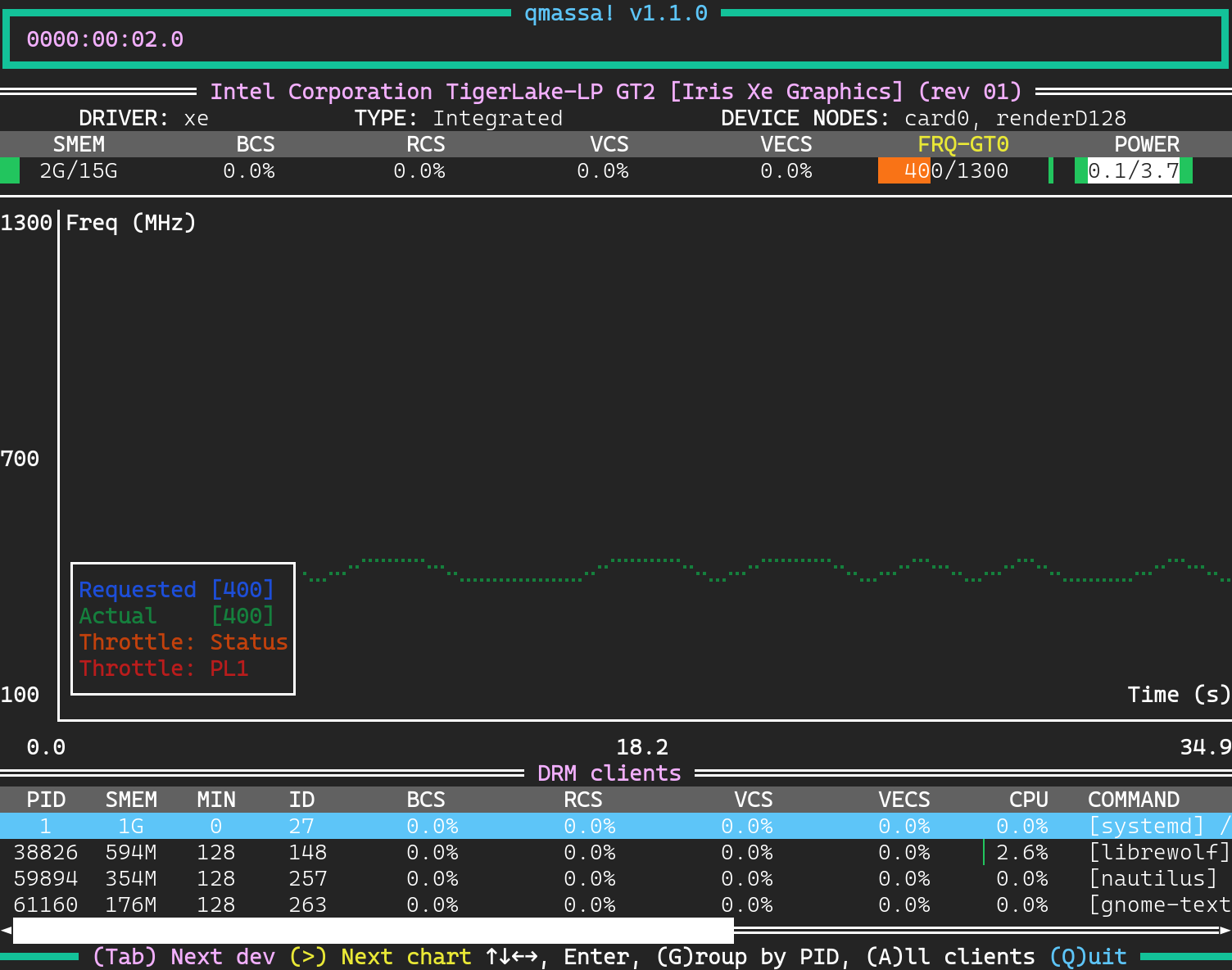
If you install intel_gpu_top or qmassa (needs to be built manually from github) you can profile SoC power usage (both GPU and SoC power draw are reported). You need to launch them with sudo privileges to see power draw.
To profile power draw use qmassa with the Xe kernel driver:
And also use htop to see CPU clock speed:
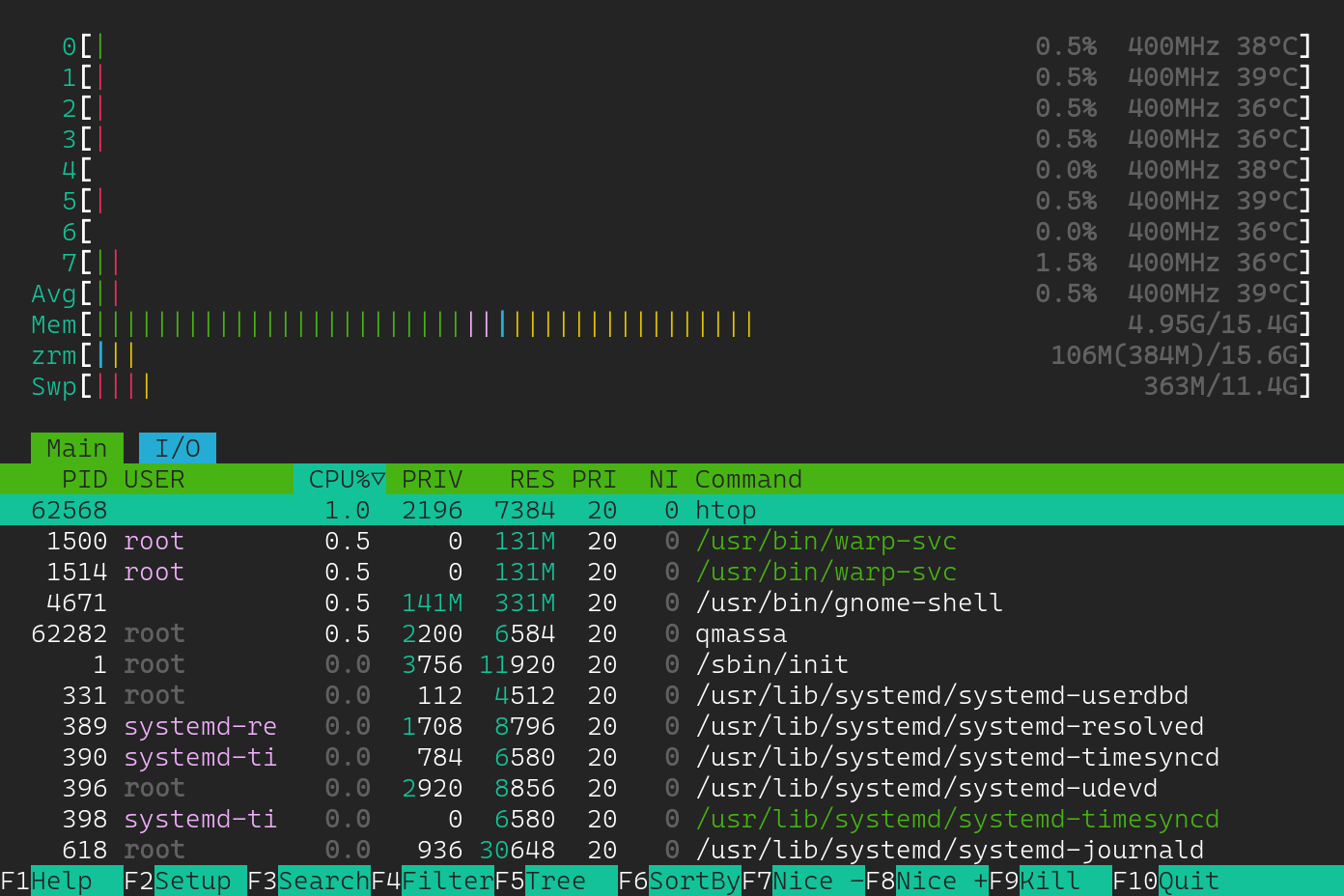
My system usually idles at .7 watts SoC power draw (this is not the same as total power draw which would include the display and connected USB devices). However I have an external USB HDD connected that for whatever reason causes elevated idle power draw to ~3.4 watts. Not a big deal, but something to be aware of when connecting peripherals and external storage. Anyways, you can use these tools to figure out why your CPU is running hot. It is possible that your CPU clock speed is stuck at max frequency and is not properly clocking down. Notice how my CPU was idling at 400 MHz, it maxes out at 4.9 GHz with turbo boost enabled.
cscs 4
Hello and welcome,
We might also get some system info;
cachyos-bugreport.sh
I understand now, it’s my first system that’s pushing my laptop to its limits, so I was surprised when I touched it and burned myself. I disabled quiet mode in the BIOS and the battery saving mode, so now the temperature is stable at 60-70 degrees. But another question: even when playing something relatively light, does it get hotter than normal even though it doesn’t need that much power?
Here’s a screenshot of the cpufreq
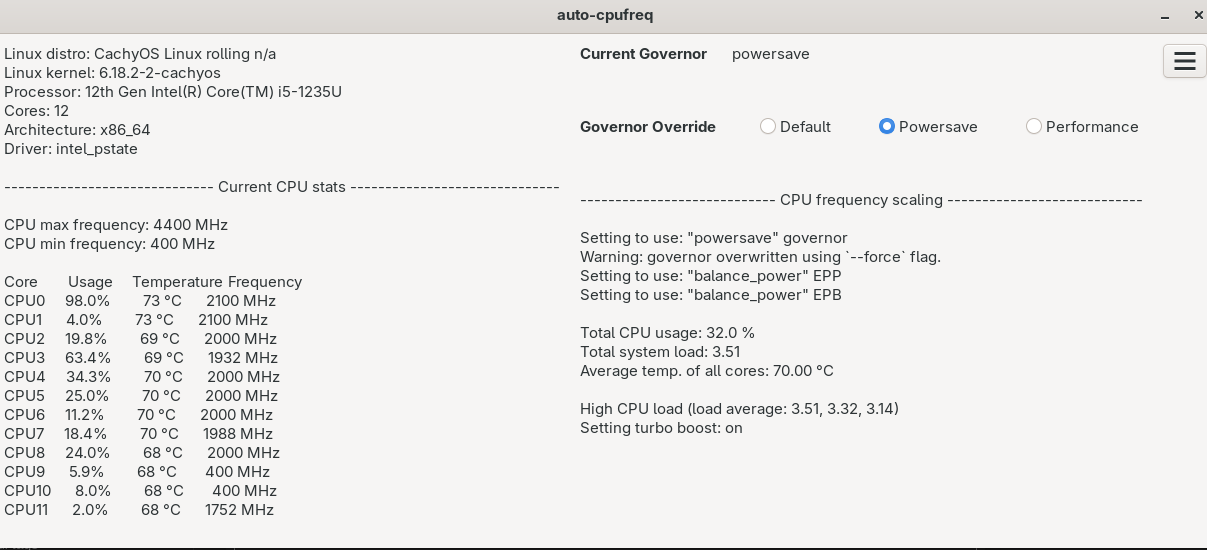
So in GNOME you can just select the power profile from the “quick settings panel”. There is Balanced, Power Save, and Performance. Balanced is usually good enough, but Power Save can be used when on battery power to extend runtime but harms performance when playing games.
If you dock or leave your laptop plugged into AC power for extended periods (days or more) you should enable the battery conservation mode for Lenovo laptops. This keeps the LiPO battery charged at 60% to avoid damage from micro cycling near ~90% state of charge.
#!/bin/bash
#Lenovo battery conservation mode (keeps battery around 60% charged)
#conservation_mode=<0|1>
bcm="/sys/bus/platform/drivers/ideapad_acpi/VPC2004:00/conservation_mode"
if [[ ! $(cat "$bcm") = 1 ]]; then
  echo 1 > "$bcm"
  echo "Lenovo Battery Conservation Mode: enabled"
else
  echo "Lenovo Battery Conservation Mode: already enabled"
fi
If your CPU clock speed stays above 400 MHz when idling without something actively running in the background, I would investigate this futher. Your laptop should only get that hot when playing a game or some other demanding task that fully loads your system. If it is getting this hot while browsing the web or watching videos you have a misconfigured system. For videos, I use MPV with HW decoding via VAAPI
#/home/"$USER"/.config/mpv/mpv.conf
vo=dmabuf-wayland
#vo=gpu-next
hwdec=vaapi,auto
hwdec-codecs=all
video-sync=display-resample
interpolation=yes
fullscreen=yes
osd-on-seek=no
hr-seek=yes
The settings configured in the BIOS for the ACPI Platform power are usually overwritten by the Linux kernel during boot and can be changed at runtime by editing settings under /sys. I find it easier to manually set these settings, but I’m sure there is a GUI tool available to do this.
#Set platform profile (CPU and GPU power/frequency limits)
#platform_profile=<low-power|balanced|performance>
plat_prof="/sys/firmware/acpi/platform_profile"
if [[ ! "$(cat "$plat_prof")" = "performance" ]]; then
  echo performance > "$plat_prof"
  echo "platform profile: performance mode enabled"
else
  echo "platform profile: performance mode already enabled"
fi


#Set CPU EPB value (affects P-state and C-state selection)
#energy_perf_bias=<0 (perf) | 4 (bal-perf) | 6 (default) | 8 (bal-power) | 15 (power)>
#sudo sh -c "4 > /sys/devices/system/cpu/cpu*/power/energy_perf_bias"
#or use
epb="/sys/devices/system/cpu/cpu0/power/energy_perf_bias"
if [[ ! $(cat "$epb") = 4 ]]; then
  cpupower set -b 4
  echo "EPB balanced-performance mode: enabled"
else
  echo "EPB balanced-performance mode: already enabled"
fi


#Set CPU EPP value (affects frequency scaling)
#energy_performance_preference=<performance|balance_performance|balance_power|power>
#sudo sh -c "echo balance_performance > /sys/devices/system/cpu/cpu*/cpufreq/energy_performance_preference"
#or use
epp="/sys/devices/system/cpu/cpu0/cpufreq/energy_performance_preference"
if [[ ! "$(cat "$epp")" = "balance_performance" ]]; then
  cpupower set -e balance_performance
  echo "EPP balanced-performance mode :enabled"
else
  echo "EPP balanced-performance mode: already enabled"
fi
tenkuma 7
I have the same laptop and it overheats. Replacing thermal paste only mitigates the problem, it occours on Linux and is worse on Windows, causing the computer to suddently power off. Been using the PC for two years and after struggling to use at that temperature the only solutions that worked for me were thermald and no turbo (with ThrottleStop on Windows).
My guess is that this is consequence of Lenovo’s poor design choices, the wifi card in this laptop is weird too, with problems like not coming back from sleep (now it only occurs on Windows, probably patched on Linux) and not being able to scan for new networks without restarting the card.
Pretty decent CPU, pretty decent GPU, poor dissipation ruined everything.
Yes, I think that’s the problem, this poor arrangement of items. I’ll have to send it to a repair shop to replace the thermal paste and have it cleaned. And I think the problem was never the cachyOs; recently a problem started happening even in Fedora. When my computer is hot or just has been on for a long time, only when I open the “Show Apps” tab, and I repeat, only at that moment, my computer crashes and only forcing a shutdown works. And this problem is currently haunting me. Maybe it’s a PC problem, an extension problem because I use the vertical app, or I don’t know what…