




Lately I’ve been experimenting with map algorithms. I have three starting points:
| Generator | Elevation | Biomes | Rivers | Editable? |
|---|---|---|---|---|
| mapgen1 | noise | noise | down | no |
| mapgen2 | distance field | distance field | down | no |
| mapgen4 | noise | simulation | up | yes |
(What happened to mapgen3? It was a failure. I had tried to change the programming language, data structures, and algorithms at the same time. I had better luck changing one thing at a time.)
I’d prefer to use mapgen4 for my experiments. But it’s hard.
Mapgen1 and mapgen2 were non-interactive. They had to run at a reasonable speed, but just once. My goal was to have it take less than 1 second. In mapgen4 I wanted every edit to re-run the entire simulation from scratch. I re-calculated the elevation, evaporation, wind, rainfall, biomes, and river flow, and then render the whole thing, ideally in 30ms. But the simulation was far more expensive than what I was using in mapgen1 and mapgen2. It took 30 seconds.
I needed to speed it up by a factor of 1000.
It took a few months in 2018, but I did it. I’m proud of that.
To make the code run faster, I:
But all of this made the code hard to work with. I had optimized it to do only the things I needed in mapgen4. It’s hard to change anything, especially at run time, with a slider. And I grew to hate working with that code.
Back in 2019 I posted to twitter[1]:
When I’m working with simple but inefficient code, I can move from design A to B to C easily. When I optimize the code, I’m often pushing myself into a local minima. It’s not only harder to change designs, I often can’t even see the other designs anymore. Mapgen4 is stuck.
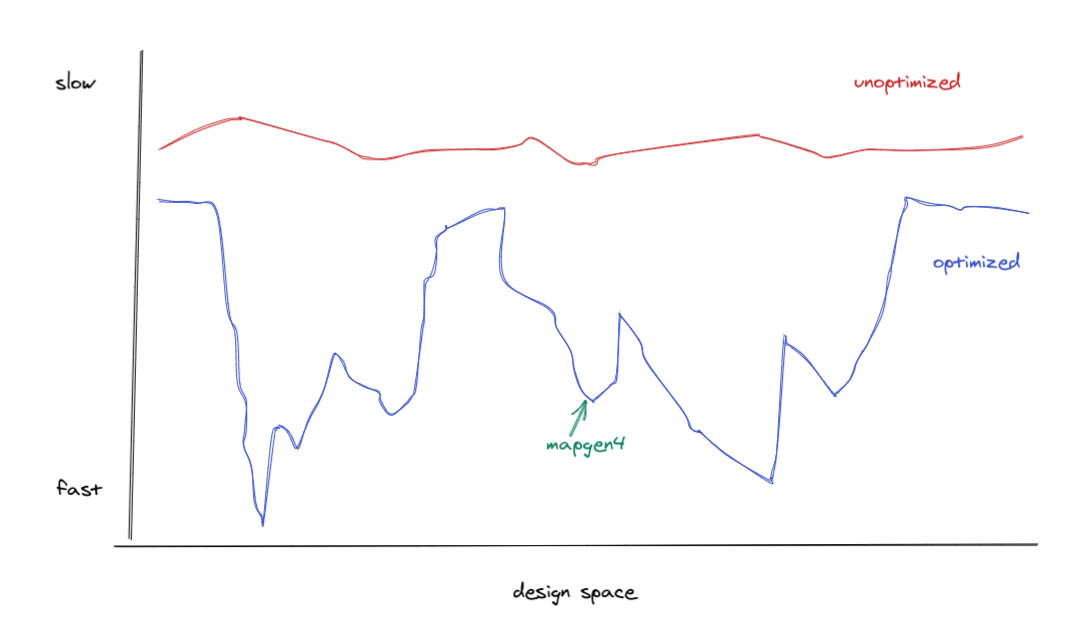
This also happens to me with abstractions. When I use abstractions early, I push myself into local minima. Harder to change, also harder to see other possibilities. Last year I had to de-abstract the code on my A* page before I could make progress https://simblob.blogspot.com/2020/04/graph-search-diagrams-and-reusable-code.html[2]
The next time I’m working on a map generation project, it will be hard to start from mapgen4 because it’s so optimized into its niche. I hate the code. I’m going to have to de-optimize it first before I can move around in generator design space. Then re-optimize it at the end.
It’s been many years now, and I’m ready to revisit the code. I wanted to experiment with some map algorithms, and tried using mapgen4 as the base. But it was a pain. Drawing a bezier curve or text in webgl is so much more work than drawing it in 2D Canvas. So I thought: what if I drew to a 2D Canvas, and then “draped” that over the mapgen4 map? I tried that back in January. It worked. Mostly. I don’t have the map data in the main thread; it’s only in the worker thread. So I drew to the 2D Canvas in the worker thread, using OffscreenCanvas, a feature that wasn’t available back in 2017 when I started mapgen4, but is available as of 2023. It was a little awkward. And sometimes glitchy. And inconsistent across browsers. It’s good enough for my own experiments but not as good for things I want to share.
So when I wanted to try an actual experiment, I went back to mapgen2. It’s reliable. I tried an experiment to build towns and roads on the map. It was so much easier to work with mapgen2 code than mapgen4 code. But it doesn’t let me paint on the map. And the generation algorithm is designed for Realm of the Mad God[3], not for other projects of mine.
So I decided to start de-optimizing mapgen4. Mapgen2 and mapgen4 share some “DNA”. They’re both built on the same underlying data structures and libraries, but they use different map generation and rendering code. So I tried gluing the mapgen2 renderer onto the mapgen4 generator, and … it worked! For now, I left in the multithreaded part of mapgen4, but I removed all the webgl rendering code and replaced it with mapgen2’s software renderer. There’s plenty more de-optimization I could do, but that’ll be another day.
So try it out! It’s a mapgen2 + mapgen4 hybrid. You can draw on the map like mapgen4 but it will draw in the style of mapgen2. It’s not optimized to the extent mapgen4 was, but I think it’ll be a good place for me to try some map experiments.
此内容由惯性聚合(RSS阅读器)自动聚合整理,仅供阅读参考。 原文来自 — 版权归原作者所有。