



惯性聚合 高效追踪和阅读你感兴趣的博客、新闻、科技资讯
阅读原文 在惯性聚合中打开

推荐订阅源

让小产品的独立变现更简单 - ezindie.com
V
V2EX
小众软件
小众软件
MongoDB | Blog
MongoDB | Blog
Jina AI
Jina AI
G
Google Developers Blog
H
Help Net Security
Microsoft Azure Blog
月光博客
月光博客
The GitHub Blog
The GitHub Blog
Y
Y Combinator Blog
爱范儿
爱范儿
B
Blog
云风的 BLOG
云风的 BLOG
H
Hackread – Cybersecurity News, Data Breaches, AI and More
GbyAI
GbyAI
博客园 - 叶小钗
aimingoo的专栏
aimingoo的专栏
Blog — PlanetScale
Blog — PlanetScale
奇客Solidot–传递最新科技情报
奇客Solidot–传递最新科技情报
有赞技术团队
有赞技术团队
博客园_首页
Google DeepMind News
M
MIT News - Artificial intelligence

Red Blob Games: latest blog posts

Red Blob Games: English: a vs an Red Blob Games: Differential heuristics Red Blob Games: Responsive design calculator Red Blob Games: Academic citations Red Blob Games: Highlighting interactive code blocks Red Blob Games: Optimizing page size Red Blob Games: Writing a guide to SDF fonts Red Blob Games: URLs with trailing punctuation Red Blob Games: What I did in 2025 Red Blob Games: Goodbye Sass Goodbye Sass Red Blob Games: RotMG map seeds Red Blob Games: Mapgen4 Mapgen4's use of WebGL2 Red Blob Games: Mapgen4 river shader Red Blob Games: Mapgen4 renderer Red Blob Games: Harnessing ChatGPT hallucinations Red Blob Games: Let Let's write a search engine, part 2 of 2 Red Blob Games: Let Let's write a search engine, part 1 of 2 Red Blob Games: Hexagon conversions Red Blob Games: Mapgen4 trade routes Red Blob Games: De-optimizing mapgen4 Red Blob Games: Hexagon spiral coordinates Red Blob Games: Thoughts on Flash Red Blob Games: What I did in 2024 Red Blob Games: Hexagon page animations Red Blob Games: SDF Halos SDF Halos
Red Blob Games: SDF combining distance fields
2024-09-28 · via Red Blob Games: latest blog posts
Blog post: 27 Sep 2024

Learning about font rendering, I was looking at text closely last time, and I noticed another issue. The shadows of each letter overlap the previous letter. That’s because I’m drawing one letter at a time. So for example in the fl, I draw the f’s letter, outline, and shadow, then I draw l’s letter, outline, and shadow. So l’s shadow is drawn on top of f’s letter.

Shadows of each letter overlap the previous letter
Closeup showing the shadow drawn over the character to the left

The first thing I considered was to draw all the shadows first and then draw all the letters. But a second problem here, harder to see, is that shadows are drawn on top of the adjacent letter’s shadows, and that causes them to be darker than they should be. The distance fields for adjacent letters always overlap:
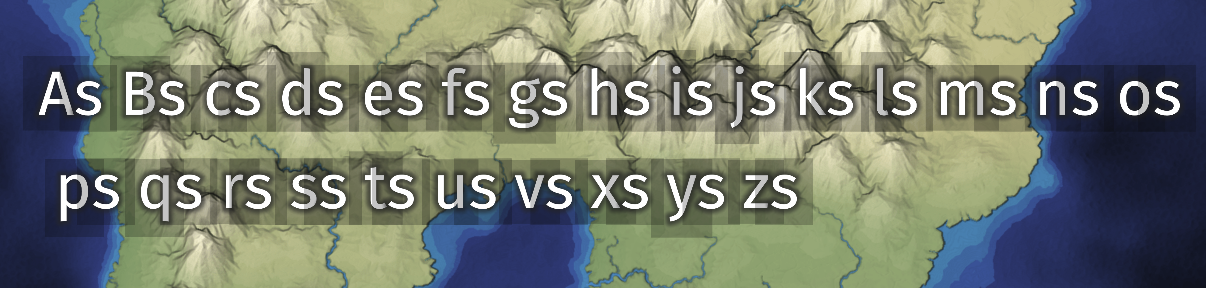
Sprite distance fields always overlap

It’s only when the letters are close enough that you can see artifacts of the double rendering.

To solve both problems, I can generate a new distance field which is the min() of the distance fields for each character. The min() of signed distance fields is the union of the shapes. I used the blendEquation()[1] function with MAX_EXT instead of the default FUNC_ADD (it’s max instead of min because msdfgen’s encoding is inverted). The MAX_EXT extension seems to have 100% support[2] in WebGL 1, and is always included with WebGL 2.

Adding an intermediate distance field texture

The output texture holds a combined distance field. I then use the distance field shader to draw that combined distance field to the map.

I could do this once per string I want to draw or once for the entire scene. I decided to do it once per string, because that allows me to use different colors and styles (thickness, outline width, shadow, halo) per string.

I ran into a few bugs with this:

  • because I couldn’t figure out how to min() msdf fields, I put an sdf in the combined distance field instead of msdf, and that meant the corners of fonts got a little rounder; to compensate I increased the resolution of the combined distance field
  • having a different resolution for the original and combined distance fields messed up the antialiasing; in the previous post I described a “slope” of distance field vs output pixels, but now there’s an intermediary with the slope stretched out
  • the letters got out of alignment when I moved them around for the intermediate texture; in particular, I had to calculate a new baseline position accounting for the change in resolution

One way I compared parameters was by rendering them in alternating frames. Here’s an example showing that the combined distance field resolution matters (slightly):

Comparison of 3X vs 5X resolution on the combined distance field

Here’s the final result, showing that the overlapped drawing is fixed, especially at the bottom left of the second g:

 
Before and after combining distance fields

The combined distance field approach solves the problem but it means I need to write each string to a separate intermediate texture, which leads to a rabbit hole of having to allocate texture space during rendering, possibly reusing textures, and dealing with gpu pipeline stalls. That’s an area I don’t understand well. Fortunately I don’t need it to be optimized for my project. But for a game project, I might choose to do the two pass approach instead, letting the shadows get drawn twice in overlapping areas. Are there better approaches? I don’t know.