











OpenClaw 应该有40万行代码,阅读理解起来难度过大,因此,本系列通过Nanobot来学习 OpenClaw 的特色。
Nanobot是由香港大学数据科学实验室(HKUDS)开源的超轻量级个人 AI 助手框架,定位为"Ultra-Lightweight OpenClaw"。非常适合学习Agent架构。
HeartbeatService 组件是 Nanobot 实现 “周期性任务检测与执行” 的核心模块,比如,根据 HEARTBEAT.md 来周期性唤醒Nanobot,执行操作:监控在运行吗?日志里有报错吗?如果出问题了,Agent 会主动给你发消息。
通过_HEARTBEAT_TOOL+LLM 工具调用的轻量化设计,HeartbeatService 组件仅用不到 200 行代码就完成了 OpenClaw 同等核心的 “定时唤醒 Agent 检查任务” 能力。
注:因为最近看的文章太多,所以如果有遗漏参考资料,还请读者指出,谢谢。
HeartbeatService是 Nanobot 的周期性任务检测与执行服务,其放弃传统的 “硬编码规则解析”,改用 LLM 驱动的智能决策,适配自然语言描述的任务场景;基于 asyncio 实现轻量化的周期性调度,无需依赖 Celery 等重型定时任务框架。
HeartbeatService的核心职责/特色是:
HEARTBEAT.md文件,并执行 HEARTBEAT.md 中的周期性任务;HeartbeatService采用 “两阶段执行” 架构,将 “决策” 和 “执行” 解耦,既保证决策的智能化,又实现执行逻辑的解耦:HEARTBEAT.md内容,判断是否有任务需要执行,避免了 “HEARTBEAT_OK” 这类硬编码令牌的不稳定性,适配自然语言描述的任务场景。on_execute和on_notify回调函数解耦 “任务执行” 和 “结果推送” 逻辑,无需修改心跳服务核心代码即可适配不同的执行 / 推送策略。
on_execute),通过 Agent 完整执行任务;on_notify),将结果推送至指定通道(如 CLI / 第三方平台);HeartbeatService 的应用场景如下:
Claw0中,一个定时器线程检查"该不该运行", 然后将任务排入与用户消息相同的队列,其架构如下:
    Main Lane (user input):
        User Input --> lane_lock.acquire() -------> LLM --> Print
                       (blocking: always wins)

    Heartbeat Lane (background thread, 1s poll):
        should_run()?
            |no --> sleep 1s
            |yes
        _execute():
            lane_lock.acquire(blocking=False)
                |fail --> yield (user has priority)
                |success
            build prompt from HEARTBEAT.md + SOUL.md + MEMORY.md
                |
            run_agent_single_turn()
                |
            parse: "HEARTBEAT_OK"? --> suppress
                   meaningful text? --> duplicate? --> suppress
                                           |no
                                       output_queue.append()

    Cron Service (background thread, 1s tick):
        CRON.json --> load jobs --> tick() every 1s
            |
        for each job: enabled? --> due? --> _run_job()
            |
        error? --> consecutive_errors++ --> >=5? --> auto-disable
            |ok
        consecutive_errors = 0 --> log to cron-runs.jsonl
其要点如下:
threading.Lock 在用户和心跳之间共享. 用户总是赢 (阻塞获取); 心跳让步 (非阻塞获取).at, every, cron), 连续错误 5 次后自动禁用.最重要的设计原则: 用户消息始终优先.
lane_lock = threading.Lock()

# Main lane: 阻塞获取. 用户始终能进入.
lane_lock.acquire()
try:
    # 处理用户消息, 调用 LLM
finally:
    lane_lock.release()

# Heartbeat lane: 非阻塞获取. 用户活跃时让步.
def _execute(self) -> None:
    acquired = self.lane_lock.acquire(blocking=False)
    if not acquired:
        return   # 用户持有锁, 跳过本次心跳
    self.running = True
    try:
        instructions, sys_prompt = self._build_heartbeat_prompt()
        response = run_agent_single_turn(instructions, sys_prompt)
        meaningful = self._parse_response(response)
        if meaningful and meaningful.strip() != self._last_output:
            self._last_output = meaningful.strip()
            with self._queue_lock:
                self._output_queue.append(meaningful)
    finally:
        self.running = False
        self.last_run_at = time.time()
        self.lane_lock.release()
四个检查必须全部通过. 锁的检测在 _execute() 中单独进行,
以避免 TOCTOU 竞态条件.
def should_run(self) -> tuple[bool, str]:
    if not self.heartbeat_path.exists():
        return False, "HEARTBEAT.md not found"
    if not self.heartbeat_path.read_text(encoding="utf-8").strip():
        return False, "HEARTBEAT.md is empty"

    elapsed = time.time() - self.last_run_at
    if elapsed < self.interval:
        return False, f"interval not elapsed ({self.interval - elapsed:.0f}s remaining)"

    hour = datetime.now().hour
    s, e = self.active_hours
    in_hours = (s <= hour < e) if s <= e else not (e <= hour < s)
    if not in_hours:
        return False, f"outside active hours ({s}:00-{e}:00)"

    if self.running:
        return False, "already running"
    return True, "all checks passed"
我们再看看 ZeroClaw。
下图是来自其官方文档的:“How the daemon keeps components alive”。从中看看 Cron 和 Heartbeat 的思路。
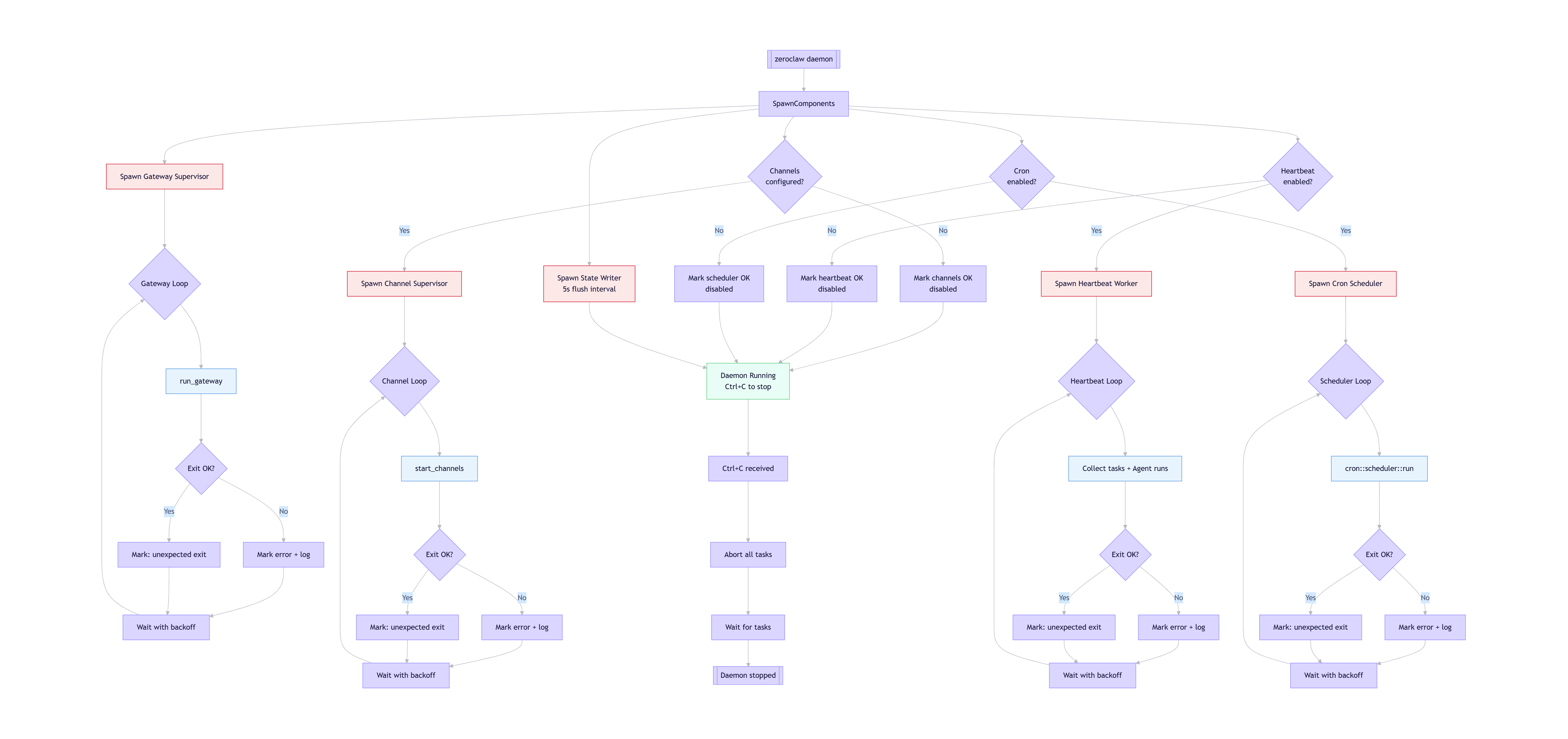
根据 ZeroClaw 的架构设计,这个流程图涵盖了以下核心逻辑:
config.toml)中的设置决定是否启动对应的 Worker。例如,如果未配置 Cron,则直接标记为 OK 并跳过。Ctrl+C 信号时,Daemon 会中止所有任务并等待线程结束,确保数据完整保存后停止。HeartbeatService 实现了一个周期性的自主唤醒系统,定期检查是否有待处理的任务,无需外部触发。这是一个任务驱动的唤醒机制:
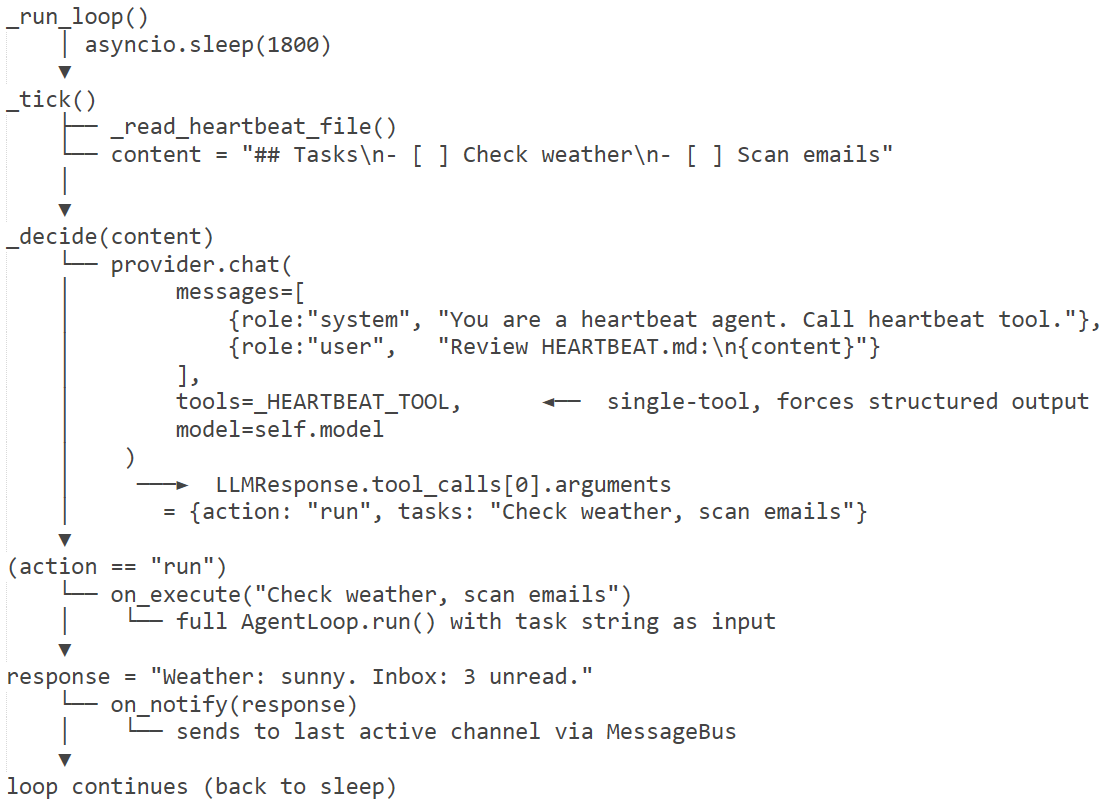
概要流程如下:
等待 interval_s 秒
↓
HeartbeatService.tick()
↓
HeartbeatService._decide()
↓
输入:HEARTBEAT.md 文件内容
↓
构建 LLM 提示:
- 系统角色:"You are a heartbeat agent."
- 用户输入:HEARTBEAT.md 内容
- 工具:_HEARTBEAT_TOOL
↓
LLM 处理请求
- 分析 HEARTBEAT.md 内容
- 决定是否需要执行任务
- 通过虚拟工具调用返回决策
↓
解析工具调用结果
- act
↓
返回 (action, tasks)
↓
├── Heartbeat: OK
│ (无任务执行)
│
├── 执行任务并通知结果
│ 1. 调用 on_execute
│ 2. 调用 on_notify
│
└── 记录执行失败
参见如下:
AGENTS.md 文件会用来指导 agent 如何管理 HEARTBEAT.md 文件中的周期性任务。
## Heartbeat Tasks

`HEARTBEAT.md` is checked every 30 minutes. Use file tools to manage periodic tasks:

- **Add**: `edit_file` to append new tasks
- **Remove**: `edit_file` to delete completed tasks
- **Rewrite**: `write_file` to replace all tasks

When the user asks for a recurring/periodic task, update `HEARTBEAT.md` instead of creating a one-time cron reminder.
HEARTBEAT.md是一个标记文件,包含需要定期检查的任务列表,文件位于工作空间根目录,可由agent自主更新。agent 可以使用文件工具(如 edit_file、write_file)更新 HEARTBEAT.md,支持添加、移除或重写周期性任务。
agent 也可以通过技能自动管理心跳任务,例如,当用户请求周期性任务时,agent 会更新 HEARTBEAT.md 而不是创建一次性提醒。
# Heartbeat Tasks

This file is checked every 30 minutes by your nanobot agent.
Add tasks below that you want the agent to work on periodically.

If this file has no tasks (only headers and comments), the agent will skip the heartbeat.

## Active Tasks

<!-- Add your periodic tasks below this line -->


## Completed

<!-- Move completed tasks here or delete them -->
我们也用MimiClaw 来进行对比验证:
HEARTBEAT.md,检查是否有待办事项。如果发现未完成的条目(非空行、非标题、非已勾选的 - [x]),就会向 Agent 循环发送提示,让 AI 自主处理。HEARTBEAT.md,机器人会在下一次心跳周期自动拾取执行(默认每 30 分钟)。HeartbeatService 秉承两阶段执行机制:
    """
    Periodic heartbeat service that wakes the agent to check for tasks.

    Phase 1 (decision): reads HEARTBEAT.md and asks the LLM — via a virtual
    tool call — whether there are active tasks.  This avoids free-text parsing
    and the unreliable HEARTBEAT_OK token.

    Phase 2 (execution): only triggered when Phase 1 returns ``run``.  The
    ``on_execute`` callback runs the task through the full agent loop and
    returns the result to deliver.
    """
        try:
            # Phase 1:调用LLM做决策,获取action和tasks
            action, tasks = await self._decide(content)

            # 若决策为skip(无任务),记录日志并返回
            if action != "run":
                return

            # 若决策为run(有任务),记录日志并执行Phase 2
            # 若配置了执行回调,触发回调执行任务
            if self.on_execute:
                response = await self.on_execute(tasks)
                # 若执行有结果且配置了通知回调,推送结果
                if response and self.on_notify:
                    await self.on_notify(response)
具体流程图如下:
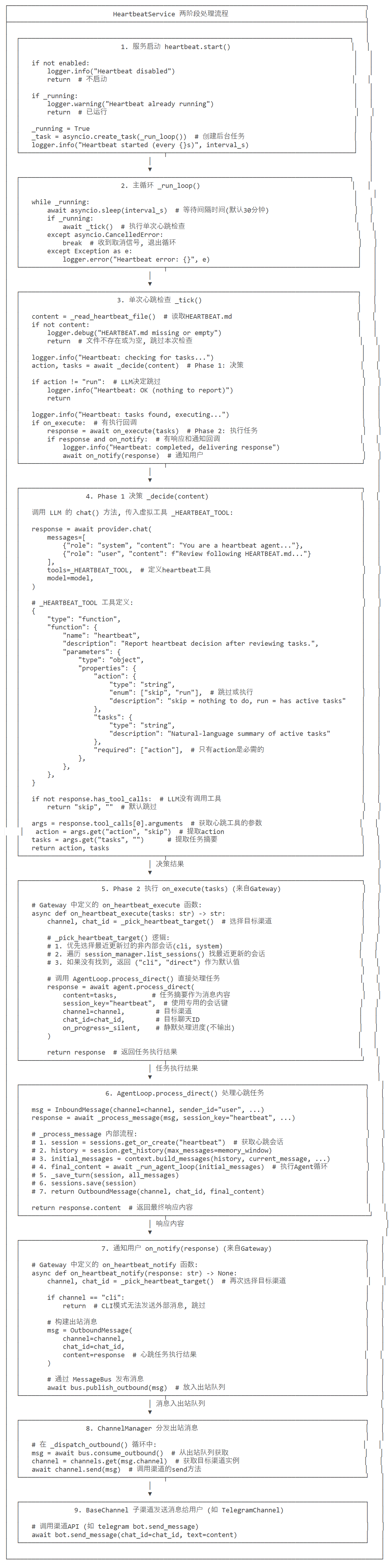
此部分是LLM 调用流程(_decide 方法)。
async def _decide(self, content: str) -> tuple[str, str]:
    """Phase 1: ask LLM to decide skip/run via virtual tool call."""
messages = [
    {
        "role": "system",
        "content": "You are a heartbeat agent. Call heartbeat tool to report your decision."
    },
    {
        "role": "user",
        "content": (
            "Review the following HEARTBEAT.md and decide whether there are active tasks.\n"
            f"{content}"
        )
    },
]
response = await self.provider.chat(
    messages=messages,
    tools=_HEARTBEAT_TOOL,  # 传入工具定义
    model=self.model,  # 使用配置的模型
)
if not response.has_tool_calls:
    return "skip", ""  # LLM 没有调用工具,返回跳过

args = response.tool_calls[0].arguments  # 获取第一个工具调用的参数
return args.get("action", "skip"), args.get("tasks", "")
response.has_tool_callsresponse.tool_calls[0].argumentsargs.get("action", "skip")args.get("tasks", "")上面步骤2使用了_HEARTBEAT_TOOL,因此我们做特殊分析。
LLM 需要分析 HEARTBEAT.md 中的任务是否需要执行。当时间到,触发回调之后,在 HeartbeatService._decide() 中会显式让LLM调用 _HEARTBEAT_TOOL。
_HEARTBEAT_TOOL 是一个虚拟工具,用于LLM决策跳过或者运行任务,LLM 被要求调用这个工具并返回适当的参数,避免了自由文本解析的不确定性。
_HEARTBEAT_TOOL 定义了action参数(skip或者run)和 task 参数(任务摘要)。根据任务状态决定返回 "skip"(无事可做)或 "run"(有活动任务)。这个定义的核心价值是约束 LLM 的输出格式—— 让原本返回自然语言的 LLM,必须按照固定结构返回 “决策结果”,方便代码后续解析,而非人工处理。
_HEARTBEAT_TOOL 的内容如下:
"""Heartbeat service - periodic agent wake-up to check for tasks."""

# 定义心跳服务的虚拟工具Schema(OpenAI Function Call格式)
# 核心作用:让LLM通过标准化工具调用的方式返回决策结果,避免自由文本解析的不稳定性
_HEARTBEAT_TOOL = [
    {
        "type": "function",
        "function": {
            "name": "heartbeat",  # 工具名称:固定为heartbeat(LLM调用时必须匹配)
            "description": "Report heartbeat decision after reviewing tasks.",  # 工具描述:告知LLM该工具的用途
            "parameters": {  # 工具参数Schema:定义LLM返回的决策结果格式
                "type": "object",
                "properties": {
                    "action": {  # 核心决策参数:skip(无任务)/run(有任务)
                        "type": "string",
                        "enum": ["skip", "run"],
                        "description": "skip = nothing to do, run = has active tasks",
                    },
                    "tasks": {  # 任务描述参数:仅run时必填,为自然语言的任务摘要
                        "type": "string",
                        "description": "Natural-language summary of active tasks (required for run)",
                    },
                },
                "required": ["action"],  # 强制要求LLM返回action参数
            },
        },
    }
]
_HEARTBEAT_TOOL的设计逻辑是:
HEARTBEAT.md的内容作为输入,让 LLM 有分析的素材。_HEARTBEAT_TOOL的调用逻辑如下:
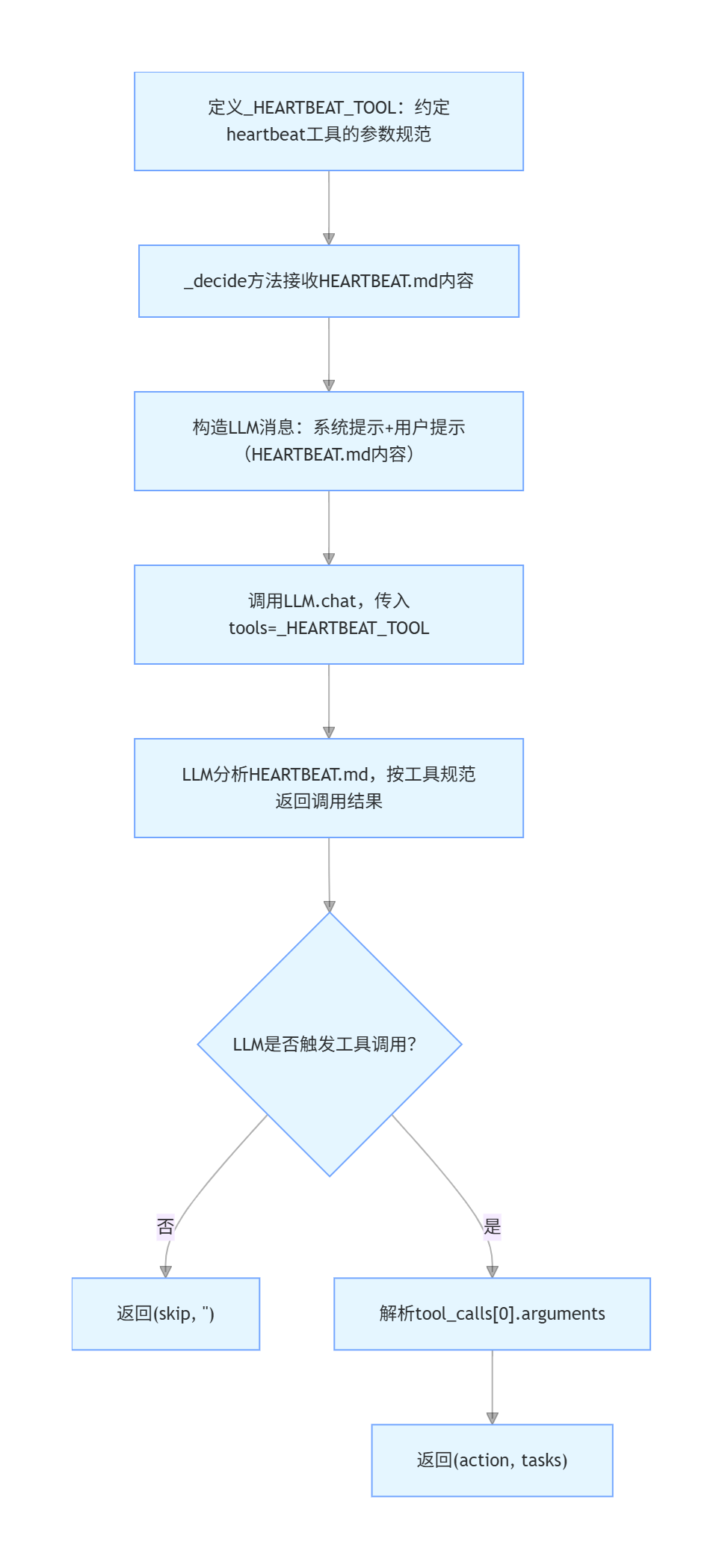
self.provider.chat的tools参数传入 LLM,LLM 按其规范返回结构化决策结果,代码再解析response.tool_calls获取最终决策;await self.provider.chat 是_HEARTBEAT_TOOL被 “激活” 的核心:
chat接口会解析tools参数,理解 “heartbeat 工具” 的调用规范;HEARTBEAT.md内容分析,然后按照_HEARTBEAT_TOOL的参数规范生成工具调用结果(而非普通文本)。LLM 被赋予的角色是 “heartbeat agent”(心跳代理),其唯一职责是:
HEARTBEAT.md内容;_HEARTBEAT_TOOL的规范调用heartbeat工具,返回 “skip/run” 决策。这个角色定位是 Nanobot “超轻量级” 的体现 ——LLM 只做单一决策,不处理复杂任务执行,保证资源消耗最小。
    # 核心异步方法:Phase 1 - LLM决策(判断是否有任务需要执行)
    # 参数:content - HEARTBEAT.md的内容
    # 返回值:(action, tasks) - action为skip/run,tasks为任务摘要
    async def _decide(self, content: str) -> tuple[str, str]:
        """Phase 1: ask LLM to decide skip/run via virtual tool call.

        Returns (action, tasks) where action is 'skip' or 'run'.
        """
        # 调用LLM提供商的chat接口,触发虚拟工具调用
        response = await self.provider.chat(
            messages=[
                # 系统提示:告知LLM其角色为心跳代理,必须调用heartbeat工具返回决策
                {"role": "system", "content": "You are a heartbeat agent. Call the heartbeat tool to report your decision."},
                # 用户提示:传入HEARTBEAT.md内容,让LLM分析并决策
                {"role": "user", "content": (
                    "Review the following HEARTBEAT.md and decide whether there are active tasks.\n\n"
                    f"{content}"
                )},
            ],
            tools=_HEARTBEAT_TOOL,  # 指定可用工具为心跳虚拟工具
            model=self.model,  # 指定使用的LLM模型
        )

        # 若LLM未触发工具调用(异常情况),默认返回skip
        if not response.has_tool_calls:
            return "skip", ""

        # 提取LLM工具调用的参数(仅取第一个工具调用结果)
        args = response.tool_calls[0].arguments
        # 返回决策结果:action默认skip,tasks默认空字符串
        return args.get("action", "skip"), args.get("tasks", "")
工具调用流程如下:
logger.info("Heartbeat: tasks found, executing...")
if self.on_execute:
    response = await self.on_execute(tasks)  # 调用执行回调
    if response and self.on_notify:
        logger.info("Heartbeat: completed, delivering response")
        await self.on_notify(response)  # 调用通知回调
on_execute 回调(由 Gateway 设置)执行任务agent.process_direct())on_notify 回调,通知用户以下是 HeartbeatService 和其他模块之间的依赖关系。
具体阐释如下:
_process_message 。而_process_message 是单条消息处理的核心入口,支持系统消息、斜杠命令、普通对话三种场景,完成「上下文构建→代理循环→结果保存→响应返回」全流程。on_notify(response) 调用 bus.publish_outbound()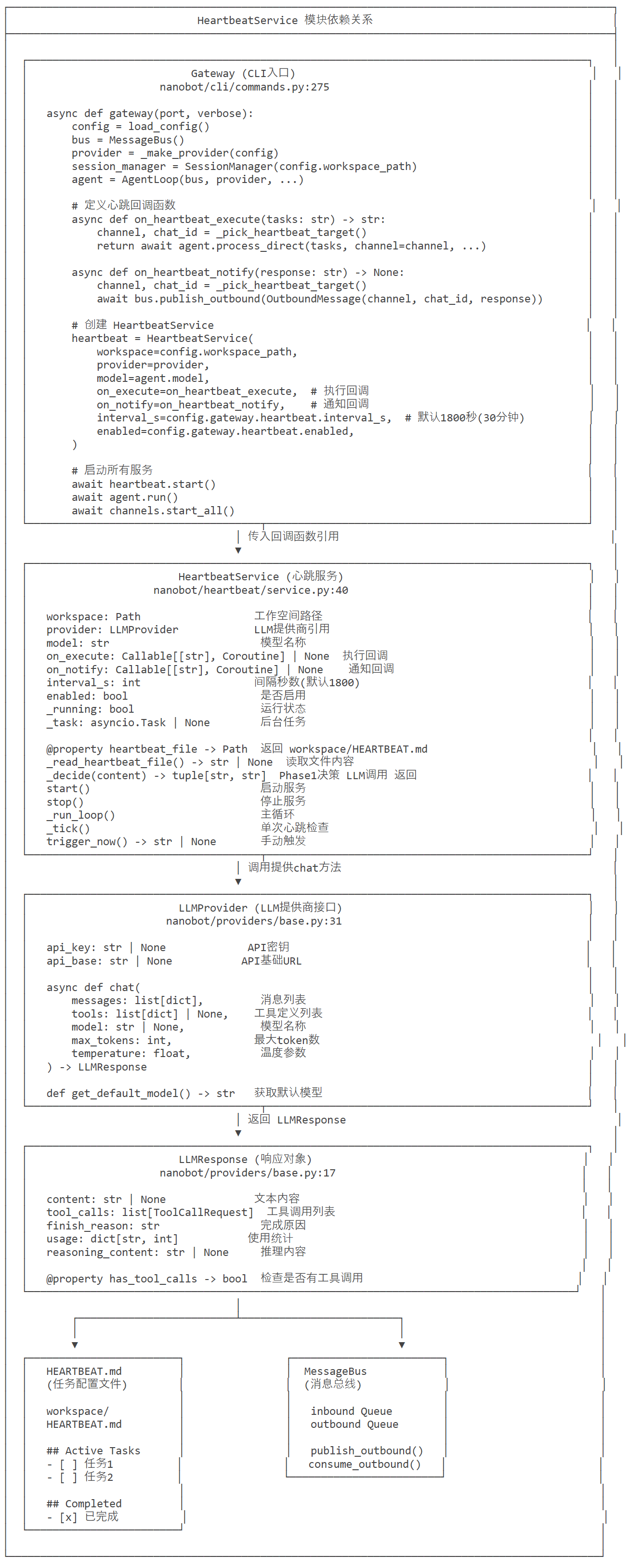
相关代码如下:
    # Create heartbeat service
    async def on_heartbeat_execute(tasks: str) -> str:
        """Phase 2: execute heartbeat tasks through the full agent loop."""
        channel, chat_id = _pick_heartbeat_target()

        async def _silent(*_args, **_kwargs):
            pass

        return await agent.process_direct(
            tasks,
            session_key="heartbeat",
            channel=channel,
            chat_id=chat_id,
            on_progress=_silent,
        )

    async def on_heartbeat_notify(response: str) -> None:
        """Deliver a heartbeat response to the user's channel."""
        from nanobot.bus.events import OutboundMessage
        channel, chat_id = _pick_heartbeat_target()
        if channel == "cli":
            return  # No external channel available to deliver to
        await bus.publish_outbound(OutboundMessage(channel=channel, chat_id=chat_id, content=response))

    hb_cfg = config.gateway.heartbeat
    heartbeat = HeartbeatService(
        workspace=config.workspace_path,
        provider=provider,
        model=agent.model,
        on_execute=on_heartbeat_execute,
        on_notify=on_heartbeat_notify,
        interval_s=hb_cfg.interval_s,
        enabled=hb_cfg.enabled,
    )
从代码可以看到:
croniter 计算 cron 表达式的下次执行时间| 特性 | CronService | HeartbeatTool |
|---|---|---|
| 目的 | 粟管用户定义的一次性或循环定时任务 | 让用户通过对话命令来管理 cron 任务 |
| 触发方式 | 通过内部定时器自动运行 | 通过LLM 工具调用 (用户对话) |
| 用户交互 | 不直接交互,需通过命令 | 直接对话交互 |
| 任务来源 | cron.json 文件 | 用户对话请求 |
| 存储位置 | ~/.nanobot/cron/jobs.json | 任务结果通过 AgentLoop 返回 |
| 调度机制 | croniter 精达式调度 | CronService 自维护的定时器 |
gateway() 创建 HeartbeatService
    设置 on_execute 和 on_notify 回调
    await heartbeat.start()
具体构建代码如下:
    hb_cfg = config.gateway.heartbeat
    heartbeat = HeartbeatService(
        workspace=config.workspace_path,
        provider=provider,
        model=agent.model,
        on_execute=on_heartbeat_execute,
        on_notify=on_heartbeat_notify,
        interval_s=hb_cfg.interval_s,
        enabled=hb_cfg.enabled,
    )
on_heartbeat_execute 和 on_heartbeat_notify 如下:
    def _pick_heartbeat_target() -> tuple[str, str]:
        """Pick a routable channel/chat target for heartbeat-triggered messages."""
        enabled = set(channels.enabled_channels)
        # Prefer the most recently updated non-internal session on an enabled channel.
        for item in session_manager.list_sessions():
            key = item.get("key") or ""
            if ":" not in key:
                continue
            channel, chat_id = key.split(":", 1)
            if channel in {"cli", "system"}:
                continue
            if channel in enabled and chat_id:
                return channel, chat_id
        # Fallback keeps prior behavior but remains explicit.
        return "cli", "direct"

    # Create heartbeat service
    async def on_heartbeat_execute(tasks: str) -> str:
        """Phase 2: execute heartbeat tasks through the full agent loop."""
        channel, chat_id = _pick_heartbeat_target()

        async def _silent(*_args, **_kwargs):
            pass

        return await agent.process_direct(
            tasks,
            session_key="heartbeat",
            channel=channel,
            chat_id=chat_id,
            on_progress=_silent,
        )

    async def on_heartbeat_notify(response: str) -> None:
        """Deliver a heartbeat response to the user's channel."""
        from nanobot.bus.events import OutboundMessage
        channel, chat_id = _pick_heartbeat_target()
        if channel == "cli":
            return  # No external channel available to deliver to
        await bus.publish_outbound(OutboundMessage(channel=channel, chat_id=chat_id, content=response))
目标渠道选择逻辑如下:
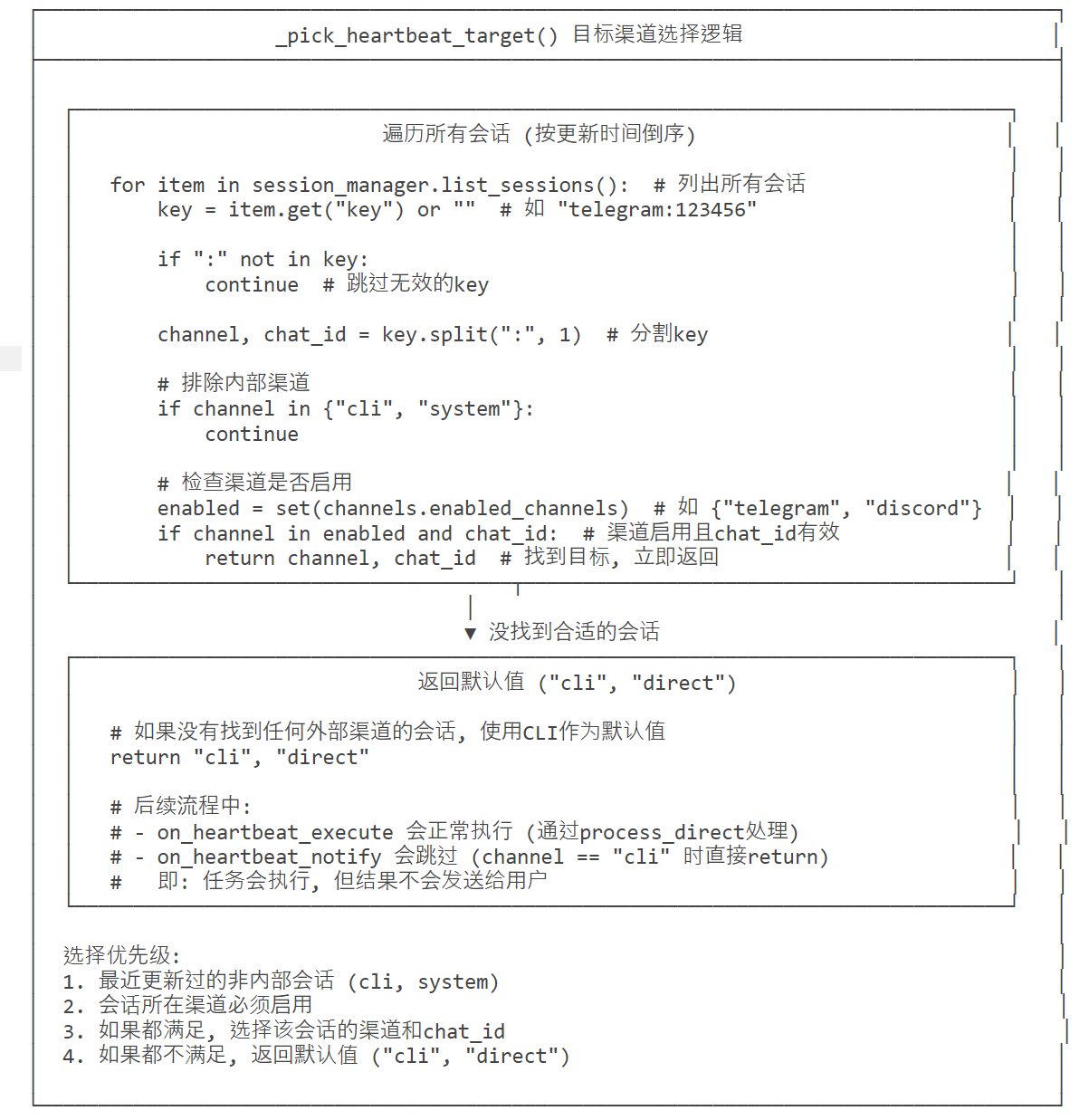
_tick() 定时触发(每 30 分钟)
    _decide() 检用 LLM 决策
    on_execute() 执行任务
    on_notify() 通知用户
async def _tick(self) -> None:
    """Execute a single heartbeat tick."""
    content = self._read_heartbeat_file()  # 读取 HEARTBEAT.md
    if not content:
        return  # 文件不存在或为空

    action, tasks = await self._decide(content)  # 调用 LLM 决策
_decide() 方法让 LLM 决策是否有活跃任务if action != "run":
logger.info("Heartbeat: OK (nothing to report)")
return # action 为 skip,记录日志并返回
heartbeat.stop() 停止定时器
清理 MCP 连接(如果需要)
也可以手动触发。
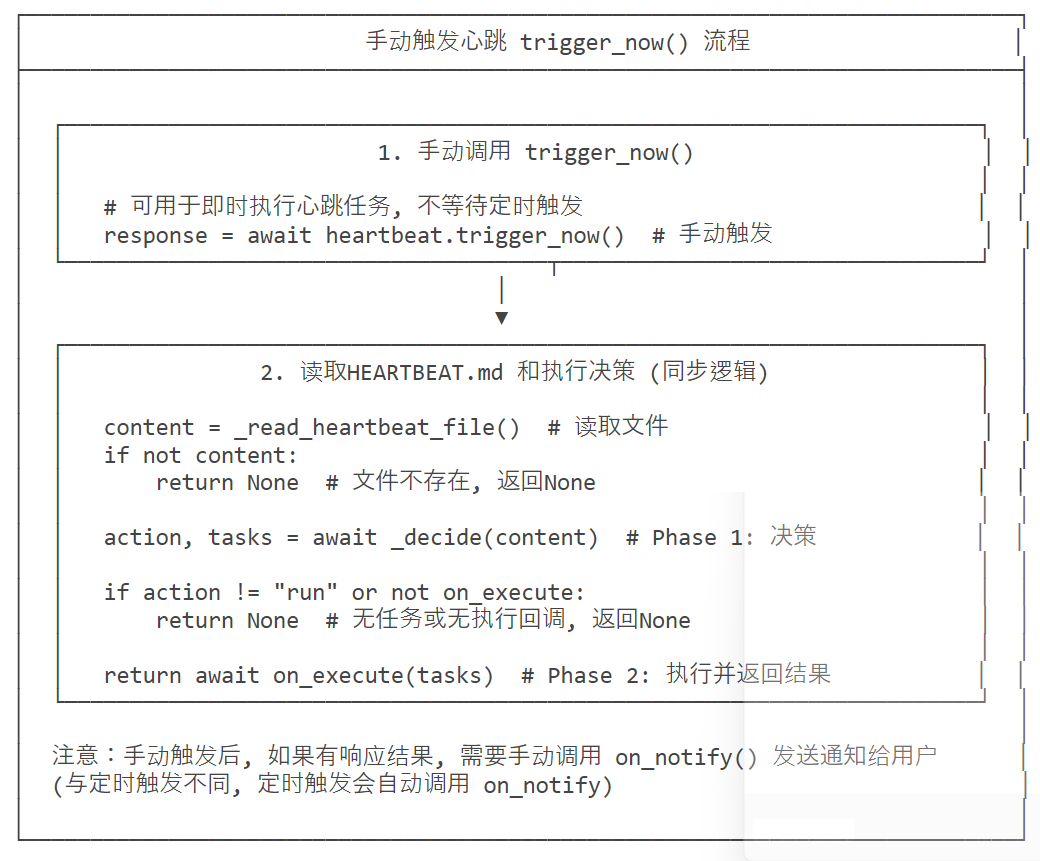
class HeartbeatService:
    """
    Periodic heartbeat service that wakes the agent to check for tasks.

    Phase 1 (decision): reads HEARTBEAT.md and asks the LLM — via a virtual
    tool call — whether there are active tasks.  This avoids free-text parsing
    and the unreliable HEARTBEAT_OK token.

    Phase 2 (execution): only triggered when Phase 1 returns ``run``.  The
    ``on_execute`` callback runs the task through the full agent loop and
    returns the result to deliver.
    """

    # 心跳服务初始化方法:配置核心依赖与参数
    # 参数说明:
    # - workspace:工作目录(HEARTBEAT.md所在路径)
    # - provider:LLM提供商实例(用于调用大模型做决策)
    # - model:使用的LLM模型名称(如doubao-seed-lite)
    # - on_execute:任务执行回调函数(Phase 2执行时触发)
    # - on_notify:结果通知回调函数(任务执行完成后推送结果)
    # - interval_s:心跳检测间隔(默认30分钟=1800秒)
    # - enabled:是否启用心跳服务
    def __init__(
        self,
        workspace: Path,
        provider: LLMProvider,
        model: str,
        on_execute: Callable[[str], Coroutine[Any, Any, str]] | None = None,
        on_notify: Callable[[str], Coroutine[Any, Any, None]] | None = None,
        interval_s: int = 30 * 60,
        enabled: bool = True,
    ):
        self.workspace = workspace  # 初始化工作目录
        self.provider = provider  # 初始化LLM提供商
        self.model = model  # 初始化LLM模型名称
        self.on_execute = on_execute  # 初始化任务执行回调
        self.on_notify = on_notify  # 初始化结果通知回调
        self.interval_s = interval_s  # 初始化心跳间隔(秒)
        self.enabled = enabled  # 初始化服务启用状态
        self._running = False  # 服务运行状态标记(False=未运行)
        self._task: asyncio.Task | None = None  # 存储心跳循环的异步任务对象

    # 只读属性:返回HEARTBEAT.md文件的完整路径
    @property
    def heartbeat_file(self) -> Path:
        return self.workspace / "HEARTBEAT.md"

    # 内部方法:读取HEARTBEAT.md文件内容
    # 返回值:文件内容字符串(None表示文件不存在/读取失败)
    def _read_heartbeat_file(self) -> str | None:
        if self.heartbeat_file.exists():  # 检查文件是否存在
            try:
                # 读取文件内容(UTF-8编码)
                return self.heartbeat_file.read_text(encoding="utf-8")
            except Exception:  # 捕获所有读取异常(如权限不足、文件损坏)
                return None
        return None  # 文件不存在时返回None

    # 核心异步方法:Phase 1 - LLM决策(判断是否有任务需要执行)
    # 参数:content - HEARTBEAT.md的内容
    # 返回值:(action, tasks) - action为skip/run,tasks为任务摘要
    async def _decide(self, content: str) -> tuple[str, str]:
        """Phase 1: ask LLM to decide skip/run via virtual tool call.

        Returns (action, tasks) where action is 'skip' or 'run'.
        """
        # 调用LLM提供商的chat接口,触发虚拟工具调用
        response = await self.provider.chat(
            messages=[
                # 系统提示:告知LLM其角色为心跳代理,必须调用heartbeat工具返回决策
                {"role": "system", "content": "You are a heartbeat agent. Call the heartbeat tool to report your decision."},
                # 用户提示:传入HEARTBEAT.md内容,让LLM分析并决策
                {"role": "user", "content": (
                    "Review the following HEARTBEAT.md and decide whether there are active tasks.\n\n"
                    f"{content}"
                )},
            ],
            tools=_HEARTBEAT_TOOL,  # 指定可用工具为心跳虚拟工具
            model=self.model,  # 指定使用的LLM模型
        )

        # 若LLM未触发工具调用(异常情况),默认返回skip
        if not response.has_tool_calls:
            return "skip", ""

        # 提取LLM工具调用的参数(仅取第一个工具调用结果)
        args = response.tool_calls[0].arguments
        # 返回决策结果:action默认skip,tasks默认空字符串
        return args.get("action", "skip"), args.get("tasks", "")

    # 公开异步方法:启动心跳服务
    async def start(self) -> None:
        """Start the heartbeat service."""
        # 若服务未启用,记录日志并返回
        if not self.enabled:
            logger.info("Heartbeat disabled")
            return
        # 若服务已运行,记录警告日志并返回(避免重复启动)
        if self._running:
            logger.warning("Heartbeat already running")
            return

        # 标记服务为运行状态
        self._running = True
        # 创建异步任务,启动心跳主循环
        self._task = asyncio.create_task(self._run_loop())
        # 记录启动日志,包含心跳间隔
        logger.info("Heartbeat started (every {}s)", self.interval_s)

    # 公开方法:停止心跳服务
    def stop(self) -> None:
        """Stop the heartbeat service."""
        # 标记服务为非运行状态
        self._running = False
        # 若存在异步任务,取消任务并置空(终止心跳循环)
        if self._task:
            self._task.cancel()
            self._task = None

    # 内部异步方法:心跳服务主循环
    async def _run_loop(self) -> None:
        """Main heartbeat loop."""
        # 循环执行,直到服务被停止
        while self._running:
            try:
                # 等待指定的心跳间隔(秒)
                await asyncio.sleep(self.interval_s)
                # 再次检查运行状态(避免等待期间服务被停止)
                if self._running:
                    # 执行单次心跳检测
                    await self._tick()
            except asyncio.CancelledError:
                # 捕获任务取消异常(stop方法触发),退出循环
                break
            except Exception as e:
                # 捕获其他异常,记录错误日志(不终止服务)
                logger.error("Heartbeat error: {}", e)

    # 内部异步方法:单次心跳检测(核心执行逻辑)
    async def _tick(self) -> None:
        """Execute a single heartbeat tick."""
        # 读取HEARTBEAT.md文件内容
        content = self._read_heartbeat_file()
        # 若文件为空/不存在,记录调试日志并返回
        if not content:
            logger.debug("Heartbeat: HEARTBEAT.md missing or empty")
            return

        # 记录日志:开始检查任务
        logger.info("Heartbeat: checking for tasks...")

        try:
            # Phase 1:调用LLM做决策,获取action和tasks
            action, tasks = await self._decide(content)

            # 若决策为skip(无任务),记录日志并返回
            if action != "run":
                logger.info("Heartbeat: OK (nothing to report)")
                return

            # 若决策为run(有任务),记录日志并执行Phase 2
            logger.info("Heartbeat: tasks found, executing...")
            # 若配置了执行回调,触发回调执行任务
            if self.on_execute:
                response = await self.on_execute(tasks)
                # 若执行有结果且配置了通知回调,推送结果
                if response and self.on_notify:
                    logger.info("Heartbeat: completed, delivering response")
                    await self.on_notify(response)
        except Exception:
            # 捕获执行过程中的所有异常,记录异常日志(不终止服务)
            logger.exception("Heartbeat execution failed")

    # 公开异步方法:手动触发一次心跳检测(应急使用)
    async def trigger_now(self) -> str | None:
        """Manually trigger a heartbeat."""
        # 读取HEARTBEAT.md内容
        content = self._read_heartbeat_file()
        # 无内容则返回None
        if not content:
            return None
        # 调用LLM做决策
        action, tasks = await self._decide(content)
        # 若无任务或无执行回调,返回None
        if action != "run" or not self.on_execute:
            return None
        # 触发执行回调并返回结果
        return await self.on_execute(tasks)
继续给第二本书打广告。

3500 行代码打造轻量级AI Agent:Nanobot 架构深度解析
【翻译】Anthropic工程博客:长运行Agent的有效利用框架
从被动唤醒到主动守望:基于AI Agent的智能任务架构实践
万字】带你实现一个Agent(上),从Tools、MCP到Skills
3500 行代码打造轻量级AI Agent:Nanobot 架构深度解析
https://github.com/shareAI-lab/learn-claude-code
OpenClaw架构-Agent Runtime 运行时深度拆解
此内容由惯性聚合(RSS阅读器)自动聚合整理,仅供阅读参考。 原文来自 — 版权归原作者所有。