


惯性聚合 高效追踪和阅读你感兴趣的博客、新闻、科技资讯
阅读原文 在惯性聚合中打开

推荐订阅源

S
Secure Thoughts
Spread Privacy
Spread Privacy
S
Securelist
D
Darknet – Hacking Tools, Hacker News & Cyber Security
Project Zero
Project Zero
G
GRAHAM CLULEY
Stack Overflow Blog
Stack Overflow Blog
爱范儿
爱范儿
Scott Helme
Scott Helme
S
Security Affairs
freeCodeCamp Programming Tutorials: Python, JavaScript, Git & More
博客园_首页
Exploit-DB.com RSS Feed
T
The Exploit Database - CXSecurity.com
The Hacker News
The Hacker News
雷峰网
雷峰网
N
News and Events Feed by Topic
宝玉的分享
宝玉的分享
O
OpenAI News
小众软件
小众软件
C
Cybersecurity and Infrastructure Security Agency CISA
奇客Solidot–传递最新科技情报
奇客Solidot–传递最新科技情报
V
Visual Studio Blog
I
Intezer
Martin Fowler
Martin Fowler
S
Security @ Cisco Blogs
A
Arctic Wolf
Engineering at Meta
Engineering at Meta
U
Unit 42
L
Lohrmann on Cybersecurity
Google Online Security Blog
Last Week in AI
Last Week in AI
T
Threat Research - Cisco Blogs
WordPress大学
WordPress大学
M
MIT News - Artificial intelligence
Schneier on Security
V2EX - 技术
V2EX - 技术
IT之家
IT之家
The Register - Security
T
Tailwind CSS Blog
GbyAI
GbyAI
量子位
人人都是产品经理
人人都是产品经理
Recorded Future
Recorded Future
W
WeLiveSecurity
AWS News Blog
AWS News Blog
B
Blog RSS Feed
腾讯CDC
Hacker News - Newest:
Hacker News - Newest: "LLM"
Microsoft Security Blog

Ubuntu blog

Tracing a memory leak bug in PID 1 and contributing an upstream fix: a Linux support story | Ubuntu MAAS installation: bare metal provisioning is easier than ever | Ubuntu Januscape vulnerability CVE-2026-53359 mitigations available | Ubuntu Managing Ubuntu on bare metal at scale Ubuntu Server: a platform made for enterprise scale | Ubuntu Building an open source chain of trust: new research uncovers key blockers and ways forward | Ubuntu Beyond safety and security: Why automotive open source demands dependability  | Ubuntu DirtyClone Linux kernel local privilege escalation vulnerability fixes available | Ubuntu pedit COW kernel local privilege escalation vulnerability mitigations | Ubuntu Canonical becomes Gold Sponsor of Trifecta Tech Foundation | Ubuntu Challenges designers face in open source (and how to fix them) | Ubuntu Hunting a 16-year-old SQLite bug with TLA+: is dqlite affected? | Ubuntu Anbox Cloud on C4A metal: Android, at scale, without friction | Ubuntu Canonical announces live kernel patching for Arm64 | Ubuntu How to use RISC-V custom instructions with Ubuntu | Ubuntu Ubuntu Summit 26.04: connected by open source | Ubuntu So you need to add microcontrollers to your fleet: now what? | Ubuntu Validating real-world skills through Canonical Academy | Ubuntu Template: Streamlining open source design contributions | Ubuntu Beyond Mythos: responding to a new threat landscape | Ubuntu A look into Ubuntu Core 26: Building a local AI inference appliance in a virtual machine | Ubuntu A decade of Ubuntu on IBM Z and IBM LinuxONE | Ubuntu AI at the edge: simplifying infrastructure with Cisco and Canonical | Ubuntu The next era of telco clouds: get open infrastructure choice with Sylva and Canonical Kubernetes | Ubuntu What is RDMA over Converged Ethernet (RoCE)? | Ubuntu Beyond tokens per watt – using Ubuntu 26.04 LTS for AI | Ubuntu A look into Ubuntu Core 26: Deploying AI models on Renesas RZ/V series for production | Ubuntu RISC-V profiles – why is RVA23 significant? | Ubuntu AI with AMD ROCm on Ubuntu: your questions answered | Ubuntu Ubuntu and Ubuntu Pro on Azure Cobalt 200 VMs | Ubuntu What is InfiniBand? | Ubuntu How Canonical Support solves hard Linux performance bugs  – even in 12-year old code | Ubuntu Securing AI agent workflows on Ubuntu with the new NVIDIA OpenShell snap | Ubuntu Canonical announces optimized Ubuntu images for TPU virtual machines by Google Cloud | Ubuntu VMware hypervisor deployment using MAAS | Ubuntu Migrating from Apache Spark 3 to Spark 4 | Ubuntu Introducing Workshop: launch sandboxed development environments on Ubuntu with a single command | Ubuntu Run agentic workloads on Arm and Ubuntu | Ubuntu Decoding design: How design and engineering thrive together in open source | Ubuntu Developing web apps with local LLM inference | Ubuntu PinTheft Linux kernel vulnerability mitigation | Ubuntu Canonical announces fully Managed Kubeflow AI operations platform on the Microsoft Azure Marketplace | Ubuntu A look into Ubuntu Core 26: Cloud-powered edge computing with AWS IoT Greengrass and Azure IoT Edge | Ubuntu CVE-2026-46333 (ssh-keysign-pwn) Linux kernel vulnerability mitigations | Ubuntu Finding the blind spot: How Canonical hunts logic flaws with AI | Ubuntu Fragnesia Linux kernel local privilege escalation vulnerability mitigations | Ubuntu Rethinking BYOD security: protecting data without trusting devices | Ubuntu Dirty Frag Linux kernel local privilege escalation vulnerability mitigations | Ubuntu Three weeks to go: A sneak peek of the Ubuntu Summit 26.04 experience | Ubuntu How to use Ubuntu on Windows | Ubuntu Fixes available for CVE-2026-31431 (Copy Fail) Linux Kernel Local Privilege Escalation Vulnerability | Ubuntu Run NVIDIA Nemotron 3 Nano Omni locally in a single command | Ubuntu Why Web Engineering is great | Ubuntu Ubuntu 16.04 LTS has reached the end of standard Expanded Security Maintenance with Ubuntu Pro. Here are your options. | Ubuntu Understanding disaggregated GenAI model serving with llm-d | Ubuntu From Jammy to Resolute: how Ubuntu’s toolchains have evolved | Ubuntu Hybrid search and reranking: a deeper look at RAG | Ubuntu Canonical expands Ubuntu support to next-generation MediaTek Genio 520 and 720 platforms | Ubuntu Intentional leadership at Canonical | Ubuntu Ubuntu Pro comes to Nutanix bare-metal Kubernetes | Ubuntu RISC-V 101 – what is it and what does it mean for Canonical? | Ubuntu Ubuntu Summit 26.04 is coming: Save the date and share your story! | Ubuntu How to manage Ubuntu fleets using on-premises Active Directory and ADSys | Ubuntu Simplify bare metal operations for sovereign clouds | Ubuntu How to Harden Ubuntu SSH: From static keys to cloud identity | Ubuntu The “scanner report has to be green” trap | Ubuntu Modern Linux identity management: from local auth to the cloud with Ubuntu | Ubuntu Canonical welcomes NVIDIA’s donation of the GPU DRA driver to CNCF | Ubuntu Hot code burns: the supply chain case for letting your containers cool before you ship | Ubuntu
Virtualized Android comes to Anbox Cloud | Ubuntu
Bertrand Boi · 2026-06-17 · via Ubuntu blog

With our latest 1.30.0 Anbox Cloud release, available today, we are introducing one of the most significant evolutions of the platform to date: support for virtualized Android. 

For the first time, Anbox Cloud can launch complete Android system images inside lightweight virtual machines, managed and orchestrated through the same Anbox APIs our users already rely on.

This new capability does not replace what Anbox Cloud already does well; it expands it. Containerized Android remains a first-class citizen, and virtualized Android adds a powerful new option when full system fidelity is required.
Two paths, one platform

We initially designed Anbox Cloud with containerized Android in mind because we consider that containers are an excellent fit for most cloud workloads that require fast and easy scaling. Indeed, containers are quick to start, they require fewer resources, and they work seamlessly with most orchestration systems. Today, containerized Android is still the ideal approach for large-scale Android application deployments for multiple use cases such as streaming, testing, automation, etc.

However, we’ve been seeing an increase in demand for workloads that go beyond applications and that would require full control over the Android system. Custom kernels, modified system services, vendor-specific components, or close alignment with physical devices all fall into this category. These are precisely the cases where containerization alone becomes restrictive and virtualized Android solutions, like Cuttlefish, become a better fit.

Virtualized Android fills this gap by allowing Android to run as a full system within a virtual machine (VM), while still allowing users to benefit from Anbox Cloud’s existing features like instance management, automation, and scalability.

“With virtualized Android in Anbox Cloud, developers can now run complete Android system images on cloud and bare-metal infrastructure such as Google Cloud C4A-metal.”  says Cedric Gegout, Canonical VP of Products. “This gives engineering teams a new way to industrialize Android: consistent environments, repeatable pipelines, higher density, and infrastructure that can be managed like any other cloud-native workload.”

Teams using highly customized Android images can easily transition them to the cloud without sacrificing quality. 

Developers using Cuttlefish-based images can now enjoy a scalable environment that fits perfectly into their CI and automation workflows. Automotive OEMs, who usually deeply modify their Android Automotive OS (AAOS) images, can test entire Android systems in a consistent, cloud-native environment.

All of this takes place within the same Anbox Cloud experience that our users enjoy: the APIs, tooling, and workflows remain consistent, regardless of how Android is executed.

What really changed under the hood

This release represents a significant architectural shift.

Historically, Android in Anbox Cloud always ran as a containerized Android system. Typically, that container was hosted as an Android container running inside another container.

While this gave us flexibility at the infrastructure level, Android itself was still constrained to a container environment. With this new release, that changes.

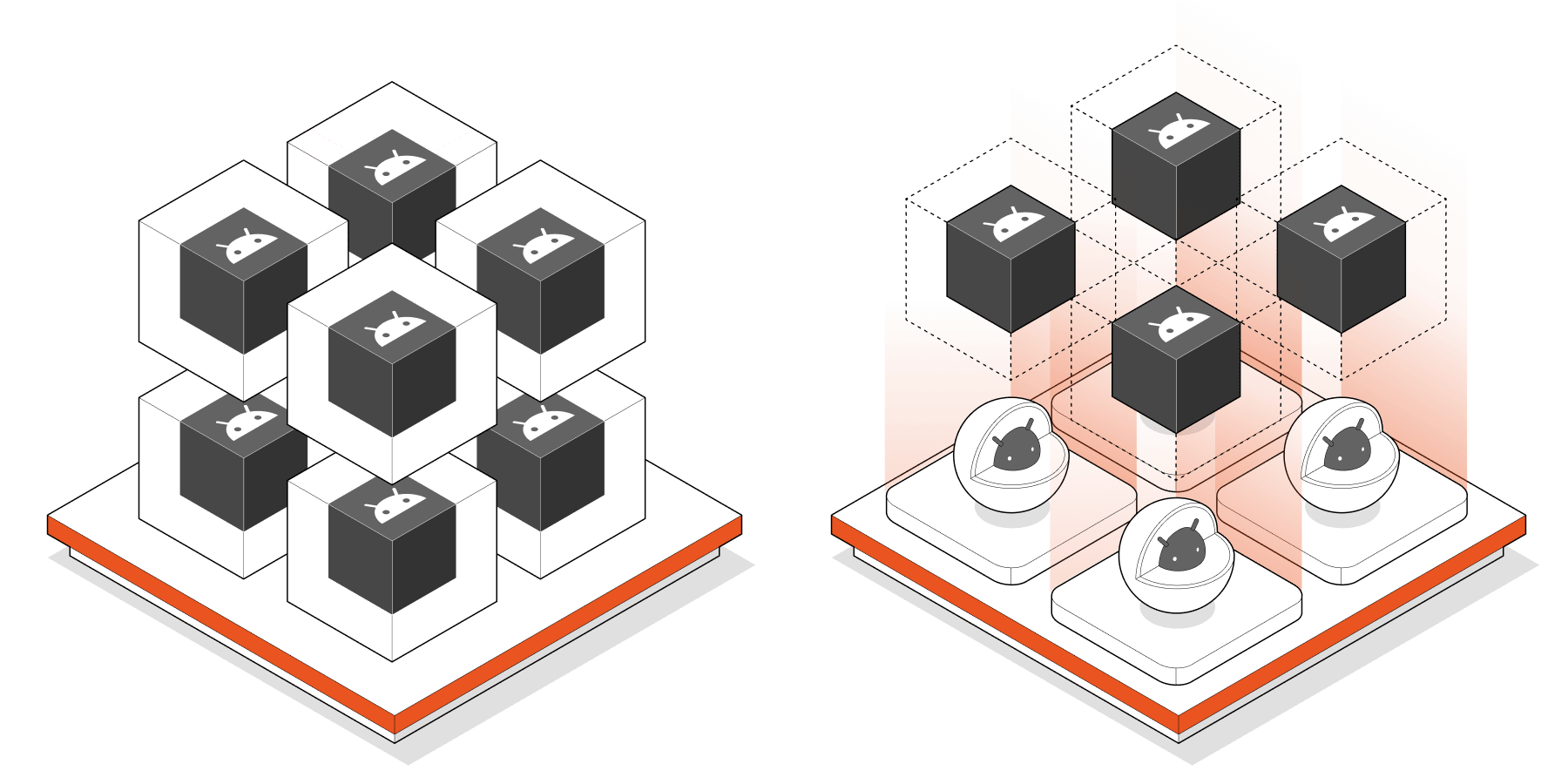
Anbox Cloud now supports two distinct Android execution models:

  • An Android container running inside a container
  • A full Android virtual machine running inside a container

Representation of a key difference between virtualized Android and containerized Android 

In other words, Android is no longer always containerized. When using the virtualized option, Android runs as a complete VM, with its own kernel and system environment, enabling significantly broader compatibility with custom and modified system images.

More importantly, LXD remains the foundation of everything. Whether Android is running in a container or a virtual machine, Anbox Cloud still relies on LXD for strong isolation, simple resource management, and orchestration, preserving our users’ familiar operating model.

When is virtualized Android more suitable than containerized Android?

The addition of virtualized Android is about choosing the right tool for the job.

When you require complete control over the Android system image, virtualized Android is the best choice. This includes custom Android Open Source Project (AOSP) or AAOS builds, OEM-specific images, and modified Google reference images such as Cuttlefish. 

It’s ideal for system validation, device-level testing, platform development, and any workload that relies on low-level Android behavior.

When it comes to applications rather than the operating system, containerized Android is still the best option. Indeed, for Android apps, containers continue to provide superior scaling efficiency and simplicity for high-density deployments and fast startup times.

Both approaches have clear advantages, and Anbox Cloud now supports both rather than forcing users to choose between them.

Looking ahead

This release is a major step toward our long-term vision: making Anbox Cloud the most powerful platform for running Android in the cloud, whether at the application level or at the full system level.

Containerized Android continues to deliver speed and scale, whereas virtualized Android provides compatibility and control. With both options, Anbox Cloud gives our users the freedom to select what works best for their workloads now and in the future.

If you are looking for architectural and technical details, download our latest whitepaper “From containerized Android™ to full system virtualization”.

Try it now and stay tuned for further developments in our upcoming releases. For detailed instructions on how to upgrade your existing deployment, please refer to the Anbox Cloud documentation.

Further reading

Learn everything about virtualized Android with Anbox Cloud in our latest whitepaper.
If you need details to get started, go through our Anbox Cloud documentation
Learn more about Anbox Cloud or contact our team to discuss your use case


Android is a trademark of Google LLC. Anbox Cloud uses assets available through the Android Open Source Project.I’m testing testing and I don’t see the first chunk and I’m pausingFirst chunk not appearing
The Android robot is reproduced or modified from work created and shared by Google and used according to terms described in the Creative Commons 3.0 Attribution License.