





If you’ve lived through enough holiday parties, you know that pretty wrapping paper can hide a real stinker of a gift.
That’s how phishing attacks work; they present victims with a shiny object guaranteed to get their attention, but that bright packaging is just a trick to steal information or money.
Phishing attacks also tend to increase during the holiday season, when people are hunting for deals and juggling package deliveries. As holiday shopping begins, scammers love to find the right wrapping to entice us to open a dangerous link. For instance, a victim might click on what seems like a digital gift card, only to find malware inside.
We all want to be savvy enough to spot phishing attempts before we click a malicious link or surrender personal information. Unfortunately, that may be more difficult than ever this holiday season, since hackers are using AI to make scams both more ubiquitous and more convincing.
In this blog, we’ll go through our phishing survey results, and what they teach us about the current state of holiday scams. We’ll also be sharing key phishing prevention tips from Dave Lewis, 1Password’s Global Advisory CISO. We hope you’ll use this data and advice to be more aware and have a safer holiday season. Think of it as 1Password’s gift to you.
As you start gearing up for the holidays, here are the critical factors to keep in mind when guarding against phishing scams.
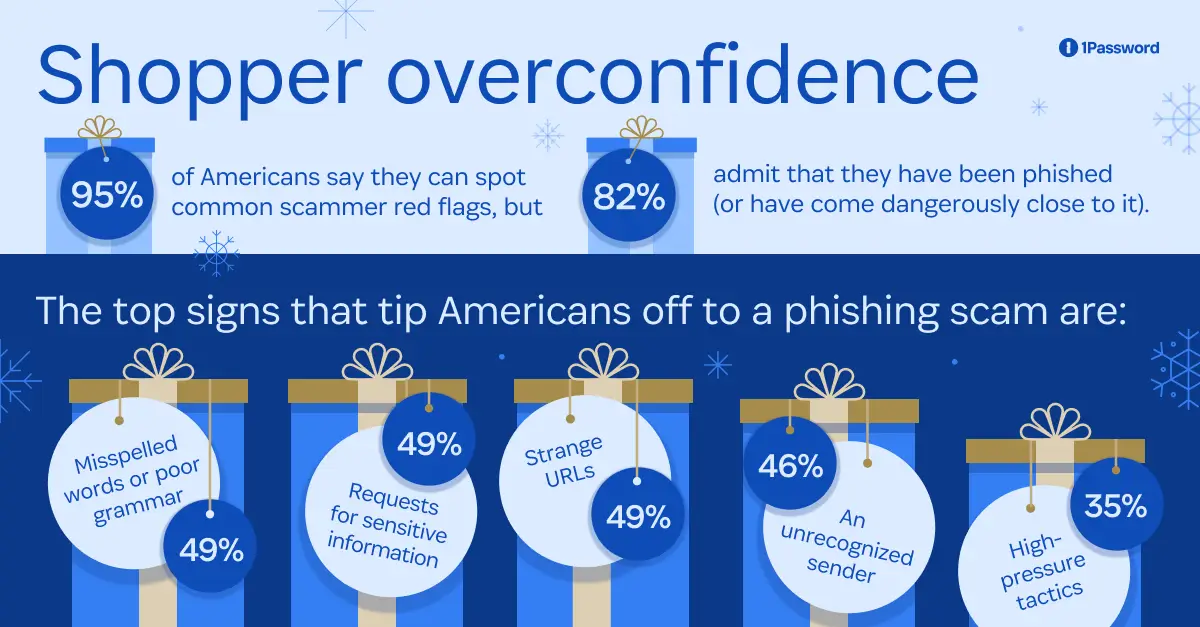
Here’s the good news: 95% of our survey respondents said they could spot common scammer red flags. The bad news is that this may lead to overconfidence, since 82% of respondents have still been phished, or come dangerously close to it.
Part of the issue is that the aforementioned “red flags” may need an update.
The top signs that tip Americans off to a phishing scam are:
Misspelled words or poor grammar (49%)
Requests for sensitive information (49%)
Strange URLs (49%)
An unrecognized sender (46%)
All of these are valid signs to be wary of online. Unfortunately, they’re less effective now that hackers are armed with AI. To quote the FBI, “AI-driven phishing attacks are characterized by their ability to craft convincing messages tailored to specific recipients and containing proper grammar and spelling…”
In other words, the advent of AI has made it harder to spot a scam based on misspellings and other former telltale signs. Our research confirms this. Two in three (66%) Americans say they’ve noticed more scammy messages, phone calls, and ads since AI became more prevalent, and 62% have received a scammy message they suspect was AI-generated.
If you can’t rely on misspellings and sloppy graphic design to spot a scam, what can you look for? One age-old tactic of scammers is pressure. Phishing scams count on you acting impulsively, so they do their best to create a sense of urgency. For instance, they’ll fake extremely limited-time Black Friday deals, with pressure to “act now to claim this discount!” But our survey found that Americans don’t know to look out for high-pressure tactics; only 35% of respondents consider them a red flag.
People also let their desire for a bargain get in the way of their better judgment; 41% of the respondents who clicked a phishing link were trying to access a special deal, price, or sale.
Dave Lewis holiday phishing reminder:
Never be afraid to ask for a second opinion. Scammers rely on embarrassment to keep victims quiet, but spotting a scam isn’t always easy. With the help of AI, scammers can send increasingly sophisticated messages at breakneck volume; even pros can get fooled. If something doesn’t feel right, show it to a co-worker, friend, or family member before acting. A quick gut check can save you from a costly mistake.
Phishing is one of the oldest scams on the internet; by now, most Americans are familiar with the most common forms of phishing. However, just as our red flags need to evolve, so do the places where we stay on guard.
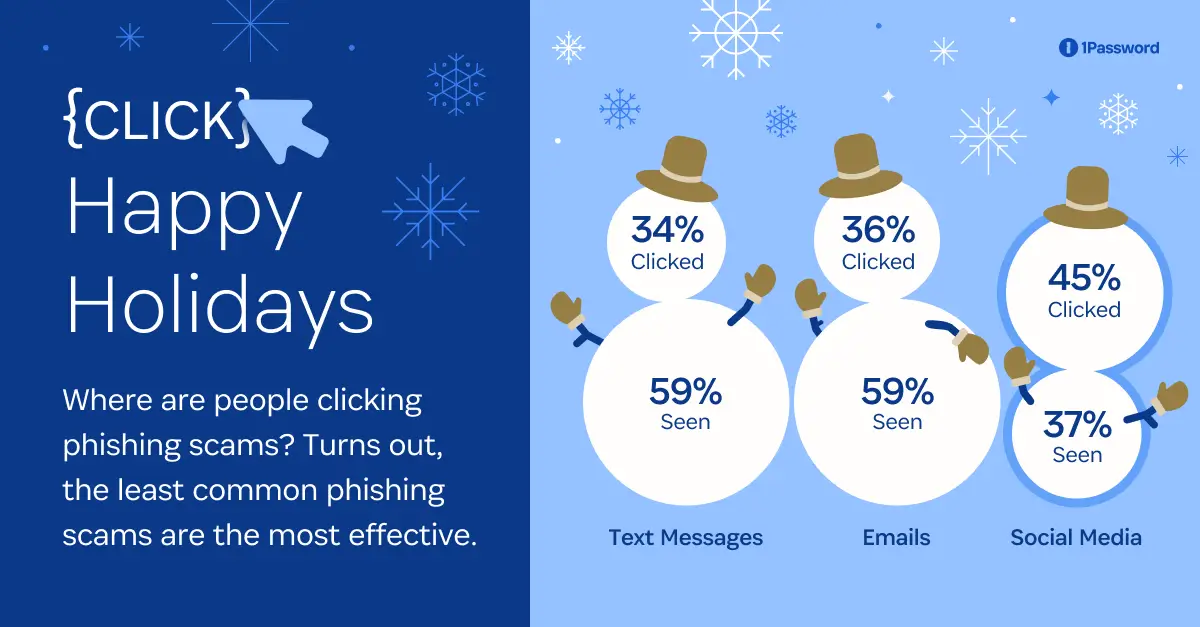
Our survey found the three most frequent places where people encounter suspected phishing scams:
Texts (59%)
Emails (59%)
Phone calls (49%)
People know to be on the lookout for scams on these channels, so it’s no surprise that they are often the least effective at tricking people into handing over their data, such as passwords and credit card numbers. For example, 34% of people reported falling prey to a “smishing” attack, meaning that they clicked a suspicious link in a text message.
On the other hand, less common phishing channels are more likely to deceive people. Social media isn’t as widely used for phishing as email or text, but 45% of people exposed to social media scams were successfully phished.
More and more users are shopping on social media every year; people are used to getting product recommendations and affiliate links from Instagram and TikTok. Social media, like phishing, also relies on impulse, with over 60% of social media users regretting an impulse buy they made on a platform.
Essentially, people get click-happy on social media, which makes it a prime medium to deliver phishing scams.
Dave Lewis holiday phishing reminder:
Be skeptical when shopping on social media. Social feeds are a prime hunting ground for scammers, who use realistic ads, fake storefronts, and sponsored posts that mimic real brands and people. Before buying or donating, verify the account, review comments for red flags, and visit the brand’s official site directly rather than purchasing through a link in a post, ad, or DM.
Our report data also challenges assumptions about who is getting scammed. Despite the perception of young people as tech-savvy digital natives, our survey found that younger generations are actually more likely to fall prey to a phishing attack.
Here’s the demographic breakdown of who has been phished:
Gen Z (70%)
Millennials(67%)
Gen X (57%)
Boomers(46%)
Before we start any (more) intergenerational conflict over the holiday season, we’ll note that younger generations are also typically exposed to more phishing attacks. For instance, 25% of Americans who've received a job-related phishing scam have clicked on it, and job seekers naturally tend to skew younger.
These job-related scams can be particularly dangerous over the holidays, when people begin to get worried about tight finances and start looking for new work (whether seasonal or long-term).
Overall, we can’t assume that any generation is better or worse at clocking a phishing scam. We should all be on guard, particularly as scammers evolve their methods.
Dave Lewis holiday phishing reminder:
If an offer seems too good to be true, it probably is. Make sure to look for telltale signs of phishing and look-a-like websites. Closely analyze the sender’s email address or phone number, hover over hyperlinks for legitimate URLs, and keep an eye out for poor grammar. Instead of automatically clicking on a link, you should always go directly to the retailer’s website to verify.
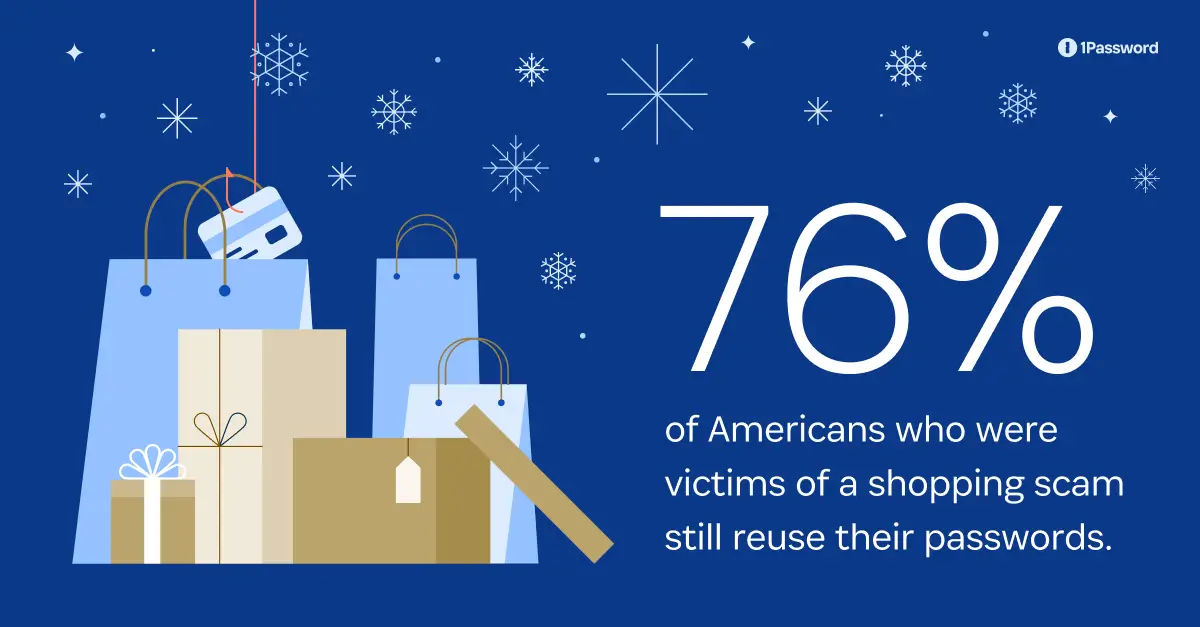
Here’s the most alarming finding of our survey: A whopping 76% of Americans who've fallen victim to a shopping scam still reuse passwords across multiple accounts.
If you’re not sure why this is a major problem, let us explain.
One common holiday scam involves bad actors sending out false shipping alerts to trick buyers into clicking malicious links or sharing personal information; we found that 31% of Americans who’ve been phished were trying to track a delivery or package.
Imagine you click a link to a very convincing imitation of the USPS website. You try to log in to track a package, only to then realize that the site isn’t legitimate. Now the bad actors who built the fake site have your real login information. At that point, having caught on, you close the window, find the proper USPS website, and change your password there.
Unfortunately, your old USPS password was also the password to access your airline points, bank account, and credit card… which is exactly what the scammers were counting on. Reused passwords are skeleton keys for bad actors to take over multiple accounts; if you’re not paying attention to your passwords, you might not find the vulnerable accounts before the hackers do.
Dave Lewis holiday phishing reminder:
Even if you’ve fallen for a scam, good password hygiene limits the damage. A single reused password can unlock multiple accounts for hackers. Use a unique password for every account, and let a password manager do the remembering for you. It’s one of the simplest, most effective ways to protect yourself from waking up to a digital nightmare.
We’ll end with a final stat: 70% of Americans have helped a family member identify a scam, but only 46% have asked for help themselves. Remember that there’s never any shame in asking for help; a little embarrassment is far better than a compromised bank account.
As we ramp up to the holidays, it’s not enough to give family and loved ones what they want; sometimes it’s better to give them what they need. If you’ve lived through enough holidays, you know that nobody’s ever thrilled to open up a new pair of socks. Despite that, those socks tend to be the gift we wind up using the most throughout the year.
With phishing scams on the rise, people are in dire need of help to stay safe online. Whether you offer it in the form of helpful advice or perhaps through a 1Password gift card (we promise that link is legit), remember that security is always a good gift.
1Password conducted this study using an online survey prepared by KW Research and distributed by PureSpectrum, completed by n=2,000 American adults. The sample was balanced by age, gender, region, and employment status. Within employees, a range of role types, seniority, and industries are represented. Data was collected from September 29 to October 3, 2025.
此内容由惯性聚合(RSS阅读器)自动聚合整理,仅供阅读参考。 原文来自 — 版权归原作者所有。