









With PC games growing increasingly complex nowadays — especially ones built on Epic Games's infamous Unreal Engine 5 — default/maxed-out graphics settings rarely (if at all) strike the optimal balance between visual fidelity and performance that most PC gamers seek, and Cthulhu: The Cosmic Abyss is no exception to this rule. As a demanding UE5 game, it should come as no surprise to many that the game's maxed-out/Epic graphics settings will be very GPU-heavy, and thus should require some tweaking to achieve better performance on most rigs, without hopefully completely sacrificing visual fidelity.
This guide should hopefully help you strike an optimal balance between performance and visuals in this game. In it, we will first provide you with a brief technical glimpse into the game, then proceed to break down how each relevant graphics setting impacts performance and visuals in the form of video comparisons. Finally, we will present you with our ready-to-use optimized graphics settings, in addition to some tips that should help improve your experience with the game.
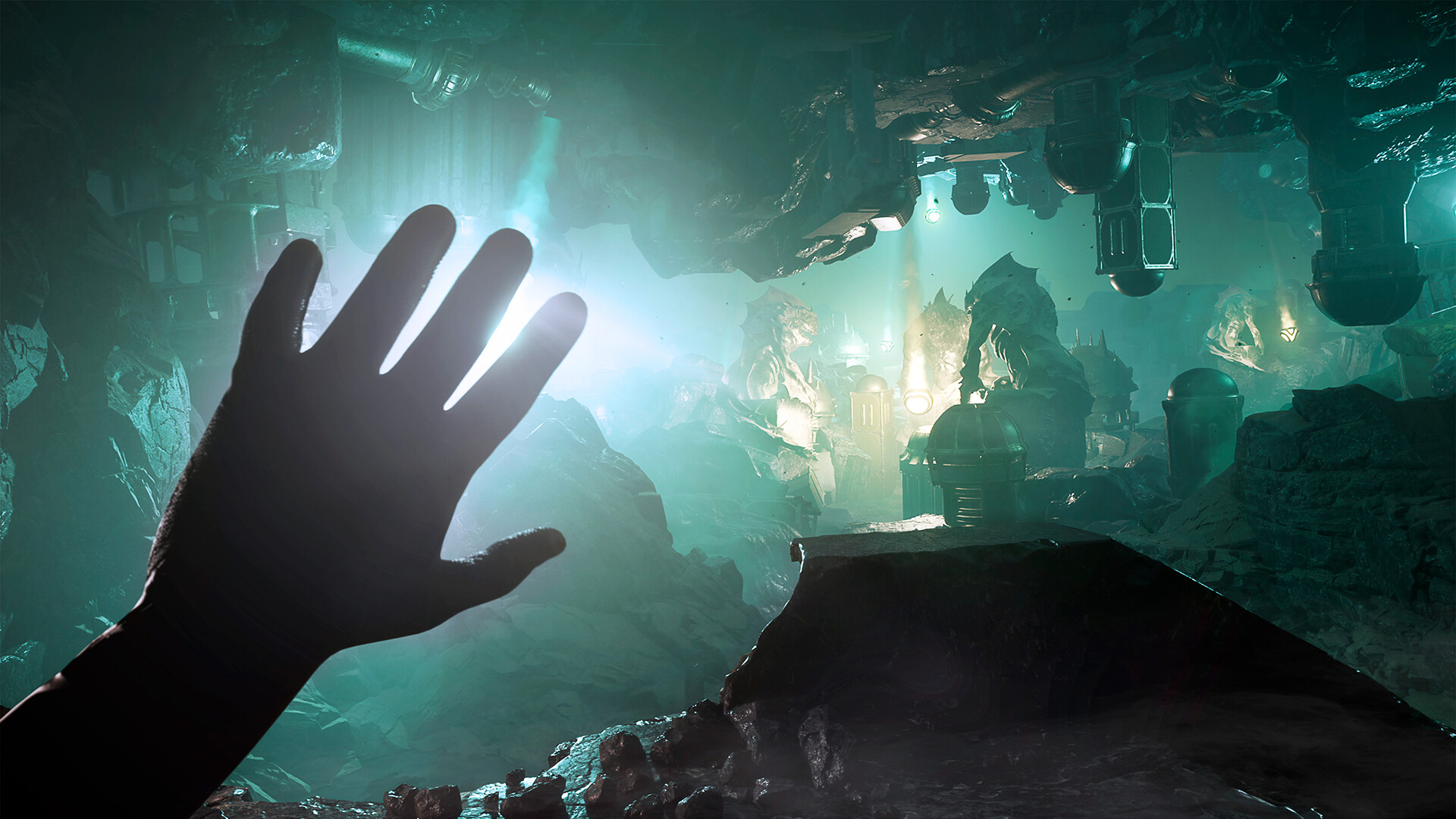
Released on April 16, 2026, on PC (via Steam) as well as PlayStation 5 and Xbox Series X|S, Cthulhu: The Cosmic Abyss is a narrative-driven Lovecraftian horror adventure developed by BIG BAD WOLF and published by Nacon. Built on Unreal Engine 5 and emphasizing atmospheric storytelling and investigative gameplay, the game casts players as occult investigator Noah, an agent of a secret organization tasked with uncovering the mysterious disappearance of miners in the depths of the Pacific Ocean. As his investigation leads into the labyrinthine ruins of the sunken city of R’lyeh, players must solve intricate puzzles, rely on advanced scanning tools, and resist the creeping madness of Cthulhu’s influence while confronting a reality-bending cosmic threat.
Let's begin by taking a look at the game's PC system requirements, courtesy of the developers:
| Tier | CPU | GPU | RAM | Storage | Additional notes |
|---|---|---|---|---|---|
| Minimum | Intel Core i7‑8700K / AMD Ryzen 5 1600X | NVIDIA GeForce GTX 1060 6 GB / AMD Radeon RX 590 8 GB / Intel Arc A580 8 GB | 12 GB | 16 GB required space. HDD supported, SSD recommended | Performance targets not mentioned, though listed specs were tested with "Performance" temporal upscaling |
| Recommended | Intel Core i5‑12600K / AMD Ryzen 5 7600 | NVIDIA GeForce RTX 3070 8 GB / AMD Radeon RX 6750 XT 12 GB / Intel Arc B580 12 GB | 16 GB | 16 GB required space. HDD supported, SSD recommended | Performance targets not mentioned, though listed specs were tested with "Performance" temporal upscaling |
As we can see from the above table, the game doesn't seem to be asking for a lot in terms of hardware, that is, until you read the additional notes part, which mentions that both the minimum and recommended specs were tested with "Performance" — AKA 50% per-resolution axis — temporal upscaling, without mentioning the exact performance targets or the used resolution/graphics settings. This can be a sign that the game is expected to be quite GPU-heavy, which would make sense as a UE5 game that's using its marquee rendering features, which are Nanite Virtualized Geometry, Lumen, and Virtual Shadows Maps.
Thankfully, the game does have a Pipeline State Object (PSO)/shader compilation step, which, in our experience with the game, was quite effective as we failed to spot any egregious instances of just-in-time shader compilation stutter. Unfortunately, the game does seem to occasionally exhibit the usual UE5 traversal stutters, which usually occur during player traversal of game levels and are likely caused by the streaming of UE5 actors.

In this section, we will explore the various graphics settings in Cthulhu: The Cosmic Abyss, via comparison videos that should showcase both the visual and performance (in terms of framerate) profiles of each setting, thus allowing us to determine which combination of settings strikes the best visuals/performance balance, which is the basis for establishing optimized graphics settings in all PC games.
Also, please be aware of the fact that the graphics settings comparisons in this section have all been made on a system with the following specs:
Also, all of the comparisons were done under GPU-limited scenarios at a resolution of 2560x1440 (1440p) with Unreal Engine 5’s Temporal Super Resolution (TSR) as the temporal upscaling/antialiasing solution at the native resolution (100% render scale), as in this game — like most other Unreal Engine 5 games — the GPU will largely be the performance limiting factor rather than the CPU (or other system components), unless you were aiming to achieve some really high framerates. Furthermore, please keep in mind that lowering GPU-intensive graphics settings (which are basically all of the game’s settings) will not affect the game's performance if the rest of your system (mainly the CPU and system memory) is too slow to keep up with your GPU.
With all that said, let's first take a look at the game's graphics settings menu:
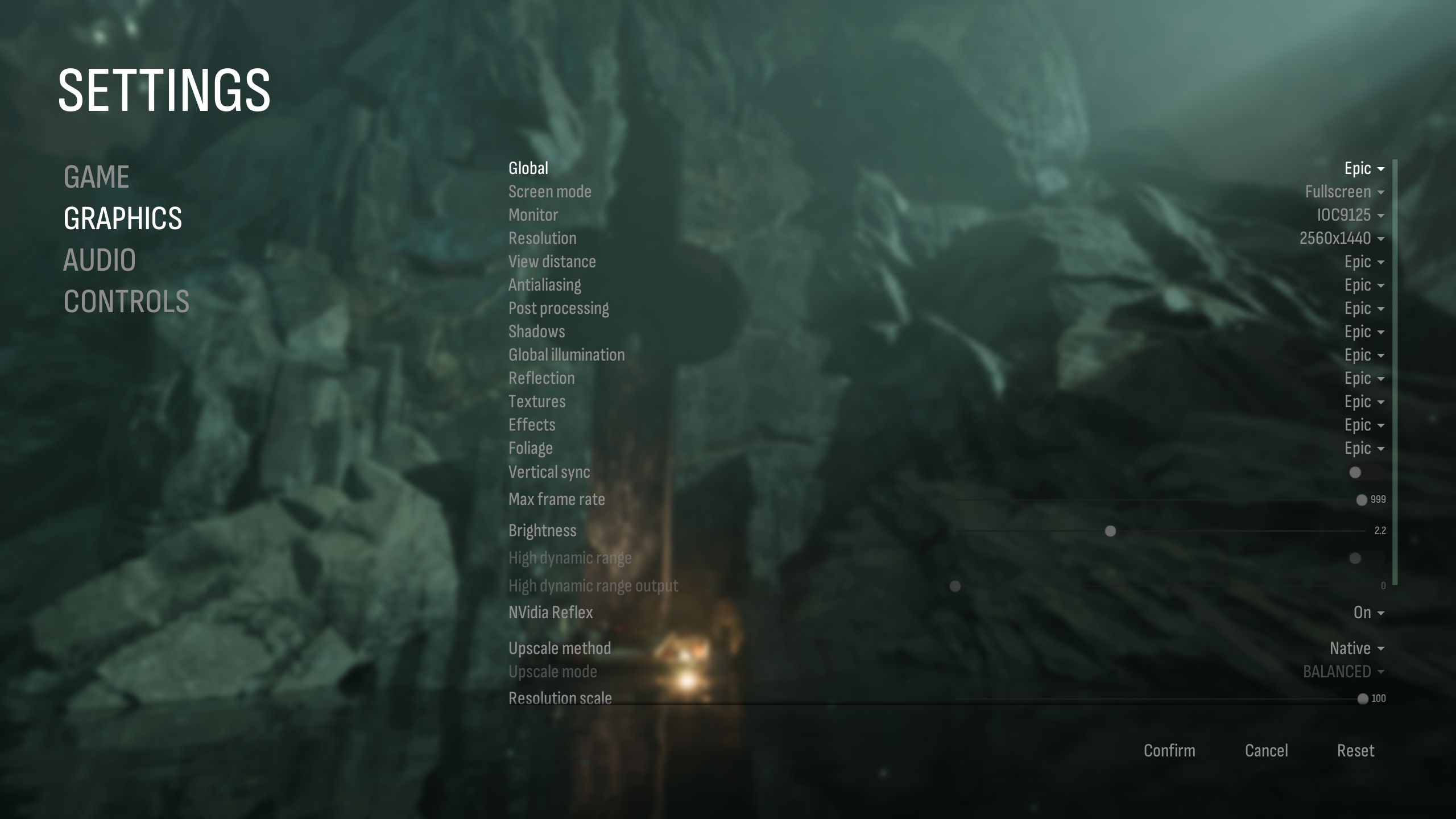
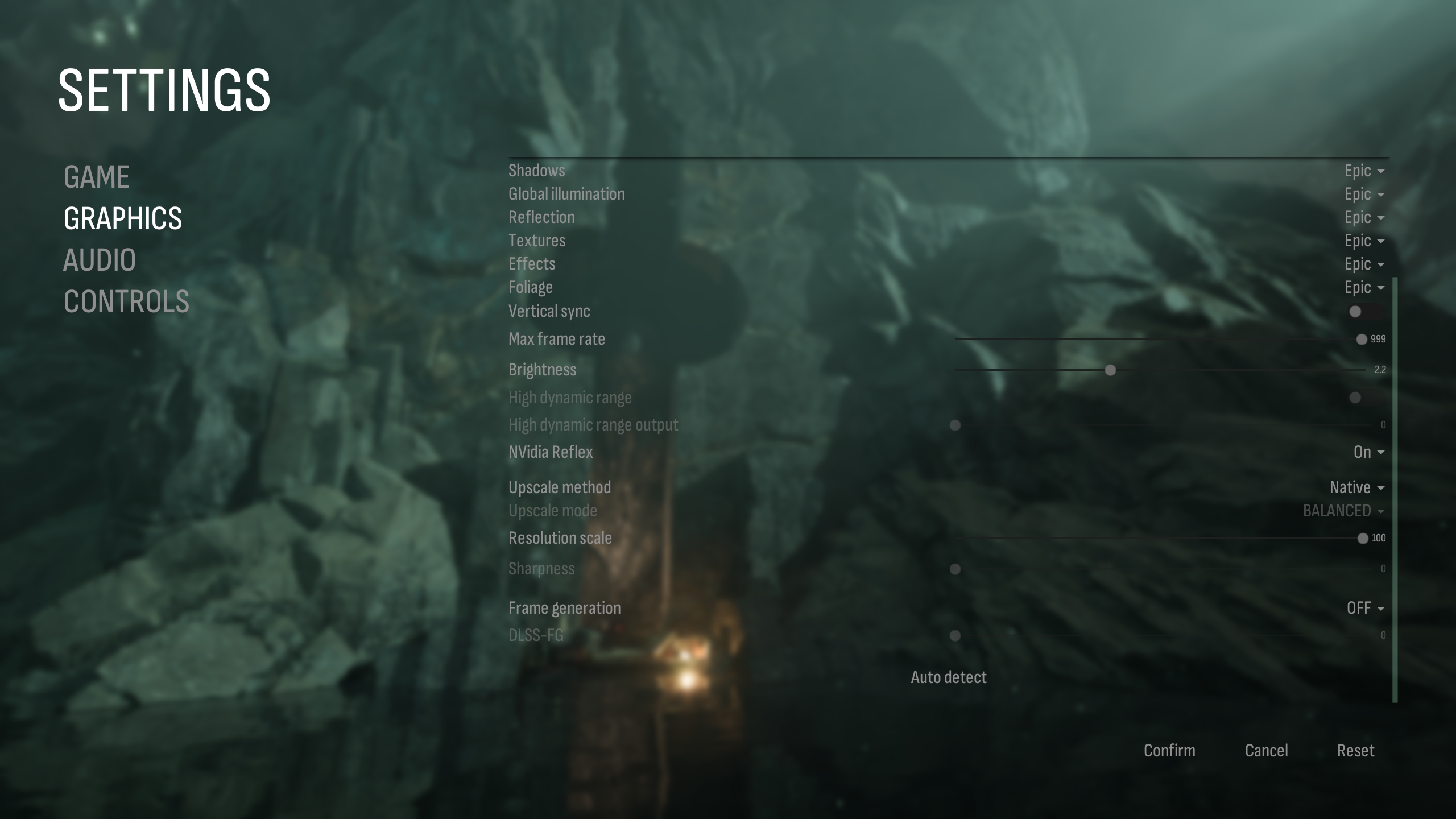
2 of 9
As we can see from the above pictures, the game's graphics settings menu seems to have the list of usual UE5 graphics settings. Also, frankly speaking, the graphics menu seems somewhat poorly designed in our view, with some rather bizarre choices — such as NVIDIA's DLSS Frame Generation/Multi Frame Generation having non-integer frame generation factors — and naming conventions, such as UE5's TSR being confusingly named "Native" rather than "TSR". And speaking of TSR, its internal resolution can be controlled by the "Resolution scale" slider. This is important to mention since the developers named it "Native" rather than "TSR", which could end up confusing people who may not have paid attention to the resolution slider. Other than that, the game seems to support all major temporal upscaling and frame generation technologies, with the unfortunate exception of Intel's XeSS. High Dynamic Range (HDR) is also thankfully supported.
With that said, let us finally delve into the visual and performance profiles of each relevant graphics setting that the game offers.
Note: The comparison videos have a CapFrameX/RivaTuner Statistics Server (RTSS) based overlay that displays game performance data regarding three metrics that we feel are relevant to gauge the performance profile of each graphics setting, which are GPU usage, real-time framerate (FPS), and dedicated GPU memory (VRAM) usage.
The first graphics setting we will look at is View Distance. This setting didn't seem to impact either performance or visuals in our experience with the game. Still, we recommend setting it to Far, just in case it may have a harsher-than-expected performance impact in a later game area.
This setting controls the fidelity of UE5's TSR temporal upscaling/antialiasing solution. We recommend setting it to Medium as a good compromise between visuals and performance.
The Post Processing setting in UE5 games usually tends to control the enablement of various effects such as depth of field, vignette, chromatic aberration, motion blur, and so on. In our experience with the game, it did not seem to affect performance much. As such, we will leave this setting up to individual user preference.
This setting controls the resolution of the game's Virtual Shadows Maps. We recommend High as a solid, balanced option between visuals and performance.
Global Illumination controls the fidelity of the game's Lumen/Signed Distance Fields (SDF)-based diffuse indirect lighting. We believe that Medium provides the best balance of visuals and performance, so we recommend it here.
The awkwardly named Reflection setting controls the resolution of the game's Lumen-based specular indirect lighting, which is also commonly known as reflections. We recommend High as a good option here.
This setting should control the resolution of the game's textures. However, it did not result in any noticeable changes in either texture fidelity or dedicated GPU VRAM usage in our experience with the game, so there is a chance that it is currently dysfunctional. As such, we have no particular recommendation for this setting.
This setting controls the fidelity of the game's various effects, such as alpha transparencies and GPU-accelerated particles. We recommend Medium here as a nice balance between visual fidelity and performance.
The Foliage setting should control the rendering fidelity of the game's foliage, such as trees, shrubs, and various plants. Still, we did not observe any major performance/visuals differences between the various levels of this setting. Be that as it may, we still recommend Medium as a safe option, in case later game areas exhibit a harsher performance impact with higher levels.
Wrapping it all up, here are the final, recommended optimized graphics settings for Cthulhu: The Cosmic Abyss, which we feel strike an optimal balance in terms of both performance and visuals for this game:
| Graphics Setting | Optimized Value |
| View Distance | Far |
| Antialiasing | Medium |
| Post Processing | Depends on individual preference |
| Shadows | High |
| Global Illumination | Medium |
| Reflection | High |
| Textures | No particular recommendation |
| Effects | Medium |
| Foliage | Medium |
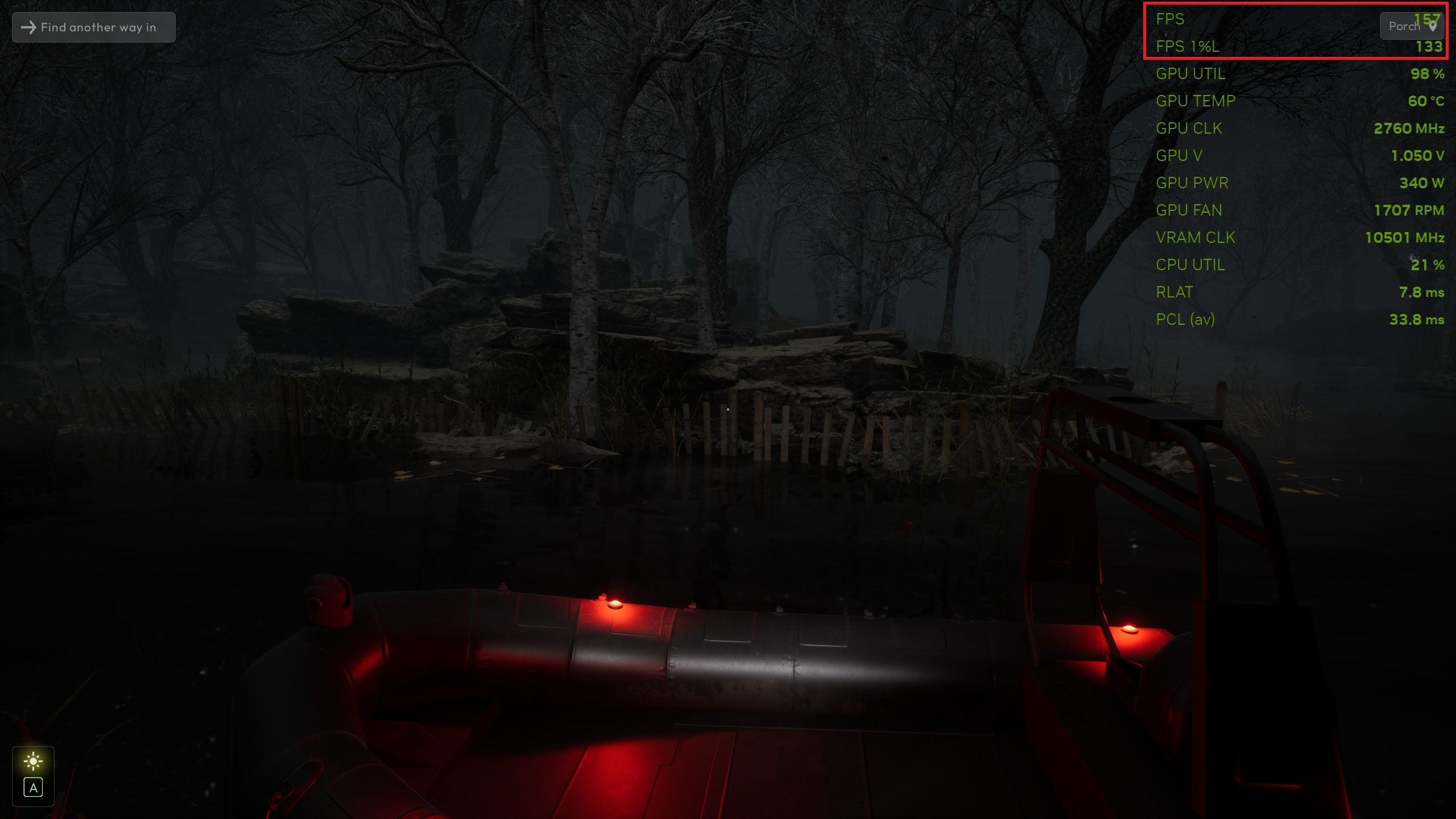
With our optimized graphics settings established, let us look at how they improve performance — at a minor cost in terms of visual fidelity — on our test system vs the game's maxed-out/Epic graphics settings, via the following comparison screenshots:
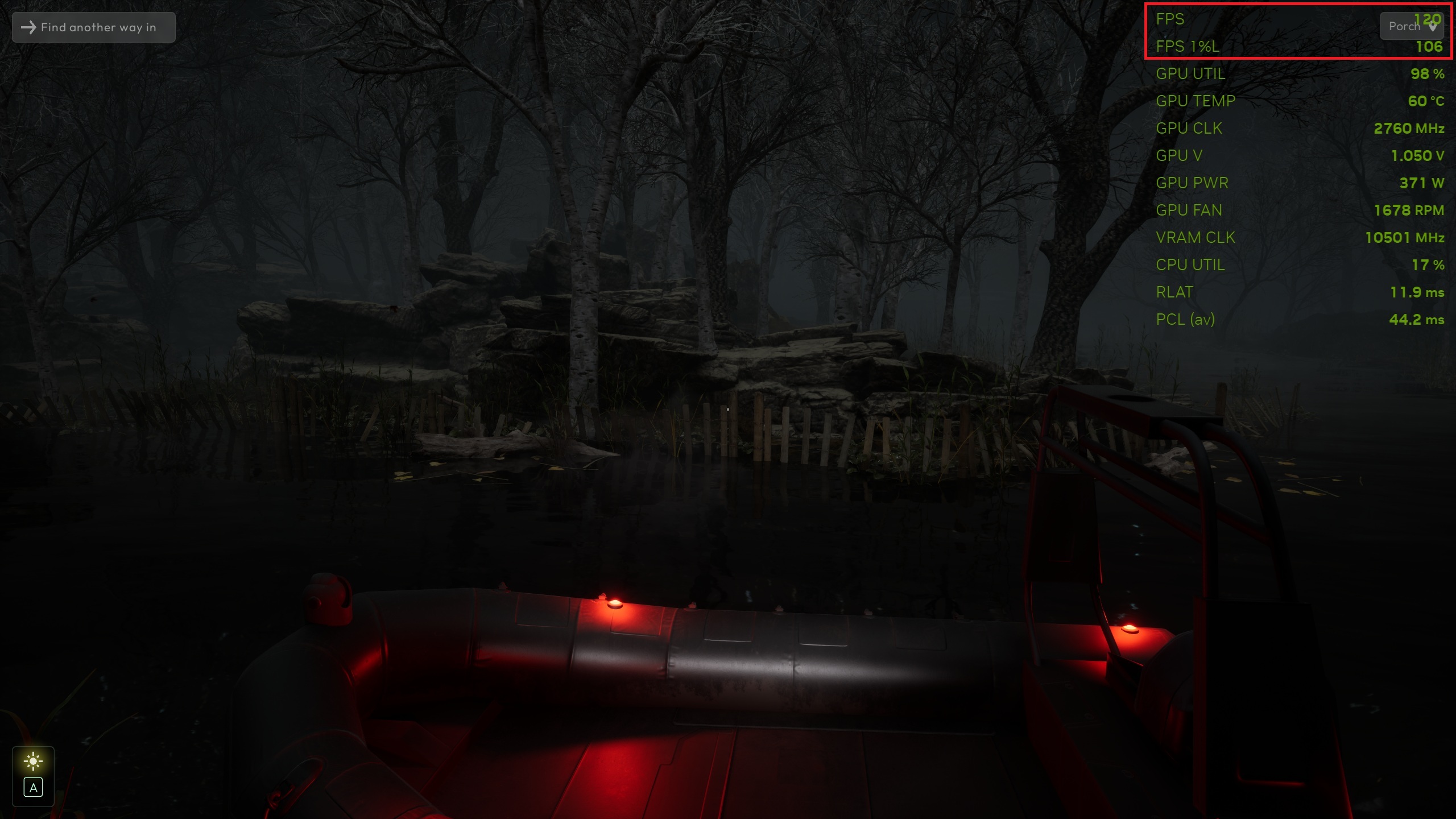
2 of 9
As we can see from the above comparison screenshots, our optimized graphics settings result in an 31%/21% increase in average and 1% low average FPS figures respectively in our chosen test scene, which are very respectable figures, given the minor loss in visual fidelity on display.
In addition to our optimized graphics settings, you can further enhance your experience with Cthulhu: The Cosmic Abyss with the additional tips below.
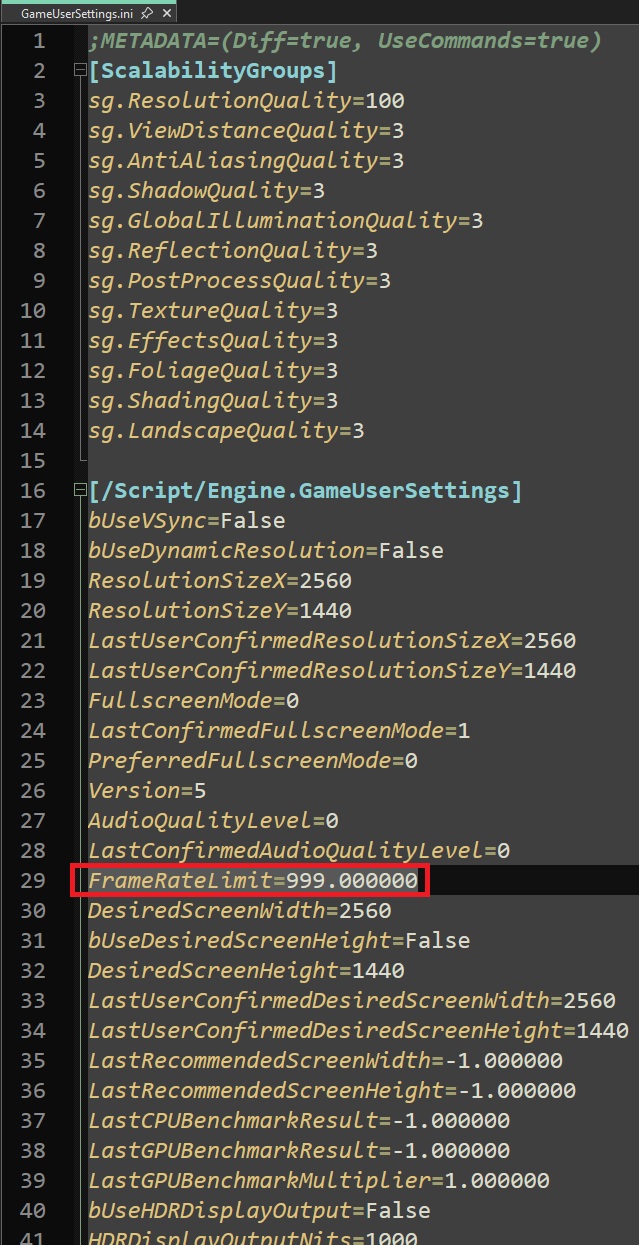
First, the game by default has a 240 FPS cap, which applies even with frame generation enabled. As such, we recommend disabling it by setting the FrameRateLimit value — which is located in %LOCALAPPDATA\CthulhuTCA\Saved\Config\Windows\GameUserSettings.ini — to an arbitrary value of your choosing that's much higher than 240.000000, like 999.000000 for example:
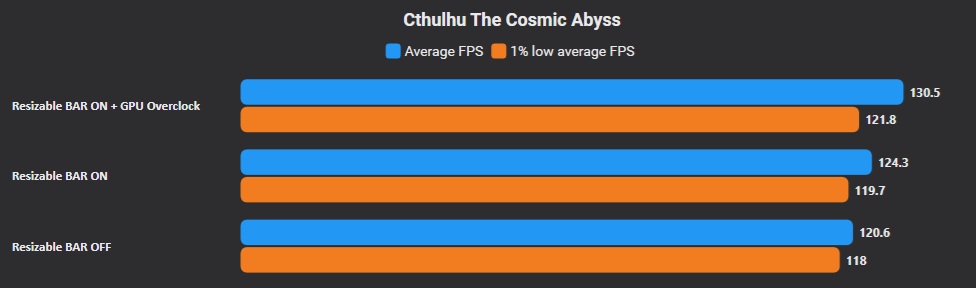
Second, enabling Resizable BAR for the game's profile via NVIDIA Profile Inspector on NVIDIA GeForce RTX GPUs (30 Series or higher) may result in a half-decent gain in GPU-limitedperformance, which can be combined not only with our optimized graphics settings, but also temporal upscaling — and perhaps also frame generation/multi frame generation for increased smoothness — not to mention a GPU overclock, to considerably improve your GPU-limited performance in Cthulhu: The Cosmic Abyss, as the following CapFrameX benchmarks can attest to:
Lastly, users of non-NVIDIA GeForce RTX 50 Series GPUs that can achieve a decent baseline level of performance in Cthulhu: The Cosmic Abyss and have high refresh rate monitors (at least 180 Hz is recommended) may want to explore using the popular DLSS Enabler mod to enable a modded version of AMD's open-source FSR 3.1 Frame Generation frame interpolation technology, which can generate up to 5 interpolated frames between "real" rendered frames, not unlike NVIDIA's own DLSS Multi Frame Generation technology.
Overall, Cthulhu: The Cosmic Abyss lands right where you’d expect most modern Unreal Engine 5 titles to sit from a technical standpoint. Performance is generally acceptable, and the game avoids the dreaded shader compilation stutters that have plagued many UE5 releases in the past. However, this is offset by occasional traversal stutters that can briefly disrupt immersion, even if they’re not overly frequent.
Visually, while the game delivers strong environmental design and atmosphere, it doesn’t quite push the envelope. In particular, character models feel noticeably dated compared to the best that modern AA/indie games have to offer.
In the end, Cthulhu: The Cosmic Abyss is a somewhat polished — yet undeniably flawed — technical package. It runs decently well, offers a decent suite of graphics settings, and avoids some of the UE5’s common pitfalls, but it also falls short of excellence due to its overall performance/visuals profile.
For more on Cthulhu: The Cosmic Abyss, please check out our review of the game from this link!


This performance analysis was based on a Steam copy of Cthulhu The Cosmic Abyss provided by publisher Nacon.

About the author: Sebastian Castellanos is a data scientist by education and training. He's also deeply passionate about PC gaming hardware and software. He has recently started writing technical articles and guides Wccftech about PC hardware, games and mods.
Follow Wccftech on Google to get more of our news coverage in your feeds.
此内容由惯性聚合(RSS阅读器)自动聚合整理,仅供阅读参考。 原文来自 — 版权归原作者所有。