


Na Li Engineering Manager
AI is evolving beyond simple text interactions toward rich multimodal capabilities, such as on-device image and audio generation, enabling developers to create highly personalized consumer experiences. While the CPU has always been the ubiquitous option for inference, running large complex models at the edge has historically required choosing between high-latency CPU execution and fragmented, specialized accelerators.
Arm Scalable Matrix Extension 2 (SME2) eliminates this tradeoff by integrating a dedicated matrix-compute unit directly into the CPU cluster. This architecture enables the CPU to function as a high-performance AI accelerator, delivering up to 5x faster inference for the matrix-heavy workloads at the heart of generative AI.
Running on-device AI on Arm hardware is dramatically streamlined with Google AI Edge, an integrated stack designed to simplify your development journey. LiteRT automatically leverages Arm SME2 at runtime through XNNPACK and Arm KleidiAI integration. It identifies and selects math-intensive kernels like iGeMM and GeMM, delivering specialized hardware acceleration. To further ease deployment, AI Edge Quantizer handles complex model compression, and Model Explorer provides a visual map to quickly identify and resolve performance hotspots.
The power of this integration is proven through deploying Stability AI’s stable-audio-open-small model entirely on Arm CPUs delivering major performance uplift. In this blog post, we’ll walk you through transforming the original floating-point PyTorch stable-audio-open-small model into a highly optimized, mixed-precision (FP16/Int8) implementation ready for high-performance acceleration on Arm CPU.
Stable Audio Open Small running on LiteRT and Arm CPU with SME2
To generate high-quality audio, such as 11-second stereo clips from a single prompt, directly on a wide range of mobile devices, practical considerations usually require a manageable model footprint, typically around 1 billion parameters. Even within this Small Language Model (SLM) range, developers face Challenging Deployment Hurdles:
By using a diffusion-based model as the optimization target, we demonstrate a complete end-to-end path with the Google AI Edge software stack. As shown below, this synergy provides a streamlined Convert → Optimize → Deploy pipeline.

Given the KleidiAI optimizations are embedded directly into XNNPACK, developers gain specialized AI acceleration automatically. There is no need to write low-level assembly or custom hardware code; the stack handles the "translation" from high-level model to silicon-optimized execution.
Start by converting the PyTorch version of the Stable-audio-open-small model into the AI Edge ecosystem. LiteRT-Torch allows for a direct conversion path for PyTorch models, minimizing friction of moving from a research environment to a production mobile environment.
import litert_torch
from litert_torch.quantize import quant_config
from litert_torch.generative.quantize import quant_recipe, quant_recipe_utils


# Specify the quantization format
quant_config_int8 = quant_config.QuantConfig(
        generative_recipe=quant_recipe.GenerativeQuantRecipe(
        default=quant_recipe_utils.create_layer_quant_dynamic(),
    )
)
# Initiate the conversion
edge_model = ai_edge_torch.convert(
    model, example_inputs, quant_config=quant_config_int8
)
Python
Copied
Find the code snippet to illustrate how LiteRT-Torch works in practice here
Previously, identifying which layers of a model were suitable for quantization was a manual, error-prone process of inspecting individual layers.
With Google’s Model Explorer, developers can now visualize the entire model graph. The new node data overlay plugin allows us to see exactly which operators are most compute-intensive or as shown below which are "quantization-safe". This visual verification ensures we only target layers where moving to INT8 won't degrade audio output quality.
For example, to improve the inference efficiency of the diffusion step, we applied dynamic INT8 quantization to the DiT (Diffusion Transformers) submodule:
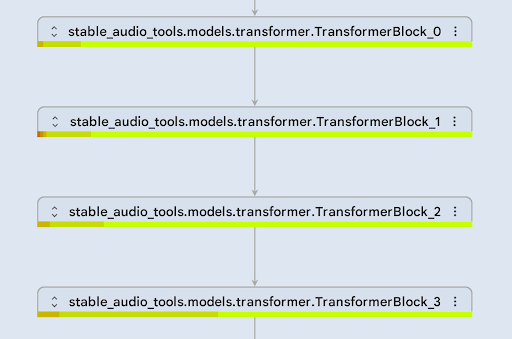
Median difference ratio error reported for each DiT transformer block.
As shown in the screenshot above, all layers in the DiT submodule are green, indicating low error values within the DiT transformer (FP32 vs. FP32+INT8). Therefore, we expect the dynamically quantized INT8 DiT submodule to achieve quality comparable to FP32.
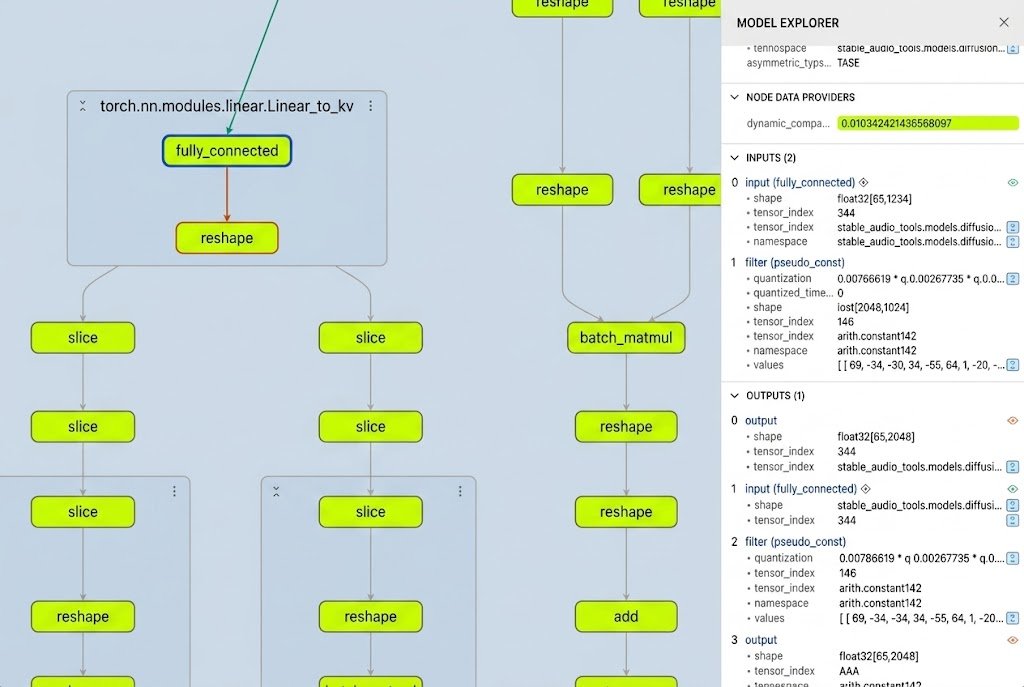
Fully connected layer with INT8 dynamic quantization. The error rate, reported under “NODE DATA PROVIDERS,” is approximately 1%.
Once the suitability of INT8 quantization was confirmed, we utilized the AI Edge Quantizer to optimize the model from FP32 to INT8.
This decision resulted in 3x performance improvement in the DiT submodule, along with a 4x reduction of its memory usage.
fp32_model_path = "./dit_model_fp32.tflite"
dynamic_quant_model_path = "./dit_model_int8+fp32.tflite"

the_recipe = [
      dict({
          'regex': '.*',
          'operation': '*',
          'algorithm_key': 'min_max_uniform_quantize',
          'op_config': {
              'weight_tensor_config': {
                  'num_bits': 8,
                  'symmetric': True,
                  'granularity': 'CHANNELWISE',
                  'dtype': 'INT',
                  'block_size': 0,
              },
              'compute_precision': 'INTEGER',
              'explicit_dequantize': False,
              'skip_checks': False,
              'min_weight_elements': 0
          },
      })
  ]

# Define the quantizer, with fp32 tflite model, and the recipe.
qt = quantizer.Quantizer(fp32_model_path, the_recipe)

quant_result = qt.quantize().export_model(dynamic_quant_model_path, overwrite=True)
Python
Copied
The final step is the runtime.
When you run this quantized model in LiteRT on an Android mobile device, it defaults to the XNNPACK delegate for CPU inference. Because XNNPACK integrates KleidiAI directly within the latest LiteRT API, developers get these optimizations automatically. These micro-kernels ensure that the core INT8 and FP16 matrix multiplications of the audio model run with maximum efficiency on the CPU.
Below is a representative snippet of how LiteRT inference is implemented in C++ using the CompiledModel API. Instructions in this guide are provided for running the audiogen app with LiteRT either on an Android™ device or macOS®.
#include "litert/cc/litert_compiled_model.h"
#include "litert/cc/litert_environment.h"
#include "litert/cc/litert_tensor_buffer.h"

// 1. Initialize the LiteRT Environment
auto env = litert::Environment::Create({}).value();

// 2. Create the CompiledModel from the .tflite file
// Hardware acceleration (e.g., SME2 via KleidiAI) is handled automatically
auto compiled_model = litert::CompiledModel::Create(
    env, "autoencoder_model.tflite", litert::HwAccelerators::kCpu).value();

// 3. Prepare input and output buffers
auto autoencoder_inputs = compiled_model.CreateInputBuffers().value();
auto autoencoder_outputs = compiled_model.CreateOutputBuffers().value();

// 4. Write input data (e.g., random noise or conditioned embeddings)
auto auto_in_lock_and_ptr = scoped_lock<float>(autoencoder_inputs[0],
litert::TensorBuffer::LockMode::kWrite);

// Fill the input

// 5. Execute inference
compiled_model.Run(autoencoder_inputs, autoencoder_outputs);

// 6. Access and read the generated audio waveform from the output buffer
auto auto_out_lock_and_ptr = scoped_lock<const float>(autoencoder_outputs[0], litert::TensorBuffer::LockMode::kRead);

// Read the output
C++
Copied
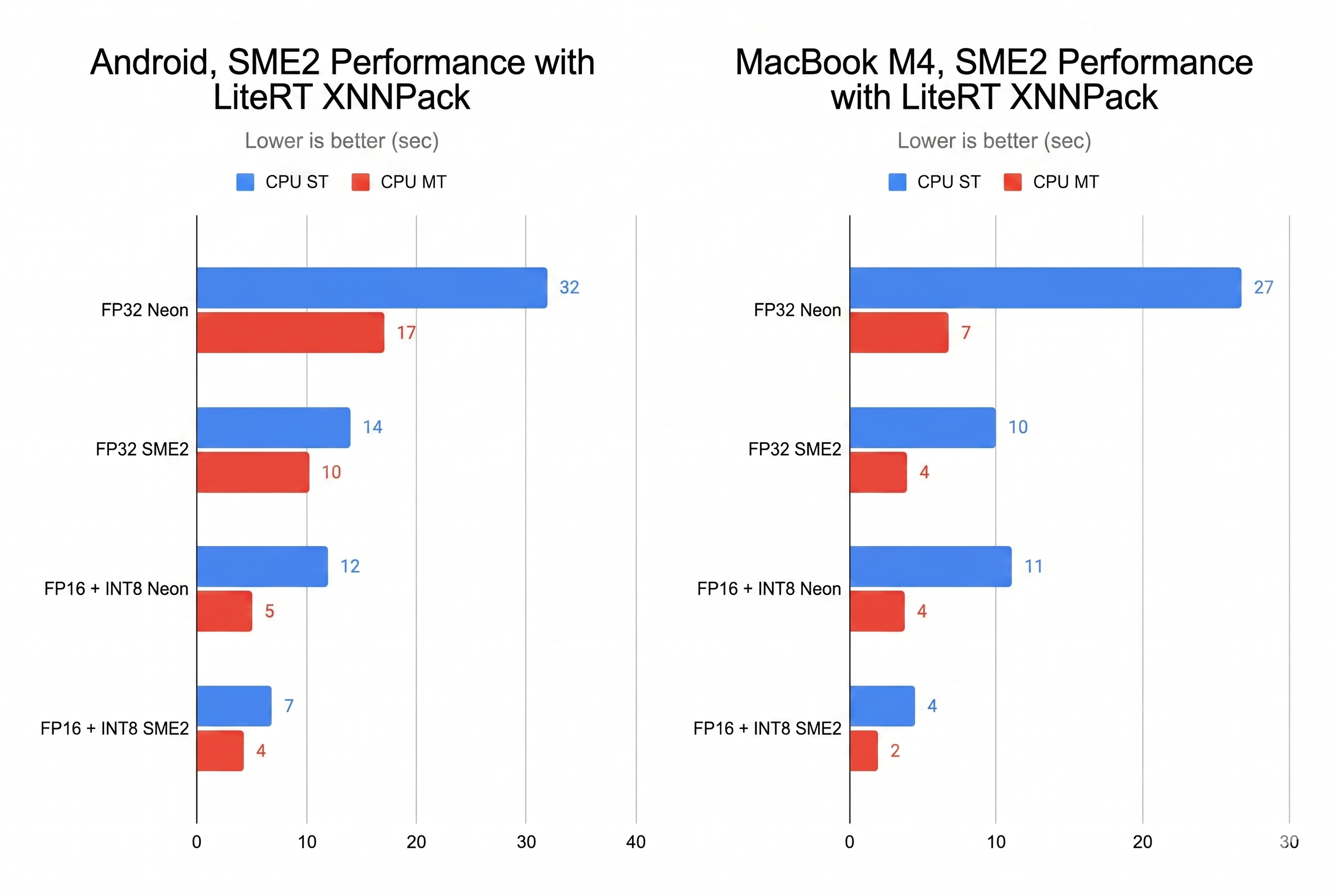
We now take our quantized fp16/int8 model from the prior section and benchmark both CPU single threaded and multi-threaded (MT) performance with the original FP32 Stable Audio Open Small model against our KleidiAI-optimized FP16 + INT8 model on an SME2-based Android device and on an Apple MacBook with M4.
As shown in the bar chart above, SME2 delivers more than a 2x performance improvement over the NEON instruction set, specialized for signal processing tasks. Even with a single core, it can generate 11 seconds of audio in under 8 seconds, which is acceptable from a user-experience perspective.
These optimizations are available for developers today. Start experimenting immediately using Google AI Edge tools and KleidiAI-accelerated LiteRT.
Explore Arm’s sample repository to access the complete end-to-end journey for Stable Audio Open:
Acknowledgements
Arm: Adnan Alsinan, Anitha Raj, Aude Vuilliomenet, Bala Gattu, Declan Cox, and Gian Marco Iodice
Stability AI credit: This post uses the Stable Audio Open Small model by Stability AI, released under the Stability AI Community License. Audio samples were generated using the model running on test devices via LiteRT & Arm Keidi AI.
Google: Advait Jain, Andrei Kulik, Changmin Sun, Cormac Brick, Dillon Sharlet, Eric Yang, Jingjiang Li, Jing Jin, Lu Wang, Maria Lyubimtsev, Meghna Johar, Pedro Gonnet, Ram Iyengar, Sachin Kotwani, Terry (Woncheol) Heo, Vitalii Dziuba
此内容由惯性聚合(RSS阅读器)自动聚合整理,仅供阅读参考。 原文来自 — 版权归原作者所有。