


The Gigabyte Z890 Aorus Elite Duo X motherboard is the first of several Z890 refresh motherboards we expect will land on our test bench in the coming weeks. Hailing from the budget mid-range side of the tracks, the Duo X supports the latest and greatest Intel processors, including the newest Arrow Lake refresh chips in the Core Ultra 270K Plus and 250K Plus, as well as the original Core Ultra chips. In addition to native Arrow Lake Refresh refresh support, Gigabyte adds an “Ultra Turbo Mode” to easily extract maximum performance from your system (details on that later), and it's one of the first to be compatible with high-density CQDIMMs (Clocked Quad-rank Unbuffered Dual In-line Memory Modules - think high-density, high-speed modules).
The Z890 Aorus Elite Duo X ($279.99) comes well-equipped for a budget mid-range board. One of its primary differentiating features is CQDIMM compatibility, designed for high capacity and high speed, enabling 256GB (2x128GB) capacities and speeds up to DDR5-8000. With that much RAM, you typically need four sticks, and there’s no chance to run close to those speeds with four sticks, as it’s too much stress on your memory controller. So, for those who want or need higher RAM capacities, you can now have that and higher speeds. To be clear, Gigabyte doesn’t officially support CQDIMMs, but it does allow them to work with the Core Ultra CPU.
Specifications of the Aorus Elite Duo X
Swipe to scroll horizontally
Socket | LGA 1851 |
Chipset | Z890 |
Form Factor | ATX |
Voltage Regulator | 19 Phase (16x 60A DrMOS MOSFETs for Vcore) |
Video Ports | (1) DisplayPort (v2.1) |
USB Ports | (1) USB 4 (40 Gbps) Type-C |
Network Jacks | (1) 5 GbE |
Audio Jacks | (2) Analog + SPDIF |
Legacy Ports/Jacks | ✗ |
Other Ports/Jack | ✗ |
PCIe x16 | (1) v5.0 (x16/x8) |
PCIe x8 | ✗ |
PCIe x4 | ✗ |
PCIe x1 | ✗ |
CrossFire/SLI | ✗ |
DIMM Slots | (2) DDR5-10266+ MT/s (OC), 128GB Capacity |
M.2 Sockets | (1) PCIe 5.0 x4 (128 Gbps) / PCIe (up to 110mm) |
SATA Ports | (4) SATA3 6 Gbps |
USB Headers | (1) USB v3.2 Gen 2x2 (20 Gbps) Type-C |
Fan/Pump Headers | (6) 4-Pin (Accepts PWM and DC) |
RGB Headers | (3) 3-pin ARGB headers |
Diagnostics Panel | (1) Debug port (1) 2-character Debug |
Internal Button/Switch | ✗ |
SATA Controllers | ✗ |
Ethernet Controller(s) | (1) Realtek RTL8126 (5 GbE) |
Wi-Fi / Bluetooth | Intel Wi-Fi 7 (BE200NGW) - 320 MHz, 6 GHz, 5.8 GHz, BT 5.4 |
USB Controllers | Row 26 - Cell 1 |
HD Audio Codec | Realtek ALC1220 |
DDL/DTS | ✗ / ✗ |
Warranty | 3 Years |
Inside the Box
Inside the retail packaging are several accessories to help get your system up and running. Gigabyte includes the typical fare: manuals, a quick-connect Wi-Fi 7 antenna, a Q-connector, two SATA cables, some pads for M.2 drives, and an Aorus sticker. There isn’t a lot here, but it isn’t lacking compared to similarly priced offerings from other board partners, either.
Design of the Aorus Elite Duo X
Image
1
of
6
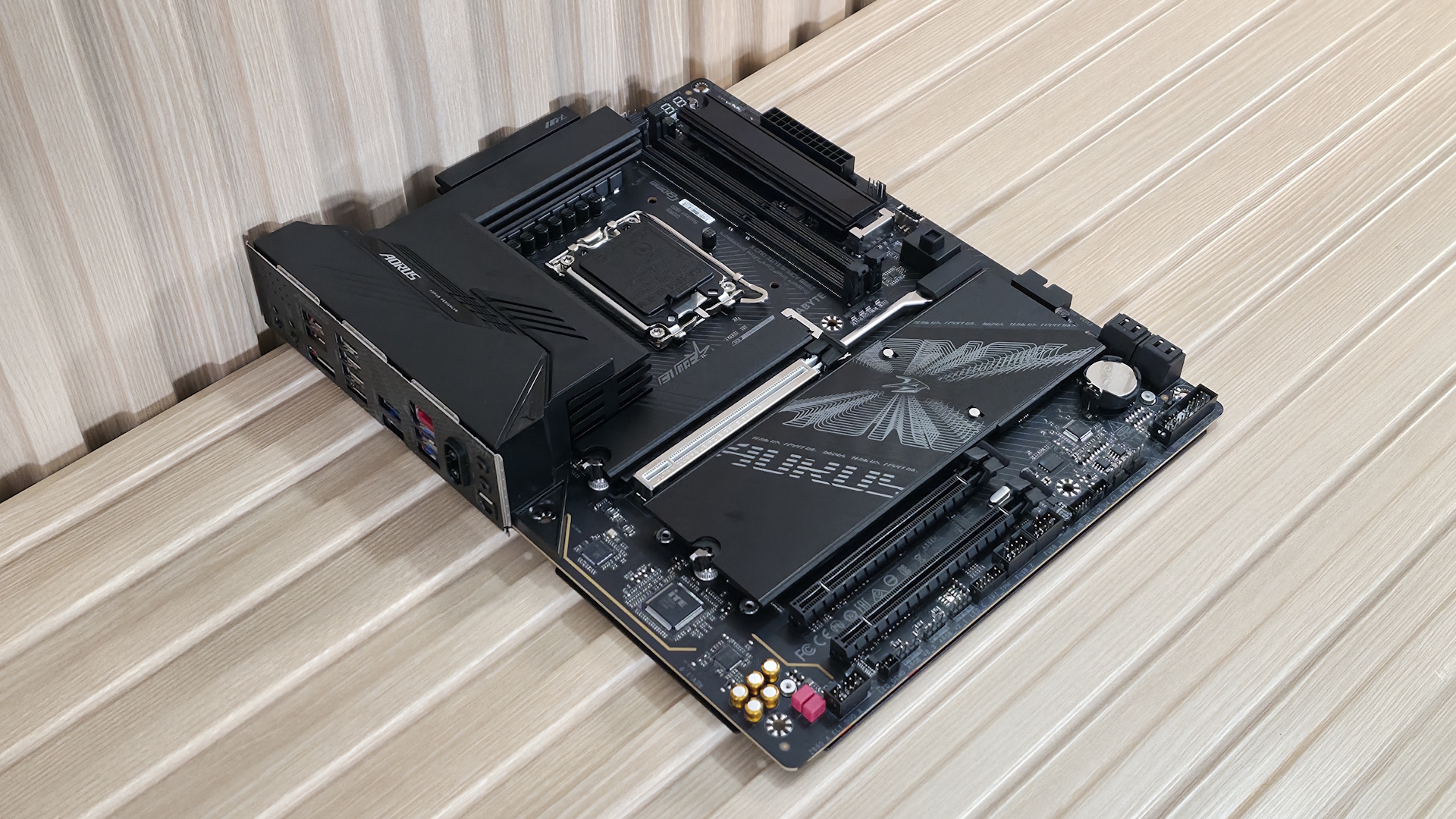
As for the looks and design, the multi-layer PCB is black with some grey lines around the socket, DRAM, and chipset areas to break up the monotony. It uses oversized heatsinks with a matte finish, and a plastic shroud above with a brushed-metal appearance. There’s also some Aorus branding on the shroud, backlit by a couple of RGB LEDs. The bottom of the board is covered with heatsinks on the hot spots, but nothing else (as expected for this class of board). The heatsinks here also sport a brushed-aluminum finish and more Aorus branding that bleeds over to the RGB-laden chipset heatsink.
In all, it’s a simple design aesthetic, fitting for its class, and it should look good with any dark-themed build.
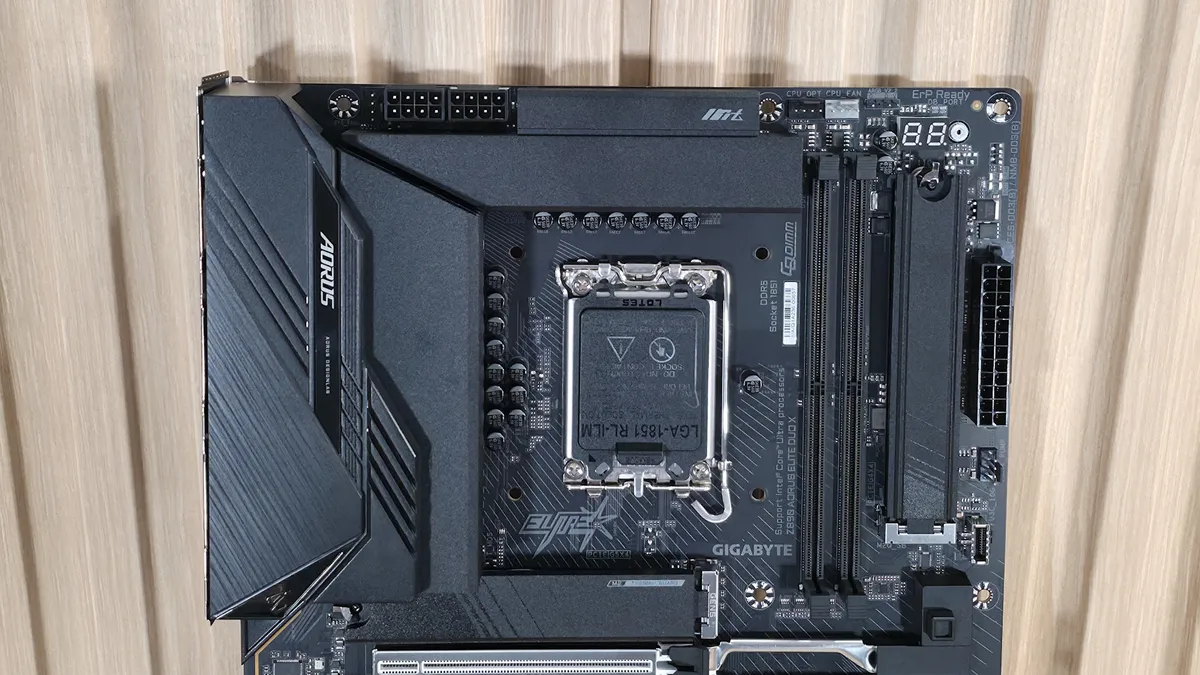
Focusing on the top half, we get a closer look at the two VRM heatsinks and shrouds and see the two 8-pin EPS connectors (one required) just above. Looking past the socket to the right, we then run into the two memory slots and Gigabyte’s D5 Duo X technology, which promises to deliver traditional 4-slot capacity with only two DIMMs and increased speeds due, in part, to direct path (skipping the middle slots) and zero signal reflection, according to Gigabyte. Listed memory support is up to a smokin’ fast 10,266 MT/s – and you can achieve that speed, but with lower-capacity DIMMs and a CPU with a better-than-average Integrated Memory Controller (IMC).
With the updated platform and chip, speeds have increased to DDR5-7000 without even overclocking the IMC. RAM isn’t cheap these days, and there isn’t an end in sight to the pricing madness. Performance will still be solid at slower speeds, but if you’re anything like me, running below the platform's maximum leaves me feeling uneasy, even if the performance difference isn’t typically much. Just be sure your use case utilizes the bandwidth before dropping more money than you need to on RAM and not getting the performance bump you expect.
Above the DRAM slots are the first two (of six) 4-pin fan headers; in this case, it's the CPU_FAN and CPU_OPT headers. Gigabyte balances output across all headers, with each capable of 2A/24W, which is plenty to support fans, AIOs, and even custom water loops. Control over the headers is handled through the BIOS, Smart Fan 6, or the Gigabyte Control Center software. Next to these headers is the 2-character debug display, which offers up codes during the POST process and provides details on where any potential problem may be.
Before we travel down the right edge, between that and the two DRAM slots is a chipset-connected M.2 socket (PCIe 4.0 x4 64 Gbps) that fits up to 110mm modules. We don’t often see M.2 in that area, but with the extra real estate afforded by using two RAM slots instead of four, you might as well add something useful here.
Down the right edge is the 4-LED debug (CPU, Boot, VGA, RAM). And like the ‘80 port’ debug above, it lets you know, at a high level, where the problem is when your system hangs in POST. Next are the 24-pin ATX connector for powering the board, the 4-pin FAN4_PUMP header, and the front-panel USB 3.2 Gen 2x2 (20 Gbps) Type-C connector.
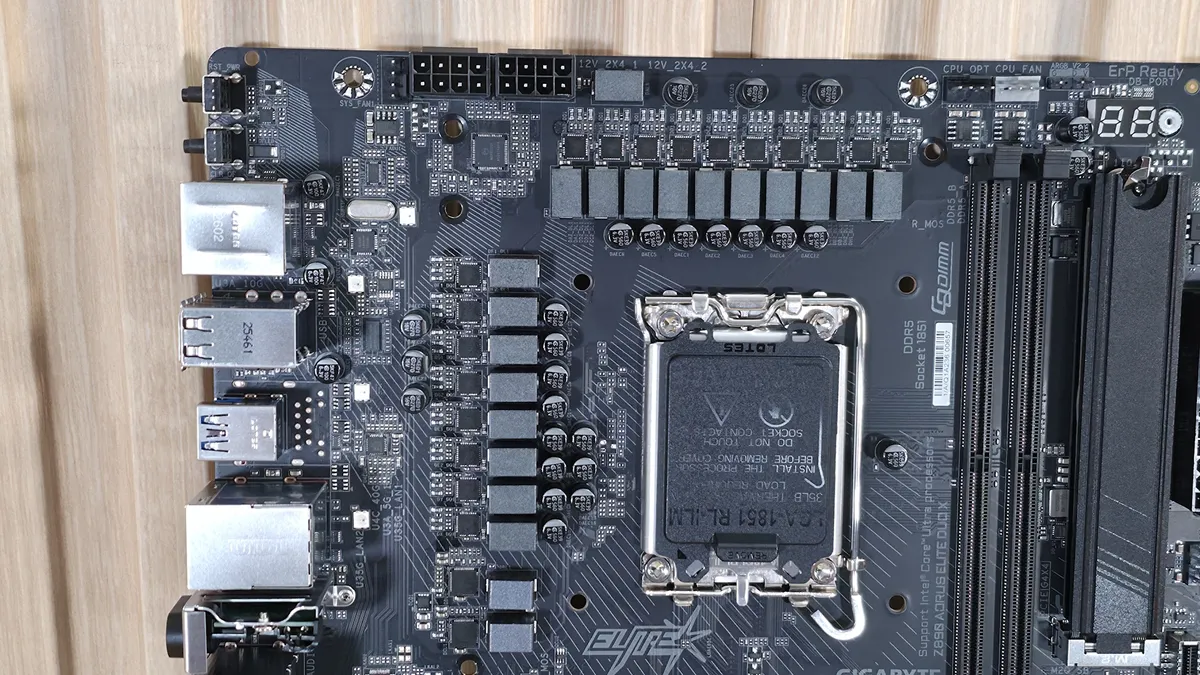
Power delivery on the Z890 Aorus Elite Duo X has a total of 19 phases, with 16 dedicated to Vcore. Power is supplied to the OnSemi NCP81537 controller via the 8-pin EPS connector. From there it heads on to 16 OnSemi NCP307155 60 SPS MOSFETs. While the 960A isn’t a lot, it can easily handle the Core Ultra 7 270K Plus, Core Ultra 5 250K Plus, as well as the Core Ultra 9 285K. You can even overclock; just be sure to keep good airflow in your chassis, as the components here can get warm with sustained heavy use.
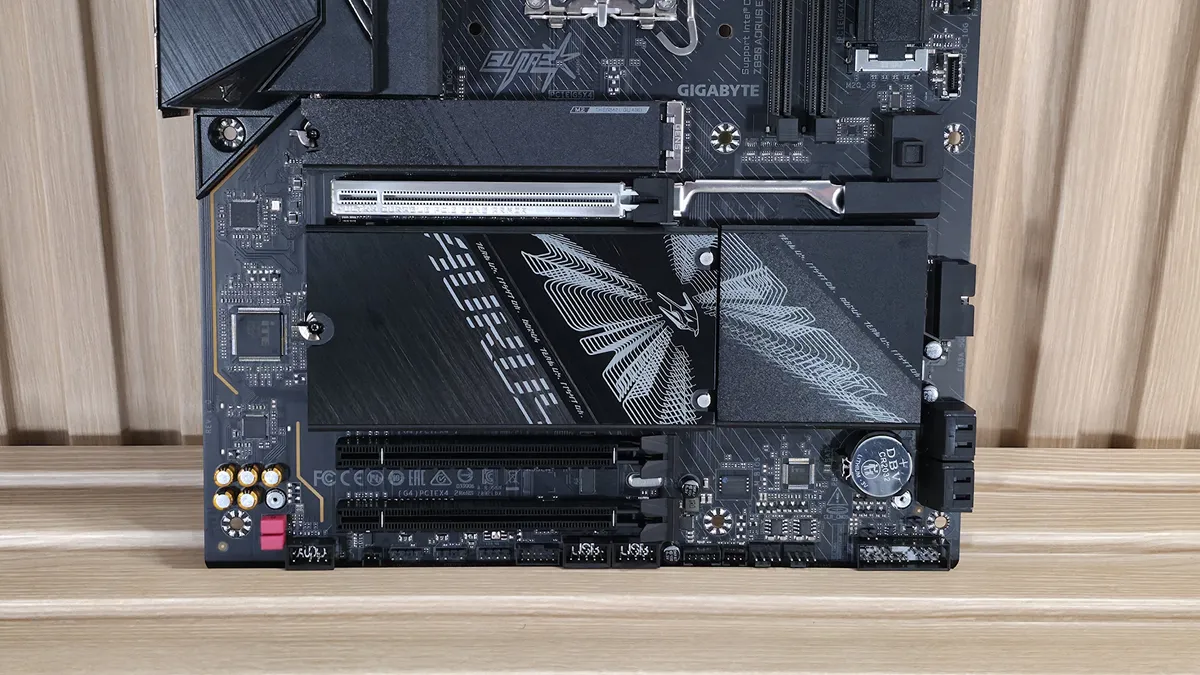
On the bottom half of the board, starting on the left, is the audio section, which includes the previous-generation flagship Realtek ALC1220 codec and a mix of standard (yellow) and WIMA (red) audio caps. It’s a solid audio solution for this class of board, though I would like to see the newest codecs (Realtek ALC408X) on the latest boards.
In the middle of the board, between the M.2 heatsinks, are three full-length PCIe slots. The top slot sports an “UD” (Ultradurable) reinforced slot and features the company's PCIe EZ-Latch Plus button for unlocking and releasing your graphics card. The slot connects the CPU, runs at the full PCIe 5.0 x16, and is the primary slot for discrete video cards. The bottom two full-length slots connect via the chipset, and both support PCIe 4.0 x4 speeds, making them good for high-speed expansion.
Mixed in with the PCIe slots are four other M.2 sockets. The top socket, above the primary graphics slot and working with its own (puny-for-a-PCIe 5.0) heatsink, connects through the CPU and is the only PCIe 5.0 4 (128 Gbps) socket. It, like the others, supports devices up to 110mm. The three M.2 sockets below share the same heatsink, and all run through the chipset at up to PCIe 4.0 x4 (64 Gbps) speeds. The bottom-most, M2M_SB, also supports SATA-based SSDs. These M.2 sockets and SATA ports support RAID 0/1/5/10 for additional speed or redundancy (remember, RAID is not a backup!).
Moving right, past the chipset heatsink, near a second source of RGB lighting on the right edge, is the 19-pin USB 3.2 Gen 1 (5 Gbps) connector and the four SATA ports (supporting RAID 0/1/5/10).
We've also captured several images of the IC's used to make this motherboard work consisting of a mix of OnSemiconductor for power and Realtek brand networking and audio.
Image
1
of
4
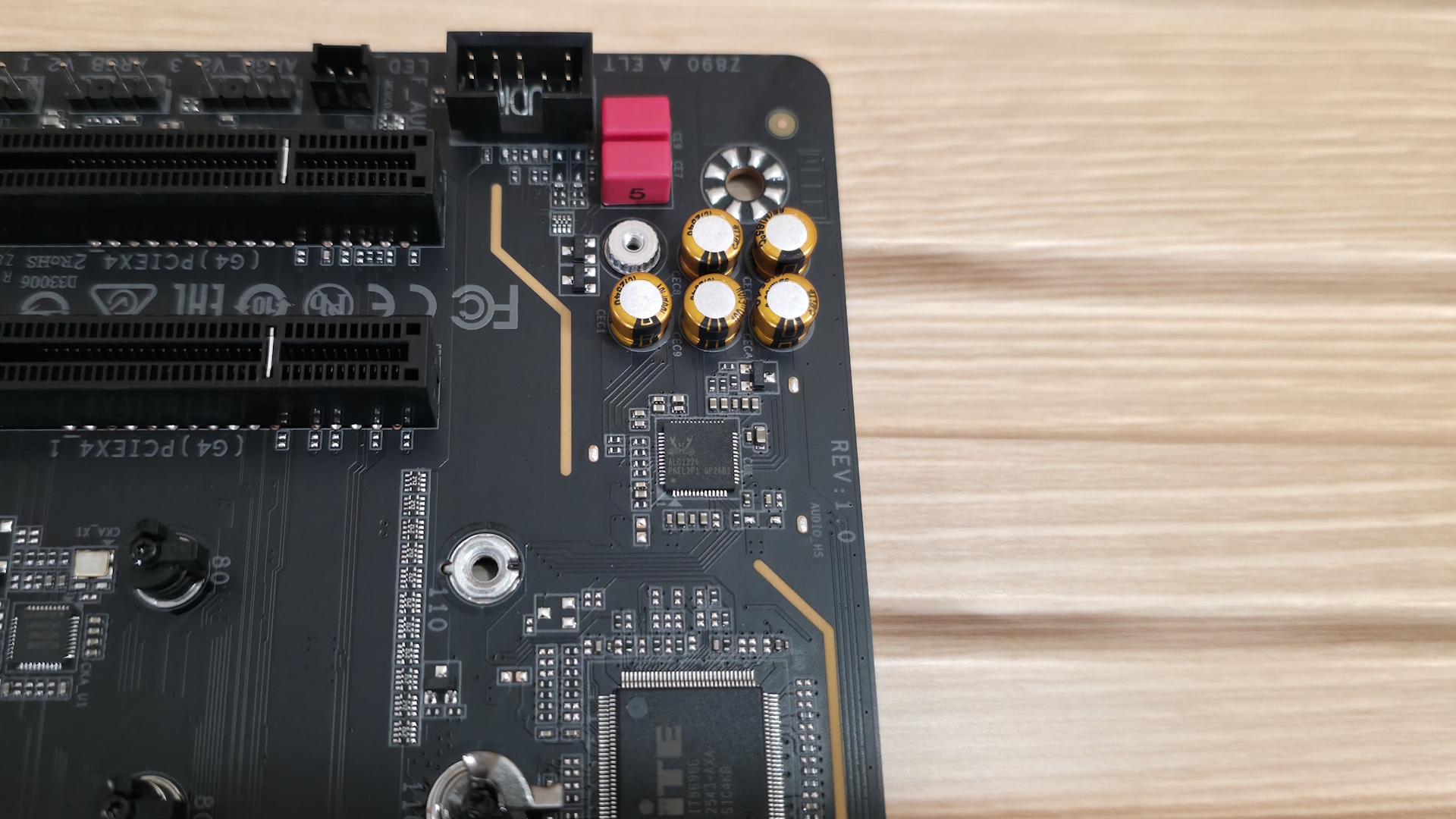
On the bottom of the board are a slew of headers. It offers your typical connectivity, with nothing missing or worth a specific mention. Below we’ve listed all the connections across the bottom (rear) of the board.
- Front panel audio
- (2) 3-pin ARGB
- 4-pin RGB
- SPI TPM header
- (2) USB 2.0 headers
- Thunderbolt AIC headers
- (2) 4-pin system fan headers
- Front panel
- 2-pin Clear CMOS
- 2-pin Reset
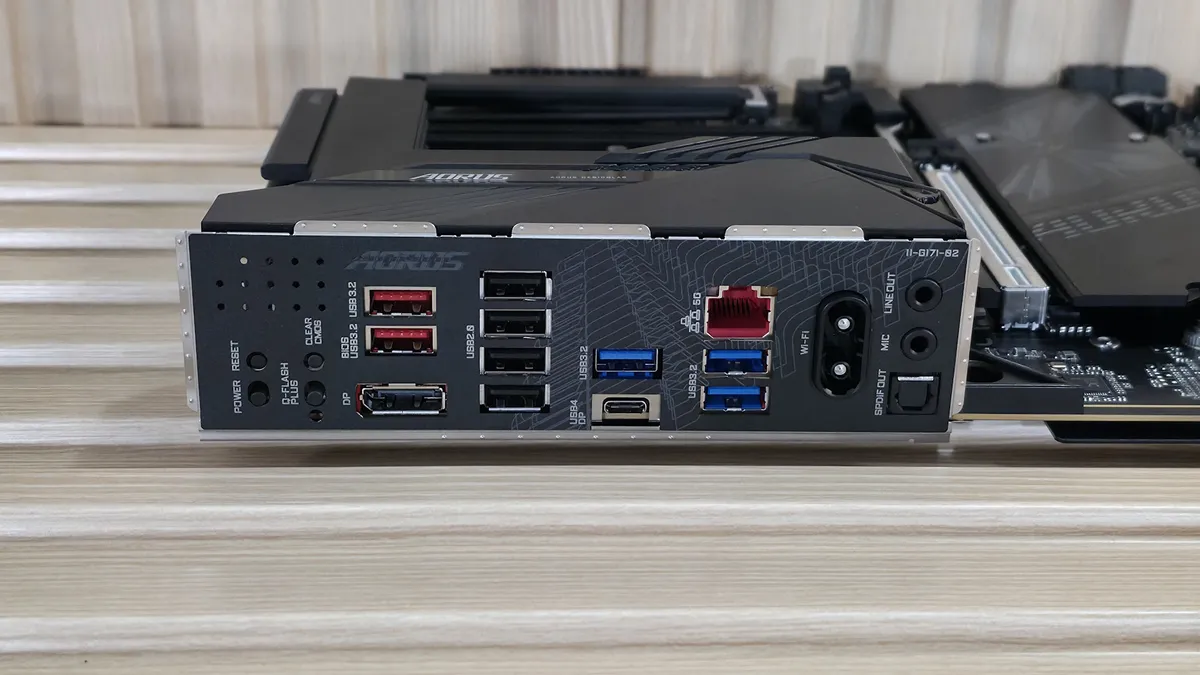
The rear I/O on the Aorus Elite Duo X offers enough connectivity and has a couple of buttons typically found on the motherboard itself. From left to right, we see those power and reset buttons, along with Clear CMOS and the Q-Flash Plus functionality. To the right is a DisplayPort output to use with integrated graphics. For USB ports, there are a total of 10: one USB4 40 Gbps Type-C port (that’s correct, USB4, not Thunderbolt 4), two USB 3.2 Gen2 (10 Gbps) ports, three USB 3.2 Gen 1 (5 Gbps) ports, and four USB 2.0 (480 Mbps) ports. Above the blue USB ports is the Realtek 5 GbE, and next to that, the quick-connect Intel Wi-Fi 7 (BE200NGW). Finally, on the right edge is the audio stack with two 3.5mm (mic and line out) and SPDIF out.