






You can generally get by using whatever charger came in the box with your device (provided one was included, which is no longer a given), be it a low-powered smartphone or a high-powered item like a gaming laptop. But if you’re anything like me and inevitably lose the original charger, or you need more ports or power for all your devices on the go and at home, the choices suddenly become less straightforward. What wattage do I need? Is GaN actually worth paying for? (Spoiler: yes!) Can the cheap, no-name charger that's on sale safely handle multiple devices over extended charging times?
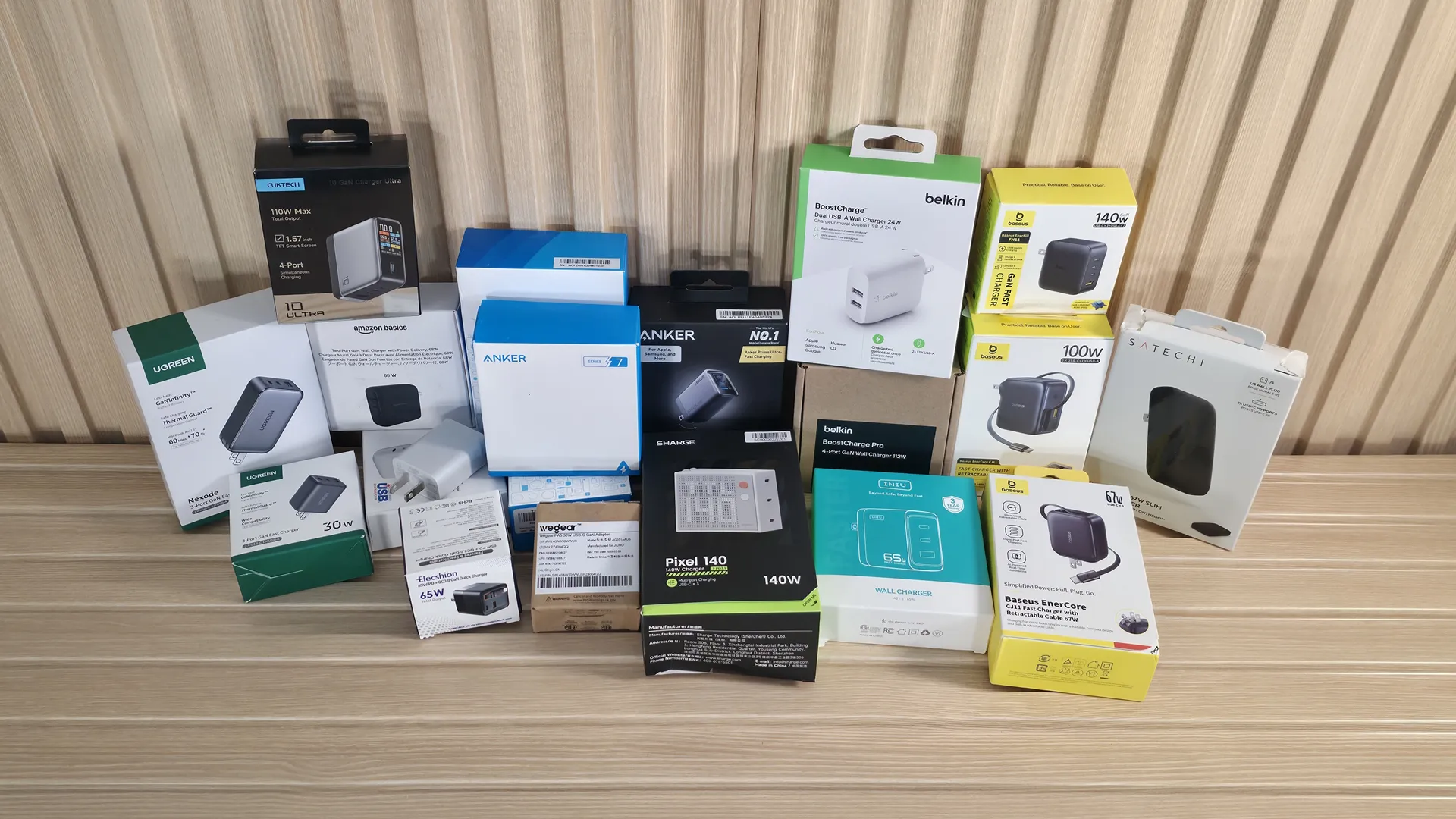
To find the best USB chargers for your phone, laptop, and other devices, we started by testing 20 different models (with plenty more to come), ranging from a 15W phone charger that came with a Samsung phone to 140W beasts, across a wide variety of brands including Anker, Baseus, Belkin, Ugreen, Cuktech, and more. Our charger testing goes beyond marketing claims, focusing on real-world performance, including sustained output over time, thermal performance, efficiency, idle power draw, and even a raw dollar-per-watt metric for those who just want the best bang for their charger buck.
We found that most of today’s chargers are relatively efficient, safer, and smarter than ever. Even the cheap options handled basic charging without issue, particularly at lower wattages. But once you hit the 100W-plus range, heat and sustained output are much more important. Modern charging technologies like USB-PD, PPS, QC, and GaN have significantly improved charging speeds, efficiency, and size. However, chargers still can’t escape physics, and removing 140W of heat from something roughly the size of a deck of cards is still challenging.
Picking a charger that gets the job done isn’t rocket science. Almost any modern charger will suffice, especially for the low-wattage devices. But if you’re looking to power laptops, tablets, or multiple devices at once, spending a bit more can get you more ports, better sustained performance, cooler temperatures, faster charging, and added peace of mind. After dozens of hours of testing, these are the best phone chargers, laptop chargers, and general USB device chargers we recommend.
Quick List
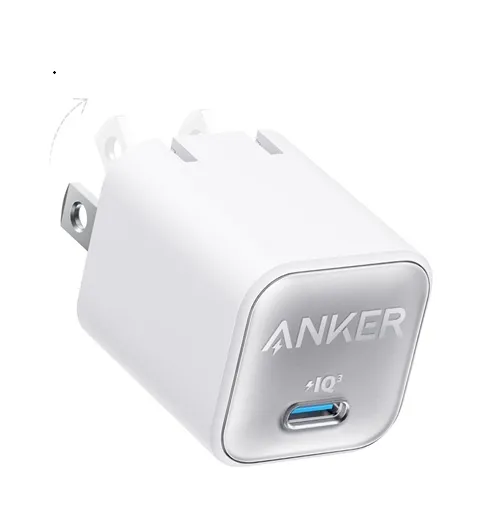
1. Anker Series 5 (Nano 3, 30W - A2147)
Best Low-Power Charger (up to 30W)
We chose Anker’s Nano 3 30W charger for its consistent output over time (to be fair, all low-output chargers we tested are pretty good at this), its thermal performance, and its built-in safety features. Priced at just $15.99 on Amazon, this single-port Type-C charger offers solid value for charging smartphones, smartwatches, tablets, and lower-power ultrabooks with ease, even during long charging sessions.
Read more below
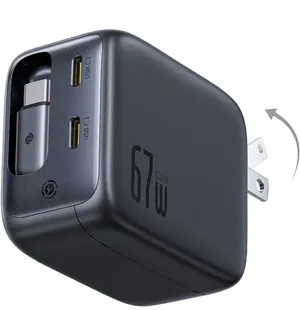
2. Baseus Enercore (67W - CJ11)
Best 65W-Range / Midrange Charger
Our best midrange-output charger goes to the Baseus Enercore. It was able to output the full wattage throughout our testing phase, recorded the lowest temperatures of the group, and offers good bang for your buck at $29.99. The built-in retractable Type-C cable makes it great for traveling, and the other two USB-C ports let you charge multiple devices at the same time.
Read more below
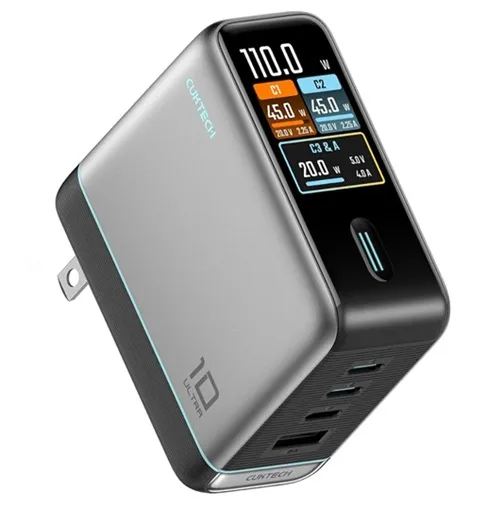
3. Cuktech 10 Ultra (110W)
Best 100W-plus / High-output Charger
Cuktech’s 10 Ultra makes our list for the best high-power charger for several reasons. First, its performance was good throughout testing, and compared to the Baseus Enercore 100W, it maintained the vast majority of its output (almost 90%) over time, while others dropped more significantly. It supports charging up to four devices at once, and also has a colorful screen that displays per-port data (something that's much more useful when you're charging multiple devices with limited output capabilities). Priced at $59.99, it’s not the cheapest of the bunch, but it's worth it compared to the competition.
Read more below
Best Wall Chargers you can buy today
Why you can trust Tom's Hardware Our expert reviewers spend hours testing and comparing products and services so you can choose the best for you. Find out more about how we test.
Best Low-Power Charger (up to 30W)

1. Anker Series 5 (Nano 3, 30W - A2147)
Best Low-Power Charger (up to 30W)
Specifications
Output: 30W
Port Count/Type: (1) Type-C
Charging Protocols: PD 3.0, QC, PowerIQ 3.0
Safety Features: ActiveShield 2.0/MultiProtect, OVT, SCP, OP
Warranty: 2 years
Reasons to buy
+
Price
+Compact size is great for travel
+Modern output and safety features
Reasons to avoid
-
Single port can be limiting
-Not for high-power devices
Anker’s Nano 3 30W charger offers users a simple, one-port charger with all of the modern charging and protection features. The little charger that could supports fast charging with USB PD 3.0 support, and PPS (Programmable Power Supply). It also utilizes Anker’s proprietary PowerIQ 3.0 technology, which combines universal device compatibility with rapid charging speeds by integrating USB-PD and Qualcomm QC (Quick Charge) protocols, and can identify your specific device to charge it as fast as possible. Anker’s MultiProtect safety system includes a full array of protections, including high-voltage protection, current regulation, temperature control, and more.
Our testing showed that the 30W Nano 3 delivered its nameplate wattage throughout the testing period. Temperatures during the test peaked at just under 65 degrees Celsius, which was on the warmer side compared to others, but nothing to be concerned about. Efficiency was also solid under load, and it didn’t draw any appreciable amount of power from the wall at idle. If you need a basic one-port charger for your smartphone, watch, or other small devices, it's well worth the $12.99 price.
Best 65W-Range / Midrange Charger

2. Baseus Enercore (67W - CJ11)
Best 65W-Range / Midrange Charger
Specifications
Output: 67W
Port Count/Type: (1) Retractable Cable Type-C (2) Type-C
Charging Protocols: USB PD 3.0, PPS, QC 3.0, AFC, FCP
Safety Features: BCT (Baseus Cooling Technology), Overcharging protection, High voltage, Short circuit, OCP
Warranty: 2 years
Reasons to buy
+
Integrated, retractable Type-C cable
+Good for charging multiple devices
+Ideal for travel
+Well-managed thermals
Reasons to avoid
-
Most expensive 67W model (when not on sale)
The Baseus Enercore 67W (CJ11) gets the nod for our best mid-range charger due to its charging flexibility with the integrated, retractable Type-C cable, consistent output over time, and well-managed thermals. The Enercore supports a wide variety of fast-charging protocols, so you can be assured your device will be recognized and will charge quickly. Safety isn’t an afterthought either, with the company's ‘AI-powered’ BCT technology (an onboard chip that monitors temperatures) to keep thermals in check, along with your more common features like OCP, OVP, and short-circuit/overcharge protections.
Testing the Baseus Enercore confirmed its low operating temperature. In fact, it delivered the lowest temperature we recorded (just under 55 degrees Celsius), running much cooler than most 65-67W models and even the 45W Anker Nano. It was also one of the most efficient we tested, but at these lower wattages, you’ll see that more is reflected in the low temperatures than on your electric bill. Priced at $29.99 (currently on sale; normally $39.99), it compares well with the competition and is the only one in our initial testing group with a retractable cable, making it more convenient for travel. So long as you’re not trying to charge multiple high-power devices, it’s ideal for multi-device charging.
Best 100W-plus / High-output Charger

3. Cuktech 10 Ultra (110W)
Best High-output Charger
Specifications
Output: 100W
Port Count/Type: (1) Type-A (3) Type-C
Charging Protocols: USB PD 3.1, PPS, QC 4.0+, UFCS, FCP, SCP
Safety Features: OCP, OVP, OTP, Overcharging/Overloading protection, Short circuit
Warranty: 2 years
Reasons to buy
+
Good for charging multiple high-power devices
+Well-managed thermals
+Informative, per-port screen
Reasons to avoid
-
Size/design covers the power socket below
-Can be overkill for many users
The curiously named Cuktech 10 Ultra lands on our best list because of its ability to charge multiple devices at once while maintaining the highest percentage of full output (after temperature-related throttling). Note that all of the high-output (100W-plus) chargers we tested throttled, which is par for the course for any passively cooled charging devices at this density. The 10 Ultra has a wide range of charging protocols and has plenty of safety features. The vibrant color display shows per-port output and warns of potential trouble due to temperature and other issues.
Testing the Cuktech 10 Ultra showed it to have average efficiency. It was actually the second-lowest peak temperature (less than 1 degree Celsius from the Baseus Encore 100W), topping out at 63.4 degrees and running cooler than chargers that output significantly less. The multiple ports (three Type-C, one Type-A) allow you to charge a slew of devices, including high-power items like a gaming laptop, and smaller devices concurrently. While it doesn’t have a retractable cord, it’s still good for travel as it can replace multiple chargers.
Glossary of Terms
- GaN: GaN refers to Gallium Nitride, a crystal-like material that replaces traditional silicon in power adapters to control and convert electrical power. GaN chargers are more efficient at transferring power, can handle more power, run cooler, and are generally smaller. GaN chargers also handle rapid voltage and current changes more effectively, supporting fast-charging standards such as USB Power Delivery (PD) and PPS.
- (USB) PD: “PD” stands for Power Delivery. Essentially, it’s a fast-charging technology that communicates with your connected device to deliver the maximum safe and optimal amount of power. This allows a single device to charge lower-power items like phones and high-power electronics like laptops over a USB-C connection. It can safely deliver up to 240W under newer standards (USB-PD 3.1), allowing many smartphones to reach 50% charge in ~30 minutes.
- PPS: PPS stands for Programmable Power Supply. As the name implies, this is an advanced USB-C charging technology that dynamically adjusts its voltage and current in real time. It communicates with your device to optimize power flow, minimizing output heat, boosting charging speeds, and is said to prolong battery life.
- QC: Qualcomm Quick Charge is a fast-charging technology developed by, you guessed it, Qualcomm, and is designed to work with any device using a Qualcomm Snapdragon processor. The latest iteration, QC5+, supports charging speeds up to 140W and smartly regulates power delivery by using lower voltage and higher current for a cooler, more efficient charge.
- FCP/SCP: Fast Charge Protocol and SuperCharge Protocol are proprietary fast-charging standards developed by Huawei for their smartphones and tablets. FCP, the older standard, uses a high-voltage, low-current model (9V/2A ~18W) while SCP is a low-voltage, high-current model that starts around 4.5V/5A ~22W with newer generations scaling much higher, even to 100W. Unless you have a Huawei device, this doesn’t apply.
- UFCS: Universal Fast Charging Specification is a brand-agnostic fast-charging standard developed by major Chinese smartphone makers (think: Huawei, OPPO, Vivo, Xiaomi). Its goal is to break brand barriers so you can quickly use a single third-party charger to power devices from different manufacturers. Like USB PD PPS (which it operates alongside), UFCS uses continuous voltage and current regulation from 5V to 30V and up to 100W.
Best Charger Shopping Tips
When choosing a charger for your devices, consider the following:
Start with Wattage: Don’t overspend if you don’t need to
If you’re buying a charger only for a smartphone, smartwatch, earbuds, or other small accessories, consider a 15-30W charger to save money. Small devices like these won’t charge any faster with more output than this. 45-67W is best for medium-sized devices (think tablets, handheld gaming devices, and ultrabooks), and is also good for multi-device charging (phones and smaller accessories). Any charger that’s 100W or more works best for gaming laptops, MacBook Pros, and multi-device charging stations. Higher wattage is also good for travel setups, as you can replace multiple chargers with one, provided it has the necessary ports. Just remember that higher wattage equals higher heat. And when plugging in three or more devices, some things might not charge as fast as possible.
Port Selection, count, and type
Today, most devices use USB-C, which supports the fastest charging standards. Type-A chargers will do the job but often have limited output, as the standard is designed to deliver only around 18W (though some proprietary cables can deliver more). A good rule of thumb for port count is 1 port for phone chargers, 2-3 ports for everyday use or travel, and 4 ports (or more) for family (read: mass) charging. You want at least one high-output USB-C port, so whatever primary device you attach charges at its fastest rate.
Don’t cheap out too much
If you’re in a pinch, buying a cheap charger from the impulse-buy section at your local gas station can certainly work. Still, ideally, you want a name-brand charger that’s certified (UL/CE) and has built-in protections like overcurrent and overvoltage. Otherwise, ultra-cheap chargers can run hotter, be less efficient, offer fewer protections, and will likely lack certifications.
Cable quality matters, too!
Even the best charger can’t deliver at full speed with the wrong cable. For higher-wattage charging, you would want certified USB-C cables that support the required wattage. It’s also best to avoid mystery cables from no-name brands, as you never know what they’re actually capable of. The good news is that charging cables are relatively cheap. For example, you can buy a USB-IF-certified 240W cable from Ugreen for only $9.99 (1M/3.3ft) or double the length (2M/6.6ft) for only $12.99. Just note that these more affordable charging cables either forego data completely or are likely limited to USB 2.0 speeds.
Again, picking the right charger isn’t as complicated as it may seem. Almost any modern, name-brand device will happily charge your low-wattage items. Just be sure to buy one that has what you need. Wattage and port count are the most important. The higher the wattage and the more power you need to charge your high-power or multiple devices, the more you'll want the most efficient chargers that don’t throttle. And if you’re charging high-output devices, don’t forget a cable certified for the wattage, and perhaps one with an attached cable, which can simplify things quite a bit.