


TCL is well known for its value-priced TVs, but I have yet to review one of its consumer-oriented monitors. I have come to learn that it offers a well-rounded line of 13 displays, ranging from 24 to 57 inches, including some impressive Mini-LED panels with high brightness and a lot of dimming zones.
I’m checking one out today: the 27R94. Though its name is short, the list of features and tech is long. It’s a 27-inch HVA panel with a full-array Mini-LED backlight rated at 1,600 nits and featuring 2,304 dimming zones, the most I’ve seen to date. It also has Quantum Dot color, 4K resolution, 165 Hz, Adaptive-Sync, and HDR. Value is included, too, with a street price of $550. Let’s take a look.
TCL 27R94 Specs
Swipe to scroll horizontally
Panel Type / Backlight | HVA / Mini LED |
| Row 1 - Cell 0 | Full Array Local Dimming (FALD) |
| Row 2 - Cell 0 | 2,304 dimming zones |
Screen Size / Aspect Ratio | 27 inches / 16:9 |
Max Resolution and Refresh Rate | 3840x2160 @ 165 Hz |
| Row 5 - Cell 0 | FreeSync and G-Sync Compatible |
Native Color Depth and Gamut | 10-bit (8-bit+FRC) / DCI-P3 |
| Row 7 - Cell 0 | HDR10, DisplayHDR 1400 |
Response Time (GTG) | 1ms |
Brightness (mfr) | 1,600 nits |
Contrast (mfr) | 4,000:1 |
Speakers | 2x 3w |
Video Inputs | 1x DisplayPort 1.4 |
| Row 13 - Cell 0 | 2x HDMI 2.1, 1x USB-C |
Audio | 3.5mm headphone output |
USB 3.0 | 1x up, 2x down or None |
Power Consumption | 43.6w, brightness @ 200 nits |
Panel Dimensions WxHxD w/base | 25.2 x 16.9-20.6 x 11.5 inches (641 x 429-523 x 292mm) |
Panel Thickness | 2.9 inches (73mm) |
Bezel Width | Top/sides: 0.3 inch (8mm) |
| Row 20 - Cell 0 | Bottom: 0.47 inch (12mm) |
Weight | 16.1 pounds (7.3kg) |
Warranty | 3 years |
The 27R94 starts with a panel type that is new to me. It’s labeled HVA (High-value VA), and it is a technology developed by TCL. The design goal is to provide the high contrast of VA with the off-axis image quality of IPS. I measured it at around 3,000:1 in my tests, which is comparable to the average VA monitor and three times the dynamic range of most IPS screens. And it does indeed have better viewing angles than any VA I’ve seen.
A Quantum Dot film provides the wide color gamut, which I measured at nearly 100% of DCI-P3. That’s a bit less than other QD monitors I’ve tested, but a good bit more than those without the tech. The 27R94 has around 10% more coverage than average. I found decent accuracy, too, though there were some minor grayscale anomalies that I’ll tell you about on page four. Plenty of picture modes provide flexibility for a variety of gaming and workday scenarios, including a usable sRGB preset.
The 27R94’s biggest asset is its Mini LED backlight. I’ve grown accustomed to monitors with 1,152 dimming zones, but this one doubles that to 2,304. And there’s plenty of peak brightness to go with that. You can have over 600 nits peak for SDR content, and I saw more than 1,700 nits from a 25% window pattern in HDR mode. It’s brighter than any OLED I’m aware of, and with the local dimming turned on, you’ll get incredible contrast too.
To ensure smooth gaming, TCL includes a 165 Hz refresh rate, which at first blush doesn’t sound like a lot, but this HVA panel operates with lower motion blur than typical VA or IPS models. There’s a good overdrive to go with it, so even at a seemingly low 165 fps frame rate, the action is very smooth.
The 27R94’s feature set further enhances the value quotient. You get all the helpful gaming aids like crosshairs and a frame counter. There’s a decent pair of internal speakers, and you get USB ports with a KVM function. Two HDMI ports, a DisplayPort port, and a USB-C port round out the video inputs. LED lighting trims the panel and stand with colored strips, providing a nice accent.
Assembly and Accessories
The 27R94 ships in blocks of crumbly foam in its three component parts. The base is very wide and deep and attaches to the upright with a captive bolt. The panel then snaps on. Arm users get a 100mm VESA mount with fasteners included. The cables are neatly packed into their own little box in a bundle that includes two USBs, DisplayPort, and HDMI. Also in the box is a very large external power supply.
Product 360
Image
1
of
3
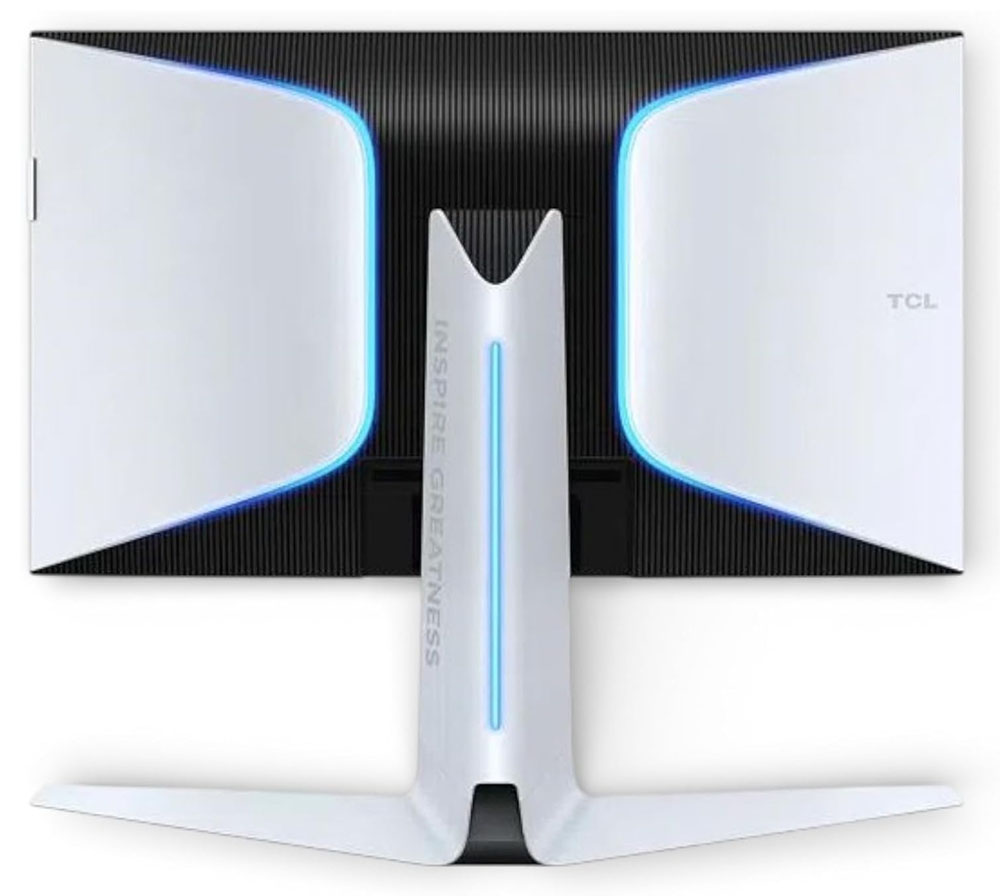
My favorite angle of the 27R94 is the back with its lined black center and white bits. It’s almost a retro-Star Wars vibe, and it stands out from the hundreds of black displays that cross my desk. The transitions are marked with LED strips both on the panel and the stand. You can change the colors and effects in the OSD.
The stand has a large, wide, and deep base. In fact, it is wider than the panel. It could easily support a larger monitor. It’s rock-solid and very well-made, with full ergonomics. You get 5/15 degrees tilt, 20 degrees swivel and a 90-degree portrait mode. The height adjustment covers a 3.7-inch range. Movements are firm and smooth, showing excellent build quality and durability.
You’ll note in the side profile photo that there is a small protrusion near the top of the panel. It’s a slide-out headphone holder that is quite substantial. That’s a nice touch to go with the 3.5mm jack on the down-facing input panel. You also get two HDMI 2.1s, a DisplayPort 1.4 and a USB-C with 90 watts of power. Peripherals connect to one upstream and two downstream USB 3.0 ports.
OSD Features
The 27R94’s OSD is operated by a small joystick that sits under the bottom center of the panel and is the monitor’s only control. It navigates a comprehensive and well-ordered menu.
Image
1
of
8
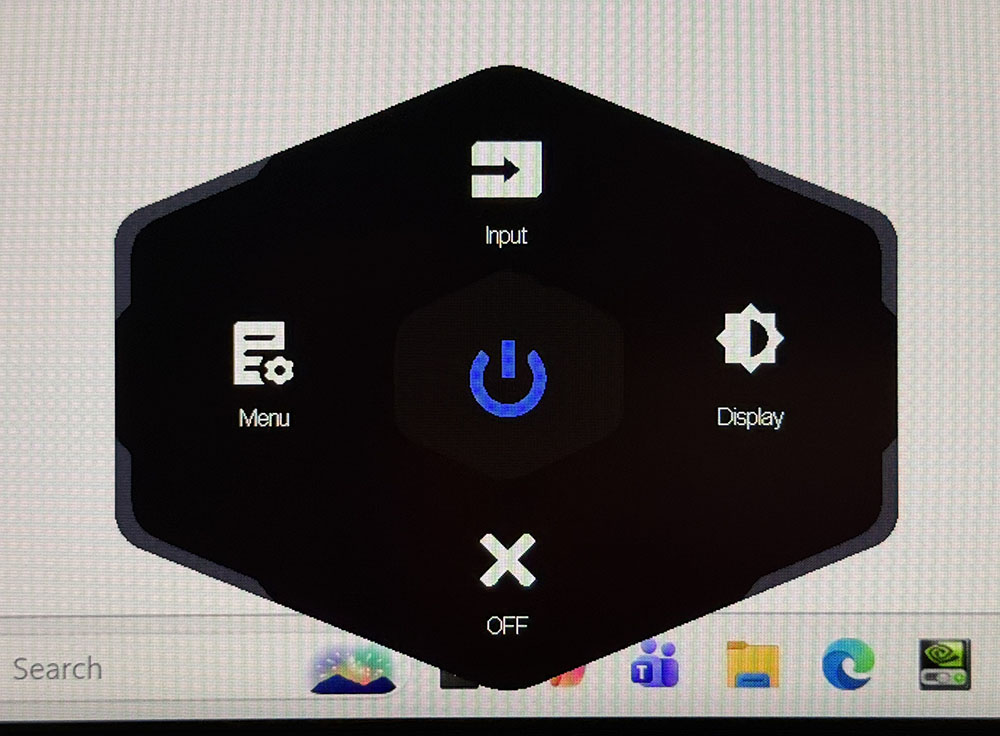
Press or click the joystick, and a small quick menu appears at the bottom of the screen. The top and right options are programmable to a variety of functions. The left click opens the full OSD.
GameMode has all the video processing and game enhancers. You can toggle FreeSync/Adaptive-Sync/G-Sync/VRR, brighten the dark areas of the image for better visibility, activate a crosshair, turn on a timer, and control the LED strips’ colors and effects. Ambient Light has static modes and three animated settings for your entertainment. The Response Time option is a three-level overdrive that works precisely to remove motion blur. When frame rates are in the 165fps range, Fast works the best. The 27R94 does not include any form of backlight strobing.
Local Dimming is available for both SDR and HDR. When it’s off, the contrast ratio is just under 3,000:1. Standard ups that to around 5,000:1 by lowering the black level. Medium and High shut off the LED completely when there is a zero-level signal, which makes contrast unmeasurable. You can also tweak luminance with two gamma presets.
The Color menu offers three white balance presets, plus RGB sliders in a single-point configuration. I noted some issues when calibrating that I’ll detail on page four. A separate menu called Scenario Mode is where you’ll find the picture presets. Standard is the default and best option there. You can also specify color gamuts, sRGB, Adobe, and P3; or dial up a particular game type. There are 11 choices in total.
KVM is supported with either the USB-C or B ports acting as the hub point. There are two Type A downstream ports to connect a keyboard and mouse, or any other USB device you wish.
TCL 27R94 Calibration Settings
I explored the Standard picture mode for the 27R94’s calibration. It allows access to all image controls, including white balance and grayscale. If you want different gamuts, they are found in the Scenario Mode menu. You get P3, sRGB, and Adobe with a fixed color temp and gamma but adjustable brightness. Initial measurements showed a slight cool tone in the brighter steps and some warmth in dark parts of the image. I could only correct the upper part of the grayscale using the RGB sliders. The adjustments made a slight improvement overall. Gamma tracks well as does gamut saturation and hue. My recommended settings are below.
In HDR mode, the 27R94 switches over automatically and leaves brightness and local dimming available. You can also tweak the color temp and the saturation level, which is unusual for an HDR monitor.
Swipe to scroll horizontally
Picture Mode | Standard |
Brightness 200 nits | 39 |
Brightness 120 nits | 21 |
Brightness 100 nits | 17 |
Brightness 80 nits | 12 |
Brightness 50 nits | 5 (min. 31 nits) |
Contrast | 47 |
Gamma | 1 |
Color Temp User | Red 52, Green 48, Blue 50 |
Gaming and Hands-on
Having read up on HVA (High-value VA) panel tech, I was expecting a smooth experience and I got one. The 27R94 is impressively smooth for 165 Hz. Though I noted average response times in testing of around 4ms GTG, the addition of TCL’s precise overdrive delivered blur-free gameplay. I was able to lock the framerate at 165fps when playing on a GeForce RTX 4090-equipped PC. Lower rates will introduce some blur. And there is no backlight strobe here, so if you can’t keep it over 140fps, you’ll need to upgrade your video card to pair it with this monitor.
Input lag was also very low. The 27R94 tested and played extremely well on that count with no perceptible delay for any control input, mouse or keyboard. It is much quicker than any 144 Hz LCD and easily keeps up with many 240 Hz panels. When considering bang-for-the-buck performance, this TCL has lots.
The image was stunning, especially in HDR mode. A 27-inch 4K monitor boasts 163 ppi, which is more than enough to hide the pixel structure from view at any distance. Add in the 27R94’s tremendous brightness and you have HDR with a lot of impact. The Quantum Dot color helps too by bringing high saturation and vivid hues throughout. Many users, including myself, would find this image very close to an OLED in quality and definitely brighter.
The 27R94 is one of the rare monitors that lets you adjust color temp and saturation for HDR content. It was nice to be able to amp up the color if I wanted for specific games like Doom Eternal. Many of its environments are either monotone or drab in color. Upping the saturation slider made them more three-dimensional. I also tried the different local dimming options and settled on Medium as the best and most accurate one. When playing at night, I was able to lower the brightness slider to reduce eye fatigue.
This is an excellent monitor for daily tasks as well. If you’re spoiled by 4K like I am, you won’t want to use anything with less pixel density. The 27R94 has more density than my 32-inch reference screen and that is a visible difference. Coupled with its insanely bright highlights, the picture really pops with a texture and dimensionality that few LCDs can match.
I also appreciate TCL’s inclusion of internal speakers, USB ports and LED lighting in a value-oriented product. At $550, the 27R94 is a really good deal that sacrifices nothing on the altar of value.
Takeaway: The 27R94 is a superb gaming monitor that is also well-suited for productivity and other kinds of entertainment. It’s super smooth with better-than-average LCD panel response and class-leading input lag. Though value-priced, it still includes extras like LED lighting, speakers and USB ports. In practice, there is nothing to complain about here.
MORE: Best Gaming Monitors
MORE: How We Test PC Monitors
MORE: How to Buy a PC Monitor