Even when you game on a portable device, some people want the biggest screen they can find. The Razer Blade 18 looks at some of the best gaming laptops — largely 16-inchers — and calls them tiny.
This system, at $5,399.99 as tested (and starting at $3,999.99) has a huge price tag, but that comes with strong build quality, top-end specs, and a dual-mode display that lets you switch between higher resolution and higher frame rates depending on what you're doing.
The Blade 18 and its aluminum chassis do have some drawbacks. The machine runs quite warm, with loud fans, and at this price, I wish Razer had taken advantage of the PCIe Gen 5 slot with an appropriate drive.
Design of the Razer Blade 18 (2026)
Razer's industrial design hasn't seen a change in a while, so the Blade 18 appears identical to the way it did last year. It's a CNC aluminum block with a Spartan, rectangular design. There is a bit of flex right behind the green, three-headed snake logo at the center of the lid, which I wish didn't exist in a design this premium.
Image 1 of 3
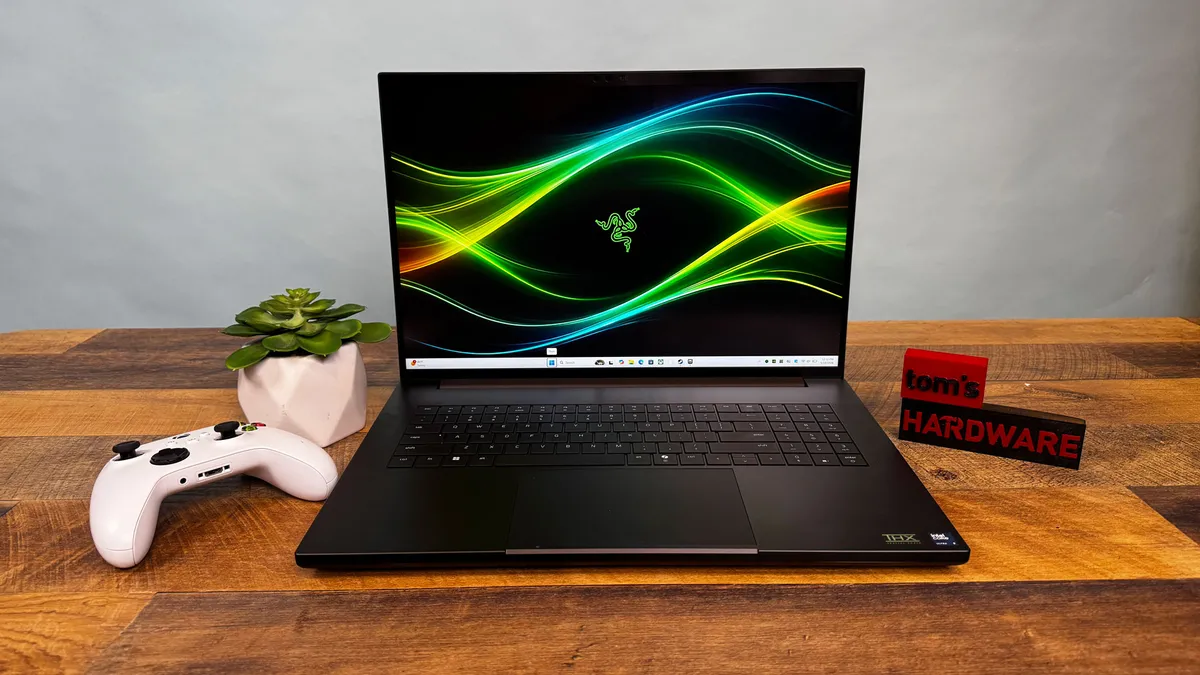
Otherwise, though, the Blade feels rock solid. It's also tremendous, at 15.74 x 10.84 x 1.1 inches and 7.06 pounds before the 400W power brick. It just fits in my backpack, which definitely isn't designed for a system this large. The all-black affair is interrupted only by the 18-inch screen and the per-key RGB on the keyboard.
There are a ton of ports on this system. The left is lined with a proprietary power port, Ethernet, a pair of USB 3.2 Gen 2 Type-A ports, Thunderbolt 4 (USB-C), and a 3.5 mm headphone jack. On the right, you'll find the Thunderbolt 5 port, HDMI 2.1, another USB-A port, the SD card slot, and a Kensington lock slot.
Image 1 of 2
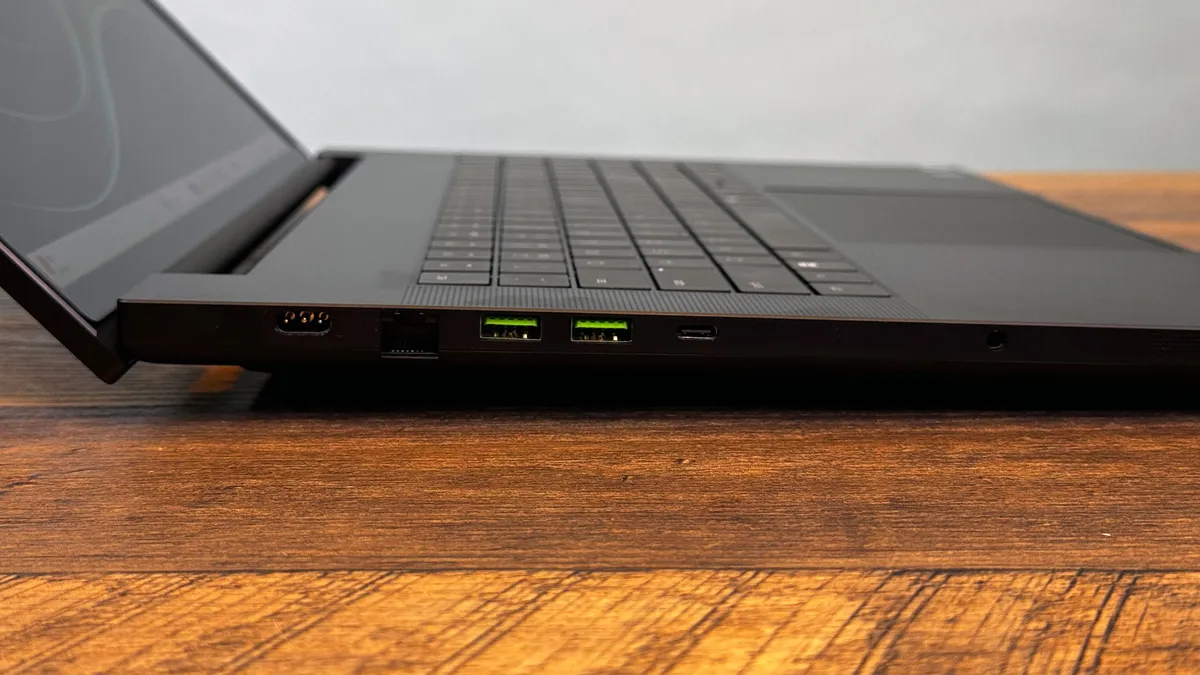
The two different Thunderbolt ports aren't labeled. I wish Razer had made it clear which is which without looking it up or plugging a device in.
Razer Blade 18 (2026) Specifications
Swipe to scroll horizontally
CPU | Intel Core Ultra 9 290HX Plus |
Graphics | Nvidia GeForce RTX 5090 Laptop GPU (24GB GDDR7, 175W max graphics power, 1,597 MHz graphics clock) |
Memory | 32GB DDR5-6400 |
Storage | 2TB PCIe Gen 4 NVMe SSD |
Display | 18-inch, Dual-mode display, 3840 x 2400 @ 240 Hz or 1920 x 1200 @ 440 Hz, Nvidia G-Sync |
Networking | Intel Wi-Fi 7 BE202, 2.5Gb Ethernet, Bluetooth 5.4 |
Ports | 3x USB 3.2 Gen Type-A, Thunderbolt 5 (USB-C), Thunderbolt 4 (USB-C), SD Card reader (UHS-II), 2.5Gb Ethernet, 3.5 mm headphone jack, HDMI 2.1 |
Camera | 5MP IR webcam, privacy shutter |
Battery | 99 WHr |
Power Adapter | 400W, proprietary |
Operating System | Windows 11 Home |
Dimensions (WxDxH) | 15.74 x 10.84 x 1.1 inches (399.96 x 275.4 x 28.7 mm) |
Weight | 7.06 pounds (3.2 kg) |
Price (as configured) | $5,399 |
Gaming and Graphics on the Razer Blade 18 (2026)
Between the Intel Core Ultra 9 290HX Plus CPU and the Nvidia GeForce RTX 5090, the Blade 18 can tackle just about anything you throw at it.
In Resident Evil Requiem, with the resolution set to 3840 x 2400 and settings topped out, including path tracing and hair strands, the game typically ran between 30 and 37 frames per second, though it dropped to 28 FPS during a scene in which Leon was chased by a giant spider. Upscaling was forced on, so I opted for quality, but left frame gen off. By dropping to 2560 x 1440, I had a more consistent 49-57 FPS, including during a boss fight with that spider.
Soon after, I realized that the 3840 x 2400 display mode had forced me into a 60 Hz refresh rate while gaming. Switching to 1920 x 1200 mode, the same boss fight at a lower resolution ran around 90 FPS.
Image 1 of 5
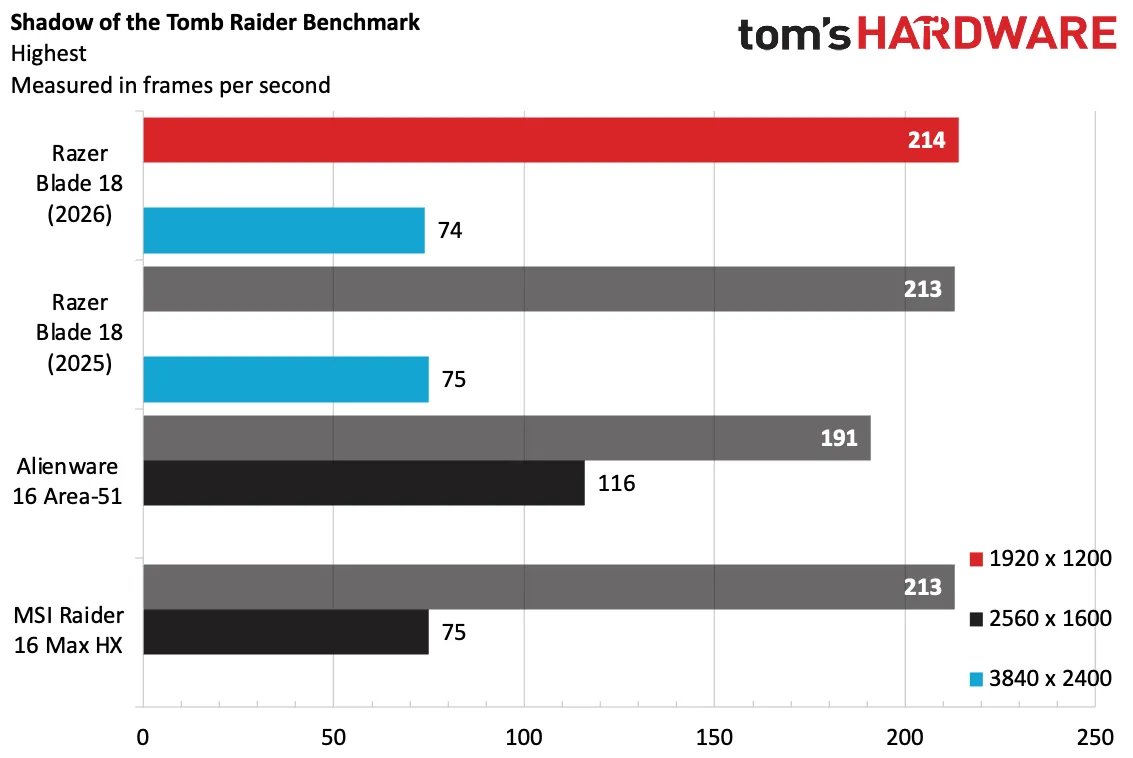
On our benchmarks, we found that the Blade 18 didn't deliver a meaningful performance bump over last year's model, which utilized a Core Ultra 9 275HX with the RTX 5090 (our review model from last year also had 64GB of RAM). The Blade 18 beat out the MSI Raider 16 HX and Alienware 16 Area-51 at 1920 x 1200 in our tests, though in some cases the leads were small. In most cases, the Blade 18 at 3840 x 2400 ran very similarly to last year's system at the higher resolution. The Alienware and Raider top out at 2560 x 1600, a much more common resolution on gaming laptops these days.
On our stress test, which consists of running Metro Exodus 15 times in a loop, the Blade 18 averaged 146.03 FPS. The system actually did best after three runs, when it warmed up, and never dipped back down. During this test, the CPU's performance cores averaged 5.14 GHz while the E-cores averaged 2 GHz. The GPU ran at an average of 1,986.32 MHZ.
Productivity Performance on the Razer Blade 18 (2026)
We tested the Blade 18 with a Core Ultra 9 290HX Plus, 32GB of RAM, and a 2TB PCIe Gen 4 SSD. Unsurprisingly, it's a strong competitor.
Image 1 of 3
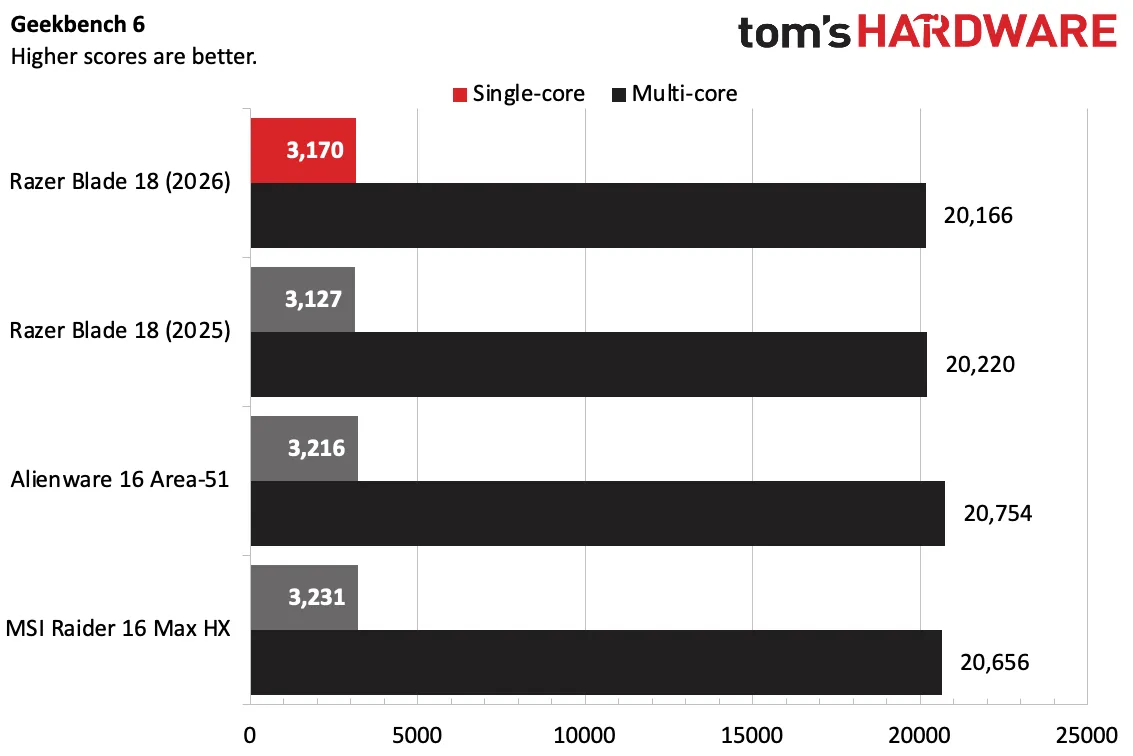
On Geekbench 6, the Blade 18's single-core score of 3,170 and multi-core score of 20,166 are admirable, but not terribly different from last year. In fact, the multi-core score was down a few points. Both the Alienware 16 Area-51 and MSI Raider 16 Max HX, each with the same CPU as this Blade 18, were slightly faster on both the single and multi-core tests.
The new Blade copied 25GB of files at a rate of 1,670.53 MBps, beating the MSI Raider 16 Max HX, but falling far behind the Alienware's PCIe Gen 5 SSD, which Razer supports but didn't include, even in a laptop over $5,000.
The Blade 18 transcoded a 4K video to 1080p in 2 minutes and 1 second, effectively the same as last year. That's faster than the Alienware, but the Raider did the job in 1:51.
Display on the Razer Blade 18 (2026)
The big (sorry) selling point on the Blade 18 is its massive, 18-inch display. The dual-mode display can switch between 3840 x 2400 at 240 Hz for productivity work or 1920 x 1200 at 440 Hz for gaming, though this does require a reboot in some instances. While trying to game at 4K, I was limited to just 60 Hz even when plugged in.
The Dual-mode is a unique advantage, though some people might prefer OLED for gaming at this price. That being said, I haven't seen 18-inch OLED panels, so Razer may have opted for dual-mode as advantageous over Mini LED. There aren't too many gaming laptops that offer 4K resolution these days.
In Resident Evil Requiem, I found myself wishing for the black levels on OLED screens in dark environments. Still, when Leon shot a gas can that exploded into an orange fireball during the game's infamous spider boss fight, it was quite vivid.
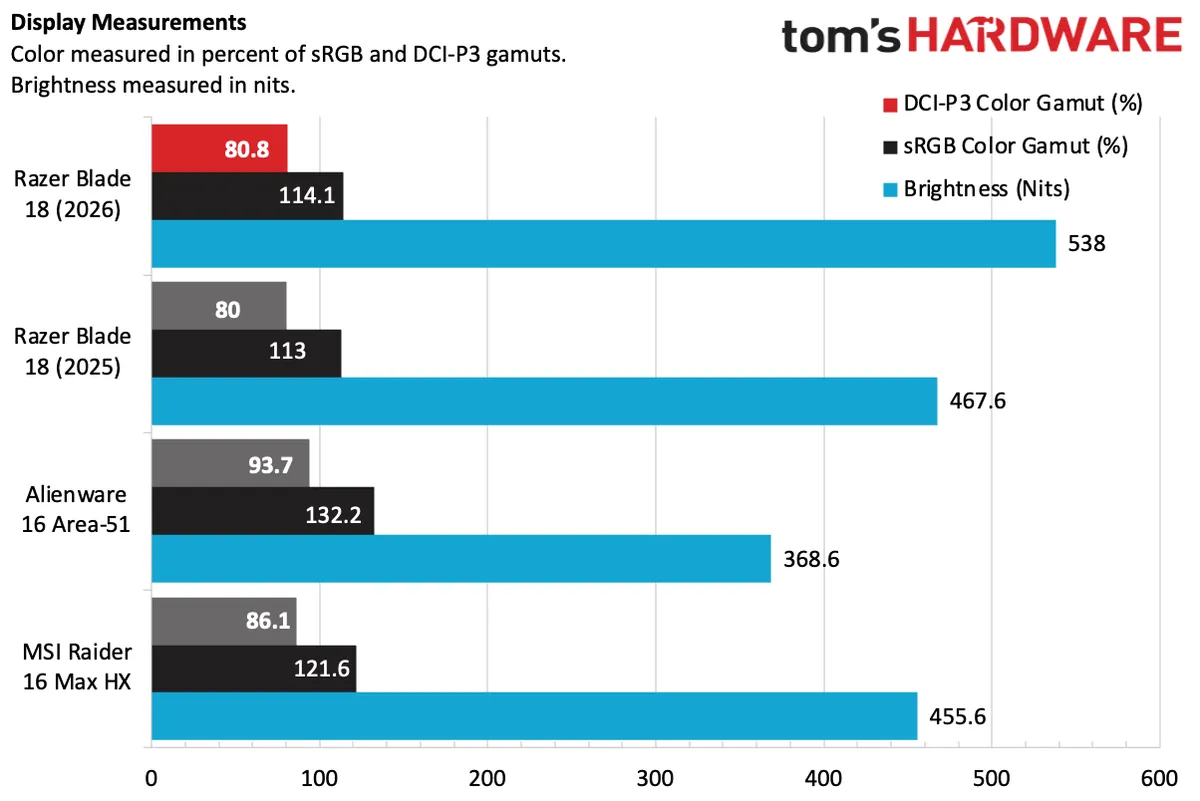
The biggest change Razer is promising outside of performance over last year's model is a brighter screen. At 538 nits, it was brighter than last year's model (467.6 nits) and both the Alienware and MSI Raider.
The color volume coverage didn't change, however, at 80.8% DCI-P3 and 114.1% sRGB. The Raider was slightly higher, while the Alienware led the pack with its OLED screen.
Keyboard and Touchpad on the Razer Blade 18
Razer outfitted the Blade 18 with a full keyboard, including a number pad. Razer claims 1.5 mm key travel and 63 grams of actuation, along with a 1,000 Hz polling rate and N-Key rollover for gaming.
Using MonkeyType, I hit 115 words per minute with 97% accuracy, which is fairly standard for me. The keys are comfortable enough, though I've seen competitors like MSI and Alienware use mechanical switches in their most expensive halo products. That would be a nice addition here.
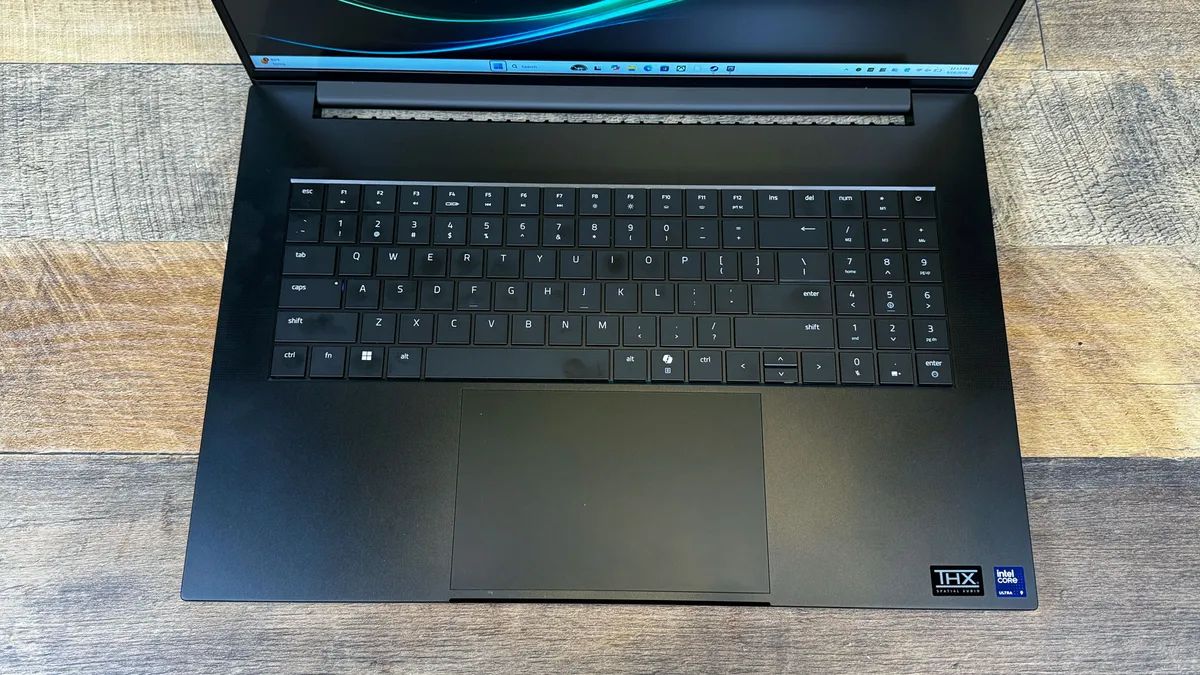
The layout is fine, but in its quest for a totally symmetrical layout, Razer used half-size up and down arrow keys and full-size left and right keys. I prefer an "inverted T", no matter which size is used, but this comes down to preference.
The touchpad is massive. At this price, I'd really like to see haptics, but Razer has opted for a standard mechanical touchpad. You can use it relatively high up, but clicks get stuck above the halfway point, leaving some of that space just for moving the cursor. There's plenty of room for gestures, though.
Razer put the touchpad in the center of the palm rest. That looks great aesthetically, but it means that when you're not using the number pad, you're likely to hit it with your hand while typing. Most gamers will use a separate gaming mouse, but if you're the type of AI developer Razer is aiming this machine at, and you're working on the go, you might accidentally move the mouse while using the keyboard. (You can disable the touchpad with a press of the decimal key on the number pad.)
Audio on the Razer Blade 18
The Razer Blade 18 has a six-speaker sound system, with four firing upward and two down-firing speakers. They support THX Spatial Audio (THX is owned by Razer), and can be customized in Razer Synapse.
These speakers are very loud. They could fill my apartment at just above 50% volume. "Raise Him Up," the immensely catchy satirical gospel tune off the soundtrack to Season 5 of The Boys, filled my home with actor Daveed Digg's voice, along with horns, a choir, and drums. I've heard better audio, particularly when it comes to pure clarity and bass, but this is pretty solid, especially if you like your music and games loud. Playing with the well-labeled ranges in Synapse THX did help me draw out the vocals and low-end from the busy track.
In Resident Evil Requiem, the speakers showed off. When Leon stepped on a skull in Racoon City, the crunch was sharp. In a boss battle with a giant spider, the shrieks were terrifying, and the gunshots were booming. Someone from my office politely came over and asked me to turn it down. I couldn't blame them.
Upgradeability on the Razer Blade 18 (2026)
Twelve Torx 4 screws hold the Blade 18's bottom to the chassis. Once I removed them, the base popped off with just my hands, and no worrying plastic clips. That's about as easy as it gets unless you have a dedicated door to components.
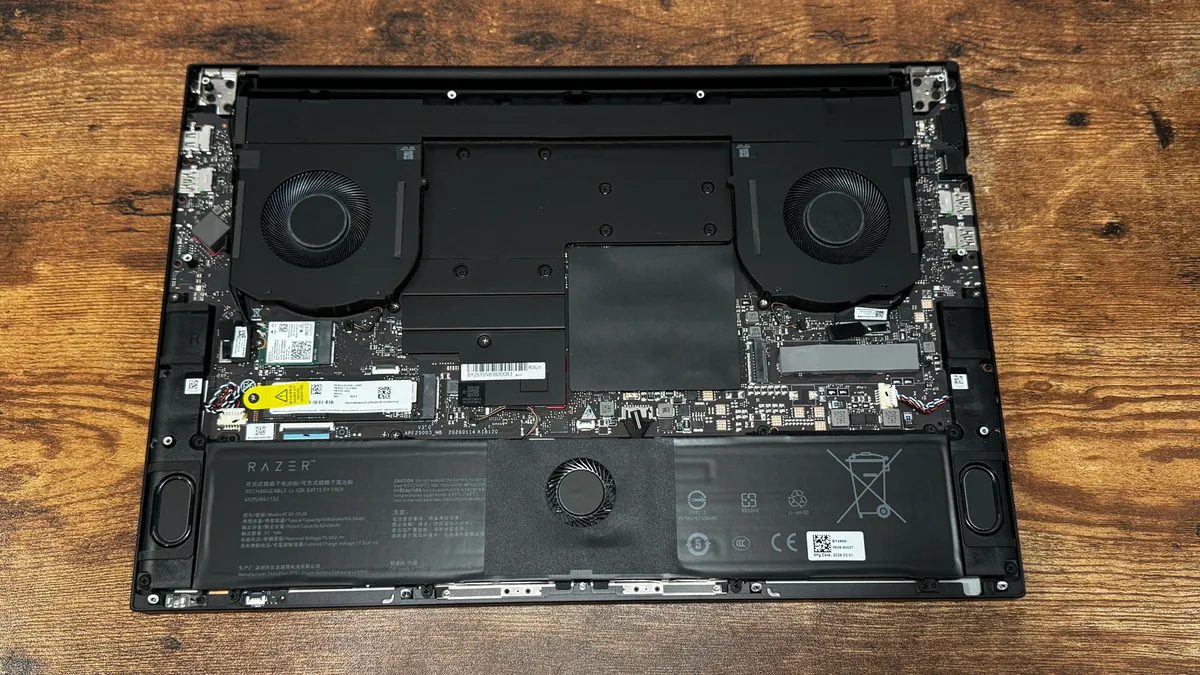
There are two SSD slots. On our review unit, the PCIe 4 slot was already filled, but you can add a second SSD to a slot that supports PCIe 5. The Wi-Fi card is removable, as is the slotted RAM, which is under shielding.
The battery is replaceable as well, though there is a fan integrated in the middle of the battery, so you'll need to be sure to disconnect the fan connector from the motherboard before removing the screws. This is a fascinating battery, and it might be harder to get than more standard shapes.
Battery Life on the Razer Blade 18 (2026)
When it comes to 18-inch gaming laptops, portable really is a turn of phrase. You'll largely want this thing plugged in for performance, if for no other reason than that it's huge.
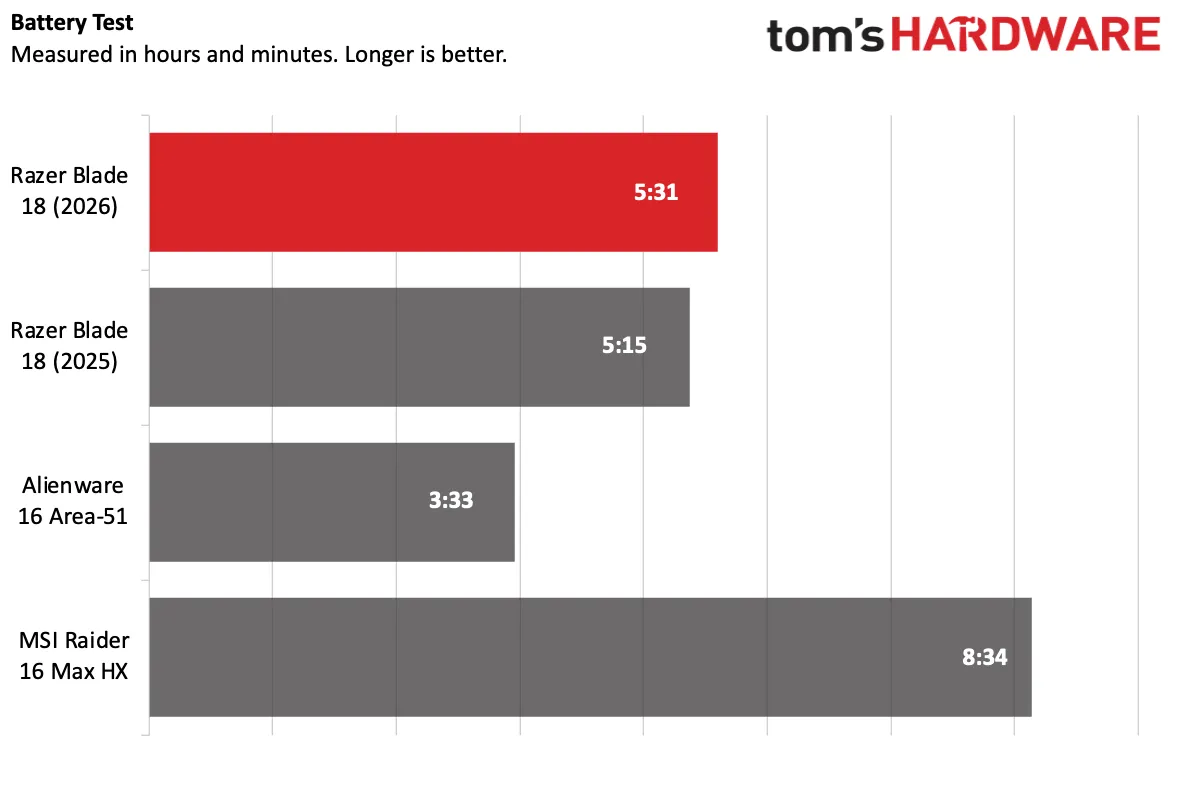
That being said, it can run off the battery for a decent amount of time. On our test, which browses the web, streams videos, and runs light OpenGL tasks with the screen set to 150 nits of brightness, the Blade lasted for 5 hours and 31 minutes. That's slightly longer than last year, and a big improvement over the Alienware (3:33). But the MSI Raider lasted the longest of the bunch at 8:34 — a full workday.
Heat on the Razer Blade 18 (2026)
The Blade's vapor chamber and tri-fan cooling have their work cut out for them. The system still gets hot under use.
After 15 runs of the Metro Exodus benchmark, the keyboard was hot to the touch at 109 degrees Fahrenheit. The touchpad was cooler at 100 F (though that's still toasty for a touchpad), while the bottom of the system was 116 F at the hottest point.
The CPU measured 88.90 degrees Celsius during the test, while the GPU averaged 69.62 C.
Webcam on the Razer Blade 18 (2026)
The Blade 18 comes equipped with a 5-megapixel webcam. Its biggest strength may be in color accuracy. In our well-lit office, it caught the exact shade of red-orange in my shirt, and some tired bags under my eyes after a long weekend. It did, however, have some graininess.
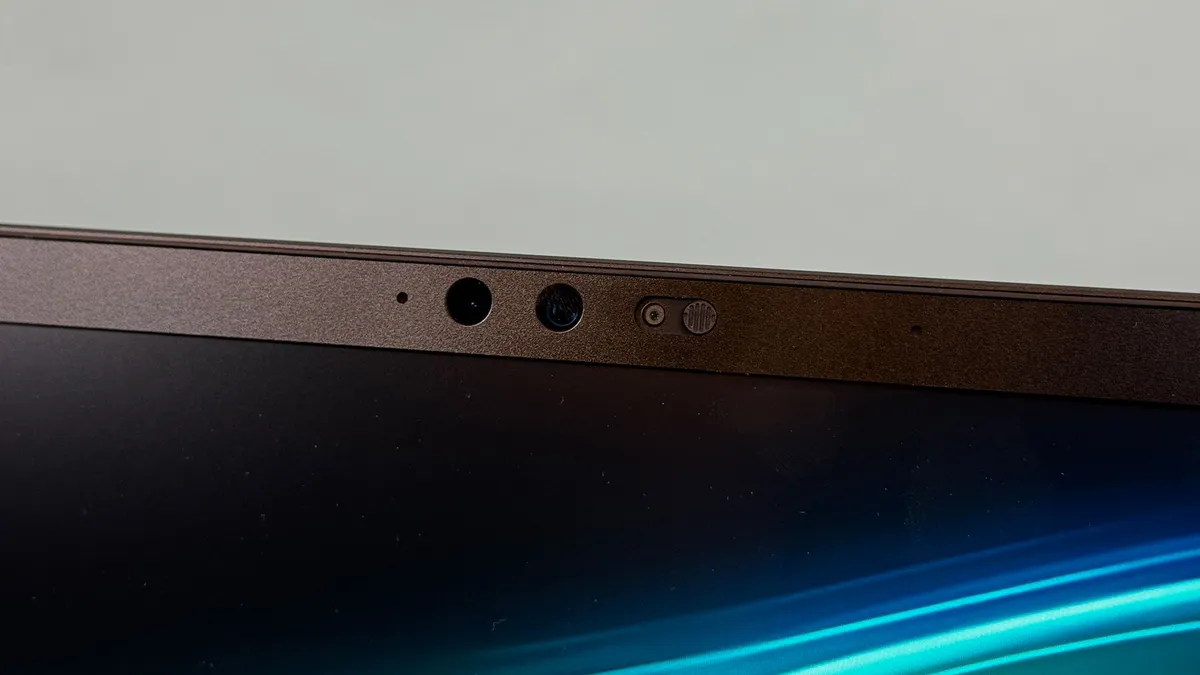
The camera system includes infrared for Windows Hello login duties, as well as a physical privacy shutter.
Software and Warranty on the Razer Blade 18 (2026)
The only software on the Razer Blade 18 is the company's Synapse app. It does a ton, including managing macros, letting you set custom profiles for games, adjusting lighting and audio, and setting performance modes. There's a lot here. Unfortunately, there are a few ads for Razer's hardware, but they're not too intrusive.
Razer sells the Blade 18 with a 1-year warranty on the laptop and a 2-year warranty on the battery.
The company has two RazerCare plans, Essential ($729.99) and Elite ($999.99), which extend your warranty to 3 years and add 24-hour claim support and coverage for mechanical failures and surge protection. Only the Elite plan covers accidental damage.
Razer Blade 18 (2026) Configurations
The Razer Blade 18 is supremely expensive. We tested it with an Intel Core Ultra 9 290HX Plus, Nvidia GeForce RTX 5090 Laptop GPU, 32GB of RAM, and 2TB of storage, which adds up to $5,399.99.
The cheapest version is $3,999.99, with the same processor, an RTX 5070 Ti, 32GB of memory, and 1TB of storage. A maxed-out version is $6,999.99 and is identical to what we reviewed, except with 128GB of RAM, which is pointed more at AI developers.
As of this writing, last year's models with a Core Ultra 9 275HX are still available, and they're all $500 less than this year's version. Given the CPU upgrades aren't huge, that's a discount worth considerling.
Bottom Line
If you want one of the biggest gaming rigs with top-end components, a bright, dual-mode screen, and tons of ports, the Blade 18 will absolutely fit the bill. But that bill will be expensive, with the system starting at $4,000 and getting more expensive from there (our review unit goes for $5,399).
For those who want an 18-inch gaming rig with few compromises, this is the one to get if you can afford it. Last year's model is $500 cheaper with a Core Ultra 9 275HX, but you'll also lose the brighter screen. I'm not sure how many people dropping $4,000-$6,000 care about that extra $500, but it's worth noting.