






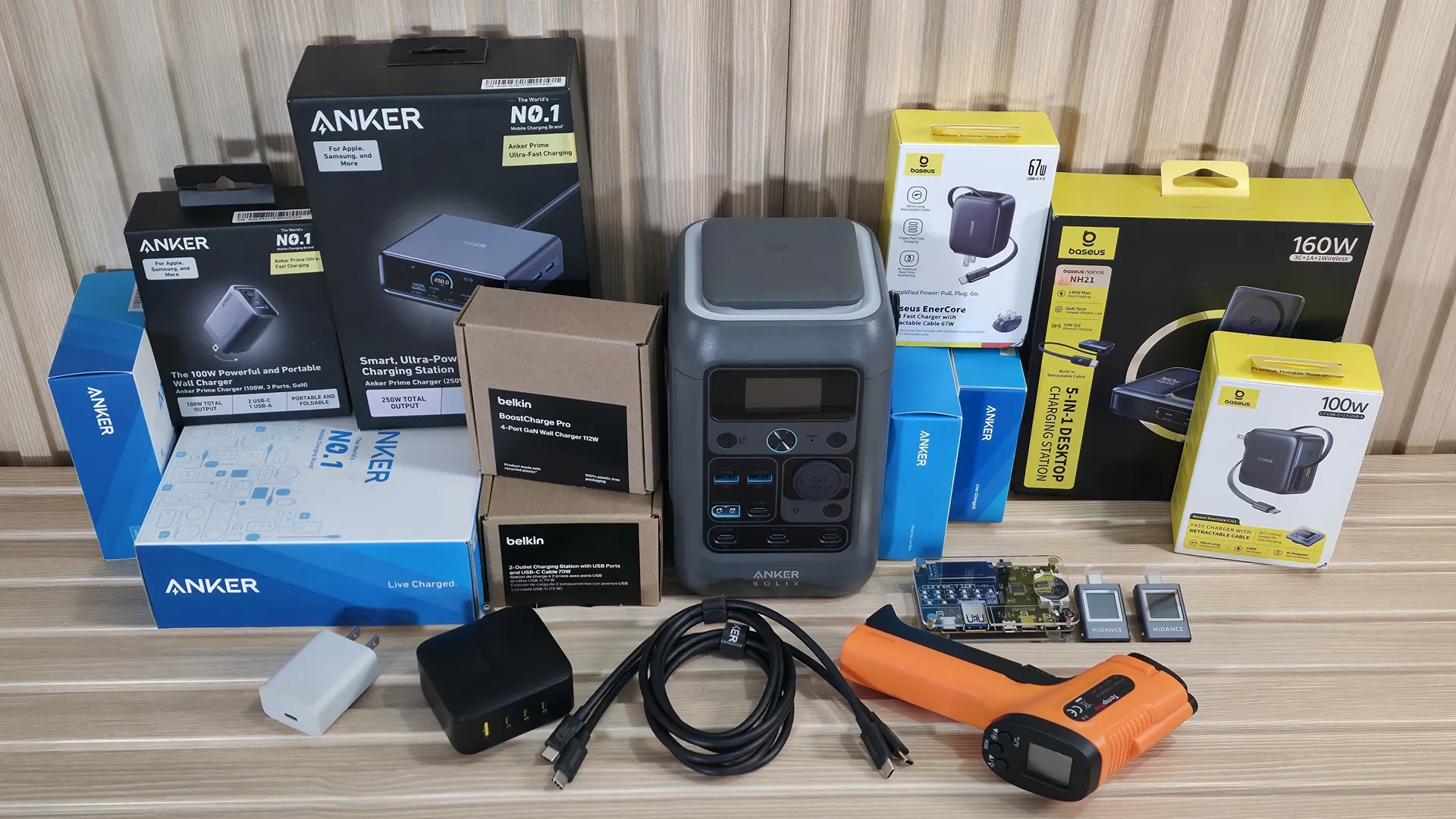
We tested the top 20 chargers on the market across different power segments to find out which models provide the most consistent power and the best charging experience without thermal throttling. For most people, charging their electronics is a normal, mundane part of life. Between our smartphones, smart watches, tablets, laptops, and other random devices, many of us simply plug the device into the included charger and never think of it again until it's complete. And while that’s fine most of the time, sometimes we lose the original or need something with more ports and power.
So, what should you get? Do you need a 140W charger, or is a 30W charger fine? Can I get away with a cheap $8 charger, or do I want/need something more advanced? How many ports, and what type, do I need? Is GaN technology necessary? Are these chargers safe when delivering full power for extended periods? This article aims to provide you with the answers you need and help you choose the right charger.
Truth be told, the answers aren’t terribly complicated, and the lion’s share of today’s electronics are smart enough not to accept the wrong voltage or overcharge, sparing us all from the potential of destroying expensive equipment like a gaming laptop or even a smartphone with the ‘wrong’ charger. We’re testing to verify output and output over time, check efficiency (the difference between output and wall usage), ensure safety (overheating, etc.), maximize charging speeds, and, of course, protect our devices from damage.
What are GaN and PD/PPS/QC/FCP/SCP technologies? Why does it matter?
Over time, new technologies and protocols have been released, said to improve charging capability. There’s the USB Power Delivery (USB-PD) standard (up to 240W) using USB-C, and Qualcomm’s Quick Charge (vendor-specific protocol) works on top of USB-PD in newer versions (QC 4.0/5). The former offers superior universality, whereas QC tends to focus on optimizing Qualcomm-powered Android devices.
GaN (short for Gallium Nitride), on the other hand, is a technology that, upon its 2018 launch, represents a leap forward for charging devices, offering increased efficiency and the potential to be more compact than traditional, less efficient silicon-based chargers. The change in materials allows for faster charging, lower temperatures, and are generally smaller, allowing for higher wattage in a more compact size. The latest generation, 5th (not counting UGreen’s 7th-gen introduction on their new chargers), offers even more output, to 240W, increased efficiency and heat management upgrades over the previous generations, for faster charging, higher power density, and smaller, even more efficient designs. You’ll most frequently see GaN 3 and 4 in the wild.
PPS (Programmable Power Supply) chargers use fast-charging technology that supports USB-PD 3.0, enabling on-the-fly adjustments to current and voltage to increase efficiency. In essence, instead of fixed-voltage steps (like 5V or 9V), PPS lowers conversion loss and heat by adapting to the device’s battery condition.
Finally, FCP (Fast Charge Protocol) and SCP (SuperCharge Protocol) are Huawei’s proprietary fast-charging technologies, with SCP reducing heat generation compared to FCP, so you can charge faster without overheating the charger.
All of these improvements have taken the basic charger and elevated it, helping not only to charge faster, run cooler and more efficiently, but also to extend battery life. The main drawback of these new chargers is the higher price compared to the potatoes of yesteryear. The more new protocols and rarer materials are used, the higher the price tends to be compared to older chargers and those with fewer features or protections (think Overvolt, Overcurrent, which most of our test subjects have).
When you’re in a pinch, chances are that $7.99 charger at the gas station will work fine to charge your phone or, depending on wattage/output, maybe even a laptop, but don’t expect it to do all the things a charger with all the modern accouterments will do (displays, different charging rates, for example), or have an app for monitoring like the Cuktech charger we tested.
Test Equipment and Setup
To gather the data, we need several items to ensure we’re getting the right information in the first place. This includes a portable power station to ‘charge,’ a tester that shows the output voltage, amps, watts, and the charging protocol, a wall power meter to see total wattage consumed, and an IR thermometer to record the device's temperature. Of course, you need a high-quality cable that won’t limit output (we chose a cable capable of 240W). In order to test the cable, we used the USB Cable Checker2 to verify its capability. Below is a list of all the parts we used for testing.
- USB Tester/Voltmeter/Ammeter Tester - Chargelab Power-Z KM003C ($109.99)
- USB Tester (used with multiple connections) - HDC-085C ($12.15)
- USB Cable Checker - Bit Trade One Cable Checker2 ($60.00)
- Portable Power Station - Anker Solix C300 ($179.99)
- IR Thermometer - TempPro TP30 ($19.99)
- Wall Power Monitor - Tekcoplus TK282PLUS_US ($19.99)
- USB-C Cable (240W) - Anker 515 ($29.99)
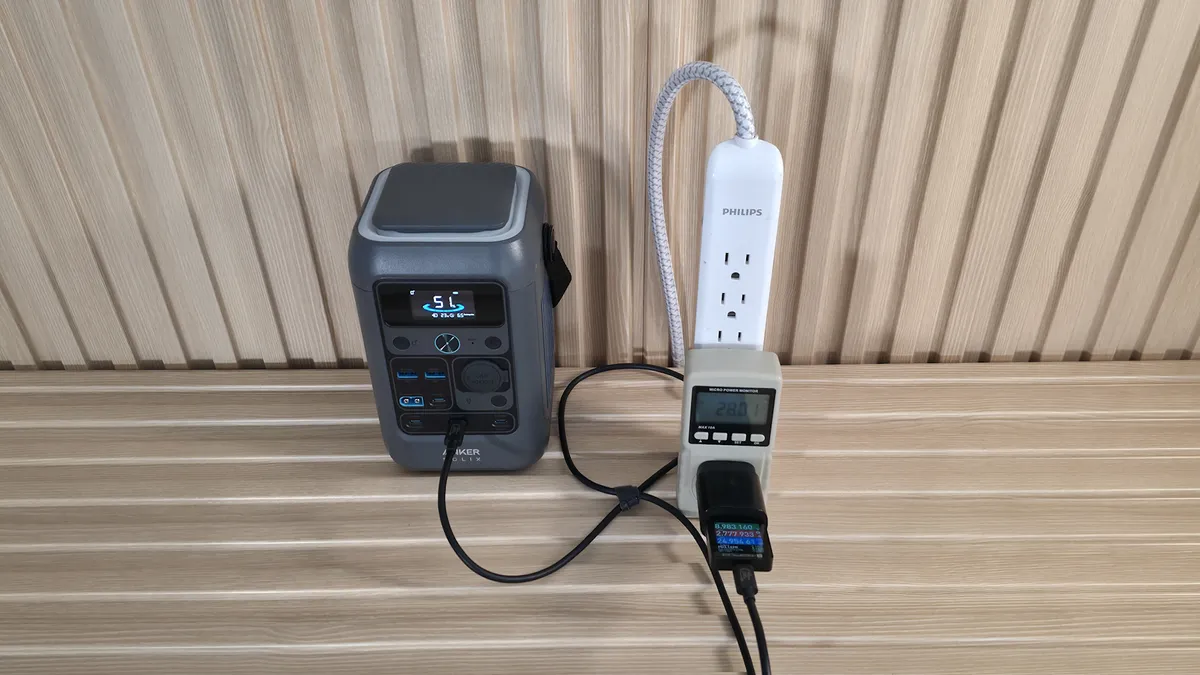
As you can see from the images below, the test configuration is quite simple. To start, we plug the wall power monitor (AKA Kill-A-Watt) into the outlet to measure how many watts the charger uses.
A charger, not unlike the power supply on your PC, will always draw more power from the wall than it outputs, as the conversion of electrical energy is not 100% efficient and generates heat due to inefficiencies in the transformation process (AC from the wall to low-voltage DC). The more efficient the device is, the less heat it produces and the less power you get billed for. Since we’re talking chargers, not PC power supplies, in most cases, the difference is typically only a few Watts and nothing to be concerned about (read: you won’t see it in your power bill).
Image 1 of 4
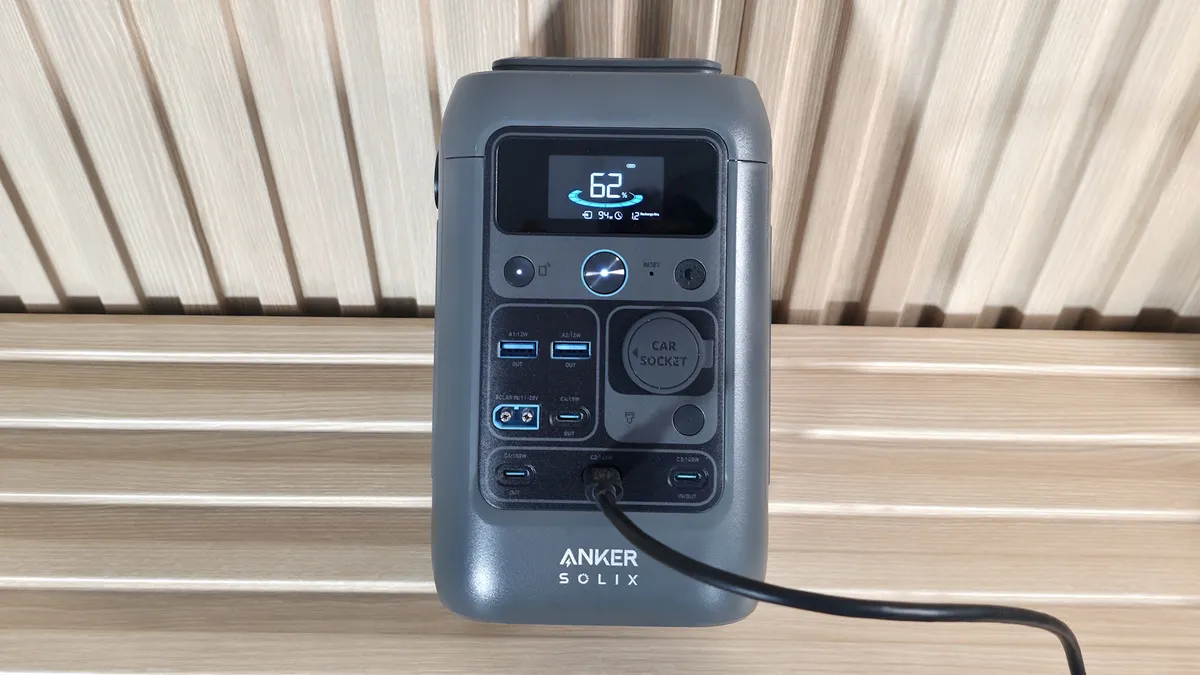
From there, we connect whatever charger we want to test to the wall power meter, and then the Power-Z KM003C charging and power bank tester connects to the charger to get the readings directly from the device. Next, we connect the already-tested good USB Type-C cable (3.3 feet, 240W) and plug it into the Anker Solix C300 DC power bank, which accepts the charge and displays the input wattage while charging, rounding out the test system.
How we Test
Before we plug the device in, we inspect the build quality (seams, does it feel like cheap plastic or is it metal?), weight, and port type. We also look at the output rating, fast-charging capabilities, and any certifications (think UL/CE). From this information, we have a good idea of the pros and cons of the features, including cost /W, port count, and protections.
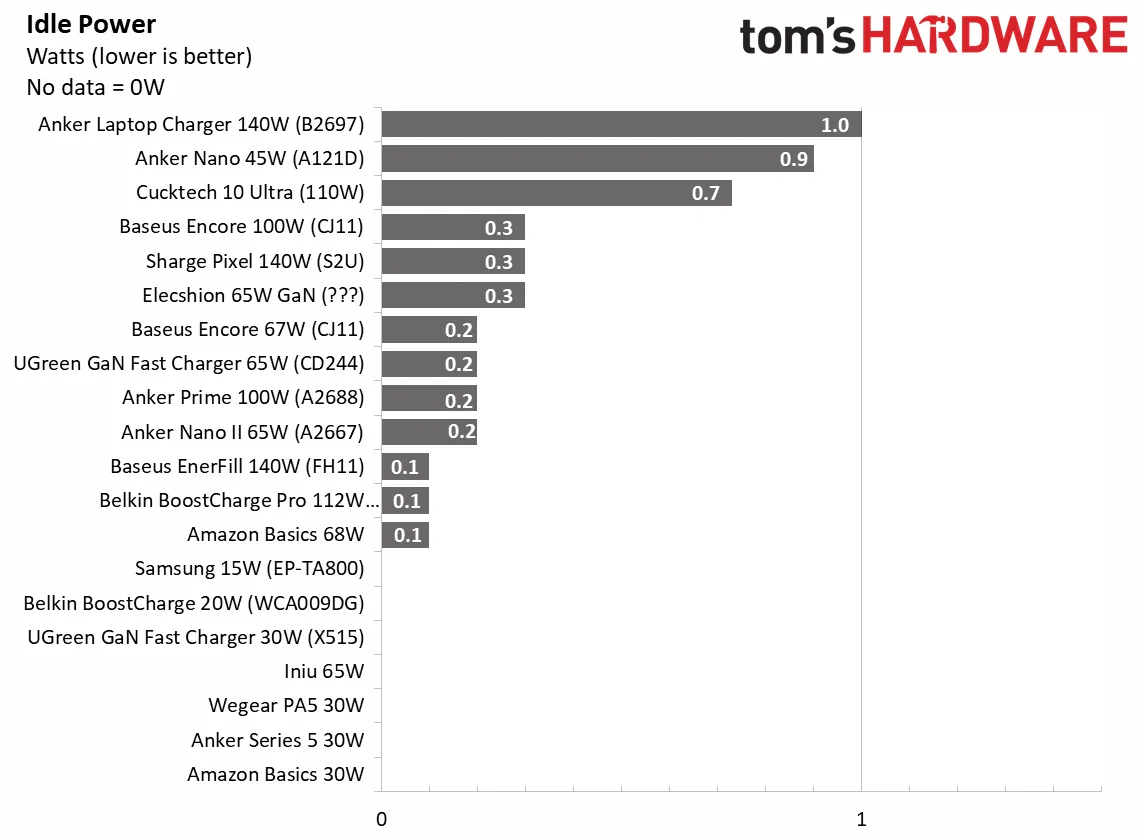
The actual testing starts with an ambient temperature reading from the case. Using the TempPro TP30 IR Thermometer, we take readings from the top and sides to determine the maximum value and record that data point as the device's starting temperature. Once that’s recorded, we plug the device in and check whether it shows any idle power use. I was surprised to see that a majority of the wall chargers we tested used some power at idle, even those without displays or LEDs. Those with displays tended to use around 1W when plugged into the wall with nothing attached.
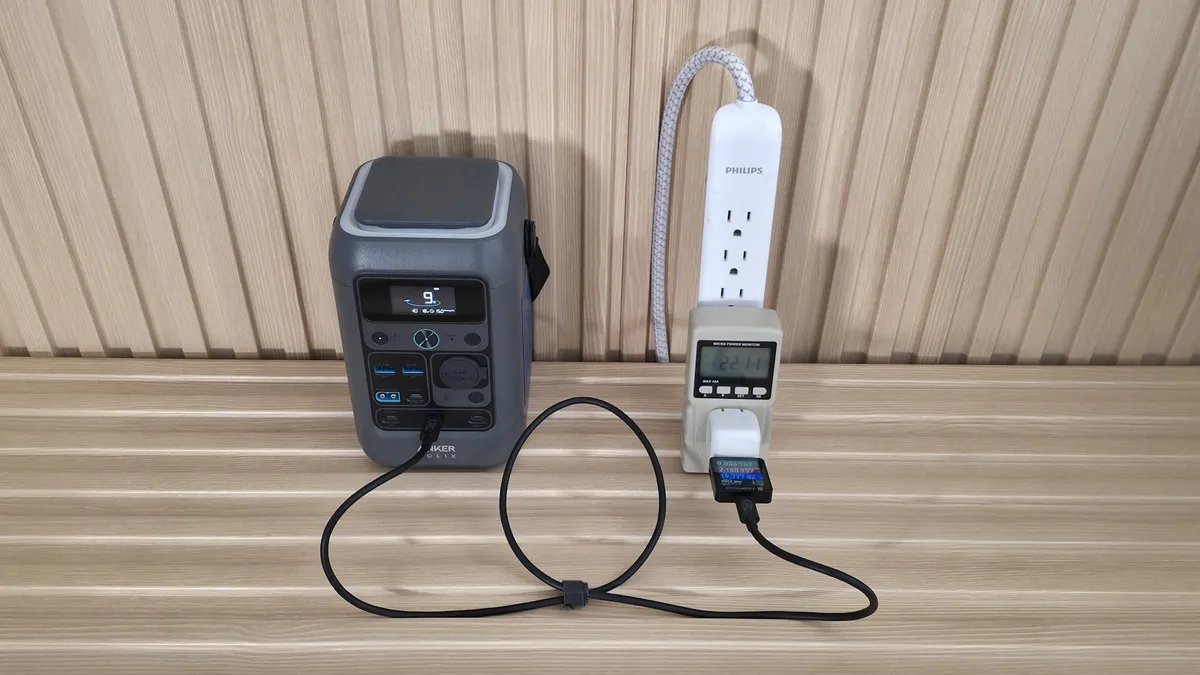
After the charger is plugged into the outlet and then connected to the power bank with the USB Type-C cable, we check the power output at five, 10, and 30 minutes into testing at the Solix. This value shows how much output the Solix is receiving for charging. As you’ll see from testing, a few chargers throttle due to temperature as we get closer to the end of our test if they’re tasked with putting out their full rated wattage for extended periods. This is mostly with the high-output chargers, as it is inherently difficult to remove, say, 140W of heat from something about the size of a deck of cards and generally surrounded by a poor thermal conductor (plastic).
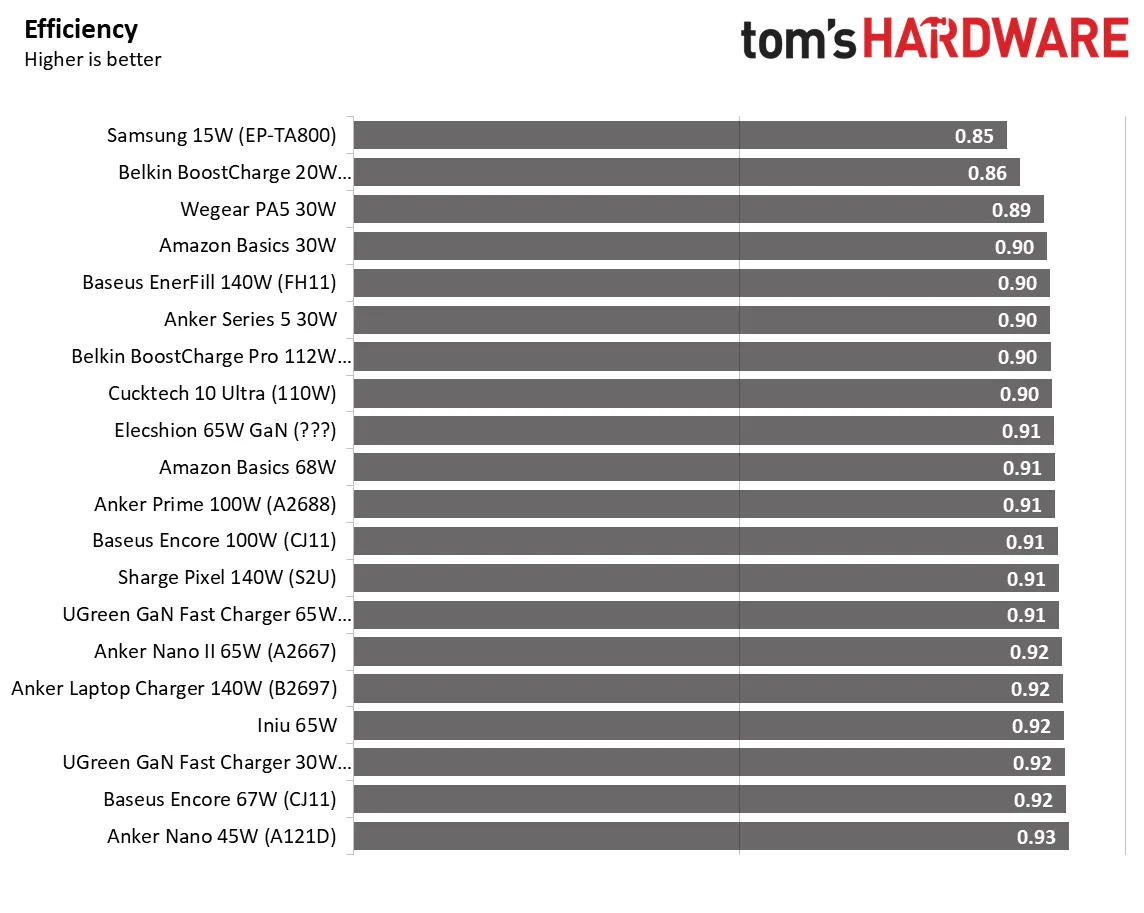
After passing the 30-minute mark, we take the temperature again and record the peak value at any point on the charger. At this time, we also capture the efficiency data from the output at the wall via the Tekcoplus wall power monitor and the Power-Z tester. The difference between what it pulls at the wall and what it pulls on the Power-Z shows how efficiently the charger converts AC to DC. As you’ll see in testing, these are all efficient, with most sitting at 90% or above. That, coupled with the minimal wattage difference, means you won’t notice a difference on your power bill.
After testing 20 chargers of all shapes, sizes, appearances, and outputs, we compiled all the data into easy-to-read charts.
Tested Chargers
We have a slew of chargers for this article, 20 to be exact, and from all walks of life. From a $9.99 off-brand Wegear to a name-brand Anker $89.99 140W model, we cover a wide variety of wall chargers (stay tuned for a desktop charger roundup, too!) with an almost dizzying array of features and technologies. In this test, we cover popular and familiar brands like Anker, Baseus, UGreen, Belkin, and even a couple of Amazon Basics. We also have lesser-known and off-brand brands like Iniu, Eleschion, Wegear, and the curiously named Cuktech in the roundup.
The chargers come in all shapes and sizes, from cubes to cuboids (3D rectangles) to those that plug in and sit flat on the wall. We have black ones, white ones, and multiple with displays that show output wattage and temperature, and there’s even the Anker Nano II ($29.99) that, when charging properly, shows a smiley face. Wattage ranges from a low 15W (anything less wouldn’t charge our power bank) to 140W devices meant for multiple devices. Some even have their own integrated, retractable Type-C cables like the Elecshion 65W (PD-585).
Image 1 of 21
Below is a simple chart listing all chargers in alphabetical order, along with wattage, port count/type, major charging feature support, and the current price (as of when this was published).
Swipe to scroll horizontally
Brand/Model | Price / (sale price) | Output (W) | Port Count/Type | Feature Support |
Amazon Basics | 30W | 1- Type-C | ? | |
Amazon Basics | 68W | 2- Type-C | ? | |
Anker Nano (A121D) | 45W | 1- Type-C | PD3.1 | |
Anker 511 | 30W | 1- Type-C | ? | |
Anker Nano II | 65W | 2- Type-C | QC 2.0, FCP/SCP | |
Anker Prime | 100W | 2- Type-C | QC 2.0, FCP/SCP | |
Anker Laptop Charger | 140W | 3- Type-C | PD 3.1 | |
Baseus Enercore | 67W | 3-Type-C | QC 2.0, FCP/SCP | |
Baseus Enercore | 100W | 3-Type-C | QC 2.0, FCP/SCP | |
Baseus Enerfill | 140W | 3- Type-C | PD 3.1 | |
Belkin BoostCharge | 20W | 1- Type-C | PD3.1 | |
Belkin BoostCharge Pro | 112W | 3- Type-C | PD3.1, EPR, SRC | |
Cuktech 10 Ultra | 110W | 3- Type-C | PD3.0, PPS, QC5, FCP, SCP | |
Elecshion | 65W | 1- Type-C | PD3.0 | |
Iniu | 65W | 2- Type-C | QC 2.0, FCP/SCP | |
Saetchi OntheGo | ??? | 67W | 2- Type-C | PD3.1, PPS |
Samsung | 15W | 1- Type-C | PD3.1, SRC | |
Sharge Pixel | 140W | 3- Type-C | PD3.1, EPR, SRC | |
Ugreen | 30W | 2- Type-C | FCP/SCP | |
Ugreen Nexode | 65W | 2- Type-C | PD 3.1, PPS, EPR, SRC | |
Wegear (PA5) | 30W | 1- Type-C | FCP/SCP |
Takeaways
After testing all 20 chargers, I walked away a bit surprised at some of the results. I was surprised to see that some chargers without screens actually have a slightly higher power draw. That said, when idle, the chargers sip power, barely reaching 0.3W, while those with screens are closer to 1W. As we touched on earlier, this isn’t remotely a big deal considering the extremely low wattage. To put it in perspective, at the US average of ~17 cents per kWh (kilowatt-hour), a constant 1W load for 30 days would run just over 12 cents.
Another tidbit I didn’t expect to see was that an overwhelming majority of these are, what I would consider, quite efficient, most within a few percentage points of each other. We did have a couple of outliers, like the older Samsung charger, which was several points below the others at 85% efficiency. The Belkin BoostCharge 20W was also lower than most, with 86% efficiency, and close to the Samsung. The rest sit between 89 and 93 efficiency, which is to be expected for any charger that isn’t the cheapest charger you can find.
Thermal throttling was also something I never considered, as I rarely had to output more than what a smartphone or smartwatch needed, but it did show up in our testing. As you can see from the first two charts, at 5 and 15 minutes into testing, wattage remained constant across all of our test subjects. However, after that, a few got too hot and throttled their output.
Of our 140W chargers, all three throttled during our test. The Anker Prime produced the most output at 118W after 30 minutes, with a reading of 67.2 degrees Celsius (measured at the hottest point on the charger with an IR thermometer). The Baseus Enerfil was the hottest 140W, peaking just under the Anker at 76.4C, but its output dropped the most to 88W. The Sharge Pixel was still pumping out 99W and ran 10 degrees cooler, reading 68.8C.
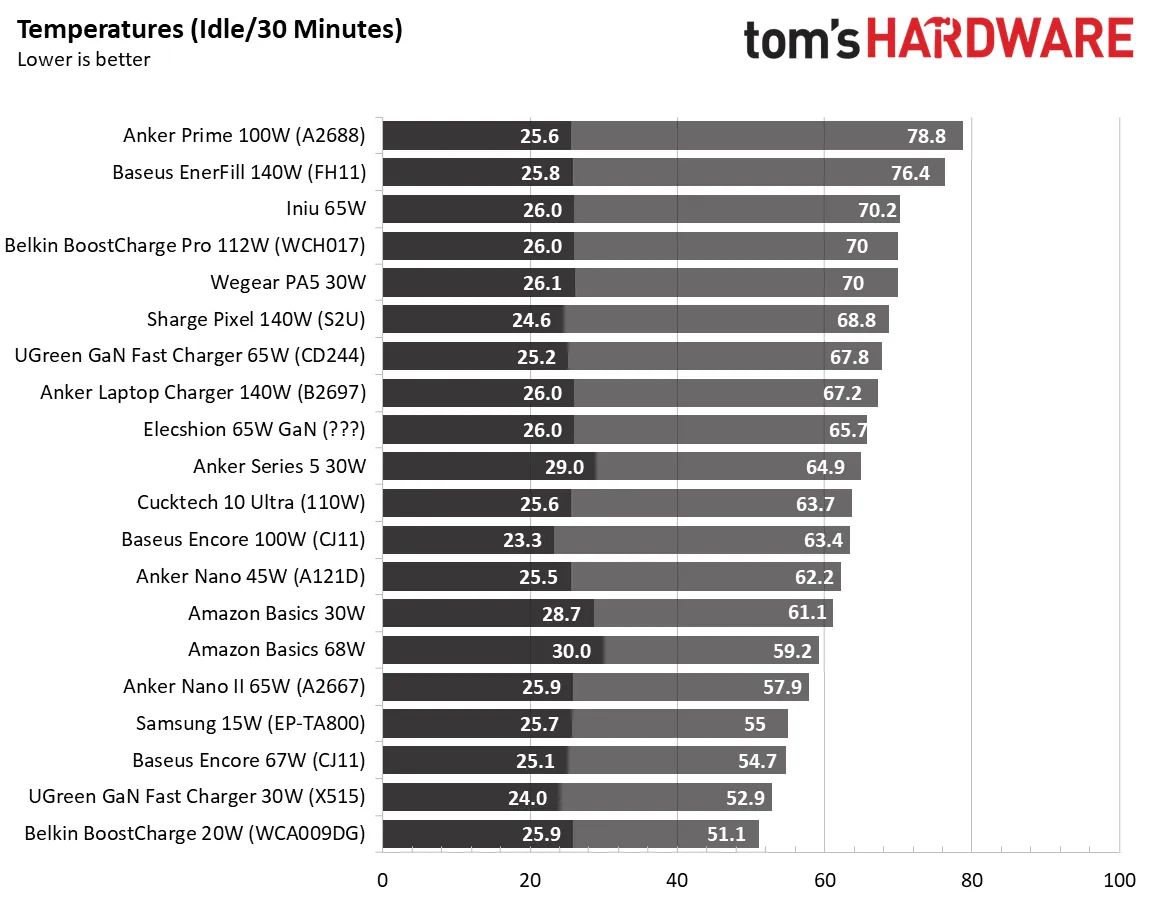
Of our ~100W chargers, a couple of those also throttled during testing. The Anker Prime (100W) and Belkin BoostCharge Pro (112W) also throttled after 15 minutes, with the Anker dropping to 89W (from 99W), and the Belkin dropping to 71W (from 101W). The 100W Anker also has the dubious distinction of running the hottest of all the tested items (and wasn’t even the highest-wattage item). The Baseus Encore (100W) and the Cuktech 10 Ultra charged with full output during our 30-minute test, keeping temperatures between a reasonable 63C and 65C, which was the lowest of any 100W< devices we tested.
As we look at lower-power chargers in the 45-68W range, none of them throttled their output. The off-brand Iniu 65W charge ran the hottest, peaking at over 70C, and was the hottest of this wattage grouping. Baseus’ Encore 67W and the Anker Nano 45W ran the coolest at around 55C and 58C, respectively—nothing to worry about here.
Last are the lower output chargers. Of these, we don’t expect to run hot, and most don’t, but there are some outliers here as well. The Wegear PA5 (30W) ran to a toasty 70C and was the hottest, by far, of our 15-30W chargers. Anker’s Series 5 charger sat at 65C, also running warm for the wattage. Belkin’s BoostCharge 20W charger ran the coolest, peaking at almost 52Cs, while the Ugreen 30W charger was just above that. In short, here, you’ll be able to run these chargers indefinitely without worrying about throttling output due to temperature. But most of these devices can only charge a single device. So if you have multiple devices or higher-wattage items like laptops or tablets, you’ll need to step up to a higher-wattage charger to charge them all quickly.
Conclusion
So far, we have tested 20 different chargers in this article, from all walks of life. From low-output single-device charging to high-output multiple-device charging, we covered quite a bit in this, our first article. We learned that, within this group, we saw full output from even the cheapest chargers, so long as we were under 67W. Beyond that, we saw some in this group start to fade due to higher temperatures, especially the high-power 140W chargers, which all throttled.
There’s little you can do to avoid that if you’re trying to charge multiple items. Even the newest generation chargers with the latest technologies still throttle output. That said, they still charged, but did so more slowly when their output was limited.
Of the high-power devices, our favorite is the Cuktech 10 Ultra ($59.99 - 110W). For under $60, it delivers plenty of power to charge laptops and multiple devices while still maintaining its output. It also has an excellent front screen that displays detailed charging information for each port (including temperature status), among other details. For the 100-140W group, Cuktech 10 Ultra offers the best balance between price, features, output, temperatures, and efficiency. In our middle group (45-68W), the Anker Nano ($29.99 - 45W) did a great job maintaining its output while also maintaining cool temperatures, and was the most efficient of all the chargers we tested so far. It also has a display to show charging status, which is a plus. Finally, if you’re just looking for something to charge lower-power devices quickly, the UGreen 30W Fast charger (under $14) does that efficiently too. You don’t have a fancy screen, but it does manage full output over time and runs the coolest among 30W devices.
In the end, all of these chargers will fast-charge your device if the output is appropriate, and in a pinch, the cheapest will do. Picking the ‘right’ charger isn’t nearly as complicated as it may seem at first glance. Across the board, even cheaper options handled simple charging duties without issue, especially at lower wattages. Higher wattages introduced tradeoffs of heat and throttling when pushed hard over time. Modern standards (think PDS, QC, GaN) have improved efficiency, size, and performance, but don’t eliminate the physical limits of delivering, say, 140W from a pocket-sized device.
To me, the takeaway is simple: match your charger's output to your actual needs. For example, if you're charging low-power devices (think a phone or two), don’t overthink it. But for high-power devices like laptops or multi-device needs, spending a bit more gets you better sustained performance, more ports, and added peace of mind for your wall/travel charger. Regardless of your needs, today’s chargers are smarter, safer, and more efficient than ever, so long as the wattage lines up, it’s hard to go too wrong. But that said, some are clearly better than others. Keep an eye out for a desktop charger article (covers even higher wattage) and a best chargers page, both available soon.