It’s hard not to be impressed by what manufacturers have achieved with the numerous options that are now available among the best PC gaming handhelds. What was once a domain left largely to Valve with the Steam Deck has evolved into a broader market, with the bulk of the systems available running Windows 11.
These devices pair sleek exteriors with high-refresh IPS or OLED displays and pack powerful (for a handheld) computing hardware inside. However, even the gaming handheld market has been squeezed by rising component prices, leading us to the MSI Claw 8 EX AI+, the subject of this review. It’s by far the most powerful gaming handheld we’ve ever tested, thanks to its Intel Arc G3 Extreme SoC, but it’s also the most expensive ($1,799).
At every turn, the Claw 8 EX AI+ impressed with its performance, but the staggering price tag incessantly looms over the experience.
Design of the MSI Claw 8 EX AI+
We hope you like purple, as that’s the only color currently available for the Claw 8 EX AI+. Purple isn’t my favorite color in the world (that distinction belongs to blue), and it gives me Joker vibes from the 1989 Batman starring Michael Keaton and Jack Nicholson. Not only is the top of the chassis molded in purple plastic, but it also has a sparkly finish that makes it look a bit jewel-like. The lower half of the system is constructed of traditional black plastic.
The handgrips on the Claw 8 EX AI+ are well-spaced, perfectly sized for my hands, and evenly distribute weight, which helps mask the system’s 785-gram heft. Speaking of the handgrips, there’s a laser-etched dot texture molded where your palms and index fingers rest on the MSI Claw 8 EX AI+ — this helps keep it in place instead of sliding around in your hands (especially if they perspire during long gaming sessions).
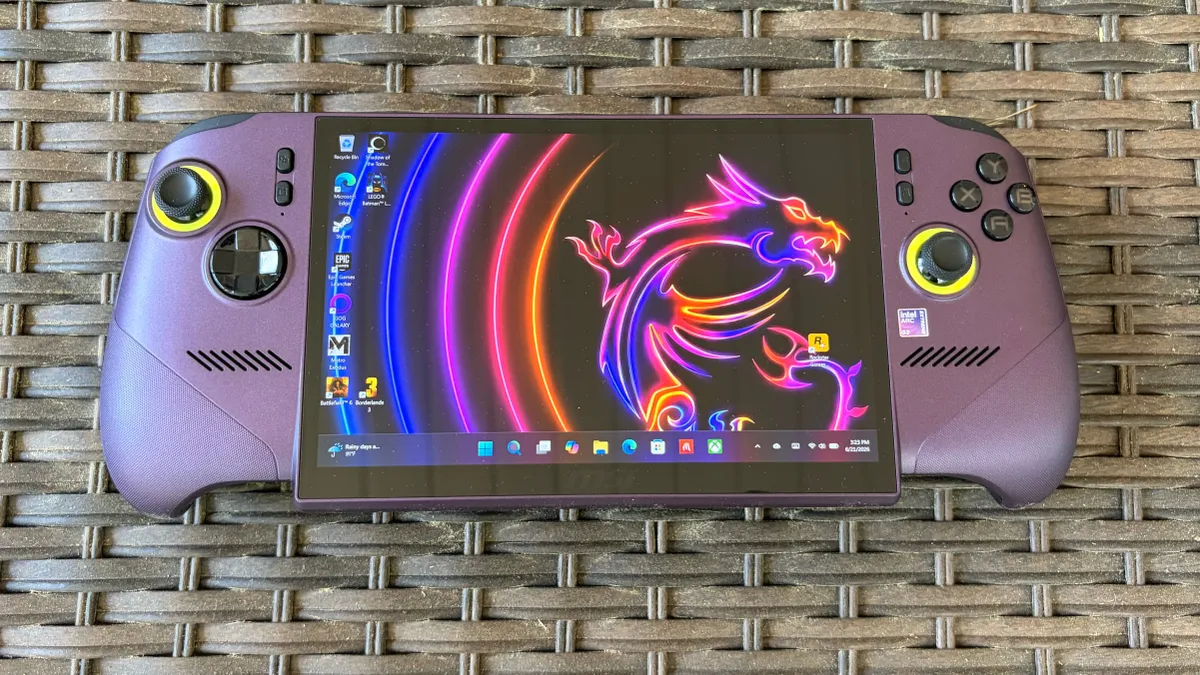
Controls-wise, the Claw 8 EX AI+ doesn’t break any new ground, which is generally a good thing. If you’re familiar with an Xbox controller, there are backlit ABXY buttons on the right, with a joystick just below, along with another joystick on the left side, with a D-pad (which features a metal dome) below it. Both joysticks sport an RGB ring at their bases. There are also four buttons on the face of the handheld, flanking the display, with the bottom-left button assigned to bringing up the MSI Quick Settings overlay for the Xbox Game Bar. The bottom right button launches MSI Center M, for launching and configuring games.
You’ll find the usual allotment of bumper and triggers at the top of the Claw 8 EX AI+. While the triggers feel nice, the bumpers are a smidge “wiggly,” but that’s a nitpick on my part. If you’re a fan of macro buttons, you may be disappointed to find that there are only two on the back of the Claw 8 EX AI+, versus the three or four you’ll find on competing systems like the Steam Deck.
Image 1 of 4
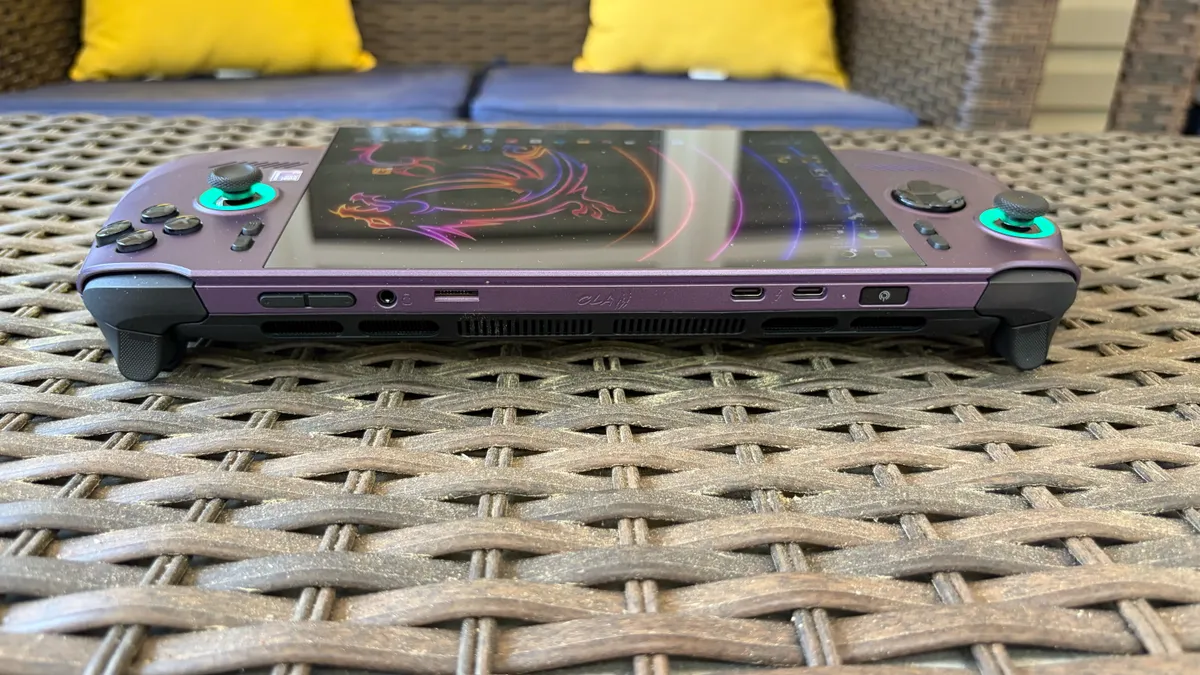
Unlike Lenovo’s Legion Go series of handhelds, you won’t find a touchpad on the Claw 8 EX AI+. So all of your screen navigation will be limited to touching the screen with your finger, or using the joysticks in the Xbox overlay or MSI Center M.
All of the I/O ports are located at the top of the unit; here you’ll find a power button that doubles as a fingerprint reader, two Thunderbolt 4 ports, a microSD reader, a 3.5mm audio jack, and volume buttons.
There are two intakes (one for each cooling fan) located beside the macro buttons, while vents below the IO panel exhaust heat.
Although I’ll talk about the screen in detail later on, I must mention that the display doesn’t fit neatly within the confines of the center mass of the Claw 8 EX AI+. Instead, the bottom portion of the screen extends roughly half an inch below the body. It looks a little wonky at first, but it seems to be the only way that MSI could fit the 8-inch display, at least without making the whole device bigger.
The Claw 8 EX AI+ measures 12.6 x 5.12 x 1.98 inches, compared to 11.42 x 4.76 x 2.00 inches for the Asus ROG Xbox Ally X, 11.64 x 5.38 x 1.66 inches for the Lenovo Legion Go 2, and 11.73 x 4.6 x 1.97 inches for the Steam Deck OLED.
MSI Claw 8 EX AI+ Specifications and Components
Swipe to scroll horizontally
Processor | Intel Arc G3 Extreme (14 cores, 14 threads, 4.7 GHz, 8-35W cTDP), Up to 46 TOPS NPU |
Graphics | Intel Arc B390 (12 cores, 2.3 GHz) |
Memory | 32GB LPDDR5x-8533, soldered |
Storage | 1TB PCIe 4.0 NVMe M.2 2280 SSD |
Display | 8-inch, 1920 x 1200, 120 Hz, IPS, touch |
Networking | Wi-Fi 7, Bluetooth 6.0 |
Ports | 2x USB4 Type-C (Thunderbolt 4 compatible), 3.5 mm headphone jack, microSD card reader (UHS-II) |
Battery | 80 WHr |
Power Adapter | 65 W |
Operating System | Windows 11 Home w/Xbox Home Mode |
Dimensions | 12.6 x 5.12 x 0.98 ~ 1.89 inches (32.1 x 13 x 2.5 ~ 4.8 cm) |
Weight | 1.73 pounds (785 g) |
Warranty | One year |
Price (as configured) | $1,799.99 |
Gaming and Graphics Performance on the MSI Claw 8 EX AI+
The Claw 8 EX AI+ features the new Intel Arc G3 Extreme SoC, which includes a 14-core GPU (4.7 GHz max clock) and a 12-core Arc B390 GPU that clocks up to 2.3 GHz.
The default power mode is MSI's AI Engine, which typically runs games at 25 watts, but can vary between 15 watts and 30 watts depending on the workload. There's also an Endurance Mode, which leverages the Intel Endurance Gaming Efficiency Preset. This limits the chip to 15 watts and targets 30 frames per second (FPS) while gaming. Finally, Manual Mode allows you to run PL1 Max at 35 watts.
For our testing, we used the default AI Engine Mode when on battery, and Manual Mode when plugged in (35 watts PL1 Max, 45 watts PL2 Max). We ran games at 1280 x 800 and 1920 x 1200 resolutions on the handheld, leveraging the Xbox Full Screen Experience to limit resource consumption from additional Windows software. Please note, however, that the ROG Xbox Ally X benchmarks were run at 720p/1080p due to its 16:9 aspect ratio display, while the Steam Deck is limited to 1280 x 800 resolution.
Image 1 of 5
While playing Lego Batman: Legacy of the Dark Knight, I was able to easily achieve 150-160 FPS on medium graphics settings at 800p with XeSS Balanced and the AI Engine power mode engaged. Battlefield 6 saw performance in the 70 fps range at 800p, with Auto detail settings and XeSS Balanced enabled.
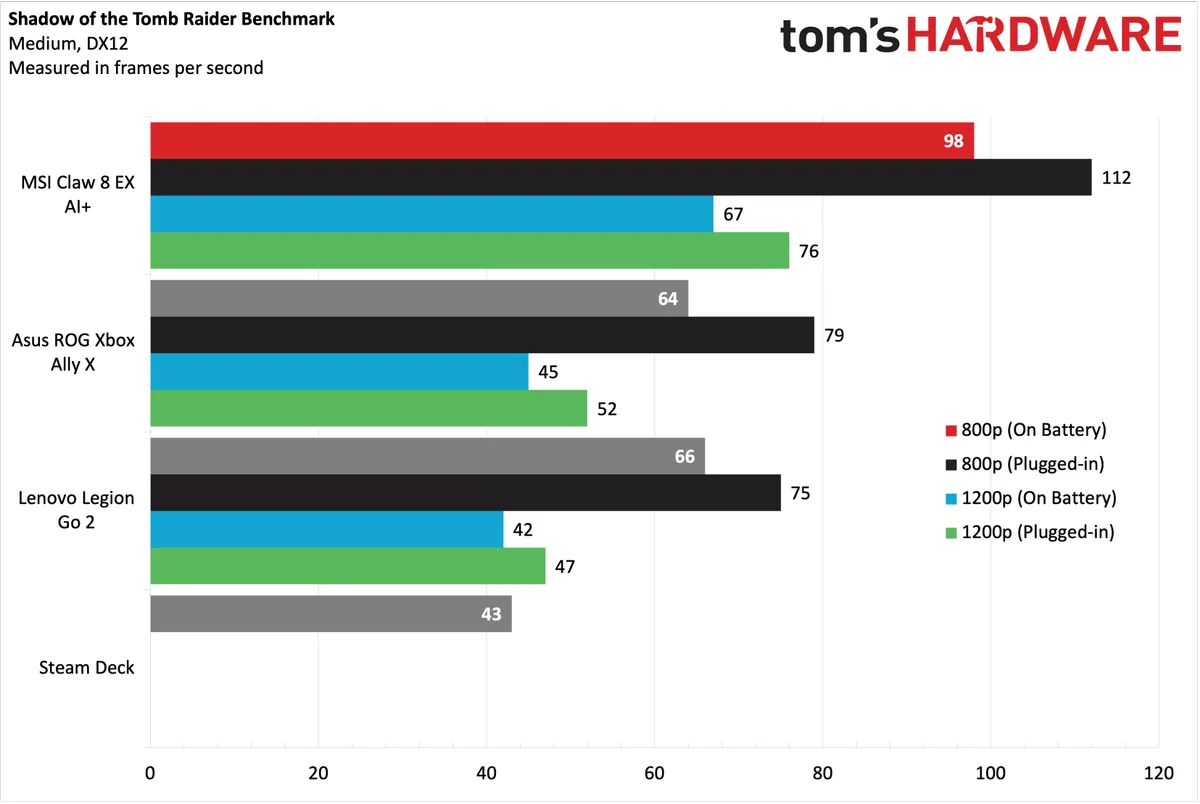
Spoiler alert: the Arc 3 Extreme powering the Claw 8 EX AI+ is an absolute beast (in the handheld segment), delivering a 20 to 30+ FPS advantage over its peers across all the games in our benchmark suite. Starting with Shadow of the Tomb Raider benchmark (Medium, DX12), the Claw 8 EX AI+hit 98 FPS at 800p on battery power and 112 fps when plugged in (a 30+ FPS advantage over the ROG Xbox Ally X. Bumping the resolution to 1200p, the Claw 8 EX AI+ was faster at 1200p on battery power (67 FPS) than the ROG Ally X and Legion Go 2 were at 720p/800p on battery power. The system also impressed, reaching 72 FPS at 1200p when plugged in.
When benchmarking Cyberpunk 2077 (Steam Deck preset), the Claw 8 EX AI+ again showed its performance might, crushing all rivals. It delivered 78 FPS on battery power and 85 FPS when plugged in at 800p. At 1200p, those figures fell to 48 FPS and 52 FPS, respectively. We're at least getting a semblance of playability at 1200p resolution in the handheld space.
Red Dead Redemption 2 (Favor performance, Vulkan) saw the Claw 8 EX AI+ run the tables again, hitting 115 FPS at 800p and 87 FPS at 1200p while plugged in to the wall. Of course, those numbers fell slightly on battery power, but were still above anything that the ROG Xbox Ally X or Legion Go 2 could muster.
It was more of the same in Borderlands 3 (Medium, DX11), which saw the largest performance variance between the Claw 8 EX AI+ on battery power and when plugged in. The handheld hit 94 FPS at 800p while plugged in, a full 18 FPS faster than with battery power. At 1200p while plugged in, it still managed to pull 78 FPS at 1200p.
Forza Horizon 6 is the newest addition to our benchmark suite, so we only have Steam Deck numbers to compare with the Claw 8 EX AI+. The Claw 8 EX AI+ hovered around the 100 FPS mark at 800p and managed 72-76 FPS at 1200p, depending on whether it was running on battery power.
For stress testing, we ran Metro Exodus 15 times at 800p at Medium quality settings to simulate roughly 30 minutes of gameplay. The Claw 8 EX AI+ hit an average frame rate of nearly 70 FPS on the benchmark. For comparison, the ROG Xbox Ally X managed 63.44 FPS using the same settings.
The Claw 8 EX AI+’s two performance cores averaged 4.06 GHz, the eight efficiency cores averaged 3.18 GHz, and the four low-power efficiency cores averaged 3.0 GHz.
Windows 11 and MSI Center M on the MSI Claw 8 EX AI+
The Claw 8 EX AI+ supports the Xbox Full Screen Experience, just like the ROG Xbox Ally X. However, it doesn't have its own dedicated Xbox app. You can access the interface by opening the Xbox app and selecting Full Screen from the top-right corner. You'll then be able to reboot the system directly into the Full Screen Experience, bypassing unnecessary Windows 11 components that could affect gaming performance.
All the benefits and limitations of the Full Screen Experience, as discussed in our ROG Xbox Ally X review, apply here, so I won't belabor those points. I would like to elaborate on the MSI Center M, which provides its own dedicated, gaming-centric interface. The full-screen interface can be navigated using the thumbpads, eliminating the need to tap the screen.
Image 1 of 7
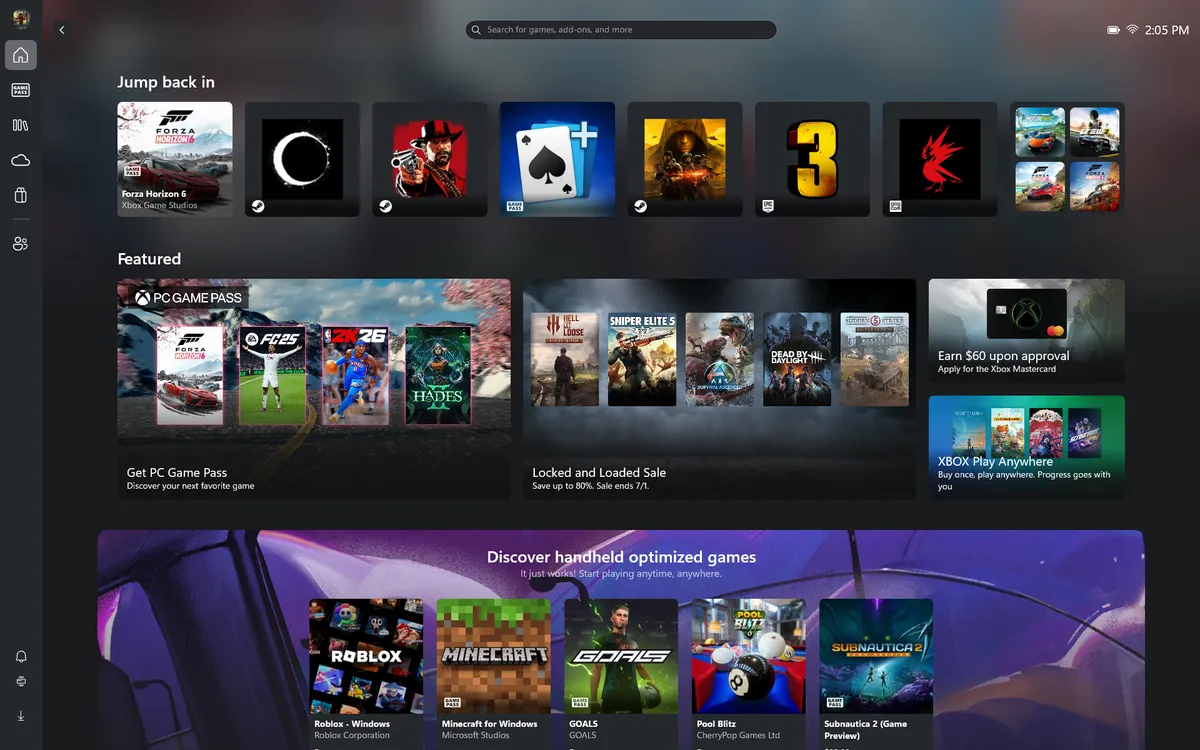
MSI Center M pulls in all of your games from multiple sources, including the Xbox Store, GOG Galaxy, Epic Games, and Steam (among others). It pulled games from all those sources, and most of them displayed a nice, high-resolution thumbnail. One exception was Cyberpunk 2077, which only displayed a low-resolution Start Menu icon that was blown up to a blurry mess.
You can customize navigation within MSI Center M to use the joysticks in Gamepad Mode (for gaming) or Desktop Mode (for using the standard Windows 11 interface). You can tweak sensitivity for the joysticks, and the Desktop Mode provides key mapping so that you can see which UI shortcut each button corresponds to.
Another component of the software package is MSI Quick Settings, an overlay that appears in the Xbox Game Bar. It can be recalled using the MSI Quick Settings button beside the left joystick. MSI Quick Settings features a sleek, easy-to-use interface that provides access to power profiles, screen brightness, gamepad control modes, display refresh rate, and screenshot capture (among other things).
Display on the MSI Claw 8 EX AI+
The Claw 8 EX AI+ features an 8-inch IPS display with a 120 Hz refresh rate and a 1920 x 1200 resolution. Given the $1,799 price tag, it would have been more fitting for MSI to include an OLED display, as we saw with the Legion Go 2. I think that’s a big miss by MSI, and one that I hope will be rectified in future versions.
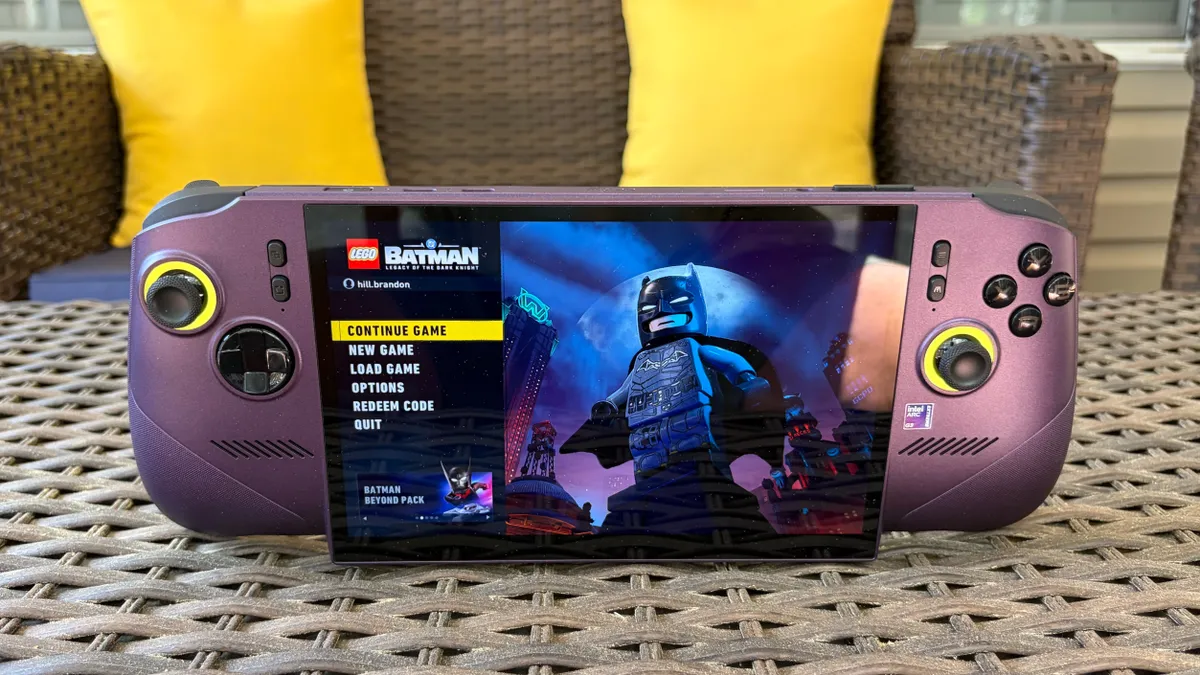
Unfortunately, due to time constraints, we were unable to perform detailed, instrumented tests on the Claw 8 EX AI+’s display. So you’ll have to trust my eyeballs and the manufacturer’s specs for the time being. MSI claims that the display on the Claw 8 EX AI+ covers 100% of the sRGB color space and offers a peak brightness of 500 nits.
Although I didn’t have a Legion Go 2 on hand for a side-by-side comparison, I do have a Legion Go and a Legion Go S on my testing bench. We measured the former at 476.7 nits, and the Claw 8 EX AI+ seemed at least as bright (at maximum brightness) as the Legion Go, if not brighter, across multiple games and while using the Windows 11 interface.
Games generally looked good on the Claw 8 EX AI+, with good color balance. I racked up plenty of hours in Battlefield 6, trying my best to soak in the lush reds, oranges, and greens of the city architecture of the Saints Quarter map without getting my head blown off. Forza Horizon 6 looked magnificent in the colorful Japanese landscape, with vibrant city centers and majestic outdoor environments reflected in the vehicles' finishes. Everything looked good, but color vibrancy and overall visual “pop” would have been even better with an OLED panel, but I digress.
Battery Life on the MSI Claw 8 EX AI+
I’ve been spending quite a bit of time recently playing more laid-back games; ones that won’t make my blood boil because of tense online matches. In particular, I’ve spent time playing Lego Batman: Legacy of the Dark Knight.
I played the game at 800p with medium settings, Intel XeSS Balanced, power mode set to AI Engine, and display set to 50 percent. After playing for an hour (with an average of around 150 FPS), the battery dropped from 100 percent to 52 percent. Switching the power mode to Endurance, locked at 30 FPS, I still had 66 percent battery after an hour (when starting at 100 percent).
If I were to drop the brightness a bit, I could see battery life extending past 3 hours in Endurance mode.
Audio on the MSI Claw 8 EX AI+
The Claw 8 EX AI+ has a pair of 2-watt speakers, which are fine. They’re perfectly serviceable for most games. Given that I spent plenty of time playing Lego Batman: Legacy of the Dark Knight, I noticed that the character voices sounded pretty good, and the plastic “clicking” sound of Lego stacking together during building exercises came through loud and clear.
Sound output was a bit more muddled in Battlefield 6, although I prefer to play games like that with headphones on anyway. In fact, given the mobility of handheld gaming PCs, most people will likely default to headphones for the best possible audio experience with the Claw 8 EX AI+.
Heat on the MSI Claw 8 EX AI+
While running the Metro Exodus stress test, the MSI Claw 8 EX AI+ registered around 90 degrees Fahrenheit on the back of the chassis, close to dead-center. Moving towards the top of the unit, heat levels rose sharply to around 109 F near the cooling fans' exhausts.
Image 1 of 2
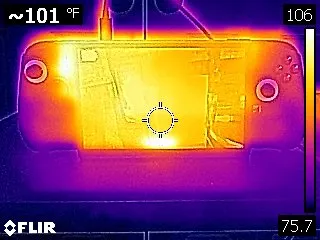
The Arc G3 Extreme chip averaged 77.3 degrees Celsius.
Upgradeability on the MSI Claw 8 EX AI+
Cracking open the Claw 8 EX AI+ is incredibly easy – only six Phillips-head screws hold the back panel in place. Once the screws are removed, you can use a well-placed plastic pry tool to insert it between the black and purple halves of the chassis where they meet. Once you pry open a small section, the rest pops off easily.
Image 1 of 2
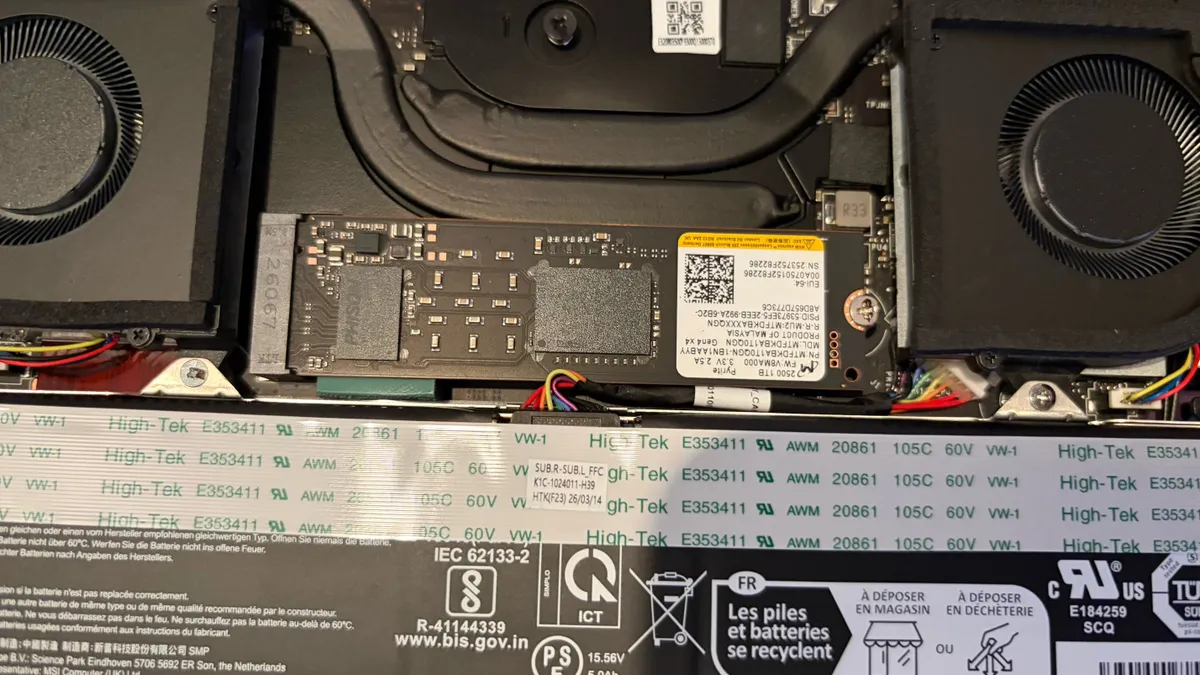
Once inside, you’ll see the battery in the lower portion of the chassis and a full-length 2280 PCIe 4.0 SSD nestled between the two cooling fans (secured with one screw). In our review unit, the SSD was a 1TB Micron 2500 with QLC NAND.
MSI Claw 8 EX AI+ Configurations
As of now, there’s only one configuration available of the Claw 8 EX AI+ with an Arc G3 Extreme SoC. Our system came with the aforementioned Arc G3 Extreme chip, 32GB of RAM, a 1TB SSD, and an 8-inch 120Hz 1200p IPS touchscreen, for a whopping $1,799.99 at Best Buy.
Bottom Line
The MSI Claw 8 EX AI+ is an impressive machine that offers a solidly-built chassis, good ergonomics, and good battery life. However, the most impressive aspect of the handheld is its performance. The Intel Arc G3 Extreme chip allowed the Claw 8 EX AI+ to absolutely dominate our gaming benchmarks, delivering anywhere from a 20 to over 30 FPS advantage at 1200p or 800p resolution.
But that performance comes at a steep price: $1,799. That’s more than just expensive; it’s MacBook Pro pricing for a handheld, which is shocking, to say the least. For comparison, the Lenovo Legion Go 2 with 32GB of RAM, a 1TB SSD, and an OLED display retails for $1,349.99, and we already had extreme reservations concerning its price tag.
The Claw 8 EX AI+ is $450 more expensive and doesn’t even have the OLED display of the Legion Go 2. The saving grace for the Claw 8 EX AI+ is the Arc G3 Extreme chip, which gives unmatched performance across the board. However, it remains to be seen if the price premium is enough of a draw to more casual gamers.