
惯性聚合 高效追踪和阅读你感兴趣的博客、新闻、科技资讯
阅读原文 在惯性聚合中打开

推荐订阅源

C
Check Point Blog
aimingoo的专栏
aimingoo的专栏
Jina AI
Jina AI
Microsoft Security Blog
IT之家
IT之家
V
Visual Studio Blog
量子位
OSCHINA 社区最新新闻
OSCHINA 社区最新新闻
freeCodeCamp Programming Tutorials: Python, JavaScript, Git & More
博客园 - 聂微东
Cyber Security Advisories - MS-ISAC
大猫的无限游戏
大猫的无限游戏
Y
Y Combinator Blog
Stack Overflow Blog
Stack Overflow Blog
D
Docker
MyScale Blog
MyScale Blog
小众软件
小众软件
云风的 BLOG
云风的 BLOG
美团技术团队
Microsoft Azure Blog
酷 壳 – CoolShell
酷 壳 – CoolShell
Last Week in AI
Last Week in AI
Apple Machine Learning Research
博客园 - 【当耐特】

Latest from Tom's Hardware

Our experts review your astonishing PC builds and setups in Rig Rundown — from wall-mounted setups to a system… News outlets are blocking Wayback Machine from archiving their pages — 23 outlets concerned AI companies might abuse fair use and use it to train their models Mark Zuckerberg reportedly working on AI clone of himself — Meta insiders claim 3D photoreal animated Zuck will be able to engage with employees on his behalf Score a massive $700 off this 4K-ready Lenovo gaming PC with an RTX 5070 Ti, now just $1,899 — epic Legion Tower 5i pre-built ships with a 20-core Intel CPU, 32GB DDR5 and a 2TB SSD Pay $1,349.99 for Gigabyte's Aero X16 laptop and save $300 on this 32GB beast with RTX 5070 graphics —… Veteran Windows dev shows off AI running on 47-year-old PDP11 with 6 MHz CPU and 64KB of RAM — 'gloriously absurd' project runs transformer model written in PDP-11 assembly language Half of all US employees now use artificial intelligence at work, crossing landmark threshold for first time — Gallup data shows daily and weekly usage hitting all-time high of 28% in Q1 2026, with 65% feeling positive about its impact on productivity China has spent 3.6 times more than the US on chipmaking subsidies over the past decade — $142 billion and counting, easily outweighs CHIPS Act FAA approves military use of drone-killing laser weapons in US airspace — decision comes after it was decided ‘systems do not present an increased risk to the flying public’ Nvidia says AI cuts 10-month, eight-engineer GPU design task to overnight job — company is still 'a long way' from AI designing chips without human input Small Missouri town ousts half its city council after $6 billion AI data center approval — petition calls for mayor's removal as frustration (and violence) over AI data centers mounts New tech can see a CPU's transistors in action — terahertz radiation can potentially steal data as a chip is… Intel's Nova Lake CPUs gear up to seize AMD’s 3D V-Cache gaming throne — early leak points to up to 52 cores, blazing DDR5-8000 support, and massive 175W TDP Acer Predator GX850 SFX power supply review: Solid electrical performance with good efficiency NZXT to cough up $3.45 million over 'predatory' Flex PC rental scheme in RICO class-action settlement — in-debt customers to get up to $5,000 of relief, eligible renters to be granted ownership Bulbous 15x fan PC case side panel dubbed the ‘Superdome’ lowers temps by 20 degrees —  $600 worth of Noctua fans arrayed in 3D-printed structure Approvals for Nvidia and AMD AI chip exports to China stall under government bottleneck —  20% staff turnover… Espresso Lite 15 Review: An entry-level portable monitor with a splash of color Save a massive $700 on this 4K-ready HP gaming PC with a 9800X3D and RTX 5070 Ti, now just $2,499 — discounted HP Omen 35L pre-built powerhouse ships with 32GB DDR5 RAM and a 1TB SSD 'CopprLink' destroys every eGPU standard in new test, achieves near-native-level performance with an RTX 5090 — setup requires $2,300 worth of additional hardware Website backup crippled by 1.6MB Friends GIF that was replicated 246,173 times, breaking Linux's EXT4 filesystem limit — Jennifer Aniston's 'happy dance' animation ate up 377 gigabytes of data due to security policy Why we spent 50+ hours retesting Intel’s Core Ultra 270K Plus and 250K Plus Just $284.99 for 32GB of Team T-Create Classic DDR5-6000 RAM is the cheapest going right now — this double-dipping… Grab MSI’s RTX 5080 gaming laptop for just over $2,000 — offers fast 240 Hz QHD+ display, dual storage slots, and expandable DDR5 memory Lenovo hikes Legion Go 2 handheld gaming PC to almost $3,000 for 2 TB model — Handheld now costs more than AMD's Strix Halo devices despite relatively weaker Z2 Extreme chip Iran's forced nationwide internet blackout becomes second-longest on record as it passes 1,000 hours offline — possessing Starlink terminals punishable by death, country using 'military-grade jamming' against service Tiny 3-inch cube PCs bring a splash of color to the passive PC market with red, orange, green and blue options — Intel Twin Lake-powered Kubb Mini PCs start at $500 Veteran Microsoft engineer says original Task Manager was only 80KB so it could run smoothly on 90s computers — original utility used a smart technique to determine whether it was the only running instance Tech enthusiast gets Doom to run on a 40-year-old printer controller — ancient Agfa Compugraphic 9000PS came with a Motorola 68020 onboard for fast processing Keychron Q6 Ultra 8K Review: 660 hours of battery life at 8 KHz
Amazon Eero Signal review: 4G LTE internet backup for you...
Brandon HillSocial Links NavigationSenior Editor · 2026-04-17 · via Latest from Tom's Hardware

Amazon’s Eero Signal offers peace of mind for users who live in areas prone to internet dropouts.

Pros

  • +

    Affordable hardware cost

  • +

    Simple setup

  • +

    Plans offer up to 100GB of backup data per month

Cons

  • -

    Base Eero Plus plan only offers 10GB of backup data per year

  • -

    Your location may limit reception/performance

  • -

    Only compatible with Eero mesh routers

Why you can trust Tom's Hardware Our expert reviewers spend hours testing and comparing products and services so you can choose the best for you. Find out more about how we test.

Amazon’s Eero family has grown to include a diverse set of mesh routers and even a wireless outdoor satellite. Now, Amazon is adding a new member: the Eero Signal. It’s a 4G LTE device that provides backup internet for a compatible Eero mesh network. Like all Eero devices, the Signal is easy to set up. Ot is governed completely by the Eero smartphone app, and it does its job with minimal fuss.

At just $99, the Eero Signal is a relatively affordable failsafe if you live in an area with frequent internet outages.

Design of the Eero Signal

The best way to describe the Eero Signal is that it looks like a shrunken Eero Pro 7/Eero Max 7 satellite. It features the same overall shape, with a single status LED at the top of the front fascia, and Eero branding at the center.

Latest Videos From

The Eero Signal is made from the same materials as the larger Eero satellites. That means the front features shiny white plastic, while the back is white plastic with a slightly textured surface. The materials have a high-quality feel.

Image

1

of

2
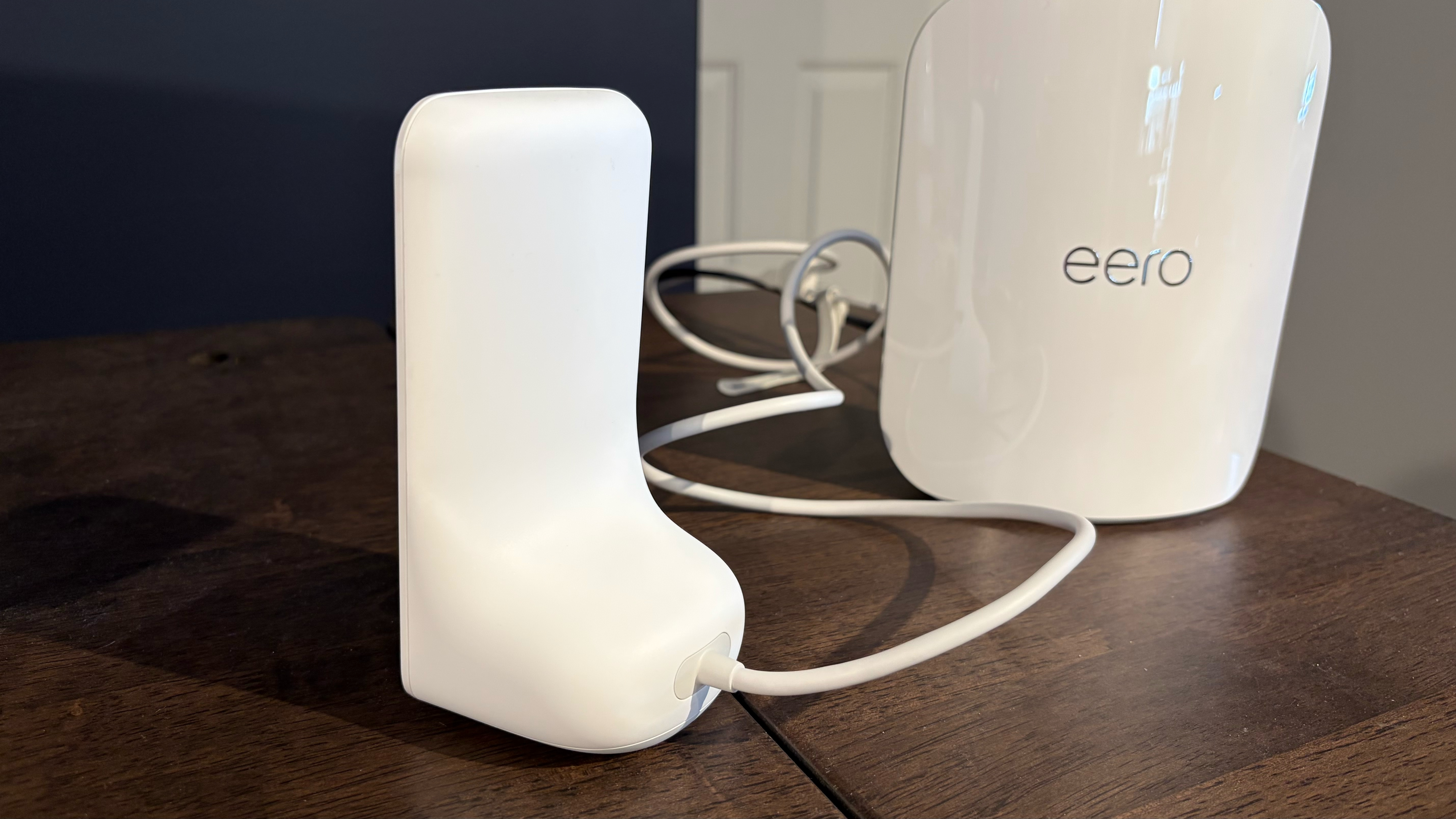
Amazon Eero Signal
(Image credit: Tom's Hardware)

The Eero Signal includes a fixed “Y” shaped power cable. The cable exits from the back of the unit and forms one branch of the Y. The second brach ends in a USB-C connector that plugs into the back of an Eero satellite. The “trunk” of the Y ends in a USB-C receptacle, which accepts the USB-C connector from the wall plug. Once everything is connected, a single USB-C wall adapter powers both the Eero satellite and the Signal.

The device is relatively small, measuring 3.09 x 5.76 x 2.80 inches and weighing 0.65 pounds.

Eero Signal Specifications

Swipe to scroll horizontally

Wireless Connectivity

4G LTE CAT 4

Connection with Eero

USB-C

Size

3.09 x 5.76 x 2.80 in.

Weight

0.65 pounds

MSRP

$99

Setting up and using the Eero app with the Eero Signal

Once the physical connections have been made, the Signal automatically appears in the Eero app. When you enter the Eero app, it will present you with two options to enable the Eero Signal cellular backup service:

Stay On the Cutting Edge: Get the Tom's Hardware Newsletter

Get Tom's Hardware's best news and in-depth reviews, straight to your inbox.

  • Eero Plus: You get 10GB of backup data per year for $99/year. Six months of service is included for free for new Eero Plus subscribers who opt for an annual plan.
  • Eero Plus 100: You get 100GB of backup data per month. During the first year, you pay just $99/year for this tier, but during the second year, the price doubles to $199.99 year.

If you currently subscribe ot Eero Plus monthly, you are not eligible for cellular data backup service with an Eero Signal. If you live in an area that experiences frequent outages, the base Eero Plus plan, which provides 10GB of data per year, seems like a poor value. $199.99/year for 100GB of data per month seems like a far better value and would provide greater peace of mind.

Amazon Eero Signal

(Image credit: Tom's Hardware)

Our Eero Signal review unit was provided with Eero Plus 100 service, giving us access to 100GB of backup data per month.

From the Eero app homepage, there are only two giveaways that an Eero Signal is connected to your mesh system. The first clue is that the main Eero gateway (in this case, an Eero Pro 7) shows green bars indicating the Eero Signal strength. The second clue is under Security & Privacy, where you’ll notice a green light next to Internet Backup.

If you click the Internet menu from the Eero app home page, it will display available connections. In our case, it confirmed my wired internet connection (T-Mobile Fiber) and that the cellular backup was ready. Clicking the Eero Internet Backup option opens a submenu that lets you turn the feature on or off.

Eero Signal Performance

The Eero Signal serves as an internet backup to your current home broadband connection, e.g., cable or fiber. And before the gears start turning in your head about using the Eero Signal with the Eero Plus 100 plan as your primary internet service, I've got some bad news. The Eero Signal cannot be used as your sole source of internet -- it requires that you have an existing ISP delivering service to your Eero mesh router. The Eero Signal serves only as a backup if your primary ISP goes offline.

I tested the Eero Signal’s primary function as a failover if your primary ISP goes offline. To do this, I removed the cable connecting the Eero Pro 7 to my fiber modem. It took about 20 seconds for the lights on the Eero Pro 7 and Eero Signal to change from white to blue, indicating that the latter was now working as an internet backup. I tested internet connectivity across multiple devices connected to the Eero mesh network, and all remained connected without issue.

However, you must remember that the Eero Signal is only a 4G LTE device, not 5G, unlike some popular home cellular internet plans from companies like AT&T, T-Mobile, and Verizon. With that in mind, don’t expect to see speeds that approach what those services can provide when operating in internet backup mode.

I saw SpeedTest download speeds of around 600 Mbps and upload speeds of 60 Mbps when I used T-Mobile 5G Home Internet as my ISP. With my current fiber connection, I achieve symmetrical speeds of around 2 Gbps. However, the Eero Signal could only muster a fraction of that, given its 4G LTE bandwidth limitations.

Image

1

of

2
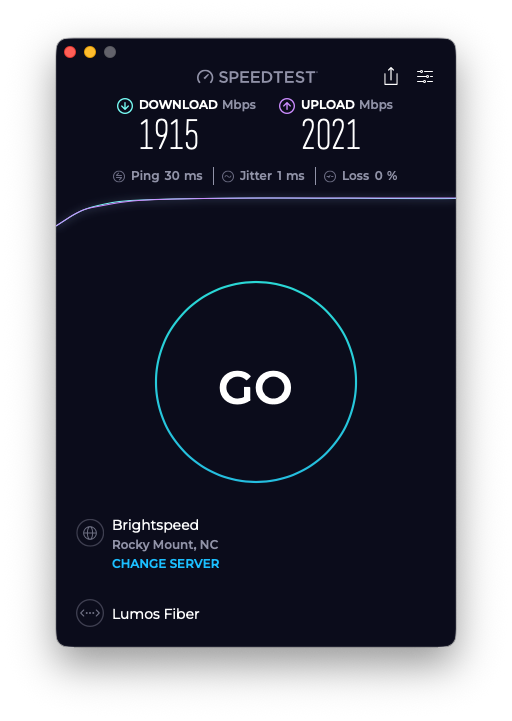
Amazon Eero Signal
MacBook Air using a wired 2.5 GbE connection (via Thunderbolt) to an Eero Pro 7 with my home fiber internet(Image credit: Tom's Hardware)

For comparison, I saw up to around 80 Mbps for downloads and 30 Mbps for uploads using the Eero Signal (the device connected to AT&T’s cellular network). Those are not breakneck speeds by any means, but remember that the Eero Signal is only meant as a backup internet service. So if you need to conduct a video call for work, download some essential files for a work project, or even watch some TV in the background, the Eero Signal should have no problem handling your workload.

Another thing to consider is cellular reception. I live outside of a major metropolitan area (Raleigh, NC), so I have solid uptime for my fiber connection and a strong cellular signal. For people who live in areas where their wired ISP might be unreliable, there’s a strong chance that cellular connectivity will be spotty as well. So while a device like the Eero Signal could work in that situation, your performance may vary greatly.

Bottom Line

The Eero Signal offers a lifeline to people living in areas with frequent internet outages. Of course, it is only compatible with Eero mesh routers, so you’ll already need to be bought into that ecosystem to take advantage of the functionality.

The device is easy to set up, doesn’t require user intervention to activate if your primary ISP goes down, and the upfront hardware cost is just $99. The $99 Eero Plus plan only gives you 10GB of backup data to use for an entire year, so that option doesn’t really seem cost-effective for the target audience of the Eero Signal. However, the $200/year Eero Plus 100 plan gives you 100GB of backup data per month, which seems like a much better option.

Brandon Hill

Senior Editor

Brandon Hill is a senior editor at Tom's Hardware. He has written about PC and Mac tech since the late 1990s with bylines at AnandTech, DailyTech, and Hot Hardware. When he is not consuming copious amounts of tech news, he can be found enjoying the NC mountains or the beach with his wife and two sons.

  • Bumstead

    Does that thing vibrate?

    Reply