
惯性聚合 高效追踪和阅读你感兴趣的博客、新闻、科技资讯
阅读原文 在惯性聚合中打开

推荐订阅源

Vercel News
Vercel News
Recorded Future
Recorded Future
CTFtime.org: upcoming CTF events
The GitHub Blog
The GitHub Blog
Application and Cybersecurity Blog
Google DeepMind News
cs.AI updates on arXiv.org
Microsoft Azure Blog
K
KPMG report finds enterprise disconnect between AI and its ROI | CIO
M
MIT News - Artificial intelligence
云风的 BLOG
云风的 BLOG
Y
Y Combinator Blog
N
News | PayPal Newsroom
freeCodeCamp Programming Tutorials: Python, JavaScript, Git & More
Help Net Security
Help Net Security
博客园 - Franky
SecWiki News
SecWiki News
Recent Announcements
T
Troy Hunt's Blog
The Register - Security
The Last Watchdog
The Last Watchdog
Webroot Blog
Webroot Blog
S
Security Affairs
博客园 - 司徒正美
S
Schneier on Security
I
InfoQ
博客园_首页
www.infosecurity-magazine.com
T
Threat Research - Cisco Blogs
Forbes - Security
Forbes - Security
腾讯CDC
N
Netflix TechBlog - Medium
N
News and Events Feed by Topic
Cloudbric
Cloudbric
T
The Exploit Database - CXSecurity.com
P
Proofpoint News Feed
A
About on SuperTechFans
Engineering at Meta
Engineering at Meta
Recent Commits to openclaw:main
B
Blog
V
Vulnerabilities – Threatpost
C
Check Point Blog
Google DeepMind News
Google Online Security Blog
C
Cyber Attacks, Cyber Crime and Cyber Security
Hacker News - Newest:
Hacker News - Newest: "LLM"
C
Cisco Blogs
Schneier on Security
O
OpenAI News
K
Kaspersky official blog

Latest from Tom's Hardware

Our experts review your astonishing PC builds and setups in Rig Rundown — from wall-mounted setups to a system… News outlets are blocking Wayback Machine from archiving their pages — 23 outlets concerned AI companies might abuse fair use and use it to train their models Mark Zuckerberg reportedly working on AI clone of himself — Meta insiders claim 3D photoreal animated Zuck will be able to engage with employees on his behalf Score a massive $700 off this 4K-ready Lenovo gaming PC with an RTX 5070 Ti, now just $1,899 — epic Legion Tower 5i pre-built ships with a 20-core Intel CPU, 32GB DDR5 and a 2TB SSD Pay $1,349.99 for Gigabyte's Aero X16 laptop and save $300 on this 32GB beast with RTX 5070 graphics —… Veteran Windows dev shows off AI running on 47-year-old PDP11 with 6 MHz CPU and 64KB of RAM — 'gloriously absurd' project runs transformer model written in PDP-11 assembly language Half of all US employees now use artificial intelligence at work, crossing landmark threshold for first time — Gallup data shows daily and weekly usage hitting all-time high of 28% in Q1 2026, with 65% feeling positive about its impact on productivity China has spent 3.6 times more than the US on chipmaking subsidies over the past decade — $142 billion and counting, easily outweighs CHIPS Act FAA approves military use of drone-killing laser weapons in US airspace — decision comes after it was decided ‘systems do not present an increased risk to the flying public’ Nvidia says AI cuts 10-month, eight-engineer GPU design task to overnight job — company is still 'a long way' from AI designing chips without human input Small Missouri town ousts half its city council after $6 billion AI data center approval — petition calls for mayor's removal as frustration (and violence) over AI data centers mounts New tech can see a CPU's transistors in action — terahertz radiation can potentially steal data as a chip is… Intel's Nova Lake CPUs gear up to seize AMD’s 3D V-Cache gaming throne — early leak points to up to 52 cores, blazing DDR5-8000 support, and massive 175W TDP Acer Predator GX850 SFX power supply review: Solid electrical performance with good efficiency NZXT to cough up $3.45 million over 'predatory' Flex PC rental scheme in RICO class-action settlement — in-debt customers to get up to $5,000 of relief, eligible renters to be granted ownership Bulbous 15x fan PC case side panel dubbed the ‘Superdome’ lowers temps by 20 degrees —  $600 worth of Noctua fans arrayed in 3D-printed structure Approvals for Nvidia and AMD AI chip exports to China stall under government bottleneck —  20% staff turnover… Espresso Lite 15 Review: An entry-level portable monitor with a splash of color Save a massive $700 on this 4K-ready HP gaming PC with a 9800X3D and RTX 5070 Ti, now just $2,499 — discounted HP Omen 35L pre-built powerhouse ships with 32GB DDR5 RAM and a 1TB SSD 'CopprLink' destroys every eGPU standard in new test, achieves near-native-level performance with an RTX 5090 — setup requires $2,300 worth of additional hardware Website backup crippled by 1.6MB Friends GIF that was replicated 246,173 times, breaking Linux's EXT4 filesystem limit — Jennifer Aniston's 'happy dance' animation ate up 377 gigabytes of data due to security policy Why we spent 50+ hours retesting Intel’s Core Ultra 270K Plus and 250K Plus Just $284.99 for 32GB of Team T-Create Classic DDR5-6000 RAM is the cheapest going right now — this double-dipping… Grab MSI’s RTX 5080 gaming laptop for just over $2,000 — offers fast 240 Hz QHD+ display, dual storage slots, and expandable DDR5 memory Lenovo hikes Legion Go 2 handheld gaming PC to almost $3,000 for 2 TB model — Handheld now costs more than AMD's Strix Halo devices despite relatively weaker Z2 Extreme chip Iran's forced nationwide internet blackout becomes second-longest on record as it passes 1,000 hours offline — possessing Starlink terminals punishable by death, country using 'military-grade jamming' against service Tiny 3-inch cube PCs bring a splash of color to the passive PC market with red, orange, green and blue options — Intel Twin Lake-powered Kubb Mini PCs start at $500 Veteran Microsoft engineer says original Task Manager was only 80KB so it could run smoothly on 90s computers — original utility used a smart technique to determine whether it was the only running instance Tech enthusiast gets Doom to run on a 40-year-old printer controller — ancient Agfa Compugraphic 9000PS came with a Motorola 68020 onboard for fast processing Keychron Q6 Ultra 8K Review: 660 hours of battery life at 8 KHz Startup secures $30 million contract to 3D print jet engines for the USAF — company to test and develop small… Linux 7.0 enables three new AI-specific keys for keyboards, an apparent expansion beyond the Copilot key — Google… $27 platypus PCIe adapter converts half-height GPUs into full-height while adding two M.2 slots for SSDs — enthusiast demos low-profile RTX 4060 with two SSDs thanks to PCIe bifurcation South Korea’s telecom giants surprise 7 million users with unlimited, universal internet — net access declared a 'basic telecommunications right,' 400 Kbps data after monthly plans run out Valve engineer shocks Linux community with game-changing VRAM hack for 8GB GPUs — breakthrough solution turbocharges gaming by prioritizing VRAM for games while background tasks take a back seat Rockstar Games confirms it was hacked by malicious group — 'ShinyHunters' takes credit, gives until April 14 to pay ransom or it will release confidential data Denuvo properly cracked in Resident Evil: Requiem, bypasses become plug-and-play — cracked version runs faster,… Intel Core Ultra 7 270K Plus vs Ryzen 7 9700X faceoff — a new midrange CPU champ emerges HyperX Eve 1800 Review: Not worth $50 Chinese Nvidia Cloud Partner procured 300 servers with banned AI GPUs worth $92 million — shares of data center supplier Sharetronic plummet following Super Micro smuggling arrest Original Apollo 11 code open-sourced by NASA — original Command Module and Lunar Module code repos are now public… Garage sale haul finds 2013 'trash can' Mac Pro nestled inside 2010 Mac Pro enclosure — Mac Pro inception still needs some work to get running Benchmarking Nvidia's RTX Neural Texture Compression tech that can reduce VRAM usage by over 80% FAA courts gamers to become air traffic controllers — boasts $155k average annual salary after three years as the… Clippy, Microsoft’s hapless Office assistant, was retired 25 years ago today — its irritating spirit lives… Save $680 instantly on this massive Corsair 96GB DDR5-6000 RAM kit — 57% discount slashes price tag to $499 Two manufacturers commit to keep Blu-ray alive after others quit manufacturing — Verbatim and I-O Data extend… MacBook user explains why he files the sharp metal edges off his Apple laptops — unibody design facilitates a… Best Laptops 2026: Our benchmarked picks for productivity, portability, and battery life Tests show $30,000 AI GPUs are terrible password crackers — RTX 5090 gaming GPU outperforms Nvidia H200 and AMD… Anthropic's Claude Mythos isn't a sentient super-hacker, it's a sales pitch — claims of 'thousands' of severe zero-days rely on just 198 manual reviews Get 32GB of Corsair DDR5 RAM for $101 - Newegg combo bundle also contains MSI's flagship X870E Godlike motherboard… Microsoft simplifies Windows Insider program — fewer channels, and switching without wiping your device HWMonitor and CPU-Z developer CPUID breached by unknown attackers — cyberattack forced users to download malware… Framework founder says that ‘personal computing as we know it is dead’ — vows to keep building ‘computers that you can own at the deepest level’ French government says it's ditching Windows for Linux — country accelerates plans to ditch US-based software… Vdura hikes its enterprise SSD pricing, now costs 22.6x more than hard drives — the price of a 30TB SSD has… Score the AMD Ryzen 7 9800X3D with 32GB of fast DDR5 RAM and an Asus X870E gaming motherboard for under $990 in this epic Newegg bundle — $200 saving brings the RAM cost down to just $196, with an AIO cooler and game thrown in for free 30 years of Lexar: What a look inside its R&D labs and factory reveals about its plans for an AI-ready future Cooler Master MWE Bronze V2 230V 650W power supply review: A competent entry-level choice Beef up your gaming rig with this 16GB Radeon RX 9060 XT for just $419 — save $50 on this 1440p champion … Embattled streamer goes viral after playing Red Dead Redemption 2 at 4 FPS — ‘i5-8300H and a 1050ti with 4GB’ setup takes 12 hours to play through the first chapter, would make the game 471 hours long Silverstone IceMyst Pro 360 Pro Review: Designed for RAM overclocking After jumping 2,200% over the last twelve months, DDR4 spot prices fall 5%, the first decline in nearly a year — DDR5 pricing sees some relief in China channel market US cybersecurity agency issues an urgent alert as Iranian hackers attack critical infrastructure — CISA guidance warns organizations to immediately shield certain programmable logic controllers from the internet to thwart future attacks Newbie overclocker destroys $5,000 RTX 5090 Lightning Z GPU they used 'to learn how to solder' — practicing newfound hobby goes wrong in the most expensive way imaginable Engineer installs 3.5-inch floppy drive in a Tesla — modern EV recognizes and runs ancient storage device, even… Ambitious hacker reduces worst-case memory latency by up to 93%, but with severe downsides — 1960s bottleneck overcome by hedging memory accesses to avoid running into DRAM refresh stalls Fueled by Musk's TeraFab tie-in, Intel's market cap hits highest level in 25 years — tops $300 billion… Geekbench 6.7 adds Intel BOT detection to spoof out 'unrealistic' CPU scores — Benchmark runs with BOT enabled will be marked as invalid Intel's EMIB-T packaging technology set for fab rollout this year — as TSMC CoWoS capacity remains limited, EMIB-T is preparing for advanced AI accelerator designs Intel Arc GPUs can finally boot up and play 'Crimson Desert' — but you'll probably want to wait for… Alleged images of the long-awaited Nvidia N1/N1X SoC surface on laptop motherboard — board features 128 GB of LPDDR5X memory alongside 8+6+2 phase VRM Intel and Google announce multi-year chip deal — Google will deploy Intel Xeon with custom IPUs for next-gen AI,… Bryson DeChambeau to use 3D-printed 5-iron at 2026 Masters in golfing first — club he fabricated himself… UK navy tracked three Russian submarines near undersea cables, damage would 'have serious consequences,' Putin warned — US and allies expand seabed protection efforts Build a $5,000 AM5 gaming PC for just $2,771 with this Newegg combo deal — 9800X3D and RTX 5070 also come with 128GB of DDR5 RAM, 4TB SSD, X870E motherboard, and AIO cooler Intel developing two-lever retention mechanism for LGA 1954 socket, according to new leak — Premium Nova Lake-S motherboards will feature 2L-ILM sockets Acer Predator X27 X1 27-inch 240 Hz OLED gaming monitor review: Blending performance and value Under $30, GameSir's Super Nova wireless controller has an unbelievable 40% slashed off the price in this limited-time offer — includes stick drift eliminating Hall Effect thumbsticks and switches Korean government to take action over soaring DRAM costs, including monitoring markets and pricing — internet data plans to be restructured and recycled PCs to be distributed to vulnerable groups Go maintainer joins collective klaxon about encryption-breaking quantum computers — developer urges immediate switch to post-quantum methods to prevent worldwide disaster Steam files suggest Valve is developing  internal 'SteamGPT' AI bot — aimed at tackling customer support tickets and CS2 anti-cheat $21 billion stolen from more than 1 million Americans due to cybercrime in 2025 — $11 billion come from stolen crypto, $8.6 billion taken from investment scams, while AI-related attacks cost $893 million 10 petabytes of sensitive data stolen from China's National Supercomputing Center, hackers claim — daring heist would be largest ever China hack, covering 6,000 clients across science, defense, and beyond A brief history of Denuvo DRM and the new hypervisor bypass — inside the cat-and-mouse game between Denuvo and the… Intel and SambaNova team up on heterogenous AI inference platform — different hardware performs different… China intensifies efforts to poach semiconductor talent from Taiwan, claims report — international restrictions… PCI Express roadmap: The path to 1TB/s with PCI 8.0, the challenges of integration, and beyond AMD reveals $899 price tag for Ryzen 9 9950X3D2 — first dual-cache X3D CPU is $200 more expensive than the Ryzen 9… Bain Capital's data center unit removes disgraced tenant suspected of smuggling Nvidia GPUs to China — Megaspeed previously alleged to have spent roughly $2 billion on AI processors for illicit distribution British cryptographer Adam Back is the secret creator of Bitcoin, claims new report — Back refutes investigation, says parallels to Satoshi are just a coincidence Tech industry lays off nearly 80,000 employees in the first quarter of 2026 — almost 50% of affected positions cut… Asus ROG Xbox Ally review: The cheapest Windows handheld gets points for showing up Taiwanese chip makers call on government to stockpile helium, liquid natural gas — TSIA pleads for strategic supplies as US and Iran sign ceasefire in Middle East Grab an entire RTX 5090 gaming PC for just $8 more than the GPU itself and score a whopping $1,600 off — huge HP discount requires a $39 controller or monitor to secure you a 4K powerhouse with a 9800X3D, 32GB DDR5, and a 1TB SSD Get $100 off the ROG Xbox Ally handheld — Ryzen Z2 A-powered version with 16GB of RAM is under $500 again Snap up 32GB of Corsair Vengeance RAM for just $192 when you pair it with AMD's 9800X3D processor and Asus X870E motherboard for $1,054 — bundle also includes a free 240mm AIO cooler and a copy of Crimson Desert Russian state hackers are hijacking TP-Link and MicroTik routers to steal Outlook credentials, cybersecurity center warns — APT28 group targets DNS and redirects traffic to attacker-controlled servers be quiet! Pure Power 13 M 1200W supply review: Platinum-level efficiency, premium pricing
3DMakerPro Toucan 3D Scanner review: All-in-one 3D scanning
Andrew Sink · 2026-05-10 · via Latest from Tom's Hardware

The 3DMakerPro Toucan delivers a portable, computer-free 3D scanning workflow with solid geometry capture and fast onboard processing. Frequent tracking loss, poor color texture quality, and an unreliable Wi-Fi file transfer process keep it from being an easy recommendation.

Pros

  • +

    Complete 3D scanning workflow doesn’t require a computer

  • +

    High-quality geometry capture

  • +

    On-device processing is generally fast

Cons

  • -

    Wi-Fi transfer is unreliable

  • -

    Tracking loss issues on larger objects

  • -

    Color textures are blurry and can’t be edited

  • -

    Expensive relative to tethered 3D scanners with similar performance

Why you can trust Tom's Hardware Our expert reviewers spend hours testing and comparing products and services so you can choose the best for you. Find out more about how we test.

The 3DMakerPro Toucan looks and feels more like a digital camera than a 3D scanner, and it even has a thumbwheel to adjust exposure. Designed for convenient on-the-go 3D scanning, the Toucan uses a blue laser structured light system with both a Class 1 and Class 3R laser to capture point clouds. These can be edited, fused into a 3D model, and exported all on-device, no computer required. The $1,699 Premium bundle reviewed in this article includes a manual turntable and carrying case and has everything you need to make a 3D model in well under an hour after unboxing.

While the name Toucan evokes the colorful bird, the Toucan 3D scanner ironically struggled most with creating color textures. Geometry is crisp and sharp using the Class 3R laser and “Ultra Mode” to create dense point clouds, but the applied color textures look unfocused and blurry. If you are more comfortable with a keyboard and mouse and want to do your editing on a computer, you can also use the JMStudio software for more granular editing on a PC or Mac.

Specifications: 3DMakerPro Toucan

Swipe to scroll horizontally

Scanning Mode

Continuous, Turntable, Photo Mode

Light Type

Blue Laser Structured Light (Class 1 / Class 3R)

Single Frame Accuracy

≤ 0.03mm Near, ≤ 0.1mm Far

3D Resolution

≤ 0.05mm Near, ≤ 0.1mm Far

Working Distance

Between 200 mm and 1000 mm

Min Scan Volume

10 x 10 x 10 mm

Scan Speed

Up to 15 FPS

Alignment

Geometry, Texture, Markers

Connectivity

Standalone, Wi-Fi

Color Texture

Supported

Output Format

OBJ, STL, PLY, ASC

Operating System

Windows, macOS

Included in the Box: 3DMakerPro Toucan

3DMakerPro Toucan 3D Scanner

(Image credit: Tom's Hardware)

The 3DMakerPro Toucan is available in two packages: Standard and Premium. The Standard package includes the Toucan scanner, a power adapter, a calibration board and stand, a manual turntable, and a set of reflective markers. The Premium package (covered in this review) includes all of this as well as a tripod and a carrying case. 3DMakerPro also includes a silicone case and a wrist strap in both packages.

Design of the 3DMakerPro Toucan

Image

1

of

2
3DMakerPro Toucan 3D Scanner
(Image credit: Tom's Hardware)

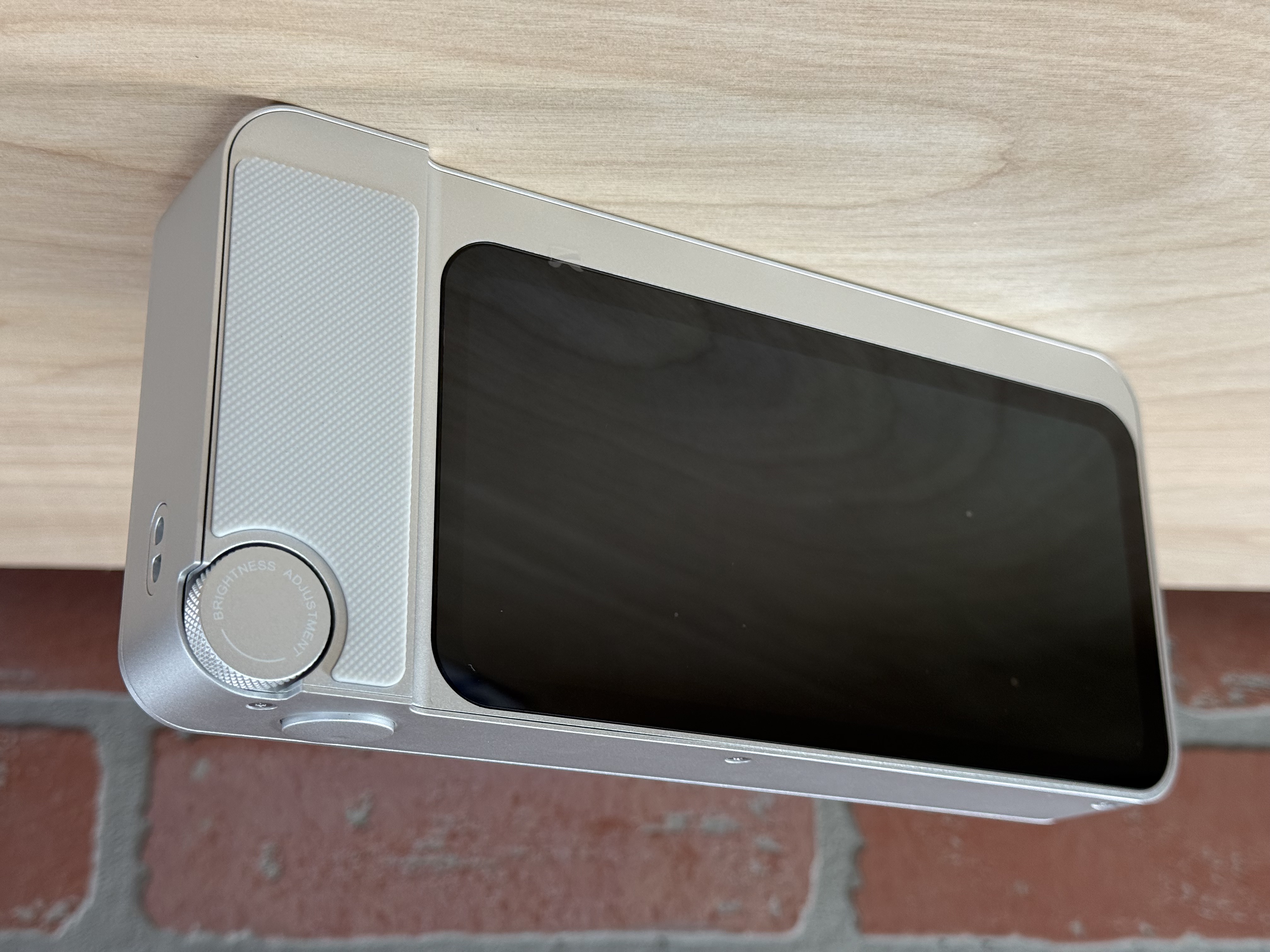
The 3DMakerPro Toucan looks like an elongated point-and-shoot camera from the early 2000s: silver body, LCD screen on the back, and a wheel selector and shutter button on the right shoulder of the unit. The metal body of the Toucan features a metal construction with a satin finish, recessed screws, and a small exhaust vent on the bottom of the unit, all giving a high-end feel. The rubber grip on the back is a comfortable resting place for your palm during scanning, and the diamond texture provides enough grip to keep it from slipping during use.

3DMakerPro Toucan 3D Scanner

(Image credit: Tom's Hardware)

The wheel and button combo seems like a winner, but I was caught off-guard when I went to start my first scan: I clicked the button and nothing happened. As it turns out, the button only works in the “Single Shot” mode by acting like a typical camera shutter. This makes sense for that mode, but it was a little frustrating to keep clicking it before every scan only to have to go back and click the button on the back of the LCD.

3DMakerPro Toucan 3D Scanner

(Image credit: Tom's Hardware)

3DMakerPro was serious about skipping the computer with this scanner: the Toucan features an 8-core 2.5 GHz CPU, 256 GB of storage, and 32 GB of DDR4 RAM. There is a USB-C port on the bottom of the Toucan for charging with the included power supply as well as a recessed power button and a thread for a tripod or other stand. Add in a 6600 mAh battery and you can see why the weight of the unit is around 735 grams, just slightly too heavy to hold comfortably with a single hand for any extended period of time.

3DMakerPro Toucan 3D Scanner

(Image credit: Tom's Hardware)

Unlike the highly ergonomic and easy-to-hold Mole, 3DMakerPro has gone in a more aesthetically-driven direction with the Toucan. While the scanner looks very premium, the sharp edges and flat surfaces make it awkward to hold comfortably for extended periods of time. The included silicone case is a welcome addition and makes the scanner significantly more comfortable to hold, but the Toucan doesn’t fit into the included carrying case while it’s wrapped in the case. Unfortunately, the silicone case is naturally sticky and tends to attract dust and dirt which has to be wiped clean regularly.

Get Tom's Hardware's best news and in-depth reviews, straight to your inbox.

Software for 3DMakerPro Toucan

3DMakerPro Toucan 3D Scanner

(Image credit: Tom's Hardware)

The 3DMakerPro Toucan uses the onboard computer to capture, process, and even export scan data and doesn’t require any other software (or even a computer) to generate a 3D model. Scan settings like laser type, frame rate, color capture, etc. can all be adjusted right on the Toucan using the large integrated LCD screen on the back of the unit. Once complete, the model can be exported as a mesh 3D file straight to a thumb drive. This onboard workflow is the primary differentiator of the Toucan, which is advertised as a portable, handheld 3D scanner.

3DMakerPro Toucan 3D Scanner

(Image credit: 3DMakerPro)

The Toucan can also be used with the 3DMakerPro JMStudio 3D application, but it doesn’t have quite the first-party experience you might expect. The Toucan can’t directly connect to a computer with a USB connection, and instead has to transfer scan data via Wi-Fi. Once the scan data has been transferred, the project can be opened and processed like a normal scan. I wasn’t able to connect the Toucan to my computer with a USB cable, and instead had to transfer files over Wi-Fi or a USB-C thumb drive, which was not included.

3DMakerPro Toucan 3D Scanner

(Image credit: 3DMakerPro)

Transferring scans from the Toucan to my computer proved to be a challenging experience. The Toucan doesn’t support transfer of scan data over the integrated USB-C port, which is only used for charging. Instead, the Toucan connects via Wi-Fi and the “Import from Device” operation is used to transfer scan data. I had issues with this connection dropping multiple times mid-transfer, and the Wi-Fi connection was inconsistent despite stable network conditions.

Transferring a 1.2 GB scan took about seven minutes, and another three minutes to decompress the file once transferred to my computer. At these speeds, it’s much easier to just export the file to a USB-C thumb drive and then upload to a computer from there.

3DMakerPro Toucan 3D Scanner

(Image credit: 3DMakerPro)

The processing in JMStudio (and the onboard Toucan software) involves cleaning the point cloud, converting it to a mesh, repairing and simplifying, and then adding an optional color texture. The process is similar between the app and the onboard software, and the Toucan is capable of processing scans entirely onboard without needing to export anything to the JMStudio software.

3D Scanning and Alignment with the 3DMakerPro Toucan

3DMakerPro Toucan 3D Scanner

(Image credit: Tom's Hardware)

The 3DMakerPro Toucan has two laser modes: Class 3R and Class 1. Class 1 products are generally classified as safe for general use, while Class 3R laser products require additional safety considerations. The Toucan will show a warning before switching to the Class 3R laser mode every single time, something that I appreciated while using. The Class 3R laser is used for high-precision scanning and complex surfaces, while the Class 1 laser is used for more general use.

3DMakerPro Toucan 3D Scanner

(Image credit: Tom's Hardware)

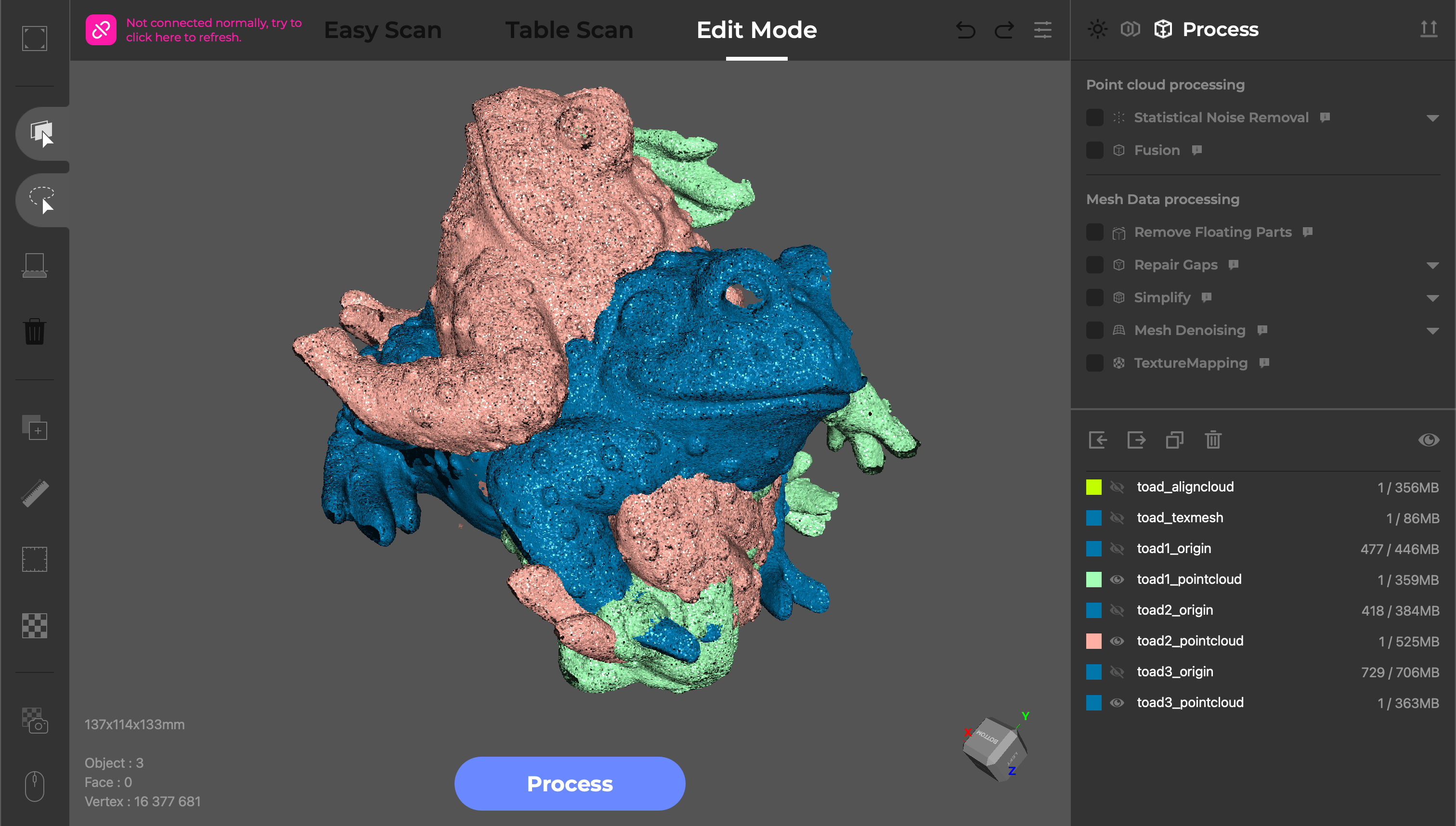
My favorite model to test a 3D scanner is a small toad sculpture because it has a high amount of surface geometry detail as well as complex paint. Using the manual turntable and the included tripod, I used the Class 3R laser in Near Mode, and enabled Color Scanning. The Toucan has a guide to indicate ideal scanning distance and will throw a warning if you are too close or too far from the model, and the brightness can be adjusted using the wheel on the top of the unit.

3DMakerPro Toucan 3D Scanner

(Image credit: 3DMakerPro)

The Toucan kept a consistent 15 FPS during scanning, which made for an impressively fast first capture that took only about a minute. After running the Structural Optimization and Statistical Noise Removal processes, the result was a point cloud with 6.8 million points that was about 619 MB in size. This is an impressively dense point cloud, and the captured detail was crisp and clear even before converting to a triangulated mesh. The processing was done entirely on the Toucan, and these operations took under 5 minutes total to complete.

Image

1

of

2
3DMakerPro Toucan 3D Scanner
(Image credit: 3DMakerPro)

In order to create the complete model, I ran two more scans and then used the automatic Align feature to create a single point cloud with all the points aligned correctly. The automatic alignment worked well, but I had to adjust the overlap from 90% to 100% to get the best results. Once everything was aligned, the last step was converting the model into a watertight mesh and reducing the triangle count. The final model has 400,000 triangles and is only 26.5 MB in size, an impressive reduction from the nearly 1.5 GB of point cloud data used to make the mesh.

3DMakerPro Toucan 3D Scanner

(Image credit: 3DMakerPro)

Unfortunately, the color texture was washed out and I was surprised to see blurriness on some of the surfaces and a general lack of clarity. I ran the Texture Mapping process a few times just in case I had missed something, but I wasn’t able to improve the overall quality of the color texture. A simple brightness or contrast slider would have been ideal for color textures like this, but neither the Toucan nor the JMStudio app offer this functionality.

3DMakerPro Toucan 3D Scanner

(Image credit: Tom's Hardware)

The Toucan has a “Base Removal” tool which will automatically detect a flat surface under a model and trim the points from the point cloud. This is a very useful tool in handheld mode and also worked well when using the included manual turntable. It works well for models that are organic or curved, but it would sometimes identify flat faces on models I scanned and fail to capture those surfaces.

3DMakerPro Toucan 3D Scanner

(Image credit: 3DMakerPro)

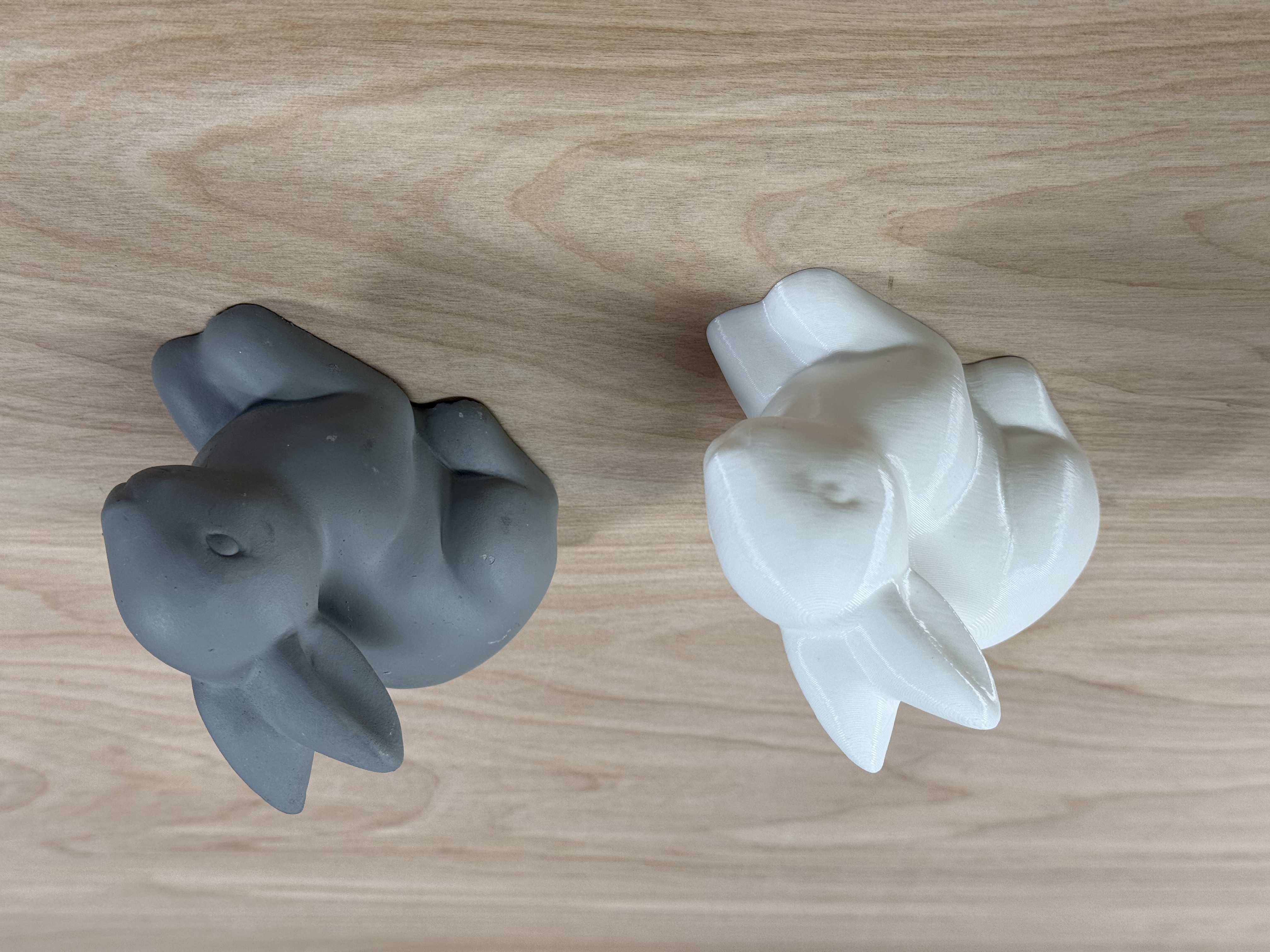
I only used a single rotation of the turntable to capture this scan of a concrete bunny, but the dense point cloud still had 2.4 million points and was more than enough to create a smooth mesh in the fusion step. There were a few small holes under the chin and in some of the areas that the scanner didn’t capture, but the Repair Gaps tool handled them easily. The final triangulated mesh had 499,062 faces and was 38.2 MB in size after the simplification step.

Image

1

of

2
3DMakerPro Toucan 3D Scanner
(Image credit: Tom's Hardware)

The generated triangle mesh was exported as an .stl and printed on a Bambu Lab X1-Carbon using PLA filament. The curves of the model were accurately captured, and the scale appeared perfect without any adjustment. Because I used the geometry tracking mode, the surfaces were all captured accurately and the model looked just like the original.

3DMakerPro Toucan 3D Scanner

(Image credit: Tom's Hardware)

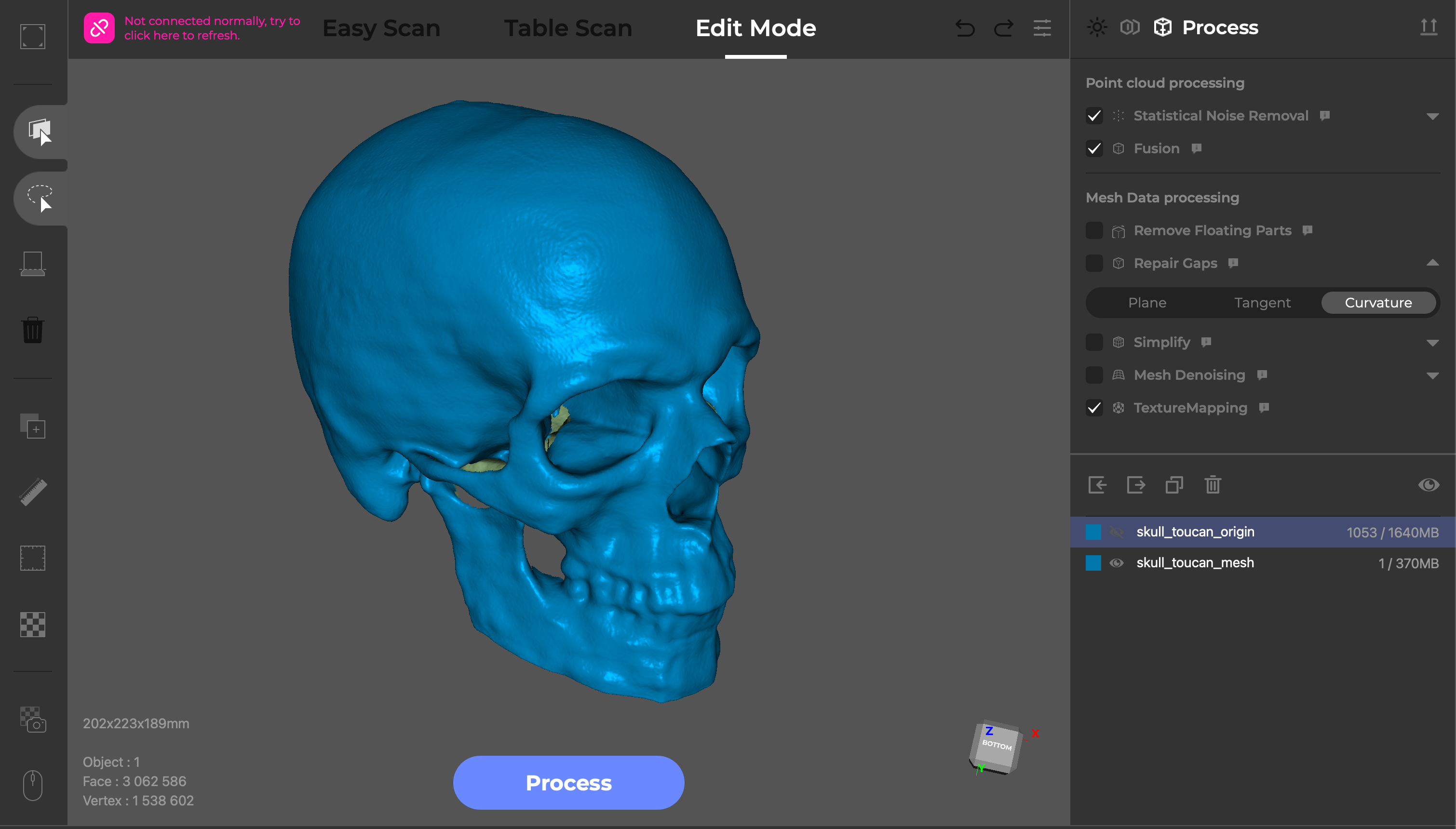
I wanted to try a model with a more complex surface, so I used this life-size 3D print of my skull that was made from a CT scan. This model has several deep recesses and lots of surface detail, so it’s a great test for a scanner like the Toucan which has an advertised capability of scanning into deep holes.

Image

1

of

2
3DMakerPro Toucan 3D Scanner
(Image credit: 3DMakerPro)

I used the Ultra Mode for quality and rotated the model three times to capture as many of the surfaces as I could. After removing the surfaces manually, I processed the point cloud using the One Click Process set to “High Quality”. The final triangulated mesh had over 3 million faces, and the visible banding from the CT scan is clearly picked up by the Toucan.

3D Scanning using Marker Mode with the 3DMakerPro Toucan

Image

1

of

2
3DMakerPro Toucan 3D Scanner
(Image credit: Tom's Hardware)

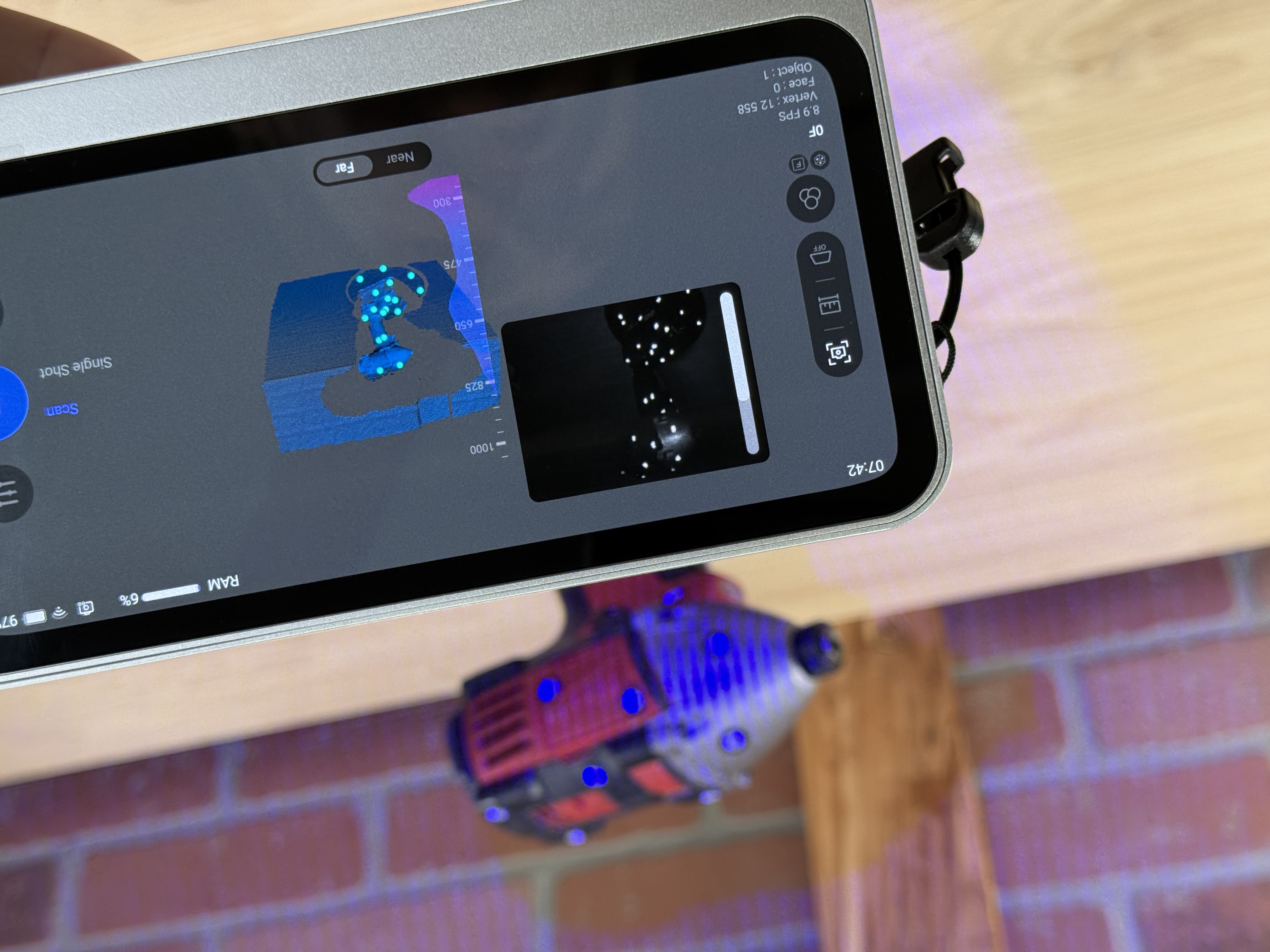
The 3DMakerPro Toucan is also able to capture scans using markers, which are used for alignment on large, complex, or otherwise difficult to capture surfaces. I typically use a Milwaukee impact driver covered in tracking markers as a test because it has curved surfaces, repeating patterns, and multiple flat planes which make it a challenge for most scanners. Using Near Mode, the Toucan failed to register the tracking dots and I had to switch to Far Mode to capture the model.

Image

1

of

2
3DMakerPro Toucan 3D Scanner
(Image credit: 3DMakerPro)

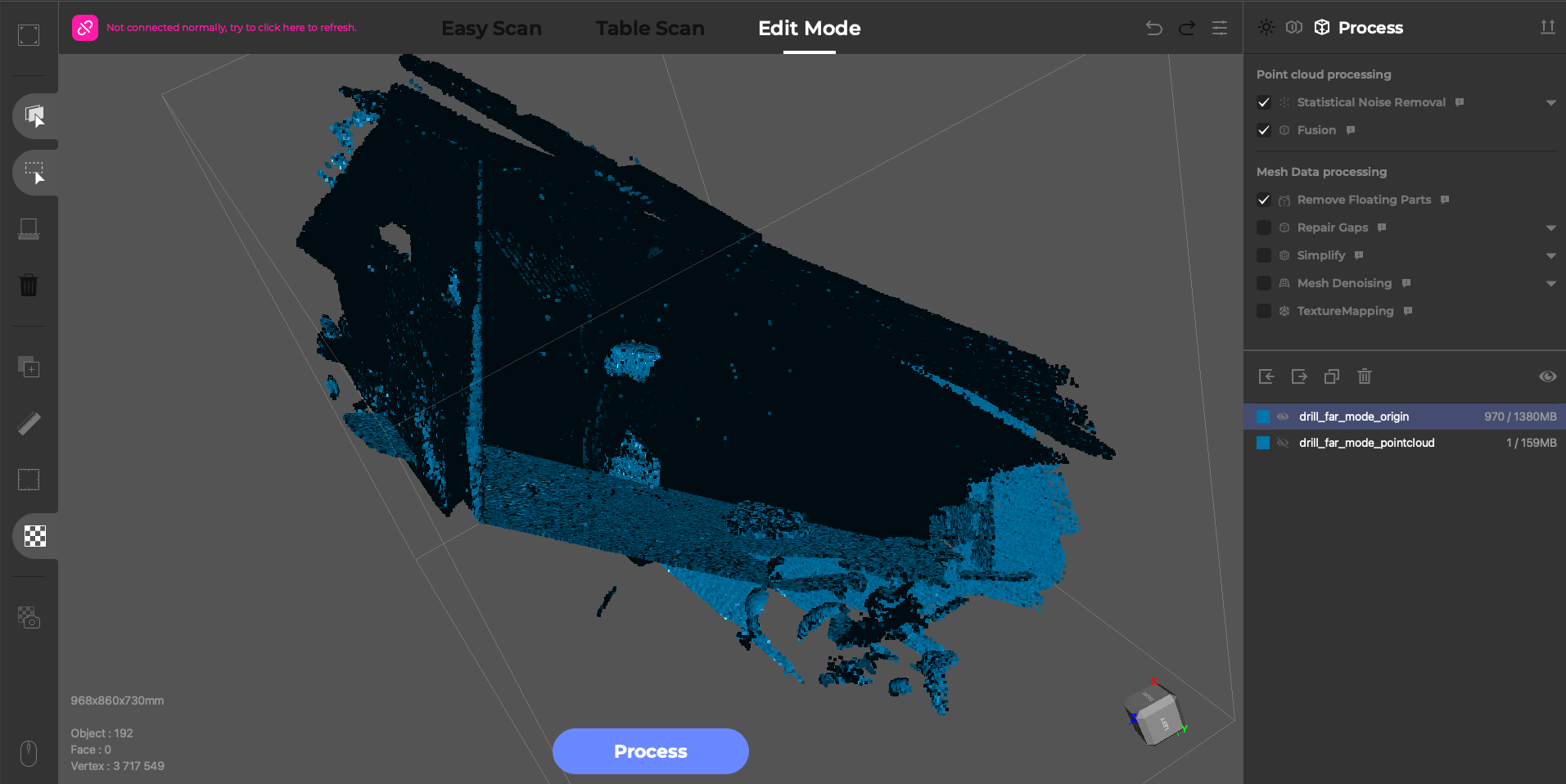
The resulting scan in Far Mode had 3.7 million points, the majority of which were captured from surrounding surfaces and needed to be trimmed away before fusion. After removing the surfaces, the point cloud for just the drill was reduced to 266 thousand points, a fraction of the original point cloud. The resulting mesh lacked sharp detail and was really only useful as a rough form.

3DMakerPro Toucan 3D Scanner

(Image credit: 3DMakerPro)

Scanned using the Class 3R laser in Ultra Mode, the detail is significantly sharper and the fused model has multiple sub-millimeter details present. The scan is so accurate that the paper-thin markers are clearly visible in both the point cloud as well as the mesh.

3D Scanning Color Textures with the 3DMakerPro Toucan

3DMakerPro Toucan 3D Scanner

(Image credit: Tom's Hardware)

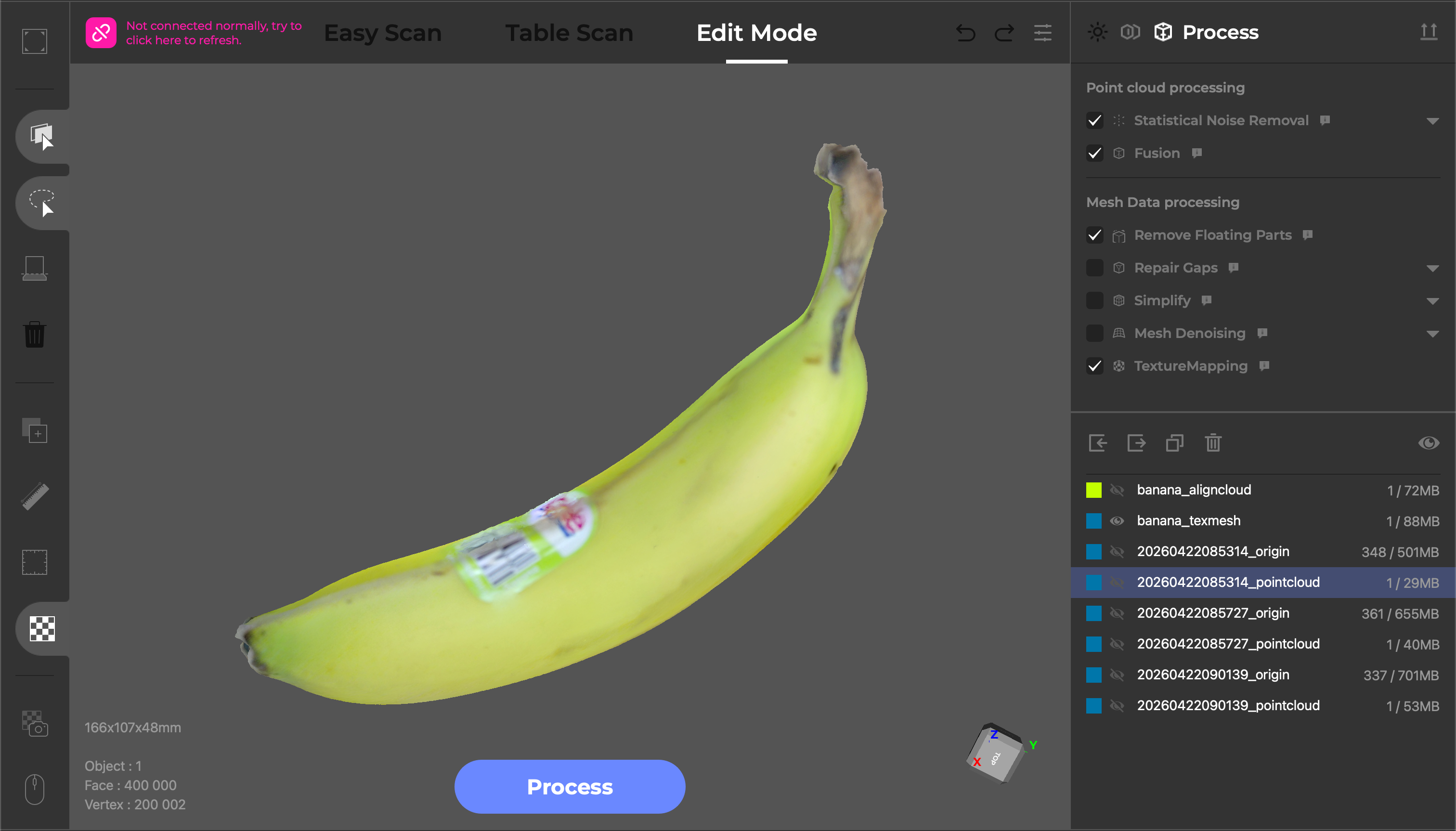
The 3DMakerPro Toucan features a dedicated 48MP RGB camera for capturing color textures, and has the ability to add color textures to a scan by simply enabling the “Color Scanning” option before starting a scan. The captured point cloud appears in full color, which is an interesting way to see a model during scanning. To test out the color texture, I scanned a banana using the “Ultra Mode” scan quality, Class 3R laser, and a high frame rate.

3DMakerPro Toucan 3D Scanner

(Image credit: 3DMakerPro)

Unlike the other workflow steps, the texture operation on the Toucan has no adjustable parameters. The only thing a user can do is click “Texture Mapping” and hope that everything comes out as expected. There’s no brightness, contrast, UV mapping, etc. and the final texture is not editable on the Toucan.

The “Texture Mapping” operation on the Toucan can take anywhere from 10 to 20 minutes to complete, which can feel like an eternity if you’re trying to quickly evaluate a scan out in the field. The lack of a “time remaining” estimate isn’t ideal, instead there is only a single progress bar that loads in the middle and stays there until the texture is complete. After my experience with the 3DMakerPro Lynx and Mole in the past, it’s disappointing to see that the color texture feature hasn’t been developed further in the JMStudio software.

Image

1

of

2
3DMakerPro Toucan 3D Scanner
(Image credit: 3DMakerPro)

The resulting color texture is blurry and not usable for most applications. The text on the sticker is illegible, and the seams from where the scans were aligned are present and not blended together. Given the amount of time this operation takes, I would expect the output to be at a higher quality or at least have adjustable parameters for the end user.

3D Scanning Outdoors with the 3DMakerPro Toucan

3DMakerPro Toucan 3D Scanner

(Image credit: Tom's Hardware)

The mobile-first design of the Toucan lends itself well to scanning outdoors, so I took it to a park to test it out. The large wooden sign at the entrance of the park had deep engravings, a rough texture, and looked visually interesting enough to be a challenge to scan. Because I was outside, I used the scanner in the Class 1 laser mode in case anyone walked by or could otherwise see the laser.

The Toucan lost tracking several times during scanning, and it took me five attempts to capture the entire sign using the Far Mode. The scanner was typically averaging about 11 FPS during the scan, and I really struggled to move in a continuous motion without losing tracking. I ran into this tracking issue frequently during testing, and the scanner would sometimes drop tracking even under ideal circumstances.

3DMakerPro Toucan 3D Scanner

(Image credit: 3DMakerPro)

The point cloud is dense and captures the visible surface well, and using the One Click Process feature at Medium quality resulted in a mesh with clearly visible woodgrain and legible text. Given the large size of the sign, the 132MB mesh has an impressive amount of visible detail. I was mostly interested in picking up the fine detail in the woodgrain, and the Toucan did a great job at that.

3DMakerPro Toucan 3D Scanner

(Image credit: 3DMakerPro)

Unfortunately, the color texture was muddy and didn’t capture the woodgrain, paint, or other details I was hoping to pick up. For something simple like this, it would most likely be easier to use a program like Blender or ZBrush to paint color on the model.

Bottom Line

3DMakerPro Toucan 3D Scanner

(Image credit: Tom's Hardware)

The 3DMakerPro Toucan is targeted at anyone who has used a 3D scanner and wished they didn’t need to be tethered (via USB or Wi-Fi) to a computer in order to capture a scan. The 8-core 2.5 GHz CPU is fast enough to handle most of the processing jobs in under a minute, with the only exception being the surprisingly long texture mapping operation. The onboard storage (256 GB) was more than enough to store dozens of scans, and the LCD made clean-up work and basic mesh editing a breeze. However, the tracking issues and the lackluster color textures are significant limitations for anyone using this in a professional context.

The Toucan is priced at $1,499 for the Standard package and $1,699 for the Premium package, which includes the tripod and carrying case. The $200 difference is worth it if you plan on carrying the scanner with you anywhere, as the tripod and the carrying case are both very useful additions for the price. While the Toucan doesn’t quite make the list of the best 3D scanners, it’s still very capable and worth considering for structured light 3D scanning in the field without a computer if generating a color texture isn’t a priority.

If you don’t need the integrated processing and are comfortable with a smaller maximum scanning volume, scanners like the 3DMakerPro Mole offer a similar workflow for a fraction of the price. The onboard computer and fully integrated workflow of the Toucan are compelling additions at this price point, with the similarly-designed Creality Sermoon P1 offered at $3,299, nearly double the price of the Premium package.

Andrew Sink first used a 3D printer in 2012, and has been enthusiastically involved in the 3D printing industry ever since. Having printed everything from a scan of his own brain to a peanut butter and jelly sandwich, he continues to dive ever more deeply into the endless applications of additive technology. He is always working on new experiments, designs, and reviews and sharing his results on Tom's Hardware, YouTube, and more.